
1. บทนำ
Thank you for choosing the Oumefar M50 Digital Metronome. This compact and versatile device is designed to assist musicians of all levels in maintaining precise tempo and rhythm during practice. It features an adjustable tempo range, various beat values, volume control, a tap function, and a convenient clip and lanyard hole for portability. Please read this manual carefully to ensure proper use and optimal performance of your metronome.
2. สินค้าหมดview
2.1 คุณสมบัติ
- Adjustable Tempo: Set your desired tempo from 30 to 280 beats per minute (BPM).
- Multiple Beat Values: Choose from 0 to 9 beats per measure.
- การควบคุมระดับเสียง: Adjust the metronome's volume or mute it entirely.
- แตะฟังก์ชัน: Determine the tempo of a song or set your ideal practice tempo.
- เอาท์พุตหูฟัง: Practice silently with the double channel headphone jack.
- การออกแบบพกพา: Equipped with a clip and lanyard hole for easy carrying and attachment.
2.2 เนื้อหาบรรจุภัณฑ์
- 1 x Oumefar M50 Digital Metronome
- 1 x 3V Cell Battery
- 1 x คู่มือผู้ใช้ (เอกสารนี้)
3. การตั้งค่า
3.1 การติดตั้งแบตเตอรี่
The Oumefar M50 Digital Metronome operates on one 3V cell battery (included).
- Locate the battery compartment on the back of the metronome.
- เปิดฝาช่องใส่แบตเตอรี่
- Insert the 3V cell battery, ensuring the correct polarity (+ and -) as indicated inside the compartment.
- ปิดฝาช่องใส่แบตเตอรี่ให้แน่น
บันทึก: If the metronome does not power on, check the battery orientation or replace the battery.
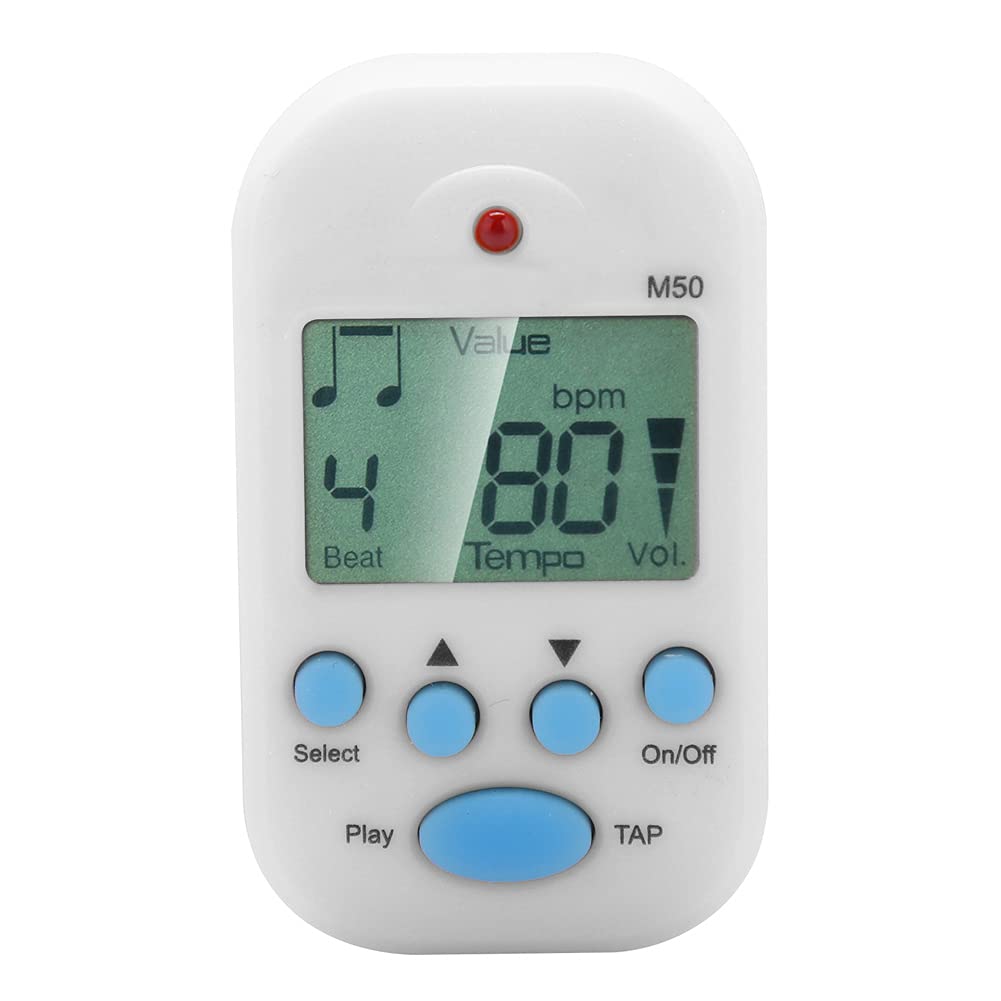
ด้านหน้า view of the Oumefar M50 Digital Metronome, showing the LCD screen displaying beat and tempo, along with the 'Select', 'Play', 'On/Off', and 'TAP' buttons.
4. คู่มือการใช้งาน
4.1 เปิด/ปิดเครื่อง
- ในการเปิดเครื่อง ให้กด เปิด/ปิด ปุ่ม.
- หากต้องการปิด ให้กดปุ่ม เปิด/ปิด ปุ่มอีกครั้ง
4.2 การตั้งค่าจังหวะ (BPM)
- With the metronome on, press the เลือก button until 'Tempo' is highlighted or flashing on the LCD screen.
- ใช้ ขึ้น (▲) และ ลง (▼) arrow buttons to adjust the BPM. The tempo can be set from 30 to 280 BPM.
4.3 Setting Beat Value
- กดปุ่ม เลือก button until 'Beat' is highlighted or flashing on the LCD screen.
- ใช้ ขึ้น (▲) และ ลง (▼) arrow buttons to select the desired beat value (0-9). '0' indicates no accent, while 1-9 indicates the number of beats per measure with an accent on the first beat.
4.4 การปรับระดับเสียง
- กดปุ่ม เลือก button until 'Vol.' (Volume) is highlighted or flashing on the LCD screen.
- ใช้ ขึ้น (▲) และ ลง (▼) arrow buttons to cycle through volume levels: Maximum, Medium, Minimum, and Mute.
4.5 Tap Function
The Tap function allows you to quickly find the BPM of a piece of music or set a desired tempo by tapping.
- กดปุ่ม แตะ button repeatedly in time with the desired rhythm.
- The metronome will calculate and display the average BPM based on your taps.
4.6 Starting and Stopping the Metronome
- To start the metronome click, press the เล่น ปุ่ม.
- To stop the metronome click, press the เล่น ปุ่มอีกครั้ง
4.7 การใช้หูฟัง
Insert standard 3.5mm headphones into the headphone jack located on the side of the metronome for private practice.

ภาพระยะใกล้ view of the Oumefar M50 Digital Metronome highlighting the double channel headphone output jack on the side, allowing for private practice.

Image showing the rear clip and the integrated lanyard hole on the Oumefar M50 Digital Metronome, designed for easy portability and attachment.
5. ข้อมูลจำเพาะ
| คุณสมบัติ | คำอธิบาย |
|---|---|
| แบบอย่าง | M50 |
| ยี่ห้อ | โอเมฟาร์ |
| วัสดุ | โลหะ + พลาสติก |
| น้ำหนัก | ประมาณ 34g (1.2 ออนซ์) |
| ขนาด | Approx. 6 x 3.5 cm (2.4 x 1.4 in) |
| Tempo Range | 30 ถึง 280 BPM |
| Beat Value | 0, 1, 2, 3, 4, 5, 6, 7, 8, 9 |
| การปรับระดับเสียง | Maximum, Medium, Minimum, Mute |
| ความแม่นยำ | ±1/1000 |
| แหล่งจ่ายไฟ | 1 x 3V Cell Battery (Included) |

Image illustrating the compact size of the Oumefar M50 Digital Metronome, measuring approximately 6 cm (2.4 inches) in length and 3.5 cm (1.4 inches) in width.
6. การบำรุงรักษา
- การทำความสะอาด: Wipe the metronome with a soft, dry cloth. Do not use abrasive cleaners or solvents.
- พื้นที่จัดเก็บ: เก็บเครื่องเมโทรโนมไว้ในที่แห้งและเย็น หลีกเลี่ยงแสงแดดโดยตรงและอุณหภูมิที่สูงหรือต่ำเกินไป
- แบตเตอรี่: If the metronome will not be used for an extended period, remove the battery to prevent leakage.
- หลีกเลี่ยงผลกระทบ: ควรปกป้องอุปกรณ์จากการตกหล่นและการกระแทกอย่างรุนแรง ซึ่งอาจทำให้ชิ้นส่วนภายในเสียหายได้
7 การแก้ไขปัญหา
| ปัญหา | สาเหตุที่เป็นไปได้ | สารละลาย |
|---|---|---|
| Metronome does not power on. | แบตเตอรี่หมดหรือติดตั้งไม่ถูกต้อง | Check battery polarity. Replace with a new 3V cell battery. |
| ไม่มีเสียงออกจากลำโพง/หูฟัง | Volume is muted or set too low. Headphones are not properly connected. | Adjust volume settings. Ensure headphones are fully plugged in. Test with another pair of headphones if available. |
| Tempo/Beat settings are not changing. | Not in the correct setting mode. | กดปุ่ม เลือก button to cycle through modes until the desired setting (Tempo or Beat) is highlighted. |
8. การรับประกันและการสนับสนุน
Oumefar products are manufactured with quality and performance in mind. For warranty information or technical support, please refer to the contact details provided at the point of purchase or visit the official Oumefar webไซต์ โปรดเก็บใบเสร็จรับเงินของคุณไว้เป็นหลักฐานการซื้อสำหรับการเรียกร้องการรับประกันใดๆ