
1. บทนำ
ขอบคุณสำหรับการซื้อasing the LONPOO LP-816 Compact Micro HiFi System. This manual provides essential information for the safe and efficient operation of your new audio system. Please read this manual thoroughly before use and retain it for future reference.
2. คำแนะนำด้านความปลอดภัย
- แหล่งพลังงาน: ตรวจสอบแหล่งจ่ายไฟ voltage ตรงกับค่าที่ระบุไว้บนตัวเครื่อง
- การระบายอากาศ : อย่าปิดกั้นช่องระบายอากาศใดๆ ควรเว้นพื้นที่รอบตัวเครื่องให้เพียงพอเพื่อให้อากาศถ่ายเทได้สะดวก
- น้ำและความชื้น: อย่าให้ตัวเครื่องโดนฝน ความชื้น หรือของเหลวที่หยด/กระเด็นใส่ อย่าวางสิ่งของที่บรรจุของเหลว เช่น แจกัน ไว้บนตัวเครื่อง
- ความร้อน: เก็บเครื่องให้ห่างจากแหล่งความร้อน เช่น หม้อน้ำ เครื่องทำความร้อน เตา หรืออุปกรณ์อื่นๆ (รวมถึง ampเครื่องให้ความร้อน) ที่ผลิตความร้อน
- การทำความสะอาด: ถอดปลั๊กเครื่องออกจากเต้าเสียบก่อนทำความสะอาด ใช้ผ้าแห้งนุ่มๆ เท่านั้น ห้ามใช้น้ำยาทำความสะอาดหรือสเปรย์ทำความสะอาด
- การบริการ: อย่าพยายามให้บริการผลิตภัณฑ์นี้ด้วยตนเอง ส่งต่อการบริการทั้งหมดไปยังช่างบริการที่ผ่านการรับรอง
- การจัดวาง: วางเครื่องบนพื้นผิวที่มั่นคงและเรียบเพื่อป้องกันไม่ให้เครื่องตก
3. เนื้อหาบรรจุภัณฑ์
ตรวจสอบว่ารายการทั้งหมดที่ระบุไว้ด้านล่างนี้รวมอยู่ในแพ็คเกจของคุณ:
- LONPOO LP-816 Micro HiFi System Unit
- รีโมทคอนโทรล
- อะแดปเตอร์แปลงไฟ
- เสาอากาศเอฟเอ็ม
- คู่มือการใช้งาน (เอกสารนี้)
4. สินค้าหมดview
4.1 Front and Rear Panel Controls
Familiarize yourself with the various buttons, ports, and indicators on your LP-816 system.
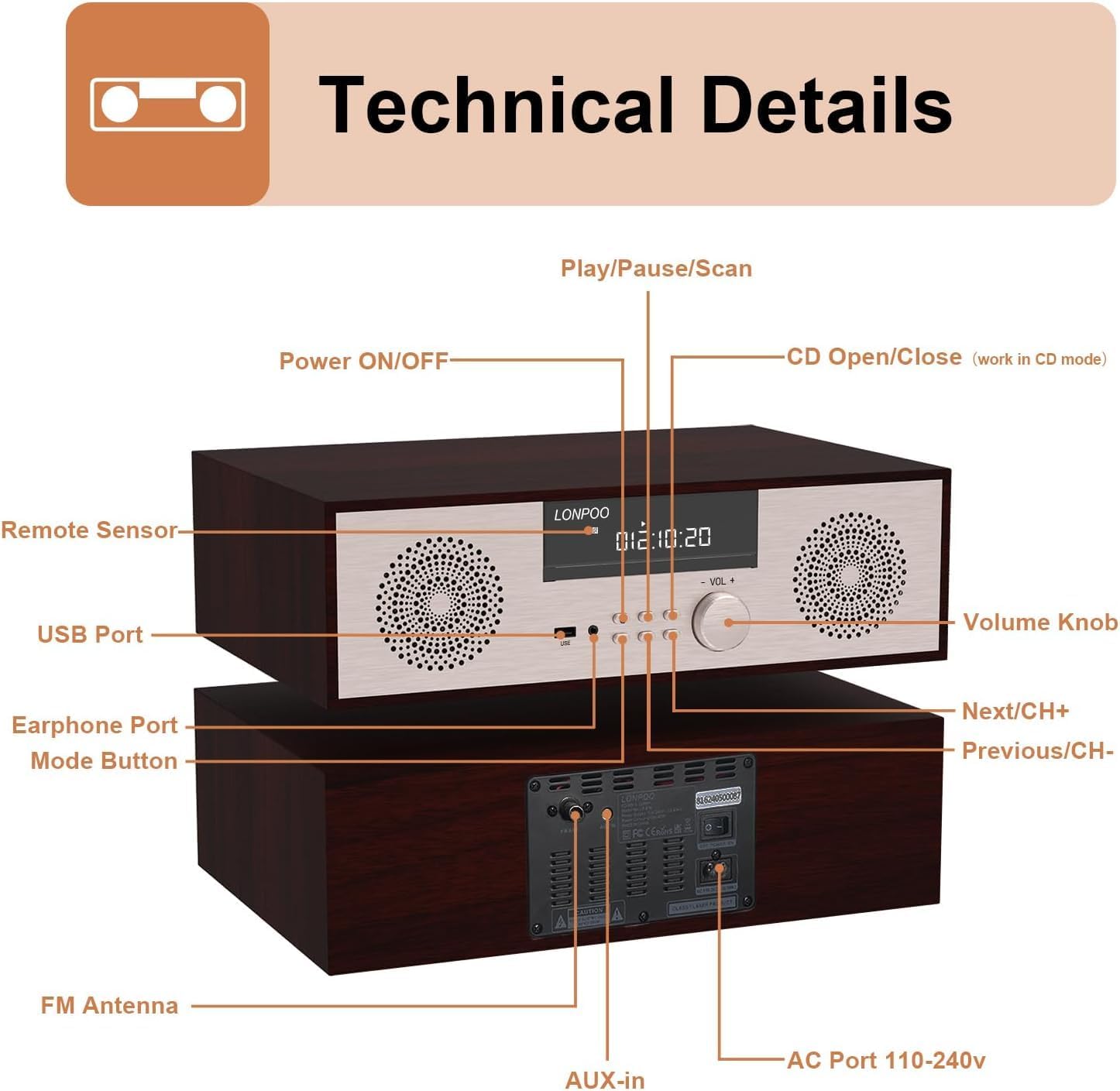
ภาพ: ด้านหน้าและด้านหลัง view of the LONPOO LP-816 system, highlighting the LCD display, control buttons, volume knob, USB port, earphone port, mode button, remote sensor, CD compartment, AUX-in, FM antenna port, and AC power port.
- เปิด/ปิดเครื่อง: เปิดหรือปิดเครื่อง
- จอแสดงผล LCD: แสดงโหมดปัจจุบัน ข้อมูลเส้นทาง ความถี่ และเวลา
- ช่องใส่ซีดี: สำหรับการใส่แผ่นซีดีเพลง
- พอร์ต USB: Connect USB flash drives for audio playback.
- พอร์ตหูฟัง: แจ็ค 3.5 มม. สำหรับเชื่อมต่อหูฟัง
- ปุ่มโหมด: Switches between CD, FM, Bluetooth, AUX, and USB modes.
- ปุ่มเล่น/หยุดชั่วคราว/สแกน: ควบคุมการเล่นและเริ่มการค้นหาคลื่นวิทยุ FM
- ปุ่มถัดไป/CH+: ข้ามไปยังแทร็กถัดไปหรือสถานีวิทยุ FM ที่ตั้งค่าไว้ล่วงหน้า
- ปุ่มก่อนหน้า/CH-: ข้ามไปยังแทร็กก่อนหน้าหรือสถานีวิทยุ FM ที่ตั้งค่าไว้ก่อนหน้า
- ปุ่มปรับระดับเสียง: ปรับระดับเสียง
- เซนเซอร์ระยะไกล: รับสัญญาณจากรีโมทคอนโทรล
- ช่องรับสัญญาณเสียงเข้า: แจ็คขนาด 3.5 มม. สำหรับเชื่อมต่ออุปกรณ์เสียงภายนอก
- เสาอากาศ FM: เชื่อมต่อเสาอากาศ FM ที่ให้มาเพื่อรับสัญญาณวิทยุ
- AC Port 110-240V: เชื่อมต่ออะแดปเตอร์ไฟ
4.2 การควบคุมระยะไกล
The remote control provides convenient access to all functions of the LP-816 system.

Image: Close-up of the LONPOO LP-816 remote control, showing various buttons for power, mode selection, volume, track control, EQ, and numeric input.
Insert two AAA batteries (not included) into the remote control, observing the correct polarity.
5. การตั้งค่า
5.1 การจัดวาง
Place the LP-816 system on a flat, stable surface. Ensure there is adequate space around the unit for proper ventilation. Avoid placing it near strong magnetic fields or direct sunlight.
5.2 การเชื่อมต่อเสาอากาศวิทยุ FM
Connect the supplied FM antenna to the 'FM Antenna' port on the rear of the unit. Extend the antenna fully for optimal FM reception.
5.3 การเชื่อมต่อสายไฟ
Connect the power adapter to the 'AC Port 110-240V' on the rear of the unit, then plug the adapter into a wall outlet.
6. คู่มือการใช้งาน
6.1 เปิด/ปิดเครื่อง
Press the 'Power ON/OFF' button on the front panel or the remote control to turn the unit on or off.
6.2 การเล่นแผ่นซีดี
To play an audio CD:
- Press the 'Mode' button until 'CD' mode is selected on the display.
- Press the 'CD Open/Close' button (if available on the unit or remote) or gently insert the CD into the slot. The unit will automatically load the CD.
- The CD will begin playing automatically. If not, press the 'Play/Pause' button.
- Use the 'Next/CH+' and 'Previous/CH-' buttons to skip tracks.
- กดปุ่ม 'เล่น/หยุดชั่วคราว' เพื่อหยุดหรือเล่นต่อ

Image: The LONPOO LP-816 system with its CD player compartment open, ready to accept a disc.
6.3 วิทยุ FM
ในการฟังวิทยุ FM:
- Press the 'Mode' button until 'FM' mode is selected.
- การสแกนอัตโนมัติ: Press and hold the 'Play/Pause/Scan' button to automatically scan and save available FM stations.
- การปรับด้วยตนเอง: Use the 'Next/CH+' and 'Previous/CH-' buttons to manually tune to a specific frequency.
- การเลือกค่าที่ตั้งไว้ล่วงหน้า: Use the 'Next/CH+' and 'Previous/CH-' buttons (short press) to cycle through saved preset stations.

Image: The LONPOO LP-816 system displaying an FM radio frequency (87.50 MHz) on its screen, with a visual representation of the FM band.
6.4 การเชื่อมต่อบลูทูธ
ในการเชื่อมต่ออุปกรณ์บลูทูธ:
- Press the 'Mode' button until 'BT' (Bluetooth) mode is selected. The display will show 'BT' and the unit will enter pairing mode.
- บนอุปกรณ์ที่รองรับบลูทูธ (เช่น สมาร์ทโฟน) ให้เปิดใช้งานบลูทูธและค้นหาอุปกรณ์ที่ใช้งานได้
- Select 'LP-816' from the list of devices.
- Once paired, the unit will indicate a successful connection, and you can play audio from your device through the LP-816.

Image: The LONPOO LP-816 system displaying 'BT' on its screen, with a smartphone nearby showing a successful Bluetooth connection to 'LP-816'.
6.5 การเชื่อมต่อ AUX-in
To play audio from an external device via AUX-in:
- Connect a 3.5mm audio cable (not included) from the headphone jack or line-out of your external device to the 'AUX-in' port on the rear of the LP-816.
- Press the 'Mode' button until 'AUX' mode is selected.
- Play audio from your external device. The sound will be output through the LP-816 speakers.
6.6 การเล่น USB
ในการเล่นเสียง fileไฟล์จากแฟลชไดรฟ์ USB:
- Insert a USB flash drive into the 'USB Port' on the front panel.
- Press the 'Mode' button until 'USB' mode is selected.
- หน่วยจะตรวจจับและเริ่มเล่นเสียงที่เข้ากันได้โดยอัตโนมัติ fileจากไดรฟ์ USB
- Use the 'Next/CH+' and 'Previous/CH-' buttons to skip tracks.

Image: A close-up of the LONPOO LP-816 system's front panel, showing a USB flash drive inserted into the USB port.
6.7 เอาต์พุตหูฟัง
Connect standard 3.5mm headphones to the 'Earphone Port' on the front panel for private listening. When headphones are connected, sound will no longer be output from the main speakers.
7. การบำรุงรักษา
7.1 การทำความสะอาด
To clean the unit, first unplug it from the power outlet. Use a soft, dry, lint-free cloth to wipe the exterior surfaces. Do not use abrasive cleaners, waxes, or solvents as they may damage the finish.
7.2 การดูแลรักษาเครื่องเล่นซีดี
Handle CDs by their edges to avoid fingerprints and scratches. If a CD is dirty, wipe it gently with a soft, dry cloth from the center outwards. Do not use solvents or abrasive cleaners on CDs.
8 การแก้ไขปัญหา
| ปัญหา | สาเหตุที่เป็นไปได้ | สารละลาย |
|---|---|---|
| ไม่มีไฟฟ้า | สายไฟไม่ได้เชื่อมต่อ เต้ารับไฟฟ้าไม่ทำงาน | ตรวจสอบให้แน่ใจว่าสายไฟเชื่อมต่อแน่นดีแล้ว ลองใช้เต้ารับไฟฟ้าอื่น |
| ไม่มีเสียง | Volume too low; Mute function active; Incorrect mode selected; Headphones connected | Increase volume. Deactivate mute. Select correct input mode. Disconnect headphones. |
| ซีดีไม่เล่น | CD inserted incorrectly; CD is dirty or scratched; CD format not supported | Reinsert CD correctly. Clean or replace CD. Ensure CD is an audio CD. |
| บลูทูธไม่เชื่อมต่อ | Bluetooth not in pairing mode; Device too far; Device already connected to another unit | ตรวจสอบให้แน่ใจว่าอุปกรณ์อยู่ในโหมดจับคู่บลูทูธ ขยับอุปกรณ์ให้ใกล้ขึ้น ตัดการเชื่อมต่อจากอุปกรณ์อื่นๆ |
| การรับสัญญาณ FM ไม่ดี | เสาอากาศไม่ได้ยืดออก; สัญญาณอ่อน; สัญญาณรบกวน | Extend and adjust FM antenna. Relocate unit for better signal. |
9. ข้อมูลจำเพาะ
- แบบอย่าง: LP-816
- ขนาดสินค้า (กว้าง x ยาว x สูง) : 15.8 x 10.5 x 4.5 นิ้ว
- น้ำหนักสินค้า: 11.57 ปอนด์
- เทคโนโลยีการเชื่อมต่อ: อุปกรณ์เสริม, บลูทูธ, USB
- ประเภทลำโพง: สเตอริโอ
- เอาต์พุตเสียง: 40 วัตต์ RMS
- คุณสมบัติ: CD Player, FM Radio, Bluetooth, AUX-in, Headphone Output, DSP Technology
10. การรับประกันและการสนับสนุน
LONPOO products are designed and manufactured to the highest quality standards. For warranty information and technical support, please refer to the warranty card included with your product or visit the official LONPOO webไซต์ โปรดเก็บใบเสร็จรับเงินไว้เป็นหลักฐานการซื้อ

