
1. บทนำ
Thank you for choosing the TechniSat DIGITRADIO 52 BT. This DAB+ FM alarm clock radio is designed to provide reliable timekeeping, radio reception, and Bluetooth audio streaming. This manual will guide you through the setup, operation, and maintenance of your device.
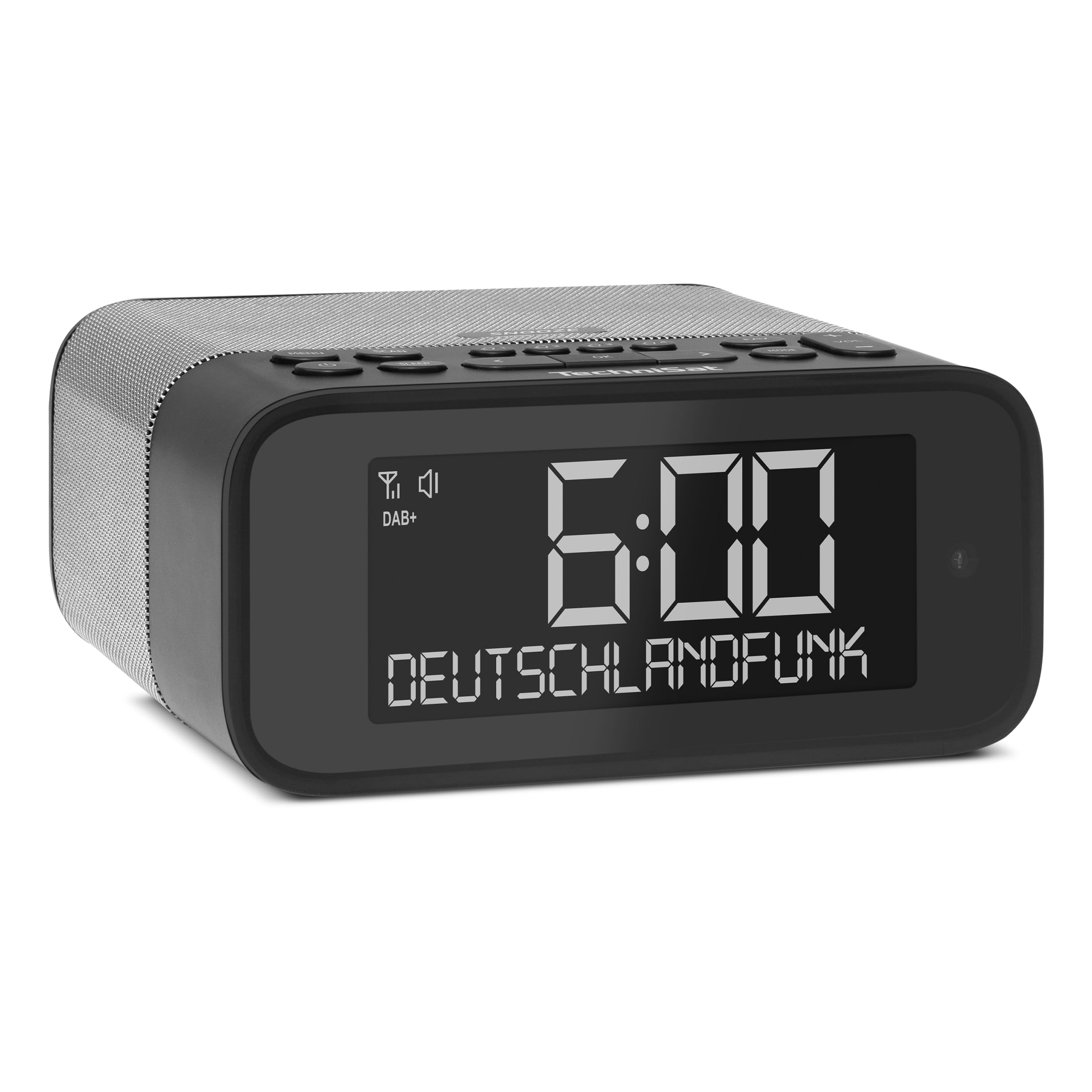
ภาพที่ 1: ด้านหน้า view of the TechniSat DIGITRADIO 52 BT. The device is black with a large digital display showing "6:00" and "DEUTSCHLANDFUNK". Control buttons are visible on the top panel.
2. ข้อมูลด้านความปลอดภัย
- อ่านคำแนะนำทั้งหมดอย่างละเอียดก่อนใช้งาน
- Keep the device away from water, moisture, and direct heat sources.
- อย่าพยายามถอดประกอบหรือดัดแปลงอุปกรณ์ แนะนำให้ส่งช่างผู้ชำนาญเข้ารับบริการทั้งหมด
- ใช้เฉพาะอะแดปเตอร์ที่ให้มาเท่านั้น
- ตรวจสอบให้แน่ใจว่ามีการระบายอากาศที่เหมาะสมรอบๆ อุปกรณ์
- ทำความสะอาดอุปกรณ์ด้วยผ้านุ่มและแห้ง ห้ามใช้น้ำยาทำความสะอาด
3. เนื้อหาบรรจุภัณฑ์
กรุณาตรวจสอบแพ็คเกจสำหรับรายการต่อไปนี้:
- TechniSat DIGITRADIO 52 BT unit
- อะแดปเตอร์แปลงไฟ
- คู่มือการใช้งาน
4. สินค้าหมดview
4.1. การควบคุมและการแสดงผล
The DIGITRADIO 52 BT features an intuitive layout for easy access to all functions.
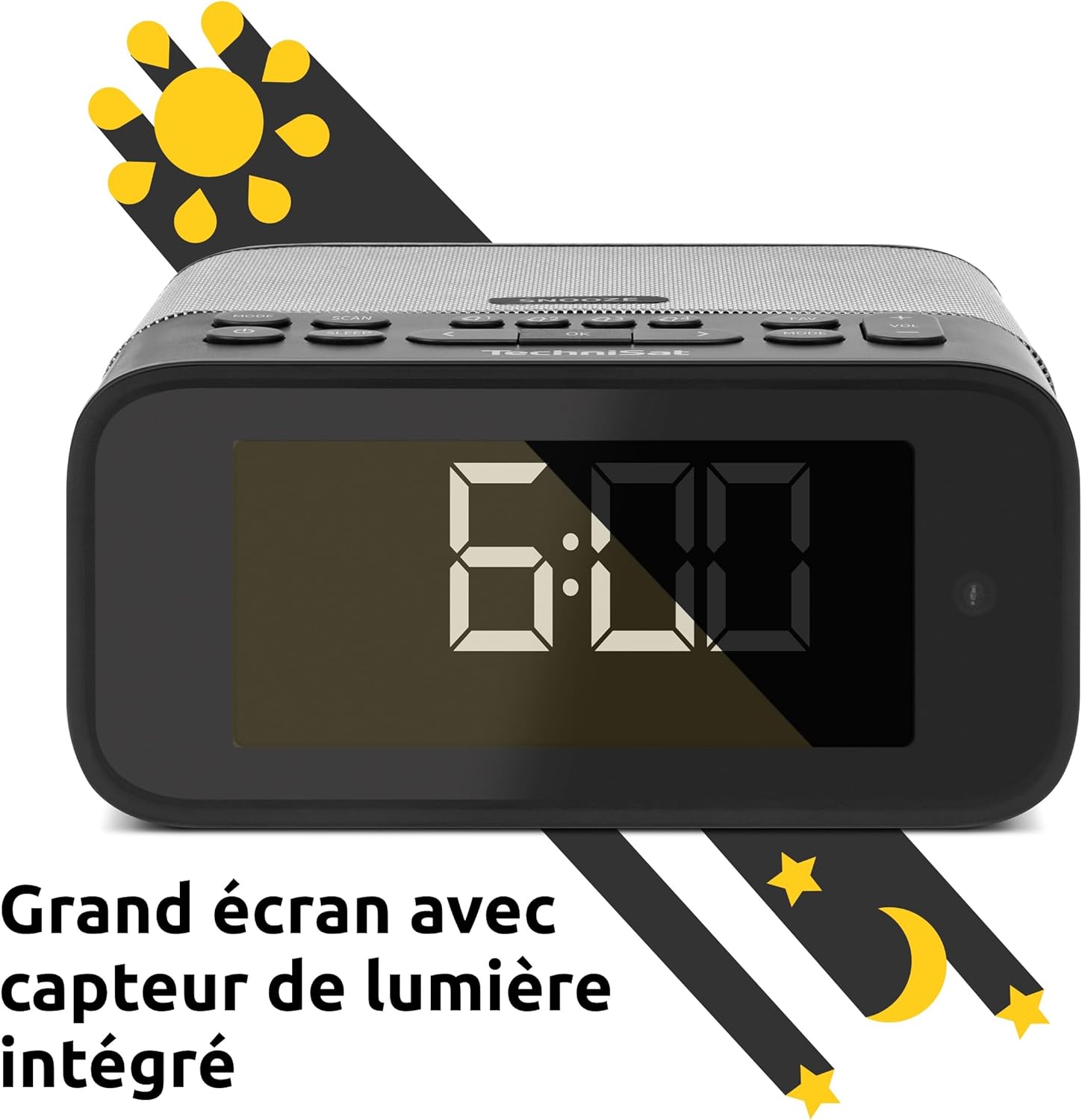
Image 2: Close-up of the large display with integrated light sensor. The display shows "6:00". The light sensor automatically adjusts screen brightness based on ambient light.
4.2. การเชื่อมต่อแผงด้านหลัง
The rear panel provides essential connectivity options.
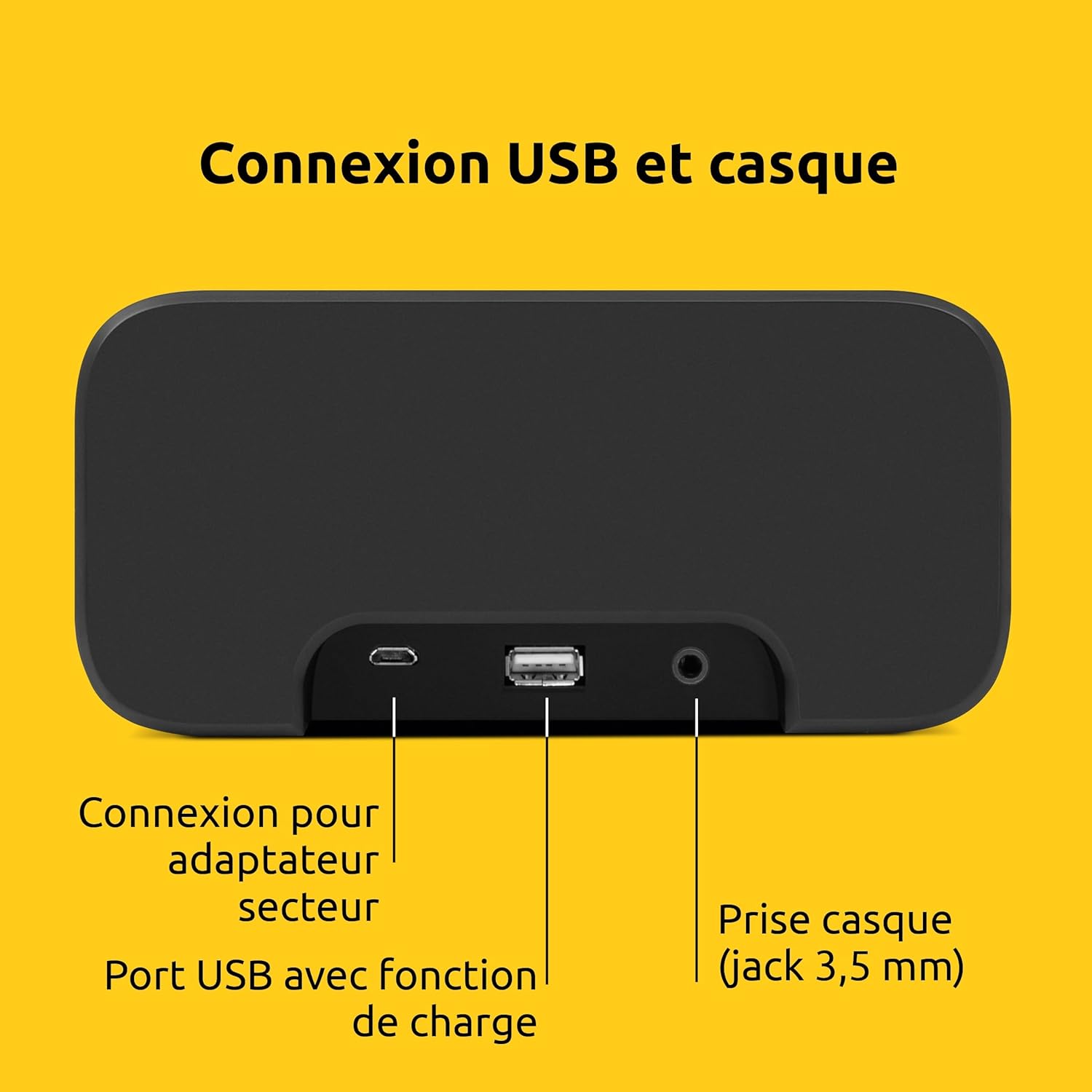
ภาพที่ 3: ด้านหลัง view of the device showing the power adapter connection, a USB port with charging function, and a 3.5mm headphone jack.
- การเชื่อมต่อไฟฟ้า: เชื่อมต่ออะแดปเตอร์จ่ายไฟที่ให้มาที่นี่
- พอร์ต USB: สำหรับชาร์จอุปกรณ์ภายนอก (เช่น สมาร์ทโฟน แท็บเล็ต)
- แจ็คหูฟัง (3.5 มม.): สำหรับการฟังส่วนตัว
5. การตั้งค่า
5.1. การเชื่อมต่อไฟฟ้า
- Connect the power adapter to the DC input on the rear of the DIGITRADIO 52 BT.
- Plug the power adapter into a standard wall outlet (230 Volts).
- The device will power on and enter standby mode or begin initial setup.
5.2. Initial Scan (DAB+ and FM)
Upon first power-on, the radio will automatically scan for available DAB+ and FM stations. This process may take a few minutes.

Image 4: The radio display showing "DAB+" and "6:00 DEUTSCHLANDFUNK", indicating successful reception of a DAB+ station.
5.3. การตั้งเวลาและวันที่
The time and date are usually synchronized automatically via DAB+ or FM signals. If manual adjustment is needed, refer to the "Operating" section for menu navigation.
6. การดำเนินการ
6.1. การเปิด/ปิดเครื่อง และโหมดสแตนด์บาย
- กดปุ่ม พลัง ปุ่มเพื่อเปิดหรือปิดอุปกรณ์
- In standby mode, the display shows the current time.
6.2. Radio Tuning (DAB+ / FM)
- กดปุ่ม โหมด button to select DAB+ or FM radio.
- ใช้ ปรับแต่ง/เลือก knob or buttons to scan for stations.
- หากต้องการบันทึกสถานีโปรด ให้กดปุ่มค้างไว้ พรีเซ็ต กดปุ่ม จากนั้นเลือกหมายเลขที่กำหนดไว้ล่วงหน้า
- หากต้องการเรียกสถานีโปรดกลับมา ให้กดปุ่ม พรีเซ็ต button, then select the desired preset number. Up to 20 favorite stations can be stored for both DAB+ and FM.
6.3. การสตรีมเสียงบลูทูธ
- กดปุ่ม โหมด button to select Bluetooth mode. The display will show "Bluetooth Pairing".
- On your Bluetooth-enabled device (e.g., smartphone, tablet), search for "DIGITRADIO 52 BT" in the Bluetooth settings.
- Select the device to pair. Once paired, you can stream audio from your device to the radio.
6.4. การควบคุมระดับเสียง
- ใช้ ปริมาณ buttons or knob to adjust the audio output level.
7. ฟังก์ชั่นปลุก
The DIGITRADIO 52 BT supports up to four programmable alarms, a snooze function, and a sleep timer.

Image 5: Visual representation of the alarm features: 4 adjustable alarms, adjustable alarm rhythm, sleep timer, and a tactile snooze button.
7.1. การตั้งปลุก
- กดปุ่ม เตือน button to enter alarm setup.
- Select one of the four available alarms (Alarm 1-4).
- Set the desired alarm time, alarm source (radio or beep), and alarm volume.
- Choose the alarm rhythm: daily, weekdays (Mon-Fri), or weekends (Sat-Sun).
- Confirm settings to activate the alarm.
7.2. ฟังก์ชั่นเลื่อนปลุก
- When an alarm sounds, gently touch the งีบหลับ area on the top of the device to temporarily silence the alarm. The alarm will sound again after a set interval.
7.3. ตั้งเวลาปิดเครื่อง
- กดปุ่ม นอน ปุ่มสำหรับเปิดใช้งานตัวตั้งเวลาปิดเครื่อง
- Select the desired duration (e.g., 15, 30, 60 minutes). The radio will play for the set duration and then automatically switch to standby.
8. การตั้งค่าการแสดงผล
The large display's brightness can be adjusted manually or automatically.
- ความสว่างอัตโนมัติ: The integrated light sensor automatically adjusts the display brightness based on ambient light conditions. This ensures comfortable viewing during the day and minimal disturbance at night.
- ปรับความสว่างด้วยตนเอง: Access the display settings through the menu to manually set the desired brightness level.
9. การชาร์จ USB
The USB port on the rear panel can be used to charge external devices.
- Connect your smartphone, tablet, or other USB-powered device to the USB port using a compatible charging cable.
- อุปกรณ์จะเริ่มชาร์จโดยอัตโนมัติ
10 การแก้ไขปัญหา
| ปัญหา | สาเหตุที่เป็นไปได้ | สารละลาย |
|---|---|---|
| ไม่มีไฟฟ้า | ไม่ได้เชื่อมต่ออะแดปเตอร์ไฟหรือเต้ารับไฟฟ้าชำรุด | ตรวจสอบให้แน่ใจว่าอะแดปเตอร์ไฟฟ้าเชื่อมต่ออย่างแน่นหนาและเต้ารับสามารถใช้งานได้ |
| การรับสัญญาณวิทยุไม่ดี | Weak signal, antenna position. | Adjust the antenna position. Try moving the radio to a different location. Perform a new station scan. |
| การจับคู่บลูทูธล้มเหลว | Device not in pairing mode, out of range, or already paired. | Ensure the radio is in Bluetooth pairing mode. Move your device closer. Disconnect from other Bluetooth devices. |
| นาฬิกาปลุกไม่ส่งเสียง | สัญญาณเตือนไม่ทำงาน ระดับเสียงเบาเกินไป | Check alarm settings to ensure it is enabled and the volume is adequate. |
| จอแสดงผลสลัว/สว่างเกินไป | Automatic brightness setting, manual override needed. | Adjust manual brightness settings or ensure the light sensor is not obstructed. |
11. ข้อมูลจำเพาะ
| คุณสมบัติ | รายละเอียด |
|---|---|
| ยี่ห้อ | เทคนิแซท |
| แบบอย่าง | DR 52 (0000/2938) |
| เครื่องรับวิทยุ | ตบเบา ๆ +, เอฟเอ็ม |
| บลูทูธ | ใช่ (บลูทูธ 5) |
| กำลังขับ | 3W RMS (mono) |
| แสดง | 4.2-inch Dimmable LCD with Light Sensor |
| สัญญาณเตือนภัย | 4 programmable alarms (radio/beep) |
| ฟังก์ชั่นการพักชั่วคราว | Yes (tactile button) |
| ตัวตั้งเวลาปิดเครื่อง | ใช่ |
| การเชื่อมต่อ | USB (charging), 3.5mm Headphone Jack |
| แหล่งพลังงาน | Electric Cable (230V input) |
| ขนาด (ยาว x สูง x ลึก) | 15 ซม. x 7 ซม. x 14 ซม. |
| น้ำหนัก | 606 กรัม |
| วัสดุ | พลาสติก |

Image 6: The compact design of the radio with its dimensions indicated as 15 cm (length), 7 cm (height), and 14 cm (depth).
12. การรับประกันและการสนับสนุน
12.1. การรับประกันของผู้ผลิต
The TechniSat DIGITRADIO 52 BT comes with a รับประกันจำกัด 2 ปี นับจากวันที่ซื้อ การรับประกันนี้ครอบคลุมถึงความบกพร่องของวัสดุและฝีมือการผลิตภายใต้การใช้งานปกติ โปรดเก็บหลักฐานการซื้อไว้เพื่อขอรับสิทธิ์การรับประกัน
12.2. การสนับสนุนลูกค้า
For technical assistance, troubleshooting, or warranty inquiries, please contact TechniSat customer support. Refer to the official TechniSat website for contact details and further information.
Note: Software updates are not guaranteed. Information on spare parts availability is not provided.