
1. บทนำ
Thank you for choosing the Bmax B8 Pro Mini PC. This compact and powerful desktop computer is designed for a wide range of applications, from office work and streaming to web browsing and home entertainment. Featuring an Intel 12th Generation i7-1255U processor, 24GB LPDDR5 RAM, and a 1TB NVMe SSD, it offers excellent performance and efficiency in a small form factor. This manual provides essential information for setting up, operating, maintaining, and troubleshooting your new Mini PC.

Image 1.1: The Bmax B8 Pro Mini PC, showcasing การออกแบบที่กะทัดรัด
2. อะไรอยู่ในกล่อง
กรุณาตรวจสอบเนื้อหาในแพ็คเกจของคุณเพื่อให้แน่ใจว่ามีสินค้าครบทั้งหมด:
- 1 x B8 Pro MINI PC
- อะแดปเตอร์ไฟฟ้า 1 ตัว
- 1 x คู่มือผู้ใช้
- 1 x สาย HDMI
- 1 x Metal Bracket (for VESA mounting)

Image 2.1: All components included in the Bmax B8 Pro Mini PC package.
3. สินค้าหมดview และคุณสมบัติ
3.1. Key Components and Ports
The Bmax B8 Pro Mini PC is designed with essential ports for connectivity and expansion. Familiarize yourself with the layout:
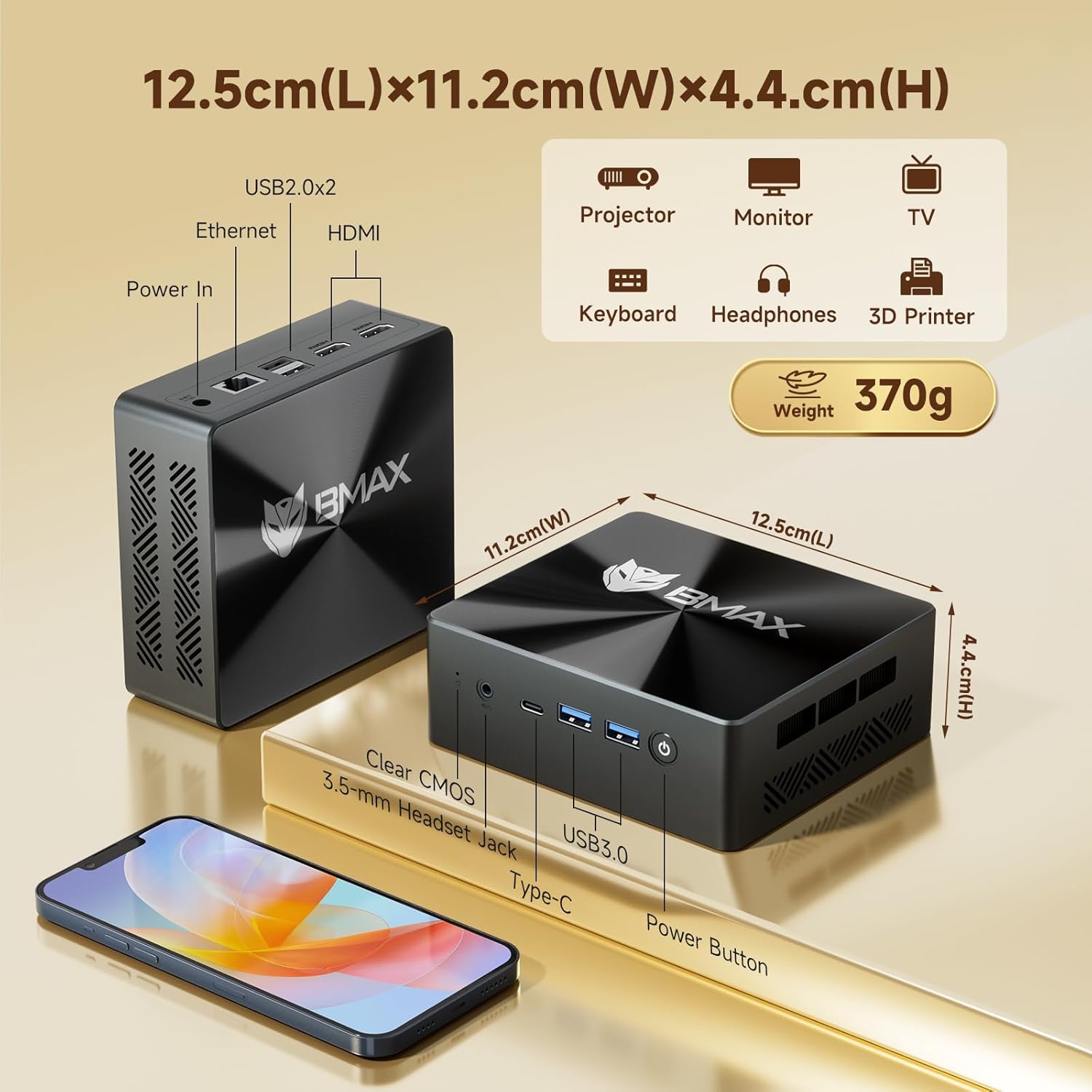
Image 3.1: Dimensions and port configuration of the Bmax B8 Pro Mini PC. Includes USB 2.0, USB 3.0, Ethernet, HDMI, Type-C, 3.5mm Headset Jack, and Power In.
- แผงด้านหน้า: Power Button, 3.5mm Headset Jack, USB 3.0 ports (x2), Type-C port.
- แผงด้านหลัง: USB 2.0 ports (x2), HDMI ports (x2), Gigabit Ethernet port, Power Input.
3.2. Performance Highlights
The B8 Pro is equipped with advanced hardware for robust performance:
- โปรเซสเซอร์: Intel 12th Generation i7-1255U Processor (10 Cores, 12 Threads, up to 4.7 GHz). This CPU provides significant improvements in single-thread, multi-thread, and graphics performance compared to previous generations.
- หน่วยความจำ: 24GB LPDDR5 RAM (5200MHz) for high-speed multitasking and efficient application handling.
- พื้นที่จัดเก็บ: 1TB NVMe SSD (M.2_NVMe 2280 x1) ensuring fast boot times and rapid application loading.
- การเชื่อมต่อ: Integrated WiFi 6 for faster wireless transmission speeds and Bluetooth 5.2 for lower latency and more stable connections with peripherals.
- การสนับสนุนการแสดงผล: Supports 4K/60Hz triple-display output via Type-C and HDMI ports, ideal for multi-monitor setups.
- ระบบระบายความร้อน : Features a smart fan and two copper heat pipes for efficient heat dissipation, ensuring stable performance even under load.

Image 3.2: Detailed specifications of the Intel Core i7-1255U processor.
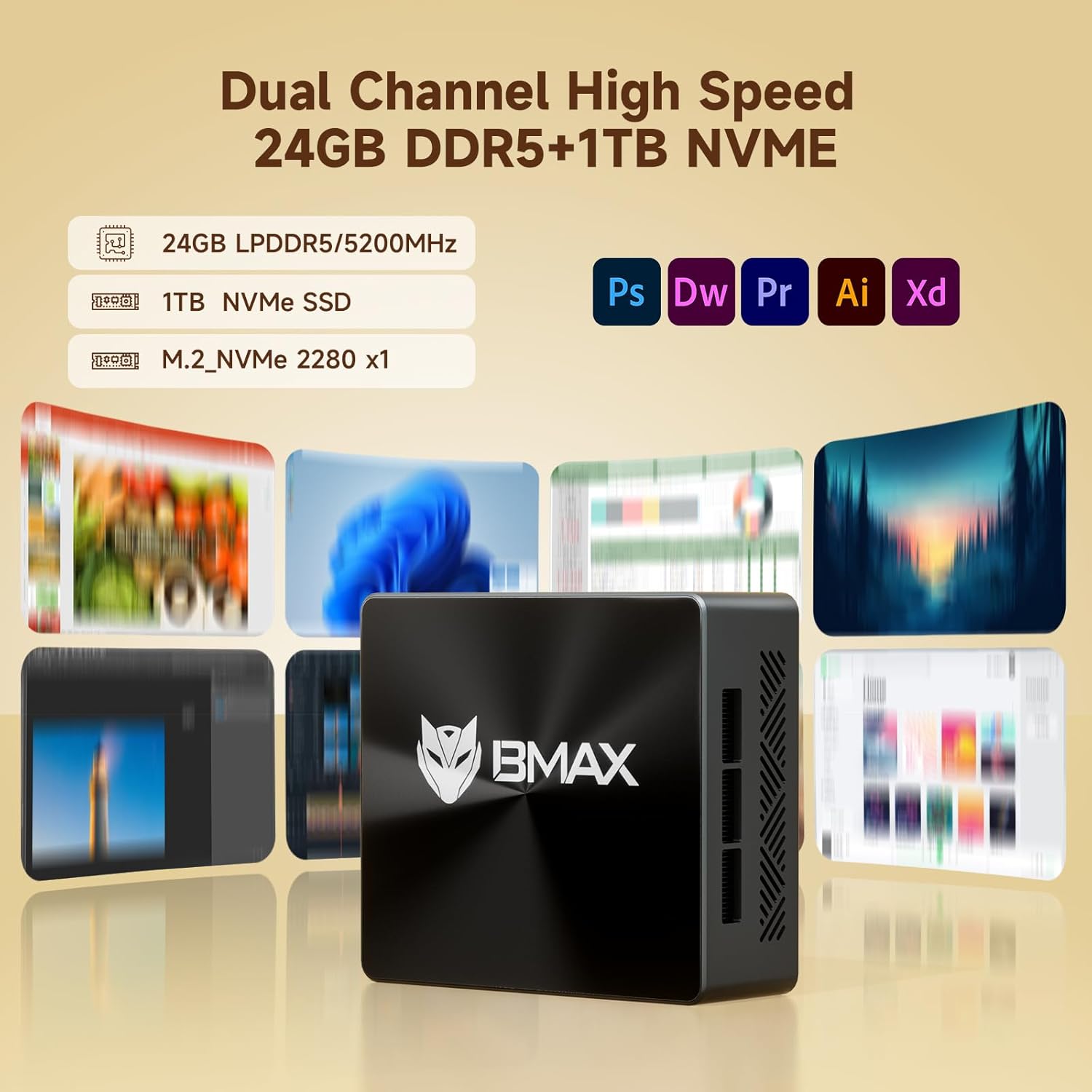
Image 3.3: Illustration of the high-speed memory and storage capabilities.

Image 3.4: Comparison of WiFi 5 and WiFi 6 speeds, highlighting Bluetooth 5.2 benefits.

Image 3.5: Diagram illustrating the smart fan and copper heat pipe cooling solution.
4. คู่มือการติดตั้ง
Follow these steps to set up your Bmax B8 Pro Mini PC:
- เชื่อมต่อกับจอแสดงผล: Connect your monitor, TV, or projector to the Mini PC using an HDMI cable. The B8 Pro supports dual HDMI output and one Type-C output for triple display configurations.
- เชื่อมต่ออุปกรณ์ต่อพ่วง: Plug in your keyboard and mouse to the available USB ports (USB 2.0 or USB 3.0).
- เชื่อมต่อกับพลังงาน: ต่ออะแดปเตอร์แปลงไฟเข้ากับพอร์ต DC-in บนมินิพีซี จากนั้นเสียบอะแดปเตอร์เข้ากับเต้ารับไฟฟ้า
- เปิดเครื่อง: กดปุ่มเปิด/ปิดที่อยู่ด้านหน้าของมินิพีซี ไฟแสดงสถานะการทำงานจะสว่างขึ้น
- ตั้งค่าเริ่มต้น: ปฏิบัติตามคำแนะนำบนหน้าจอเพื่อดำเนินการตั้งค่าเริ่มต้นของ Windows 11 Pro ให้เสร็จสมบูรณ์ รวมถึงภาษา ภูมิภาค การเชื่อมต่อเครือข่าย และการสร้างบัญชีผู้ใช้
- การเชื่อมต่อเครือข่าย: Connect to your network via Ethernet cable or Wi-Fi. For Wi-Fi, select your network from the available list and enter the password.
5. คู่มือการใช้งาน
5.1. การทำงานพื้นฐาน
- เปิด/ปิดเครื่อง: กดปุ่มเปิด/ปิดเพื่อเปิดเครื่องคอมพิวเตอร์ หากต้องการปิดเครื่อง ให้คลิกปุ่ม Start ใน Windows จากนั้นเลือก Power > Shut down
- เริ่มต้นใหม่อีกครั้ง: จากเมนูเริ่ม เลือก เปิด/ปิดเครื่อง > เริ่มระบบใหม่
- โหมดสลีป: จากเมนูเริ่ม เลือก เปิด/ปิดเครื่อง > เข้าสู่โหมดสลีป
5.2. การเชื่อมต่อกับอุปกรณ์ภายนอก
- อุปกรณ์ยูเอสบี: Connect USB flash drives, external hard drives, printers, or other USB devices to any available USB port.
- อุปกรณ์บลูทูธ: To connect Bluetooth headphones, speakers, or other devices, go to Windows Settings > Bluetooth & devices, turn on Bluetooth, and pair your device.
- เอาต์พุตเสียง: Use the 3.5mm headset jack on the front panel for headphones or external speakers. Alternatively, audio can be output through HDMI to your display.
6. การบำรุงรักษา
การบำรุงรักษาที่เหมาะสมจะช่วยให้มินิพีซีของคุณมีอายุการใช้งานยาวนานและทำงานได้อย่างมีประสิทธิภาพสูงสุด:
- การทำความสะอาด: Regularly clean the exterior of the Mini PC with a soft, dry cloth. Use compressed air to gently clear dust from the ventilation grilles to prevent overheating. Ensure the device is powered off and unplugged before cleaning.
- การอัปเดตซอฟต์แวร์: Keep your Windows operating system and drivers updated. Go to Windows Settings > Windows Update to check for and install updates.
- การจัดการพื้นที่เก็บข้อมูล: Periodically check your storage usage. Delete unnecessary files, uninstall unused programs, or use Windows Disk Cleanup to free up space on your 1TB NVMe SSD.
- การระบายอากาศ : ควรวางมินิพีซีไว้ในบริเวณที่มีอากาศถ่ายเทสะดวก อย่าปิดกั้นช่องระบายอากาศ
7 การแก้ไขปัญหา
If you encounter issues with your Bmax B8 Pro Mini PC, refer to the following common problems and solutions:
| ปัญหา | สาเหตุที่เป็นไปได้ | สารละลาย |
|---|---|---|
| ไม่มีไฟเข้า / คอมพิวเตอร์ไม่เปิดเครื่อง | อะแดปเตอร์แปลงไฟไม่ได้เชื่อมต่ออย่างถูกต้อง; ปัญหาเกี่ยวกับปลั๊กไฟ; อะแดปเตอร์แปลงไฟชำรุด | Ensure power adapter is securely connected to both PC and outlet. Try a different power outlet. Verify power adapter is working. |
| ไม่มีการแสดงผลบนจอภาพ | HDMI/Type-C cable loose or faulty; Incorrect input source on monitor; Monitor off or faulty. | Check display cable connections. Ensure monitor is on and set to the correct input source (HDMI 1, HDMI 2, etc.). Try a different cable or monitor. |
| ไม่มีการเชื่อมต่ออินเทอร์เน็ต (Wi-Fi) | Wi-Fi disabled; Incorrect Wi-Fi password; Router issue; Driver issue. | Ensure Wi-Fi is enabled in Windows settings. Re-enter Wi-Fi password. Restart your router. Check for updated Wi-Fi drivers. |
| ไม่มีเสียง | Volume muted; Incorrect audio output device selected; Driver issue. | Check volume levels and ensure it's not muted. In Windows Sound settings, select the correct output device. Update audio drivers. |
| PC runs slowly or freezes | Too many applications running; Low disk space; Overheating; Malware. | Close unnecessary applications. Free up disk space. Ensure proper ventilation. Run a malware scan. |
8. ข้อมูลจำเพาะ
Detailed technical specifications for the Bmax B8 Pro Mini PC:
| คุณสมบัติ | ข้อมูลจำเพาะ |
|---|---|
| ยี่ห้อ | บีแม็กซ์ |
| ชื่อรุ่น | บีทูโปร |
| โปรเซสเซอร์ | Intel 12th Generation Core i7-1255U (4.7 GHz max) |
| แรม | แรม 24GB |
| ฮาร์ดไดรฟ์ | 1TB NVMe SSD |
| การ์ดจอ | บูรณาการ |
| ระบบปฏิบัติการ | OS (Windows 11 Pro pre-installed) |
| ความละเอียดหน้าจอ | 3840 x 2160 (4K) |
| พอร์ต USB 2.0 | 2 |
| พอร์ต USB 3.0 | 2 |
| การเชื่อมต่อ | WiFi 6, Bluetooth 5.2, กิกะบิตอีเทอร์เน็ต |
| ขนาด (กว้าง x ยาว x สูง) | ขนาด 12.5 ซม. x 11.2 ซม. x 4.4 ซม. (ประมาณ 4.92 x 4.41 x 1.73 นิ้ว) |
| น้ำหนักสินค้า | 1.87 ปอนด์ (ประมาณ 848 กรัม) |
9. การรับประกันและการสนับสนุน
Bmax products are designed for reliability and performance. For specific warranty terms and conditions, please refer to the warranty card included with your product or visit the official Bmax website. If you encounter any issues that cannot be resolved using the troubleshooting guide, or require further assistance, please contact Bmax customer support through their official channels. When contacting support, please have your product model number (B8 Pro) and purchase information ready.