
1. บทนำ
Thank you for choosing the ORDRO G730 5K Digital Camera. This manual provides essential information for setting up, operating, and maintaining your camera. Please read it thoroughly before use to ensure optimal performance and longevity of your device.
มีอะไรอยู่ในกล่อง
- 1 x ORDRO G730 Digital Camera
- 1 x การ์ดหน่วยความจำ 64GB
- 2 x แบตเตอรี่แบบชาร์จไฟได้
- 1 x Flexible Tripod Stand
- 1 x ไมโครโฟนภายนอก
- 1 x รีโมทคอนโทรล
- สาย USB 1 เส้น
- 1 x คู่มือผู้ใช้ (เอกสารนี้)
2. ข้อมูลด้านความปลอดภัย
เพื่อป้องกันความเสียหายต่อกล้องของคุณ หรือการบาดเจ็บต่อตัวคุณเองหรือผู้อื่น โปรดปฏิบัติตามข้อควรระวังด้านความปลอดภัยดังต่อไปนี้:
- อย่าให้กล้องโดนน้ำหรือความชื้น
- หลีกเลี่ยงการทำกล้องตกหรือได้รับแรงกระแทกรุนแรง
- เก็บกล้องให้ห่างจากสนามแม่เหล็กแรงสูง
- อย่าพยายามถอดประกอบหรือดัดแปลงกล้อง
- Use only ORDRO-approved accessories and power sources.
- เก็บกล้องไว้ในที่เย็นและแห้งเมื่อไม่ใช้งาน
3. การเริ่มต้น
3.1 การติดตั้งแบตเตอรี่
- เปิดฝาช่องใส่แบตเตอรี่ที่อยู่บริเวณด้านล่างของกล้อง
- Insert the rechargeable battery, ensuring the correct polarity.
- ปิดฝาช่องใส่แบตเตอรี่จนกระทั่งได้ยินเสียงคลิกสนิท
3.2 การใส่การ์ดหน่วยความจำ
The camera supports SD cards. A 64GB card is included.
- หาช่องเสียบการ์ด SD ที่ด้านข้างของกล้อง
- ใส่การ์ด SD โดยให้หน้าสัมผัสโลหะหันไปทางด้านหน้าของกล้องจนกระทั่งล็อคเข้าที่
- ในการถอด ให้ค่อยๆ ดันการ์ดจนกว่าจะหลุดออกมา
3.3 การเปิด/ปิดเครื่อง
Press and hold the Power button to turn the camera on or off. The 3.2-inch IPS touch flip screen will illuminate upon startup.
4. สินค้าหมดview
ทำความคุ้นเคยกับส่วนประกอบและปุ่มควบคุมของกล้อง
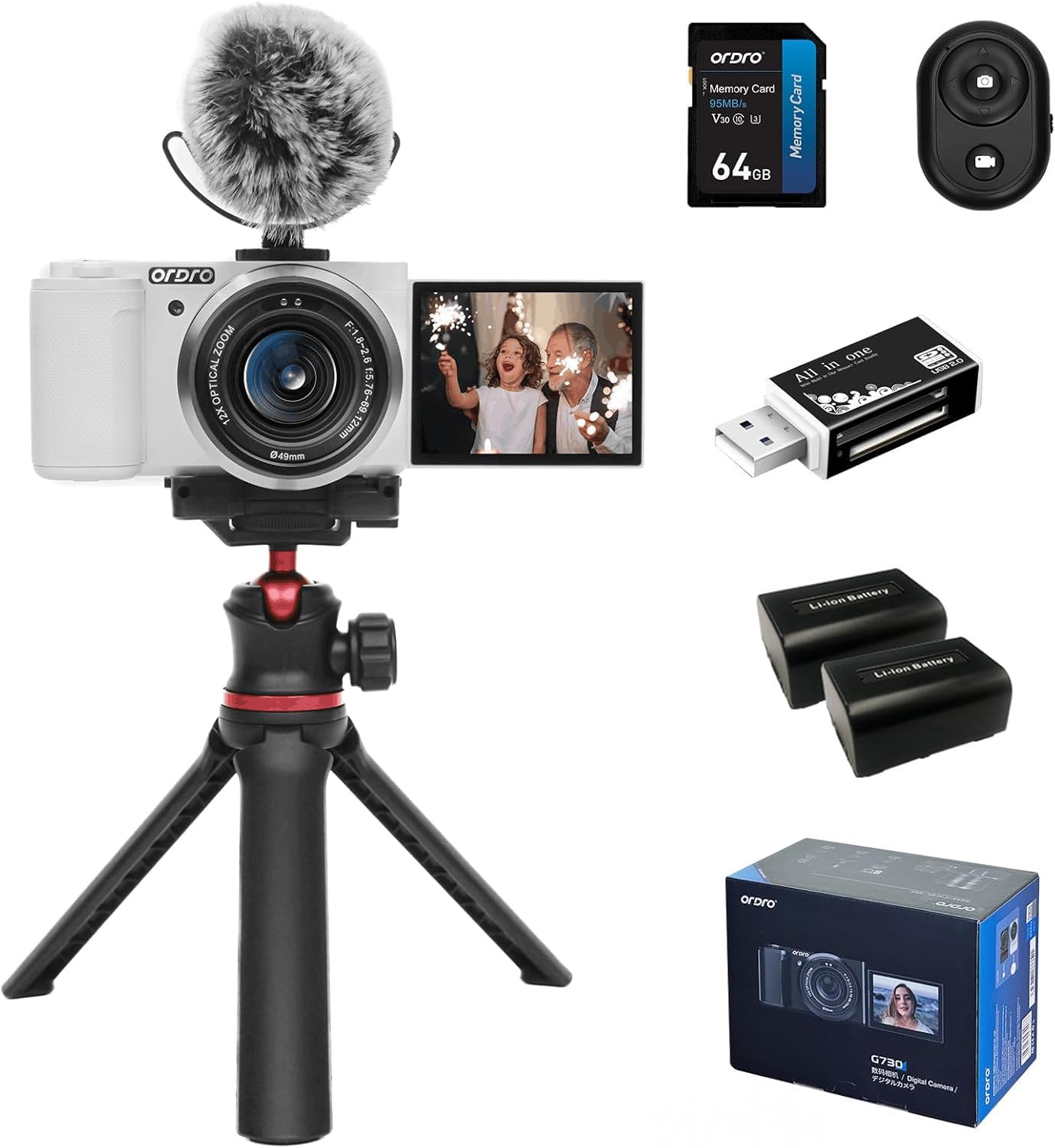
รูปที่ 4.1 : ด้านหน้า view of the ORDRO G730 Digital Camera, showing the lens and ORDRO branding.
รูปที่ 4.2: ด้านข้าง view of the ORDRO G730 Digital Camera, illustrating the 3.2-inch IPS touch flip screen in an open position.

รูปที่ 4.3: ย้อนกลับ view of the ORDRO G730 Digital Camera, highlighting the control buttons and the touch screen interface.

Figure 4.4: The ORDRO G730 camera shown with an external microphone attached, demonstrating its expandability for audio recording.

Figure 4.5: The ORDRO G730 camera mounted on its flexible tripod, illustrating a stable setup for various shooting angles.
5. คู่มือการใช้งาน
5.1 โหมดการถ่ายภาพ
The ORDRO G730 offers a variety of shooting modes to suit different scenarios:
- อัตโนมัติอัจฉริยะ: Automatically adjusts settings for optimal results.
- ตั้งค่าอัตโนมัติ: Allows some manual control while the camera sets exposure.
- โหมดปรับรูรับแสงอัตโนมัติ: คุณตั้งค่ารูรับแสง กล้องจะตั้งค่าความเร็วชัตเตอร์เอง
- ชัตเตอร์ไพรออริตี้: คุณตั้งค่าความเร็วชัตเตอร์ กล้องจะตั้งค่ารูรับแสงเอง
- การเปิดรับแสงด้วยตนเอง: ควบคุมรูรับแสงและความเร็วชัตเตอร์ได้ด้วยตนเองอย่างเต็มที่
- วีดีโอ: โหมดเฉพาะสำหรับการบันทึกวิดีโอ
- การเลือกฉาก: Pre-set modes for specific scenes (e.g., Landscape, Portrait).
- มาโคร: สำหรับการถ่ายภาพระยะใกล้
- อินฟราเรดคืนวิสัยทัศน์: For shooting in low-light or dark conditions.
In most modes (except Intelligent Auto), you can adjust white balance, color temperature, saturation, and apply filters.
5.2 คุณสมบัติการถ่ายภาพ
- ปณิธาน: Capture still images up to 64MP.
- ซูมออปติคอล: Utilize the 12x optical zoom (5.76mm to 69.12mm) for detailed shots from a distance.
- โหมดการโฟกัส: Switch between AF (Autofocus) and MF (Manual Focus) for precise control. The camera supports face detection autofocus.
- สมดุลแสงขาว: Adjust white balance settings (e.g., Auto) and use the White Balance Shift feature for accurate color representation.
- ตัวกรอง: Apply from 15 creative filters to enhance your photos.
- WDR (ช่วงไดนามิกกว้าง): Improves detail in both bright and dark areas of an image.
- Face Beauty & Face Capture: Enhance portraits and automatically detect faces for optimal focus and exposure.
- ถ่ายภาพต่อเนื่อง: Capture a sequence of photos rapidly.

รูปที่ 5.1: เกินview of the ORDRO G730's video (5K 30fps, 4K 60fps, 2.7K 60fps, 1080p 60fps) and photo (64M, 56M, 48M, 36M, 30M) capabilities.

Figure 5.2: Demonstration of enhanced portrait beautification and white balance shift options for fine-tuning image appearance.

Figure 5.3: Visual representation of the 15 creative filters available to style your photos.
5.3 Video Recording Features
- ความละเอียดวิดีโอ: Record videos in UHD 5K30p, 4K HDR, or Full HD at 60fps.
- สโลว์โมชั่น: Capture moments and play them back at a reduced speed.
- เวลาที่ล่วงเลย: Create dynamic short videos of gradual changes.
- การบันทึกแบบวนซ้ำ: บันทึกอย่างต่อเนื่อง โดยเขียนทับข้อมูลเก่าtagเช่นเมื่อการ์ดหน่วยความจำเต็ม
Video 5.4: An official product video demonstrating the ORDRO G730 digital camera's vlogging capabilities, including its 270° flip LCD screen, 4K video recording, and enhanced portrait beautification features. This video highlights the camera's ease of use for capturing unique moments and supports 4K HDR video recording and Full HD at 60fps, showcasing 5K Ultra HD image quality and a 3.2-inch touch screen with 1024x768 color gamut.
วิดีโอ 5.5: วิดีโอแนะนำผลิตภัณฑ์อย่างเป็นทางการasing the ORDRO G730 digital camera's features for video and photo vlogging. It demonstrates the camera's manual focus, white balance shift, creative filters, and compact design, emphasizing its suitability for vlogging anywhere, anytime. The video also highlights the 270° flip LCD screen for easy self-recording.
5.4 Using the 3.2-inch IPS Touch Flip Screen
The camera features a 3.2-inch IPS touch flip screen with a resolution of up to 1024x768 pixels. This screen can be flipped 270 degrees, making it ideal for self-recording, vlogging, and shooting from various angles. Use the touch interface to navigate menus and adjust settings.
5.5 การทำงานของรีโมทคอนโทรล
The included mini remote control allows you to operate the camera from a distance, preventing camera shake and enabling convenient self-portraits or group shots. Refer to the remote control's specific instructions for pairing and functions.

Figure 5.6: The mini remote control in use with the ORDRO G730 camera, providing convenient wireless operation.
6. การเชื่อมต่อ
6.1 การเชื่อมต่อ Wi-Fi
The ORDRO G730 supports Wi-Fi connectivity for seamless content creation and sharing. Download the "OD Cam" app on your smartphone to remotely control photo shooting and video recording, and to transfer files.

Figure 6.1: The ORDRO G730 camera demonstrating Wi-Fi connectivity for instant photo and video sharing with a smartphone.
เอาต์พุต HDMI 6.2 ช่อง
Connect your camera to a TV or monitor using an HDMI cable (not included) to view ภาพถ่ายและวิดีโอของคุณบนหน้าจอที่ใหญ่ขึ้น
6.3 Webฟังก์ชันการทำงานของกล้อง
กล้องสามารถใช้เป็น webcam. Connect it to your computer via the USB cable and select "Webcam" mode. This is suitable for live streaming, video calls, and online teaching.
6.4 ไมโครโฟนภายนอก
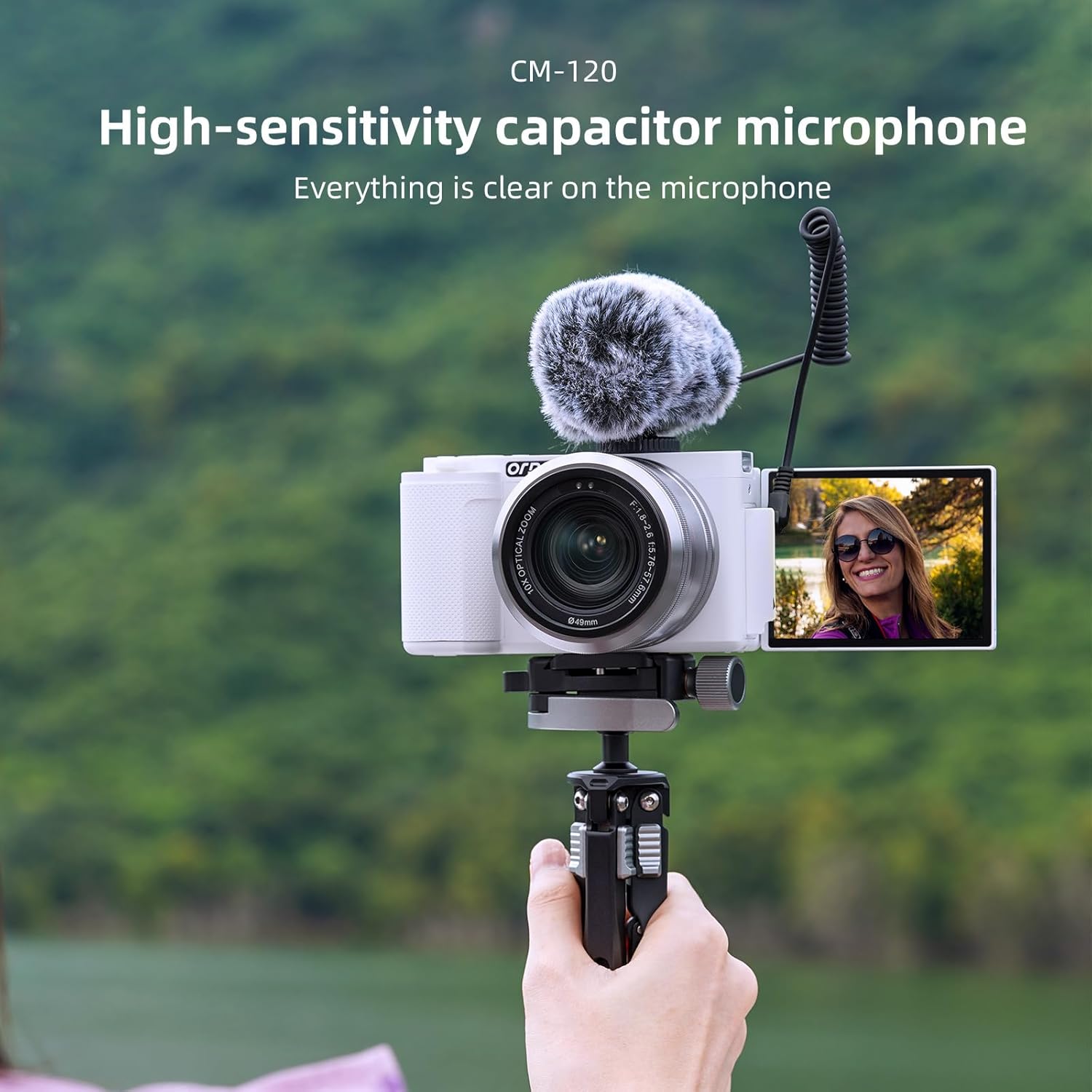
For enhanced audio quality, connect the included external microphone to the camera's 3.5mm jack.

Figure 6.2: The high-sensitivity capacitor microphone (CM-120) attached to the camera, ensuring clear audio capture.
6.5 ขายึดขาตั้งกล้อง
The camera features a standard 1/4-inch tripod mount for stability and compatibility with various tripods, including the flexible tripod provided.
7. การบำรุงรักษา
7.1 การทำความสะอาดกล้อง
- ใช้ผ้าแห้งนุ่มๆ เช็ดทำความสะอาดตัวกล้อง
- For the lens, use a lens cleaning cloth and specialized lens cleaning solution.
- ห้ามใช้น้ำยาทำความสะอาดที่มีฤทธิ์กัดกร่อนหรือตัวทำละลาย
7.2 การดูแลแบตเตอรี่
- ชาร์จแบตเตอรี่ให้เต็มก่อนใช้งานครั้งแรก
- ถอดแบตเตอรี่ออกหากจะไม่ใช้กล้องเป็นเวลานาน
- เก็บแบตเตอรี่ไว้ในที่แห้งและเย็น
7.3 พื้นที่จัดเก็บ
When not in use, store the camera in its protective bag in a dry, dust-free environment, away from extreme temperatures.
8 การแก้ไขปัญหา
If you encounter issues with your ORDRO G730 camera, refer to the following common problems and solutions:
| ปัญหา | สาเหตุที่เป็นไปได้ | สารละลาย |
|---|---|---|
| กล้องไม่สามารถเปิดได้ | แบตเตอรี่อ่อนหรือหมด หรือใส่แบตเตอรี่ไม่ถูกต้อง | ชาร์จแบตเตอรี่ให้เต็ม ตรวจสอบให้แน่ใจว่าใส่แบตเตอรี่ถูกต้องแล้ว |
| คุณภาพรูปภาพ/วิดีโอไม่ดี | Incorrect settings; dirty lens; insufficient lighting. | Check shooting mode and settings. Clean the lens. Ensure adequate lighting or use Night Vision mode. |
| ปัญหาการเชื่อมต่อ Wi-Fi | Incorrect Wi-Fi settings; app not installed. | Ensure Wi-Fi is enabled on camera and smartphone. Download and install the "OD Cam" app. |
| กล้องหยุดนิ่งหรือไม่ตอบสนอง | ความผิดพลาดของซอฟต์แวร์ การ์ดหน่วยความจำเต็ม | Remove and reinsert the battery to reset. Check memory card space. |
หากปัญหายังคงมีอยู่ โปรดติดต่อฝ่ายสนับสนุนลูกค้า
9. ข้อมูลจำเพาะ
Detailed technical specifications for the ORDRO G730 Digital Camera:
| คุณสมบัติ | ข้อมูลจำเพาะ |
|---|---|
| ชื่อรุ่น | จี730 |
| เทคโนโลยีโฟโต้เซนเซอร์ | CMOS (IMX415) |
| ความละเอียดของภาพนิ่งที่มีประสิทธิภาพ | 64 MP |
| ความละเอียดวิดีโอ | 5K30p, 2880p (4K) |
| ซูมออปติคอล | 12 เท่า |
| ระยะโฟกัส | 5.76มม. ถึง 69.12มม. |
| รูรับแสงสูงสุด | F.no 1.8 ~ 2.6 |
| ขนาดหน้าจอ | 3.2 นิ้ว |
| ประเภทจอภาพ | IPS Touch Flip LCD |
| ความละเอียดการแสดงผลสูงสุด | 1024*768 พิกเซล |
| ระบบป้องกันภาพสั่นไหว | ดิจิตอล |
| เทคโนโลยีการเชื่อมต่อ | Wi-Fi, USB 3.0, HDMI |
| รองรับ File รูปแบบ | เจเพ็ก, MP4 |
| ความจุของหน่วยความจำ | 64 GB (External-Memory Size) |
| ประเภทเซลล์แบตเตอรี่ | ลิเธียมไอออน |
| น้ำหนักสินค้า | 1.18 Milligrams (Note: This value seems unusually low and may be a data entry error. Please refer to product packaging for accurate weight.) |
| คุณสมบัติพิเศษ | Night Vision, WDR, Face Detection, Time-lapse, Slow Motion, Loop Recording, Filters |
10. การรับประกันและการสนับสนุน
Your ORDRO G730 Digital Camera comes with a standard manufacturer's warranty. Please refer to the warranty card included in your package for specific terms and conditions. For technical support, service, or inquiries, please visit the official ORDRO webเว็บไซต์หรือติดต่อฝ่ายบริการลูกค้าของพวกเขา