
1. บทนำ
The DATOUBOSS PSW-E-12V 2000W Pure Sine Wave Inverter is designed to convert 12V DC battery power into stable 220V-230V 50Hz AC power. This inverter provides a clean and reliable power source for various electronic devices, making it ideal for use in RVs, boats, solar power systems, and during emergency power outagใช่
Its pure sine wave output ensures compatibility with sensitive electronics, reducing noise and electrical interference. The robust aluminum casing offers durability and protection for both domestic and outdoor applications.
สิ่งที่รวมอยู่:
- 1 x DATOUBOSS 12V 220V Pure Sine Wave 2000W Inverter
- 2 x Battery Cables (Red and Black)
- 1 x คู่มือผู้ใช้
2. คำแนะนำด้านความปลอดภัย
Please read all safety instructions carefully before installing and operating the inverter. Failure to follow these instructions may result in electric shock, fire, or serious injury.
- การระบายอากาศ : ตรวจสอบให้แน่ใจว่ามีการระบายอากาศที่เพียงพอรอบๆ อินเวอร์เตอร์ อย่าปิดกั้นช่องระบายอากาศ
- สิ่งแวดล้อม: ติดตั้งอินเวอร์เตอร์ในที่แห้ง เย็น และมีอากาศถ่ายเทสะดวก ห่างจากแสงแดดโดยตรง แหล่งความร้อน และวัสดุที่ติดไฟได้ง่าย
- การสัมผัสน้ำ: Do not expose the inverter to water, rain, or moisture.
- การเชื่อมต่อ: Ensure all connections are tight and secure to prevent loose connections, which can cause overheating and fire.
- การต่อลงดิน: ต้องต่อสายดินอินเวอร์เตอร์อย่างถูกต้อง
- เด็ก: เก็บอินเวอร์เตอร์ให้พ้นมือเด็ก
- บุคลากรที่ผ่านการรับรอง: การติดตั้งและบำรุงรักษาควรดำเนินการโดยบุคลากรที่มีคุณสมบัติเท่านั้น
- ความจุในการรับน้ำหนัก: Do not exceed the inverter's rated power capacity.
- ปริมาณแบตเตอรี่tage: ตรวจสอบให้แน่ใจว่าระดับแบตเตอรี่tage ตรงกับแรงดันอินพุตของอินเวอร์เตอร์tagอี (12V DC)
คำเตือน: ปริมาณสูงtage inside. Do not open the inverter casing.
3. สินค้าหมดview
The DATOUBOSS PSW-E-12V 2000W inverter features a compact design with multiple output ports and an intelligent cooling system.
คุณสมบัติหลัก:
- Pure Sine Wave Output: Provides stable and clean power for sensitive electronics.
- High Efficiency: Conversion efficiency greater than 92%.
- Multiple Output Ports: 2 EU AC sockets, 1 USB 2.1A port, and 1 Type-C port.
- LCD Display: Real-time monitoring of input/output voltage, power, frequency, and fault indications.
- Comprehensive Protection: Overload, overheating, high/low voltage, short circuit, reverse polarity protection.
- Intelligent Cooling Fan: Automatically activates based on internal temperature to prevent overheating and ensure quiet operation.
การระบุส่วนประกอบ:
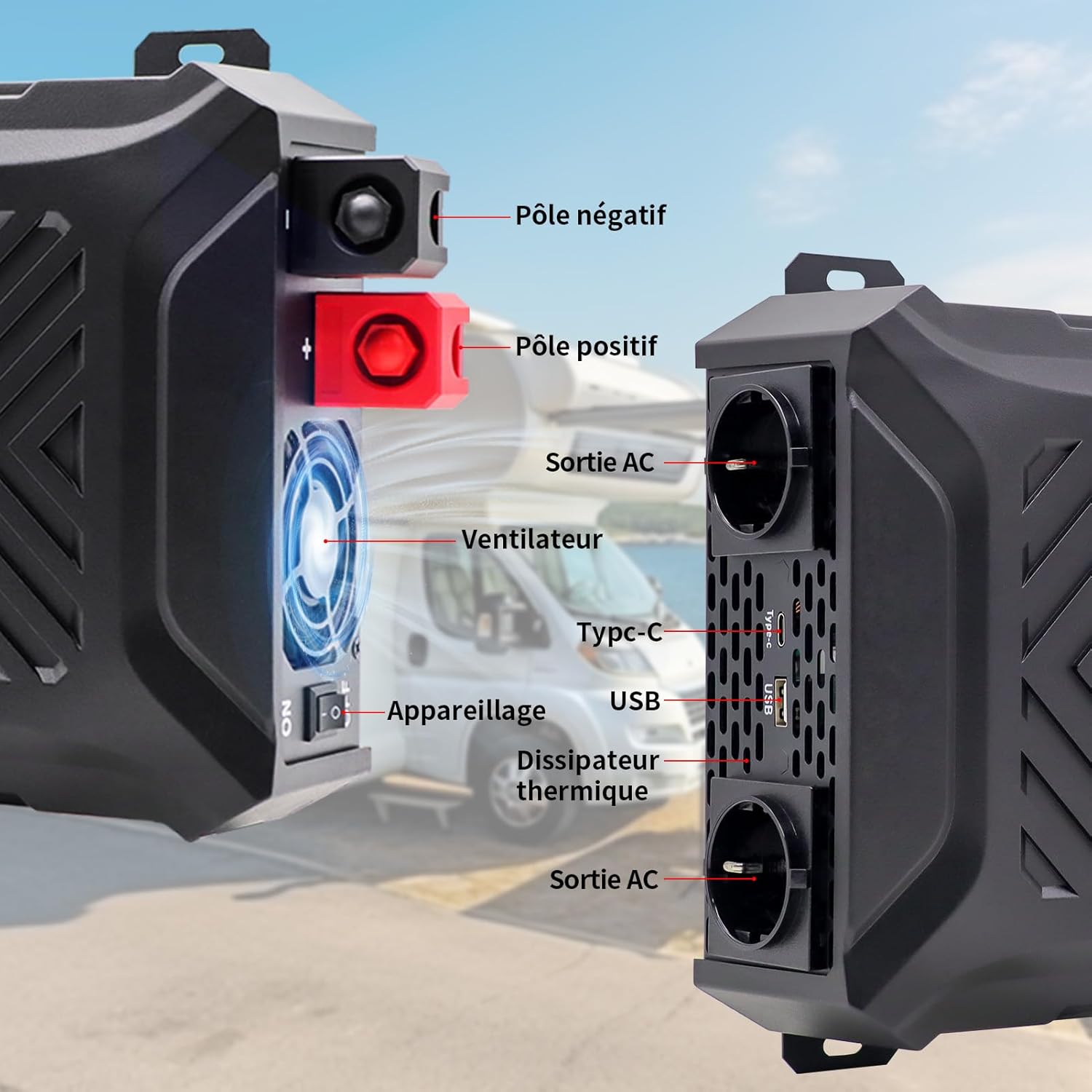
ภาพ: ด้านหน้าและด้านข้าง view of the inverter with labels for the negative pole, positive pole, AC output sockets, fan, Type-C port, USB port, and heat sink.

ภาพ: รายละเอียด view of the inverter's LCD screen, AC output sockets, USB port, and Type-C port, with labels for input voltage, ปริมาณการส่งออกtage, real-time power, output frequency, and battery level.

Image: The DATOUBOSS inverter connected to various devices, illustrating its multiple output options including two EU AC outlets, a USB port, and a Type-C port, along with its 12V DC input.
4. คำแนะนำในการตั้งค่า
Follow these steps for proper installation and connection of your inverter.
4.1 การติดตั้งอินเวอร์เตอร์
- Choose a secure, flat, and well-ventilated location.
- Ensure there is sufficient space around the inverter for airflow, especially around the fan and heat sink.
- Mount the inverter using appropriate screws and brackets (not included unless specified).
4.2 การเชื่อมต่อแบตเตอรี่
The inverter requires a 12V DC battery system. Ensure the battery type is compatible (GEL, SLA, LI, FLD, AGM, CLA, LifePO4).

Image: Icons representing various compatible battery types including GEL, SLA, LI, FLD, AGM, CLA, and LifePO4, indicating the inverter's versatility.
- Turn off the inverter: ตรวจสอบให้แน่ใจว่าสวิตช์เปิดปิดของอินเวอร์เตอร์อยู่ในตำแหน่ง 'ปิด'
- Connect the negative cable: Connect the black battery cable to the negative (-) terminal of the battery and then to the negative (-) terminal of the inverter.
- Connect the positive cable: Connect the red battery cable to the positive (+) terminal of the battery and then to the positive (+) terminal of the inverter.
- การเชื่อมต่อที่ปลอดภัย: Tighten all connections firmly to prevent sparks or overheating.
- การต่อลงดิน: Connect the inverter's grounding terminal to a proper earth ground.
สำคัญ: Always connect the battery cables in the correct polarity. Reverse polarity can damage the inverter and void the warranty. Use the provided battery cables or cables of appropriate gauge for the power rating.
4.3 Optional Solar Panel Connection
The inverter can be integrated into a solar power system. A solar charge controller is required for this setup.

Image: A diagram illustrating the connection of solar panels to a solar charge controller, which then connects to a battery bank, and finally to the DATOUBOSS inverter to power various household appliances.
5. คู่มือการใช้งาน
Once the inverter is properly installed and connected, follow these steps to operate it.
5.1 การเปิด/ปิดเครื่อง
- การเปิดเครื่อง: After ensuring all connections are secure, switch the inverter's power button to the 'ON' position. The LCD screen will illuminate, displaying current status.
- วิธีปิดเครื่อง: Disconnect all AC loads from the inverter, then switch the inverter's power button to the 'OFF' position.
5.2 การใช้จอแสดงผล LCD
The LCD screen provides real-time information about the inverter's operation and status.
- อินพุต Voltagอี (DC): แสดงฉบับปัจจุบันtage จากแบตเตอรี่
- ปริมาณการส่งออกtagอี (AC): Shows the inverter's AC output voltage.
- กำลังขับ (วัตต์): Indicates the real-time power consumption of connected devices.
- Output Frequency (Hz): Displays the AC output frequency (50Hz).
- ตัวบ่งชี้ระดับแบตเตอรี่: Shows the approximate charge level of the connected battery.
- ตัวบ่งชี้ความผิดพลาด: Displays error codes or symbols if a protection mechanism is triggered.

Image: The inverter's LCD screen displaying operational data, alongside icons representing various safety protections such as overvoltage, overheating, overload, and undervoltage.
5.3 การเชื่อมต่ออุปกรณ์
- Plug your AC appliances into the EU sockets.
- Connect USB-powered devices to the USB 2.1A port.
- Connect Type-C powered devices to the Type-C port.
บันทึก: The total power consumption of all connected devices must not exceed the inverter's rated continuous power (2000W). For inductive loads (e.g., motors, refrigerators), the starting surge power can be significantly higher than the running power. Ensure the inverter's peak power (4000W) can handle these surges.
6. การบำรุงรักษา
การบำรุงรักษาอย่างสม่ำเสมอจะช่วยให้เครื่องแปลงกระแสไฟฟ้าของคุณมีอายุการใช้งานยาวนานและทำงานได้อย่างมีประสิทธิภาพสูงสุด
6.1 การทำความสะอาด
- Ensure the inverter is turned off and disconnected from all power sources before cleaning.
- Use a soft, dry cloth to wipe the exterior of the inverter.
- Periodically check and clean the ventilation openings to ensure proper airflow. Do not use liquid cleaners or solvents.
6.2 พื้นที่จัดเก็บ
- หากต้องเก็บรักษาอินเวอร์เตอร์เป็นเวลานาน ควรตัดการเชื่อมต่อจากแบตเตอรี่และเก็บไว้ในที่แห้งและเย็น
- Ensure the battery connected to the inverter is properly maintained according to its manufacturer's instructions, especially if it's a lead-acid battery requiring periodic charging.
7 การแก้ไขปัญหา
ส่วนนี้จะกล่าวถึงปัญหาทั่วไปที่คุณอาจพบเจอเกี่ยวกับอินเวอร์เตอร์ของคุณ
| ปัญหา | สาเหตุที่เป็นไปได้ | สารละลาย |
|---|---|---|
| ไม่มีเอาต์พุต voltage / อินเวอร์เตอร์ไม่ทำงาน | การเชื่อมต่อแบตเตอรี่หลวม, ปริมาณแบตเตอรี่ต่ำtage, inverter switch off, internal fuse blown. | ตรวจสอบการเชื่อมต่อแบตเตอรี่ ชาร์จหรือเปลี่ยนแบตเตอรี่ ตรวจสอบให้แน่ใจว่าสวิตช์อินเวอร์เตอร์เปิดอยู่ ติดต่อฝ่ายสนับสนุนหากสงสัยว่าฟิวส์ขาด |
| Inverter shuts down / Overload alarm | โหลดที่เชื่อมต่อเกินกำลังไฟฟ้าที่กำหนดของอินเวอร์เตอร์ | Reduce the total load by disconnecting some appliances. Check appliance wattage. |
| สัญญาณเตือนความร้อนมากเกินไป | การระบายอากาศไม่ดี อุณหภูมิแวดล้อมสูงเกินไป การใช้งานหนักเป็นเวลานาน | Ensure proper ventilation. Move inverter to a cooler location. Reduce load. |
| ปริมาณต่ำtagสัญญาณเตือน | ปริมาณแบตเตอรี่tagอีต่ำเกินไป | Charge the battery immediately. Disconnect loads to prevent deep discharge. |
| ปริมาณสูงtagสัญญาณเตือน | ปริมาณแบตเตอรี่tagอีสูงเกินไป | Check battery charging system. Disconnect inverter from battery if voltage remains high. |
| Abnormal noise from inverter | Fan operating, or inductive load causing slight hum. | Normal operation for fan. If noise is excessive or unusual, contact support. |
หากปัญหายังคงมีอยู่หลังจากพยายามแก้ไขปัญหาเหล่านี้แล้ว โปรดติดต่อฝ่ายสนับสนุนลูกค้า
8. ข้อมูลจำเพาะ
Technical details for the DATOUBOSS PSW-E-12V 2000W Pure Sine Wave Inverter.

Image: The DATOUBOSS inverter with its dimensions labeled: 37 cm (14.57 in) length, 28.5 cm (11.22 in) width, and 18 cm (7.09 in) height, along with the included red and black battery cables.
| คุณสมบัติ | รายละเอียด |
|---|---|
| ยี่ห้อ | ดาทูบอส |
| ชื่อรุ่น | PSW-E |
| หมายเลขรุ่น | PSW-E-12V 2000W |
| อินพุต Voltage | กระแสตรง 12 โวลต์ |
| ปริมาณการส่งออกtage | กระแสสลับ 220V-230V |
| ความถี่เอาต์พุต | 50เฮิรตซ์ |
| พลังงานต่อเนื่อง | 2000 วัตต์ |
| พลังสูงสุด | 4000 วัตต์ |
| ประสิทธิภาพการแปลง | > 92% |
| รูปคลื่นเอาท์พุต | เพียวไซน์เวฟ |
| พอร์ตเอาท์พุต | 2 x EU AC Sockets, 1 x USB 2.1A, 1 x Type-C |
| แหล่งพลังงาน | ใช้พลังงานแสงอาทิตย์และแบตเตอรี่ |
| ขนาดสินค้า | กว้าง 37 ยาว 28.5 สูง 18 เซนติเมตร |
| การใช้ที่แนะนำ | Home and Outdoor Use |
9. การรับประกันและการสนับสนุน
DATOUBOSS provides a comprehensive warranty and customer support for your product.
ข้อมูลการรับประกัน:
- ผลิตภัณฑ์นี้มาพร้อมกับ การรับประกันจากผู้ผลิต 24 เดือน ตั้งแต่วันที่ซื้อสินค้า
- การรับประกันครอบคลุมการชำรุดของวัสดุและฝีมือการผลิตภายใต้การใช้งานปกติ
- Damage caused by improper installation, misuse, unauthorized modifications, or natural disasters is not covered.
การสนับสนุนลูกค้า:
If you have any questions regarding the use, performance, or troubleshooting of your DATOUBOSS inverter, please do not hesitate to contact our customer service team. We offer friendly and patient customer support.
Please refer to the contact information provided with your purchase or visit the official DATOUBOSS webเว็บไซต์สำหรับรายละเอียดการสนับสนุน