
ทอมเลิฟ พี30
คู่มือการใช้งานกล้องจุลทรรศน์ดิจิทัล TOMLOV P30
รุ่น : P30
Brand: TOMLOV
1. บทนำ
Thank you for choosing the TOMLOV P30 Digital Microscope. This handheld microscope is designed to provide an engaging and educational experience for users of all ages, especially children, allowing for detailed observation of the micro-world. With its dual magnification levels, HD camera, and portable design, the P30 is an excellent tool for scientific exploration at home, outdoors, or in educational settings.
This manual provides comprehensive instructions for setting up, operating, and maintaining your TOMLOV P30 Digital Microscope to ensure optimal performance and longevity.
2. สินค้าหมดview
2.1 คุณสมบัติหลัก
- ระดับการขยายสองระดับ: Offers 1-100X standard magnification for general observation and 500-1000X high magnification for detailed examination of slides. Includes 4X digital zoom.
- HD Camera & Video: Equipped with a 16MP camera for capturing high-resolution photos and 1080P video recording. A 16GB SD card is included for storage.
- หน้าจอ LCD ขนาด 2 นิ้ว: Provides a clear, visible display for live viewing and instant replay of captured discoveries, facilitating easy sharing.
- ดีไซน์พกพาสะดวกและน้ำหนักเบา: Weighing just 6 oz, it is ideal for outdoor exploration and easy handling by children.
- อายุการใช้งานแบตเตอรี่ยาวนาน: แบตเตอรี่แบบชาร์จไฟได้ในตัวขนาด 800mAh ใช้งานได้ต่อเนื่องนานสูงสุด 3 ชั่วโมง
- Included P10 Magnifying Glass: Comes with an additional pocket magnifying glass for broader exploration.
2.2 ส่วนประกอบและอุปกรณ์เสริม
The TOMLOV P30 package includes the following items:
- TOMLOV P30 Digital Microscope
- TOMLOV P10 Pocket Magnifying Glass
- สายชาร์จ USB
- การ์ด Micro SD ขนาด 16GB (ติดตั้งมาแล้วหรือซื้อแยกต่างหาก)
- คู่มือการใช้งาน
2.3 แผนผังผลิตภัณฑ์

Figure 2.3.1: The TOMLOV P30 Digital Microscope (pink, right) and the TOMLOV P10 Pocket Magnifying Glass (grey, left). The P30 features a screen at the top, a power button, and a ribbed grip, with a clear base for viewing. The P10 is a handheld magnifying glass with a screen and control buttons.

รูปที่ 2.3.2: ภาพระยะใกล้ view of the TOMLOV P10 Pocket Magnifying Glass, held in a hand, showing its screen displaying a magnified view of plant material and its control buttons.
3. การตั้งค่า
3.1 การชาร์จอุปกรณ์
Before first use, fully charge the TOMLOV P30 microscope. Connect the included USB charging cable to the microscope's charging port and the other end to a standard USB power adapter (not included) or a computer USB port. The charging indicator light will show the charging status and turn off when fully charged. A full charge provides up to 3 hours of use.

Figure 3.1.1: Two children are shown outdoors, one holding the pink TOMLOV P30 microscope. An icon indicates "3H Battery working time," emphasizing the device's long battery life for outdoor exploration.
3.2 การใส่การ์ด Micro SD
The TOMLOV P30 comes with a 16GB Micro SD card for storing photos and videos. Locate the Micro SD card slot on the side of the microscope. Gently insert the card with the gold contacts facing down until it clicks into place. To remove, push the card in slightly until it springs out.
4. คู่มือการใช้งาน
4.1 การเปิด/ปิดเครื่อง
Press and hold the Power button (usually marked with a circle and vertical line) for a few seconds to turn the microscope on. The LCD screen will light up. To turn off, press and hold the Power button again until the screen shuts down.
4.2 การปรับกำลังขยาย
The P30 offers two primary magnification ranges: 1-100X for standard observation and 500-1000X for high-detail viewing. The microscope automatically adjusts focus within these ranges. For digital zoom, use the designated zoom buttons (if available) or navigate through the menu options.
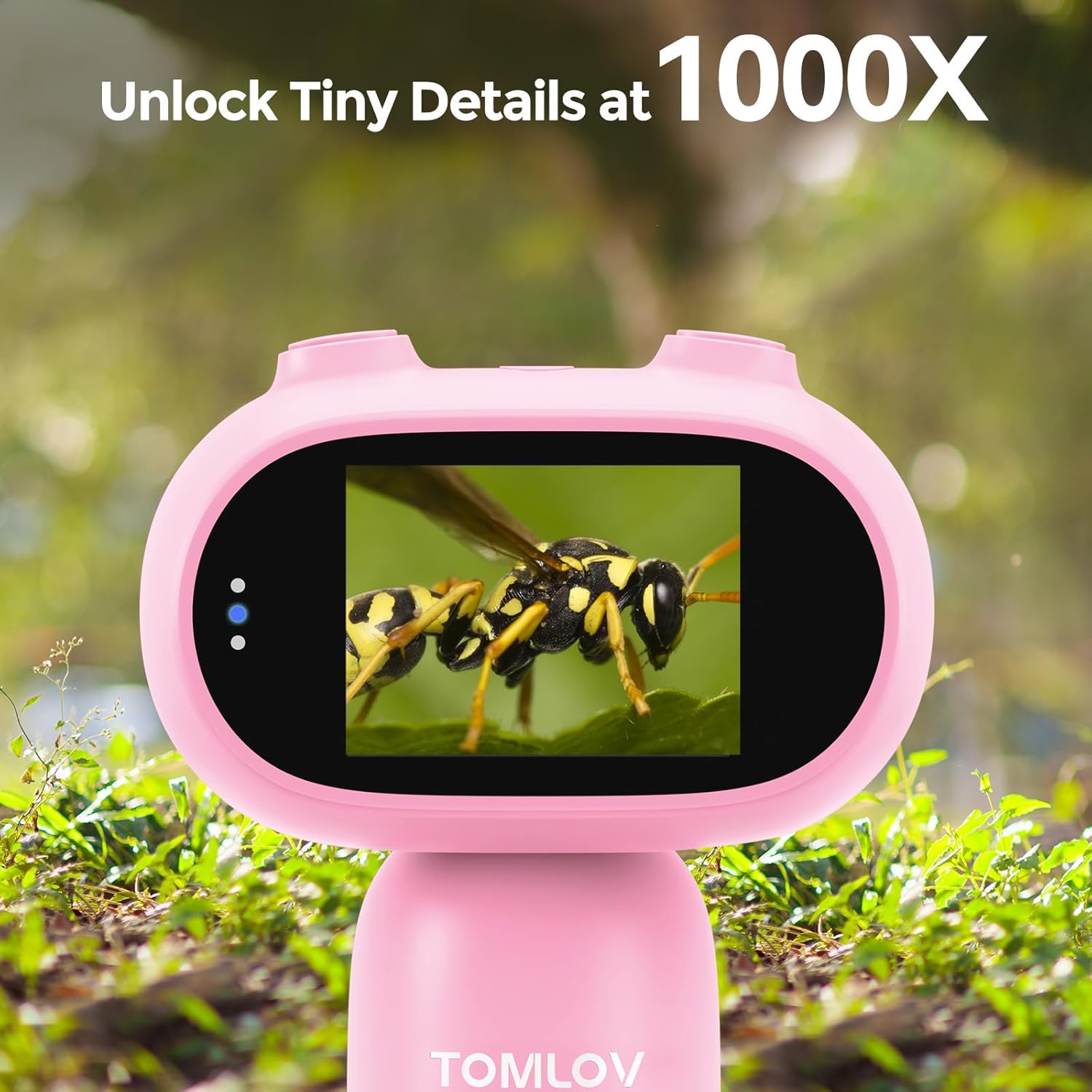
Figure 4.2.1: A close-up of the TOMLOV P30 microscope's screen, displaying a highly magnified image of a bee, illustrating its capability to "Unlock Tiny Details at 1000X".
4.3 การถ่ายภาพและวิดีโอ
While observing, press the Photo button to capture a still image. Press the Video button to start recording; press it again to stop. All captured media will be saved to the inserted Micro SD card.

Figure 4.3.1: A graphic illustrating the TOMLOV P30's capabilities: 1080P Video recording, 16MP Photo capture, and Playback functionality, with examples of magnified insects.
4.4 Viewing and Sharing Discoveries
คุณสามารถกลับมาใหม่ได้view your captured photos and videos directly on the 2-inch LCD screen. Navigate through your media using the directional buttons. The screen allows for easy sharing of observations with others.

Figure 4.4.1: A group of children gathered around the TOMLOV P30 microscope, looking at its 2-inch screen, highlighting its "Shareable Screen" feature for collaborative viewการไอเอ็นจี
การถ่ายโอน files to a computer, connect the microscope to your PC using the USB cable. The microscope will appear as a removable disk drive, allowing you to copy files. Alternatively, you can remove the Micro SD card and insert it into a card reader connected to your computer.

Figure 4.4.2: A young girl and an adult are shown at a desk, with the TOMLOV P30 microscope connected via USB to a laptop, demonstrating the ease of editing and sharing discoveries on a PC.
5. การบำรุงรักษา
5.1 การทำความสะอาด
- Use a soft, dry cloth to clean the body of the microscope.
- For the lens and screen, use a lens cleaning cloth or a microfiber cloth specifically designed for optics. Do not use abrasive cleaners or solvents.
- ตรวจสอบให้แน่ใจว่าอุปกรณ์ปิดอยู่ก่อนทำความสะอาด
5.2 พื้นที่จัดเก็บ
Store the TOMLOV P30 in a cool, dry place away from direct sunlight and extreme temperatures. Keep it in its original packaging or a protective case when not in use to prevent dust accumulation and damage.
6 การแก้ไขปัญหา
| ปัญหา | สาเหตุที่เป็นไปได้ | สารละลาย |
|---|---|---|
| อุปกรณ์ไม่เปิดเครื่อง | แบตเตอรี่อ่อน | ชาร์จอุปกรณ์ให้เต็มโดยใช้สาย USB ที่ให้มา |
| หน้าจอว่างเปล่าหรือค้าง | ซอฟต์แวร์มีปัญหา | กดปุ่มเปิด/ปิดค้างไว้ 10 วินาทีเพื่อบังคับรีสตาร์ท |
| ไม่สามารถบันทึกรูปภาพ/วิดีโอได้ | การ์ด SD เต็มหรือเสียบไม่ถูกต้อง | Check if the SD card is properly inserted. Delete old files or replace the SD card if full. |
| ภาพเบลอ | Incorrect distance from object or dirty lens. | Adjust the distance between the microscope lens and the object. Clean the lens if necessary. |
7. ข้อมูลจำเพาะ
- แบบอย่าง: P30
- ยี่ห้อ: ทอมลอฟ
- กำลังขยาย: 1-100X (Standard), 500-1000X (High)
- ซูมดิจิตอล: 4X
- ความละเอียดกล้อง: 16MP
- ความละเอียดวิดีโอ: 1080พ
- ขนาดหน้าจอ: จอ LCD ขนาด 2 นิ้ว
- ประเภทแหล่งกำเนิดแสง: นำ
- แหล่งพลังงาน: ใช้แบตเตอรี่ (แบตเตอรี่แบบชาร์จไฟได้ในตัว 800mAh)
- อายุการใช้งานแบตเตอรี่: นานถึง 3 ชั่วโมง
- วัสดุ: พลาสติก
- สี: สีชมพู
- น้ำหนัก: ประมาณ 6 ออนซ์
- พื้นที่จัดเก็บ: Supports Micro SD card (16GB included)
- ASIN: B0DM94LXT8
- วันที่เข้าใช้งานครั้งแรก: 7 พฤศจิกายน 2024
8. การรับประกันและการสนับสนุน
TOMLOV products are designed for reliability and performance. For specific warranty information, please refer to the warranty card included with your product or visit the official TOMLOV website. If you encounter any issues or have questions regarding your TOMLOV P30 Digital Microscope, please contact TOMLOV customer support through their official channels or the retailer from whom you purchased the product.
หากต้องการความช่วยเหลือเพิ่มเติม คุณสามารถไปที่ ร้าน TOMLOV บน Amazon.
Ask a question about this manual
Ask about setup, troubleshooting, compatibility, parts, safety, or missing instructions. Manuals+ will review the question and use this page’s manual context to help answer it.