
1. บทนำ
The eppfun LE Audio Bluetooth 5.4 Transmitter is designed to provide high-quality wireless audio streaming from various audio sources to your Bluetooth-enabled headphones or speakers. Featuring advanced QCC3086 Bluetooth 5.4 Chipset, it supports AptX Lossless, AptX Adaptive, and LE Audio (96kHz/24Bit) codecs, ensuring a superior listening experience. Its versatile input options and long-range capability make it an ideal solution for home entertainment and personal audio.
2. เนื้อหาบรรจุภัณฑ์
- eppfun LE Audio Bluetooth 5.4 Transmitter
- สายสัญญาณเสียง
- สายสัญญาณเสียง AUX 3.5 มม.
- สายสัญญาณเสียง RCA
- สายไฟ USB-C
- คู่มือการใช้งาน (เอกสารนี้)
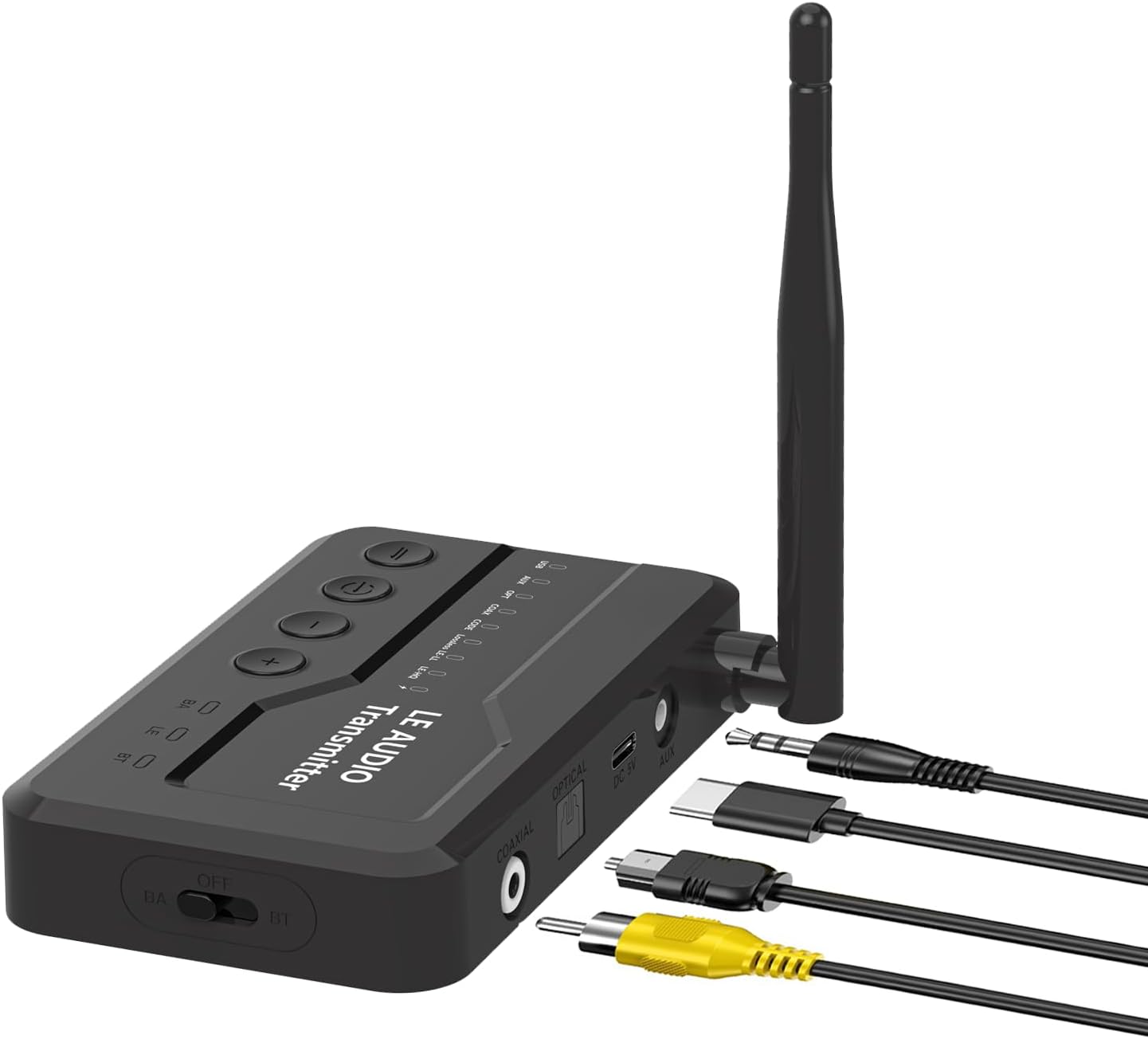
Image: The eppfun LE Audio Bluetooth 5.4 Transmitter shown with its various included audio and power cables, including optical, AUX, RCA, and USB-C.
3. คู่มือการติดตั้ง
3.1 Powering On the Transmitter
Connect the provided USB-C power cable to the DC 5V port on the transmitter and the other end to a USB power adapter (not included) or a USB port on your TV/computer. The device will power on automatically.
3.2 Connecting to Audio Source
The transmitter supports multiple audio input types. Choose the appropriate cable based on your audio source (TV, PC, PS5, etc.):
- อินพุตออปติคัล: Use the optical cable to connect the transmitter's OPTICAL port to your TV's optical audio output.
- อินพุตโคแอกเชียล: Use a coaxial cable (not included) to connect the transmitter's COAXIAL port to your audio source's coaxial output.
- อินพุต AUX: Use the 3.5mm AUX cable to connect the transmitter's AUX port to your audio source's 3.5mm audio output.
- อินพุต USB-C: Connect the USB-C cable to the USB port on the transmitter and to a USB audio output on your computer or PS5.

ภาพ: ระยะใกล้ view of the transmitter's rear panel, highlighting the Optical, Coaxial, DC 5V (power), and AUX input ports for various audio connections.

Image: A visual guide demonstrating how the transmitter connects to different devices like a PlayStation 5, a laptop, and a desktop PC using Coaxial, Fiber Optic, USB-C, and AUX inputs.
3.3 การเชื่อมต่อกับหูฟัง/ลำโพง
Once connected to an audio source, the transmitter will automatically enter pairing mode (indicated by a flashing LED). Put your Bluetooth headphones or speakers into pairing mode. They should automatically connect to the transmitter. For optimal performance, it is recommended to use eppfun LE Audio headphones.
4. โหมดการทำงาน
The eppfun LE Audio Bluetooth 5.4 Transmitter supports both Classic Bluetooth (BT) and Broadcast Audio (BA) modes.
4.1 Classic Bluetooth (BT) Mode (1-to-1 Connection)
In BT mode, the transmitter connects to a single Bluetooth headphone or speaker, providing a dedicated audio stream. This is suitable for private listening.
4.2 Broadcast Audio (BA) Mode (1-to-Many Connection)
In BA mode, the transmitter can broadcast audio to multiple compatible headphones or speakers simultaneously. This is ideal for sharing audio with several listeners in the same room, such as watching a movie with family or friends. This mode offers low latency and is particularly useful with LE Audio compatible devices.

Image: A diagram illustrating the difference between BT (Classic Bluetooth + LE Audio) 1-to-1 connection and BA (Broadcast Audio) 1-to-N connection, showing multiple headphones receiving audio in BA mode.

Image: A visual representation of the Broadcast Operating Mode, demonstrating how a single audio emission from the transmitter can be received by multiple headphones or speakers with Broadcast functionality.
4.3 Audio Codec Selection
The transmitter supports various audio codecs including AptX Lossless, AptX Adaptive, LE Audio, and others. You can switch between supported audio codecs using the dedicated button on the device. Refer to the LED indicators on the transmitter for the currently active codec (e.g., AptX Lossless, AptX Adaptive, LE Audio 96kHz/24Bit).
5. การบำรุงรักษา
To ensure the longevity and optimal performance of your eppfun LE Audio Bluetooth 5.4 Transmitter, follow these simple maintenance guidelines:
- รักษาความสะอาดของอุปกรณ์โดยการเช็ดด้วยผ้าแห้งนุ่มๆ หลีกเลี่ยงการใช้สารเคมีรุนแรงหรือน้ำยาทำความสะอาดที่มีฤทธิ์กัดกร่อน
- เก็บเครื่องส่งสัญญาณไว้ในที่แห้งและเย็น หลีกเลี่ยงแสงแดดโดยตรงและอุณหภูมิที่สูงหรือต่ำเกินไป
- หลีกเลี่ยงการทำอุปกรณ์หล่นหรือกระแทกอย่างรุนแรง
- อย่าพยายามถอดประกอบหรือซ่อมแซมอุปกรณ์ด้วยตัวเอง เพราะจะทำให้การรับประกันเป็นโมฆะ
6 การแก้ไขปัญหา
If you encounter issues with your eppfun LE Audio Bluetooth 5.4 Transmitter, please refer to the following common troubleshooting steps:
- ไม่มีพลังงาน/อุปกรณ์ไม่เปิด: Ensure the USB-C power cable is securely connected to both the transmitter and a working USB power source. Check if the power source is active.
- ไม่มีเอาต์พุตเสียง:
- Verify that the correct audio input cable (Optical, AUX, Coaxial, USB-C) is securely connected to both the transmitter and your audio source.
- Ensure your audio source (TV, PC) is outputting audio through the selected port. For many TVs, the audio output setting (e.g., Optical Out) must be set to พีซีเอ็ม format for the transmitter to receive the signal correctly.
- Check the volume levels on both your audio source and your connected headphones/speakers.
- ไม่สามารถจับคู่/เชื่อมต่อได้:
- Ensure both the transmitter and your headphones/speakers are in pairing mode.
- ย้ายอุปกรณ์ให้เข้าใกล้กันมากขึ้น
- Turn off and then turn on both devices to reset their Bluetooth connection.
- Clear previous pairing records on your headphones/speakers if possible.
- Audio Latency/Delay: While the device supports low-latency codecs, some delay may be noticeable depending on the connected headphones/speakers and the audio source. Ensure you are using AptX Low Latency or LE Audio compatible headphones for best results.
- การเชื่อมต่อไม่เสถียร/ระยะสั้น: Ensure there are no significant obstructions between the transmitter and your headphones/speakers. Avoid placing the transmitter near strong electromagnetic interference sources. The maximum range is up to 100 feet in open areas.
7. ข้อมูลจำเพาะ
| คุณสมบัติ | ข้อมูลจำเพาะ |
|---|---|
| หมายเลขรุ่น | LE |
| เวอร์ชันบลูทูธ | 5.4 |
| ชิปเซ็ต | คิวซีซี3086 |
| ตัวแปลงสัญญาณเสียงที่รองรับ | AptX Lossless, AptX Adaptive, LE Audio (96kHz/24Bit), AptX HD, AptX LL, AptX, AAC, SBC |
| เทคโนโลยีการเชื่อมต่อ | บลูทูธ, ไร้สาย |
| อินเทอร์เฟซอินพุต | Optical, Coaxial, AUX (3.5mm), USB-C |
| อุปกรณ์ที่รองรับ | Television, Computers, PS5 game console, Audio devices with supported outputs |
| ช่วงสาย | สูงสุด 100 ฟุต (ประมาณ 30 เมตร) |
| กำลังไฟเข้า | กระแสตรง 5 โวลต์ |
| น้ำหนักสินค้า | 8.4 ออนซ์ |
| ขนาดแพ็คเกจ | 6.81 x 5.08 x 1.18 นิ้ว |
| สี | สีดำ |
8. การรับประกันและการสนับสนุน
eppfun products are designed for reliability and performance. For warranty information and customer support, please refer to the documentation included with your purchase or contact the seller directly. For this product, the seller is EppFun Direct US.
For further assistance, you may also visit the official eppfun store on Amazon or contact their customer service channels.