
สินค้าเกินview
The XO BE18 is a stereo audio wireless Bluetooth headset featuring RGB lighting. It is designed for immersive listening experiences and convenient communication, offering multiple playback modes including Bluetooth, AUX, TF card, and FM radio.
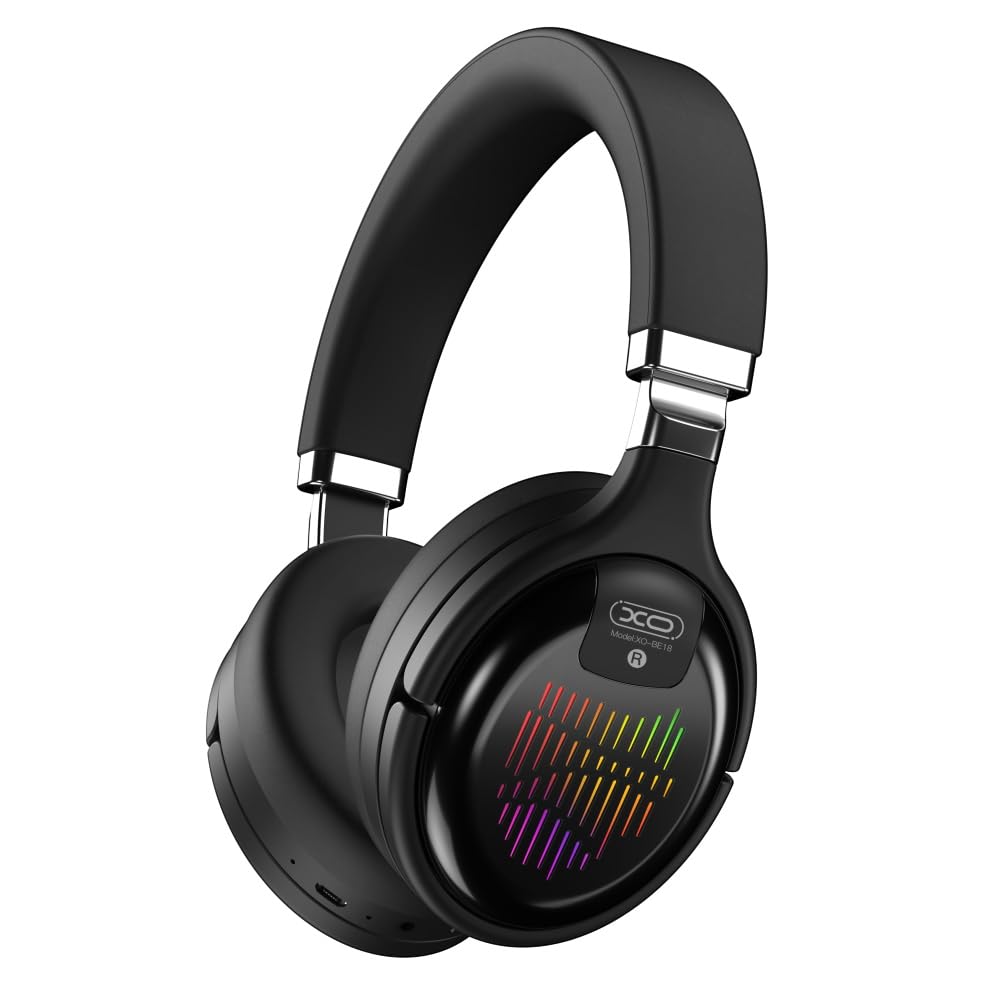
Image: The XO BE18 Wireless Bluetooth Headset, showcasing its over-ear design and integrated RGB lighting on the earcups.
เนื้อหาแพ็คเกจ
โปรดตรวจสอบให้แน่ใจว่ามีสินค้าทั้งหมดอยู่ในแพ็คเกจ:
- XO BE18 Wireless Bluetooth Headset
- สายชาร์จ
- คู่มือการใช้งาน (เอกสารนี้)

Image: The XO BE18 headset shown within its retail packaging, indicating the included accessories.
การตั้งค่า
การชาร์จหูฟัง
- ค้นหาพอร์ตชาร์จบนหูฟัง
- Connect the provided charging cable to the headset and a compatible USB power source (e.g., computer USB port, USB wall adapter).
- The LED indicator on the headset will typically show a specific color (e.g., red) during charging and change (e.g., turn off or blue) when fully charged.
- การชาร์จเต็มจะใช้เวลาประมาณ 2.5 ชั่วโมง
การเปิด/ปิดเครื่อง
- การเปิดเครื่อง: Press and hold the Power button for approximately 3-5 seconds until the LED indicator lights up and you hear an audible prompt.
- วิธีปิดเครื่อง: กดปุ่มเปิด/ปิดค้างไว้ประมาณ 3-5 วินาที จนกว่าไฟ LED จะดับลงและคุณได้ยินเสียงแจ้งเตือน
คำแนะนำการใช้งาน
จับคู่บลูทู ธ
- ตรวจสอบว่าชุดหูฟังปิดอยู่
- Press and hold the Power button for approximately 5-7 seconds until the LED indicator flashes rapidly (e.g., alternating blue and red), indicating pairing mode.
- บนอุปกรณ์ของคุณ (สมาร์ทโฟน แท็บเล็ต คอมพิวเตอร์) เปิดใช้งาน Bluetooth และค้นหาอุปกรณ์ที่มีอยู่
- Select "XO BE18" from the list of found devices.
- Once paired, the LED indicator will typically flash slowly or turn solid blue, and you will hear a confirmation tone.
การควบคุมพื้นฐาน
The headset features various buttons for controlling audio playback and calls. Refer to the image below for button locations.

ภาพ: ระยะใกล้ view of the XO BE18 headset earcup, highlighting the control buttons and ports.
- ปุ่มเปิด/ปิด: กดค้างเพื่อเปิด/ปิดเครื่อง กดสั้นๆ เพื่อเล่น/หยุดเพลง หรือรับ/วางสาย
- เพิ่มระดับเสียง (+): กดสั้นเพื่อเพิ่มระดับเสียง กดยาวเพื่อเล่นเพลงถัดไป
- ลดเสียงลง (-): กดสั้นเพื่อลดระดับเสียง กดยาวเพื่อเล่นเพลงก่อนหน้า
- ปุ่มโหมด (M): Short press to switch between Bluetooth, AUX, TF card, and Radio modes.
ไฟ RGB
The headset features integrated RGB lighting on the earcups. This lighting typically activates automatically when the headset is powered on. Specific controls for the RGB lighting (if any) may be integrated with the mode button or a dedicated button not explicitly detailed.

Image: The XO BE18 headset displaying its colorful RGB lighting on the earcups.
การใช้ไมโครโฟน
The built-in microphone allows for hands-free calls. When a call comes in, press the Power button once to answer. Press again to end the call.
โหมด AUX
Connect an audio cable (not included) from your device's 3.5mm audio jack to the headset's AUX port to use it in wired mode. The headset does not require power in AUX mode.
โหมดการ์ด TF
ใส่การ์ด TF (microSD) พร้อมเสียง files into the designated slot. Use the Mode button to switch to TF card mode.
โหมดวิทยุ
Use the Mode button to switch to Radio mode. The headset will automatically scan for available FM radio stations.
การซ่อมบำรุง
- การทำความสะอาด: ใช้ผ้านุ่มและแห้งเช็ดทำความสะอาดชุดหูฟัง ห้ามใช้น้ำยาทำความสะอาดหรือสารละลายที่มีฤทธิ์กัดกร่อน
- พื้นที่จัดเก็บ: When not in use, store the headset in a cool, dry place. The headset features a portable folding design for compact storage.
- การดูแลแบตเตอรี่ เพื่อยืดอายุการใช้งานแบตเตอรี่ ควรหลีกเลี่ยงการใช้แบตเตอรี่จนหมดบ่อยๆ ควรชาร์จหูฟังเป็นประจำ แม้จะไม่ได้ใช้งานอย่างต่อเนื่องก็ตาม
- การสัมผัสน้ำ: ชุดหูฟังนี้ไม่กันน้ำ โปรดหลีกเลี่ยงการสัมผัสกับน้ำหรือความชื้นมากเกินไป

Image: The XO BE18 headset shown in its folded configuration, demonstrating its portable design.
การแก้ไขปัญหา
| ปัญหา | วิธีแก้ปัญหาที่เป็นไปได้ |
|---|---|
| หูฟังไม่สามารถเปิดเครื่องได้ | ตรวจสอบให้แน่ใจว่าหูฟังชาร์จเต็มแล้ว เชื่อมต่อกับแหล่งจ่ายไฟแล้วลองใหม่อีกครั้ง |
| ไม่สามารถจับคู่กับอุปกรณ์ได้ |
|
| ไม่มีเสียงหรือเสียงเบา |
|
| ไมโครโฟนไม่ทำงาน |
|
| ไฟ RGB ไม่ทำงาน | Ensure the headset is powered on. If the issue persists, contact customer support. |
ข้อมูลจำเพาะ
| คุณสมบัติ | รายละเอียด |
|---|---|
| ชื่อรุ่น | BE18 |
| การเชื่อมต่อ | ไร้สาย (บลูทูธ V5.0) |
| ช่วงสาย | ประมาณ 10 เมตร |
| เทคโนโลยีเสียง | Hi-Fis Audio, Intelligent Noise Reduction |
| การวางตำแหน่งหู | บนหู |
| การควบคุมเสียงรบกวน | การแยกเสียง |
| ไมโครโฟน | ในตัว |
| ความจุของแบตเตอรี่ | 250mAh |
| เวลาเล่นเพลง | ประมาณ 4 ชั่วโมง |
| เวลาโทร | ประมาณ 4 ชั่วโมง |
| เวลาในการชาร์จ | ประมาณ 2.5 ชั่วโมง |
| เวลาสแตนด์บาย | Long Standby Capability |
| กำลังขับของลำโพง | 3มิลลิวัตต์ |
| ความไวต่อความรู้สึก | 94 ± 3dBm |
| อัตราส่วน S/N | >=75เดซิเบล |
| ความถี่ในการทำงาน | 20เฮิรตซ์-20กิโลเฮิรตซ์ |
| โหมดการเล่น | Bluetooth, AUX, TF Card, Radio |
| โปรโตคอลบลูทูธ | A2DP, HSP, HFP |
| ขนาด (แพ็คเกจ) | 195 x 195 x 80 มม. |
| สี | สีดำ |

Image: A detailed table outlining the technical specifications and product information for the XO BE18 headset.
การรับประกันและการสนับสนุน
This product comes with a standard manufacturer's warranty. For specific warranty terms and conditions, please refer to the warranty card included in your product packaging or contact the retailer where you purchased the product.
For technical support or further assistance, please contact your retailer or visit the official XO webเว็บไซต์ (ถ้ามี)