
ScopeAround SASA160
ScopeAround Digital Otoscope User Manual
Model: SASA160
Brand: ScopeAround
การแนะนำ
The ScopeAround Digital Otoscope with IPS Screen (Model SASA160) is designed for clear, real-time visual inspection of the ear canal. This device allows users to perform ear checks instantly without the need for external connections like phones or apps. It is equipped with a high-resolution camera and integrated lighting to provide detailed views, making it suitable for personal and family ear care, including monitoring ear wax and general ear health.

Image: The ScopeAround Digital Otoscope, showing the main unit with its integrated screen, detachable lens with extension cable, various ear picks, specula, alcohol pads, Q-tips, and USB cable.
คุณสมบัติหลัก
- Built-In IPS Screen: Features a clear IPS display for instant viewing without requiring a phone or app connection. Simply power on and view ภาพแบบเรียลไทม์
- กล้องความละเอียดสูง: The 720p HD camera and integrated IPS screen provide sharp, true-to-life images, allowing clear visualization of fine details within the ear canal without glare or distortion.
- Slim 3.9mm Lens with LED Lights: Designed for comfort and safety, the slim lens is gentle for all ages. Six LED lights with three brightness levels ensure optimal illumination for clear viewการไอเอ็นจี
- Flexible Detachable Lens and Extension Cable: The lens can be detached and connected to an extended cable, offering flexibility for self-inspection or assisting others comfortably.
- การจับภาพและวิดีโอ: Capture clear photos and videos of the ear canal. Files are saved on the included 8GB memory card, useful for tracking progress or sharing with healthcare professionals.
- การออกแบบที่เป็นมิตรต่อผู้ใช้: Ergonomic grip and intuitive controls make the device easy to handle for both professionals and home users.

Image: Diagram highlighting the integrated screen for easy and efficient ear examinations, providing a clear and detailed view ของช่องหู
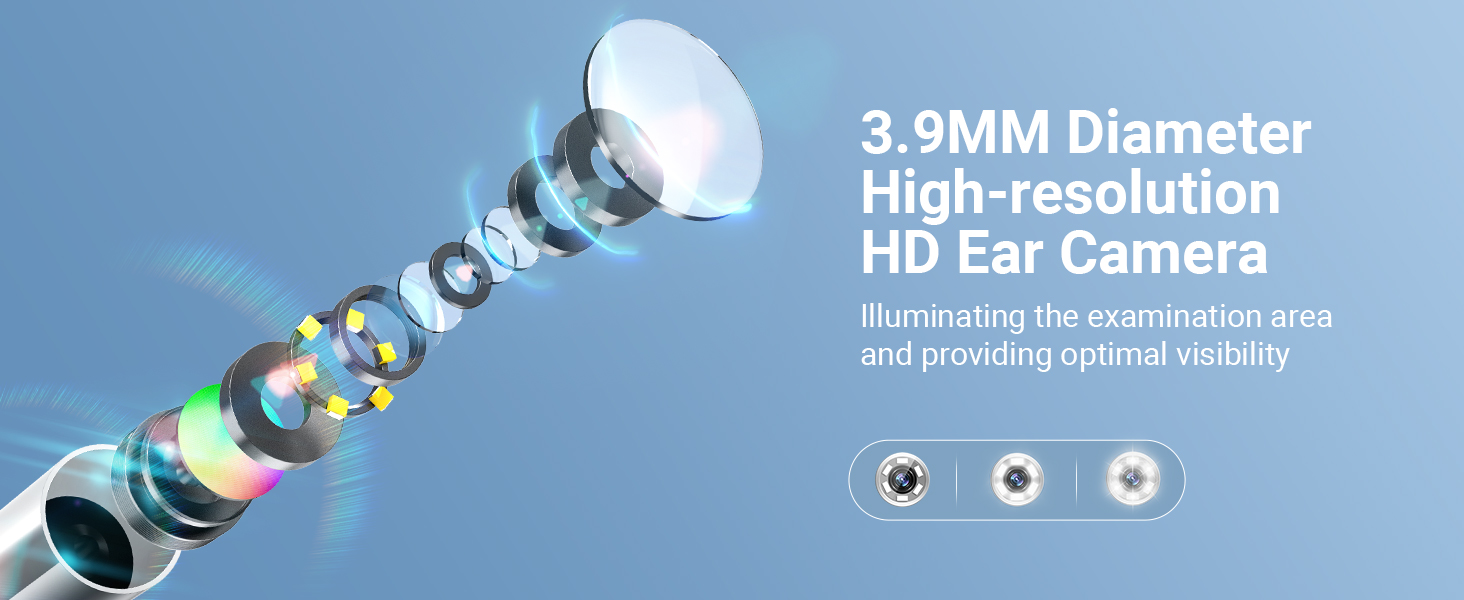
Image: Illustration of the 3.9mm diameter high-resolution HD ear camera, showing how it illuminates the examination area and provides optimal visibility.
มีอะไรอยู่ในกล่อง
- SA160 Digital Otoscope (Main Unit)
- Ear Picks x 4
- Specula x 5
- Alcohol Pads x 4
- 1 Pack of Q-tips
- สายต่อขยาย
- สายชาร์จ USB
- การ์ดหน่วยความจำ 8GB (ติดตั้งไว้ล่วงหน้าหรือรวมแยกต่างหาก)

Image: A visual representation of all items included in the product package, such as the otoscope, various ear picks, specula, alcohol pads, Q-tips, extension cable, USB cable, and user manual.
การตั้งค่า
- ชาร์จอุปกรณ์: Before first use, fully charge the otoscope using the provided USB charging cable. The charging port is located on the device.
- ใส่การ์ดหน่วยความจำ: Ensure the 8GB memory card is properly inserted into the designated slot on the otoscope. This is necessary for saving photos and videos.
- Attach Lens/Extension Cable:
- For direct use, attach the lens probe directly to the main unit.
- For self-examination or extended reach, connect the lens probe to the extension USB cable, then connect the extension cable to the main unit. Ensure connections are secure.
- Attach Specula/Ear Picks: Select an appropriate speculum or ear pick and attach it to the tip of the lens probe. Ensure it is securely fitted to prevent accidental detachment during use.
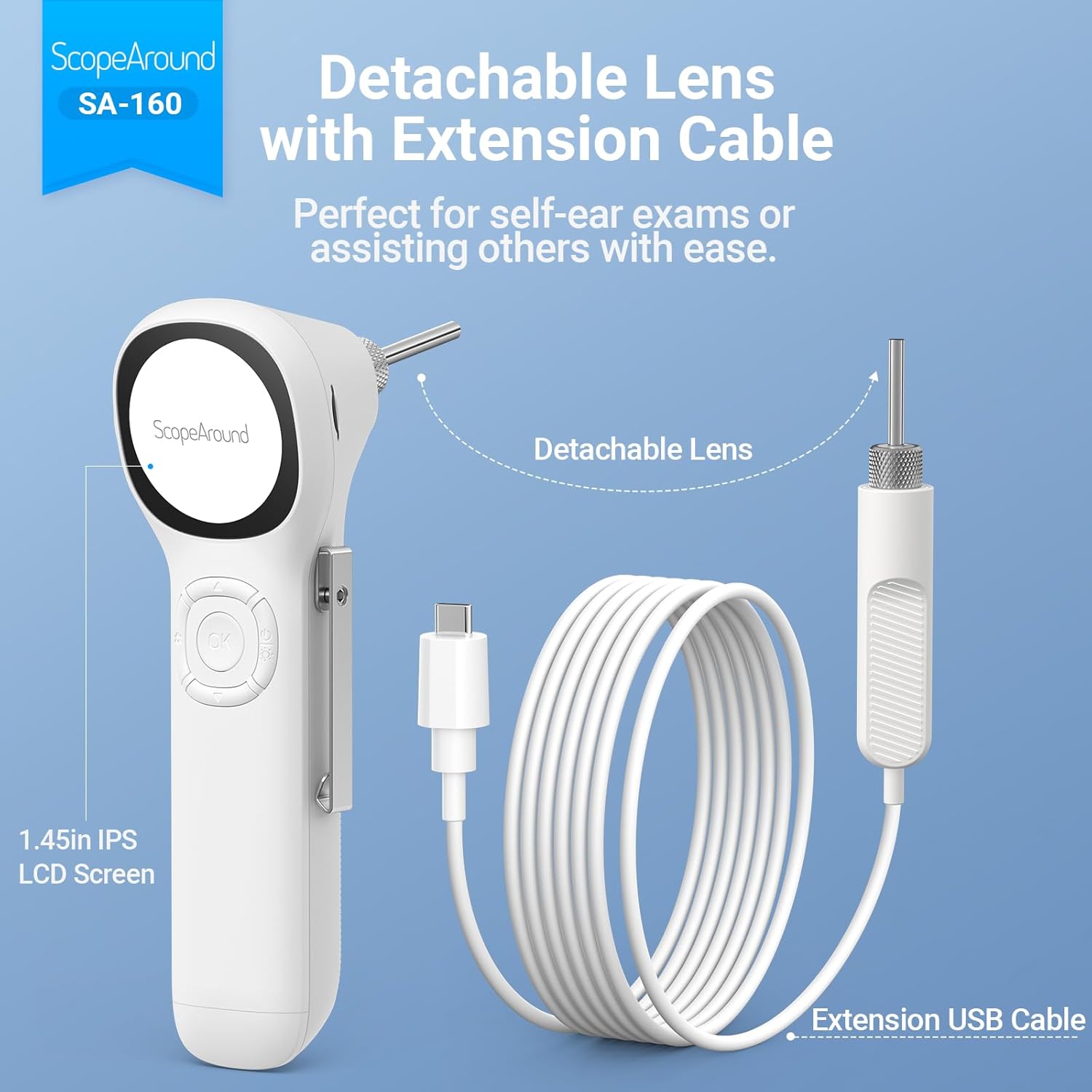
Image: The detachable lens and extension USB cable, illustrating how they connect to the main unit for flexible use, perfect for self-ear exams or assisting others.

Image: A detailed diagram labeling the various components and controls of the ScopeAround Smart Otoscope, including the 1.45-inch screen, settings button, OK button, Up/Down buttons, power button, lens module, capture button, reset, and Type-C port.
การดำเนินการ
- เปิดเครื่อง: Press and hold the Power Button to turn on the device. The IPS screen will activate, displaying the live view จากกล้อง
- ปรับความสว่าง: Use the dedicated button (often integrated with the power button or a separate control) to cycle through the three brightness levels of the LED lights for optimal visibility.
- Perform Examination: Gently insert the speculum-covered lens into the ear canal. Observe the live feed on the IPS screen. Move the otoscope slowly and carefully to get a comprehensive view.
- ถ่ายภาพ/วิดีโอ:
- Press the Capture Button to take a still photo.
- Press and hold the Capture Button to start recording a video. Press again to stop recording.
- Files are automatically saved to the 8GB memory card.
- Adjust Magnification/Rotation: If available, use the controls to adjust magnification (e.g., 1.0x, 1.3x, 1.5x) for more detailed views or rotate the image 180 degrees for flexible positioning.
- Review สื่อ: Access saved photos and videos through the device's menu. You can transfer these files to a computer via the Type-C interface for larger screen viewing and health documentation.
- หมดแรง: Press and hold the Power Button to turn off the device after use.

Image: Demonstrates the two primary uses: self-ear checks using the extension cable and assisting others with direct use of the otoscope.

Image: Illustrates the adjustable magnification (1.0x, 1.3x, 1.5x) for detailed views and the 180-degree image rotation feature for flexible positioning during examinations.

Image: Shows a user transferring files from the otoscope to a laptop via the Type-C interface, emphasizing the ease of sharing ear health documentation with professionals.
การซ่อมบำรุง
- Cleaning the Lens and Specula:
- After each use, especially when used on different individuals, clean the lens and specula thoroughly.
- Use the provided alcohol pads or a soft cloth dampened with isopropyl alcohol to wipe the lens and the exterior of the specula.
- Ensure the lens is free of debris or earwax before storage.
- การทำความสะอาดตัวเครื่องหลัก: เช็ดตัวเครื่องหลักด้วยผ้านุ่มและแห้ง หลีกเลี่ยงการใช้น้ำยาทำความสะอาดที่มีฤทธิ์กัดกร่อนหรือจุ่มอุปกรณ์ลงในน้ำ
- พื้นที่จัดเก็บ: Store the otoscope and its accessories in a clean, dry place, away from direct sunlight and extreme temperatures. Keep all small parts, especially ear picks and specula, organized in their case to prevent loss.
- การดูแลแบตเตอรี่ เพื่อยืดอายุการใช้งานแบตเตอรี่ ควรหลีกเลี่ยงการปล่อยให้แบตเตอรี่หมดจนเกลี้ยงบ่อยๆ ชาร์จอุปกรณ์เป็นประจำ แม้ว่าจะไม่ได้ใช้งานตลอดเวลาก็ตาม

Image: Illustrates safe and dangerous methods of ear cleaning, emphasizing the importance of proper technique to avoid ear canal injury and cross-infection.

Image: Close-up of the removable and soft silicone ear pick, highlighting its design for protection and convenience during ear wax removal.
การแก้ไขปัญหา
| ปัญหา | สาเหตุที่เป็นไปได้ | สารละลาย |
|---|---|---|
| อุปกรณ์ไม่เปิดเครื่อง | แบตเตอรี่เหลือน้อย; อุปกรณ์ทำงานผิดปกติ | Charge the device fully. If issue persists, contact customer support. |
| ภาพไม่ชัดหรือไม่คมชัด | Dirty lens; incorrect focal distance; insufficient lighting. | Clean the lens with an alcohol pad. Adjust the distance from the ear canal. Increase LED brightness. |
| ไม่สามารถบันทึกรูปภาพ/วิดีโอได้ | การ์ดหน่วยความจำเต็มหรือเสียบไม่ถูกต้อง; เกิดข้อผิดพลาดกับการ์ด | Check if the 8GB memory card is properly inserted. Delete old files to free up space or format the card (backup important data first). |
| อุปกรณ์หยุดทำงานหรือไม่ตอบสนอง | ซอฟต์แวร์มีปัญหา | Perform a soft reset (refer to user manual for specific reset instructions, usually a small reset button). |
ข้อมูลจำเพาะ
- ชื่อรุ่น : Otoscope SA160
- หมายเลขรุ่นสินค้า: SASA160
- ยี่ห้อ: ขอบเขตโดยรอบ
- สี: สีขาว
- วัสดุ: พลาสติก
- ขนาดแพ็คเกจ: 8.19 x 4.41 x 2.4 นิ้ว
- น้ำหนักสินค้า: 9.6 ออนซ์
- ประเภทแหล่งกำเนิดแสง: นำ
- มุมจริงของ View: 78 องศา
- กำลังขยายสูงสุด: 1.5 เท่า
- เล่มที่tage: 3.7 โวลต์ (กระแสตรง)
- แบตเตอรี่: ต้องใช้แบตเตอรี่ลิเธียมโพลิเมอร์ 1 ก้อน (รวมอยู่ด้วย)
- อุปกรณ์ที่รองรับ: No device needed (standalone operation)
- วันที่พร้อมใช้งานครั้งแรก: 4 พฤศจิกายน 2024

Image: Detailed specifications of the SA-160 camera, including 3.9mm HD ear camera, 6 LED lights, 3 brightness adjustments, 0.39-1.18 inch focal distance, and 78-degree field of view.
การรับประกันและการสนับสนุน
For warranty information, technical support, or service inquiries, please refer to the official ScopeAround webหรือติดต่อฝ่ายบริการลูกค้าโดยตรง โปรดเก็บใบเสร็จรับเงินไว้เป็นหลักฐานการซื้อสำหรับการเรียกร้องการรับประกันใดๆ
ScopeAround is committed to providing high-quality products and customer satisfaction. For further assistance, please visit the ScopeAround Store on Amazon หรือติดต่อทีมสนับสนุนของพวกเขา
Ask a question about this manual
Ask about setup, troubleshooting, compatibility, parts, safety, or missing instructions. Manuals+ will review the question and use this page’s manual context to help answer it.