
1. บทนำ
Thank you for choosing the AM ARROWMAX Mini Electric Drill Pen. This precision tool is designed for detailed drilling tasks in various materials, offering portability, adjustable speed, and an intuitive OLED display. Please read this manual thoroughly before use to ensure safe and optimal operation.

Image 1.1: The AM ARROWMAX Mini Electric Drill Pen with its accompanying bit storage case.
2. ข้อมูลด้านความปลอดภัย
- Always wear appropriate eye protection when operating the drill.
- ให้มือและเสื้อผ้าหลวมๆ ออกห่างจากชิ้นส่วนที่หมุน
- ตรวจสอบให้แน่ใจว่าชิ้นงานอยู่ในตำแหน่งที่ปลอดภัยampยึดหรือตรึงไว้เพื่อป้องกันการเคลื่อนไหวระหว่างการเจาะ
- Do not operate the drill in wet conditions or near flammable liquids or gases.
- เก็บเครื่องมือให้พ้นมือเด็ก
- Use only the specified drill bits and accessories.
- Disconnect the power source (USB-C cable) before changing bits or performing maintenance.
- If the tool shows signs of damage or malfunction, discontinue use immediately.
3. เนื้อหาบรรจุภัณฑ์
ตรวจสอบว่ามีรายการทั้งหมดอยู่ในแพ็คเกจของคุณ:
- 1 x AM ARROWMAX Mini Electric Drill Pen
- 10 x Titanium-Coated Steel Drill Bits (0.6mm to 2.2mm)
- สายชาร์จ 1 x USB-C
- 1 x คู่มือการใช้งาน (เอกสารนี้)
- 1 x Magnetic CNC Alloy Storage Box (for drill bits)

ภาพที่ 3.1: จบแล้วview of the complete kit, including the drill pen, drill bits, storage box, manual, and USB-C cable.
4. สินค้าหมดview
The AM ARROWMAX Mini Electric Drill Pen features a compact design with an aluminum alloy body, an OLED display, LED work lights, and a USB-C charging port. It offers 5 adjustable speed settings for versatile use.
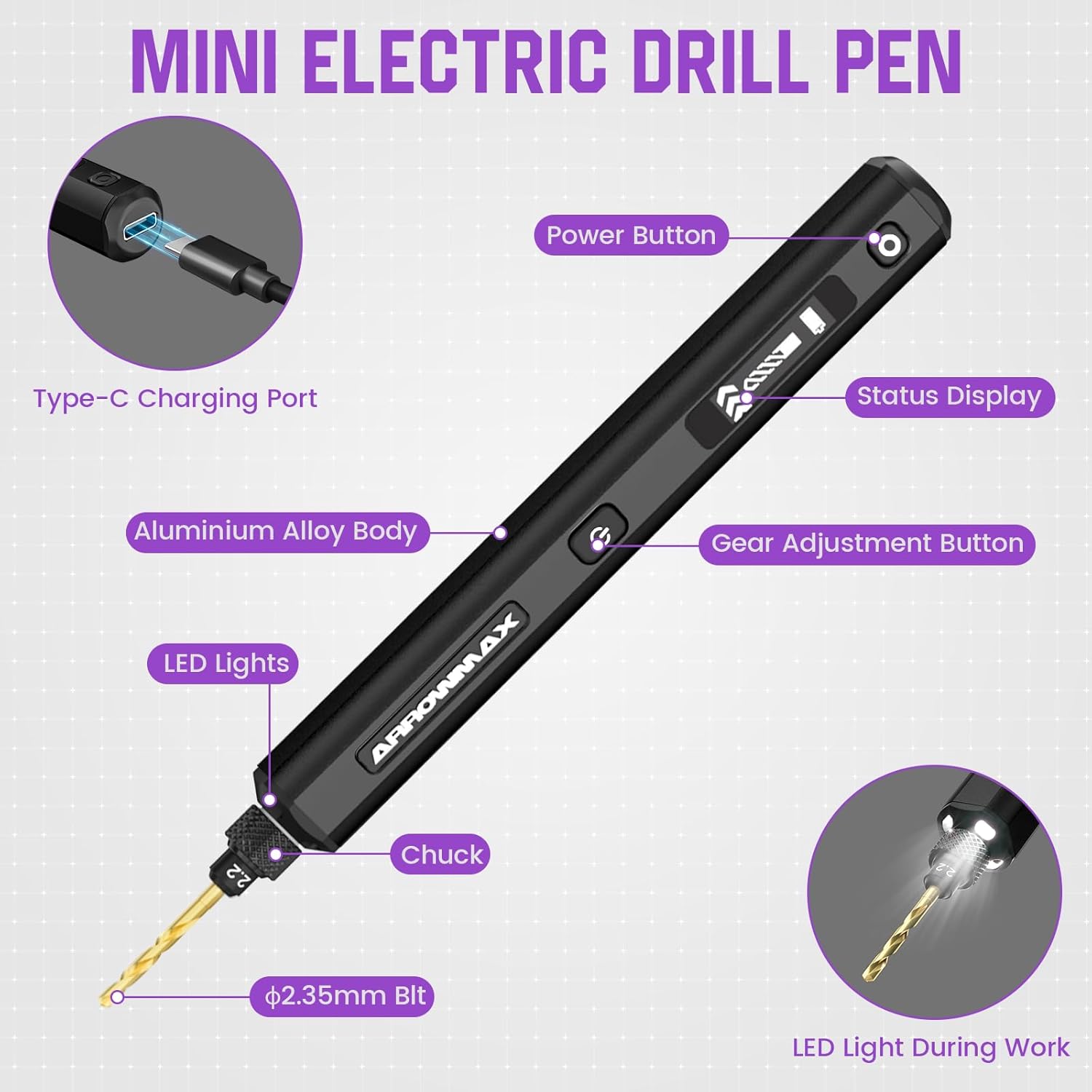
Image 4.1: Detailed diagram highlighting key components: Type-C Charging Port, Power Button, Status Display (OLED), Gear Adjustment Button, Aluminium Alloy Body, LED Lights, Chuck, and ⌀2.35mm Bit.
5. การตั้งค่า
5.1 การชาร์จอุปกรณ์
- Connect the provided USB-C cable to the charging port on the drill pen.
- ต่อปลายอีกด้านของสาย USB-C เข้ากับอะแดปเตอร์แปลงไฟ USB 5V ที่ใช้งานร่วมกันได้ (ไม่ได้รวมอยู่ในชุด) หรือพอร์ต USB ของคอมพิวเตอร์
- The OLED display will indicate the charging status. A full charge typically takes approximately 3 hours and provides up to 3 hours of continuous use.
5.2 การติดตั้ง/เปลี่ยนดอกสว่าน
- Ensure the drill pen is powered off before changing bits.
- Unscrew the chuck at the front of the drill pen counter-clockwise to loosen it.
- Insert the desired titanium-coated steel drill bit into the chuck. Ensure the bit is fully seated.
- Tighten the chuck clockwise until the drill bit is securely held. Do not overtighten.

Image 5.1: The included titanium-coated steel drill bits range from 0.6mm to 2.2mm, all with a ⌀2.35mm shaft.
6. คู่มือการใช้งาน
6.1 เปิด/ปิดเครื่อง
- To power on, press and hold the Power Button (⑂) for approximately 2 seconds. The OLED display will illuminate.
- To power off, press and hold the Power Button (⑂) again for approximately 2 seconds.
6.2 การปรับความเร็วรอบ (RPM)
- Once powered on, tap the Gear Adjustment Button (⇔) to cycle through the 5 available speed settings.
- The OLED display will show the current speed level (1-5) and corresponding RPM.
- Available speeds: Level 1 (500 RPM), Level 2 (600 RPM), Level 3 (700 RPM), Level 4 (800 RPM), Level 5 (900 RPM).
6.3 การเปลี่ยนทิศทางการหมุน
- While the drill is operating, quickly double-press the Power Button (⑂) to toggle the rotation direction (clockwise/counter-clockwise). The OLED display will indicate the current direction.
6.4 LED Work Lights
- The integrated LED lights automatically illuminate when the drill is operating, providing better visibility of your workpiece.

Image 6.1: The OLED display indicates the current speed level and allows for rotation direction changes by toggling the power button.
7. การบำรุงรักษา
7.1 การทำความสะอาด
- After each use, wipe the drill pen with a clean, dry cloth to remove dust and debris.
- อย่าใช้สารเคมีรุนแรงหรือน้ำยาทำความสะอาดที่มีฤทธิ์กัดกร่อน
- ตรวจสอบให้แน่ใจว่าช่องเสียบชาร์จไม่มีสิ่งสกปรกอุดตัน
7.2 Drill Bit Care
- Clean drill bits after use to remove material residue.
- Store drill bits in the provided magnetic storage box to prevent damage and loss.
- Replace dull or damaged drill bits to maintain drilling precision and prevent strain on the motor.
7.3 พื้นที่จัดเก็บ
- Store the drill pen and accessories in a cool, dry place, away from direct sunlight and extreme temperatures.
- โปรดตรวจสอบให้แน่ใจว่าอุปกรณ์ชาร์จเต็มแล้วก่อนเก็บรักษาในระยะยาว เพื่อรักษาอายุการใช้งานของแบตเตอรี่
8 การแก้ไขปัญหา
| ปัญหา | สาเหตุที่เป็นไปได้ | สารละลาย |
|---|---|---|
| สว่านไม่เปิด | แบตเตอรี่อ่อนหรือไม่มีการชาร์จ | Charge the drill pen using the USB-C cable. Ensure the charging indicator is active. |
| Drill bit is loose or wobbles. | ขันหัวจับไม่แน่นพอ | Power off the drill, then securely tighten the chuck around the drill bit. |
| Drill stops rotating or operates intermittently. | Low battery; excessive pressure during drilling; motor overload. | Recharge the device. Reduce pressure on the workpiece. Allow the motor to cool down if it feels warm. Ensure the bit is not jammed. |
| อุปกรณ์ไม่ชาร์จ | Faulty cable or power adapter; debris in port. | Try a different USB-C cable and power adapter. Clean the USB-C port gently. |
| หน้าจอ OLED ไม่ทำงาน | อุปกรณ์ปิดอยู่ เกิดความผิดปกติ | Ensure the device is powered on. If the issue persists, contact customer support. |
9. ข้อมูลจำเพาะ
| คุณสมบัติ | รายละเอียด |
|---|---|
| ยี่ห้อ | แอร์โรว์แม็กซ์ |
| แบบอย่าง | SDS-BLACK (230875-B) |
| แหล่งพลังงาน | ใช้พลังงานจากแบตเตอรี่ |
| ประเภทแบตเตอรี่ | ลิเธียมโพลีเมอร์ |
| ความจุของแบตเตอรี่ | 500 มิลลิแอมป์ |
| เล่มที่tage | 5 โวลต์ |
| จำนวนความเร็ว | 5 |
| ความเร็วการหมุนสูงสุด | 900 รอบต่อนาที |
| Drill Bit Shaft Diameter | ⌀2.35mm (Universal) |
| Included Drill Bit Sizes | 0.6มม., 0.8มม., 1.0มม., 1.2มม., 1.4มม., 1.5มม., 1.6มม., 1.8มม., 2.0มม., 2.2มม. |
| คุณสมบัติพิเศษ | Portable, LED Lights, OLED Display |
| ขนาดสินค้า | ยาว 7.28 นิ้ว x กว้าง 2.76 นิ้ว x สูง 1.18 นิ้ว |
| น้ำหนักสินค้า | 9.1 ออนซ์ |
| วัสดุ | โลหะ |
10. การรับประกันและการสนับสนุน
For warranty information and customer support, please refer to the official ARROWMAX webหรือติดต่อผู้ค้าปลีกของคุณ เก็บใบเสร็จรับเงินไว้เป็นหลักฐานการซื้อ
หมายเหตุเกี่ยวกับวิดีโอ: The provided product data indicates the presence of videos. However, specific video URLs and metadata (such as 'creator_type') required for embedding were not available. Therefore, no videos have been embedded in this manual.