
การแนะนำ
Thank you for choosing the BEBANG WX-A01-121A Detachable Kids Handheld Microscope Miniscope. This digital microscope is designed to provide an engaging and educational experience for young explorers, allowing them to observe the micro-world with up to 1000X magnification on a 2.0-inch HD screen. Its versatile design allows for both handheld and stand-mounted use, making it suitable for various indoor and outdoor scientific explorations. This manual provides essential information for the safe and effective operation and maintenance of your new microscope.

The BEBANG WX-A01-121A Detachable Kids Handheld Microscope Miniscope.
มีอะไรอยู่ในกล่อง
เมื่อเปิดแพ็คเกจของคุณ โปรดตรวจสอบให้แน่ใจว่ามีสิ่งของทั้งหมดต่อไปนี้อยู่:
- BEBANG WX-A01-121A Digital Microscope Unit
- ขาตั้งกล้องจุลทรรศน์
- Slides Set (10 prepared + 5 blank)
- การ์ด SD 32GB
- สายชาร์จ (USB-C)
- กล่องเก็บของ
- จานเพาะเชื้อ
- แหนบ
- คู่มือการใช้งาน (เอกสารนี้)
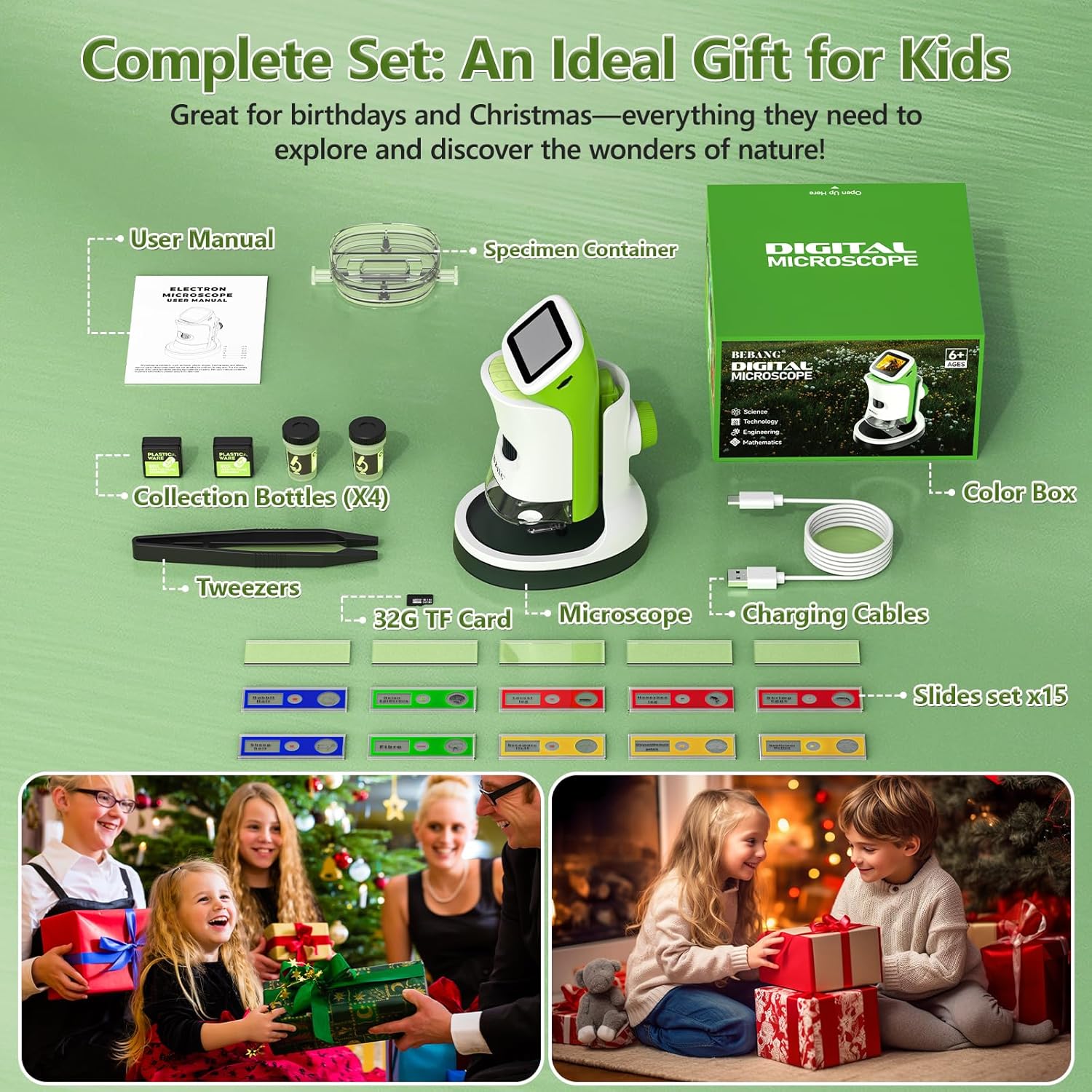
All components included in the BEBANG WX-A01-121A package.
คุณสมบัติผลิตภัณฑ์
The BEBANG WX-A01-121A microscope offers a range of features designed for ease of use and comprehensive observation:
- 4K 2.0" HD Screen: Provides clear, high-definition viewing of magnified specimens.
- กำลังขยาย 1000 เท่า: Allows for detailed examination of small objects.
- การออกแบบที่ถอดออกได้: Use as a handheld device for outdoor exploration or attach to the stand for stable indoor observation.
- การจับภาพและวิดีโอ: Record discoveries directly onto the included 32GB SD card.
- PC Connectable: Transfer photos and videos to a computer for further analysis or sharing.
- การส่องสว่างด้วยไฟ LED: Built-in LED lights ensure bright and even illumination of specimens.
- แบตเตอรี่แบบชาร์จไฟได้: Portable power for extended use.

The microscope offers up to 1000X magnification and can connect to a PC.
การตั้งค่า
Follow these steps to set up your BEBANG microscope:
- ชาร์จกล้องจุลทรรศน์: Connect the microscope to a USB power source using the provided USB-C charging cable. The charging indicator light will show the charging status.
- ใส่การ์ด SD: Locate the SD card slot (usually on the side or back of the microscope unit) and gently insert the included 32GB SD card until it clicks into place.
- Attach to Stand (Optional): เพื่อความมั่นคง viewing, align the microscope unit with the stand's base and slide it into position until it securely locks. Ensure the clips on the stand are ready to hold slides.
- เปิดเครื่อง: Press and hold the power button (usually located on the side or front) for a few seconds until the screen illuminates.

The microscope unit securely attached to its stand for stable observation.
คำแนะนำการใช้งาน
Operating your BEBANG microscope is straightforward:
1. Observing Specimens with the Stand
- Place a prepared slide or a specimen in the petri dish onto the stage of the microscope stand. Use the clips to secure slides if necessary.
- Adjust the focus knob (typically on the side of the microscope body) until the image on the screen is clear.
- Use the magnification adjustment to zoom in or out as desired.
- Adjust the LED illumination for optimal viewความชัดเจน.

A child observing a specimen on a slide using the microscope with its stand.
2. Handheld Observation
- Detach the microscope unit from its stand by pressing the release button (if applicable) and sliding it off.
- Hold the microscope directly over the object you wish to observe.
- Adjust the focus knob to achieve a clear image on the screen.
- This mode is ideal for examining larger objects or exploring outdoors.

A child using the microscope in handheld mode to observe plants outdoors.
3. การถ่ายภาพและวิดีโอ
- While observing a specimen, press the designated photo button to capture a still image.
- Press the video button to start recording. Press it again to stop recording.
- All captured media will be saved to the inserted 32GB SD card.

The microscope's 2.0-inch HD screen showing options for photo, video, and playback.
4. การเชื่อมต่อกับพีซี
- Connect the microscope to your computer using the USB-C cable.
- The microscope should appear as a removable storage device.
- You can then access and transfer your photos and videos from the SD card to your computer.

The microscope connected to a computer, illustrating the PC connectable feature for transferring media.
Video Demonstration: Kids Handheld Microscope with Stand
This video demonstrates the use of the BEBANG Kids Handheld Microscope, showcasing its features and how children can interact with it for exploration and learning.
การซ่อมบำรุง
Proper care will ensure the longevity of your microscope:
- การทำความสะอาด: Use a soft, dry cloth to clean the exterior of the microscope. For the lens and screen, use a specialized lens cleaning cloth and solution. Avoid abrasive materials.
- พื้นที่จัดเก็บ: Store the microscope in a cool, dry place, away from direct sunlight and extreme temperatures. Use the provided EVA case for protection when not in use.
- การดูแลแบตเตอรี่ ควรชาร์จแบตเตอรี่เป็นประจำ แม้ว่าจะไม่ได้ใช้งานบ่อย เพื่อรักษาสภาพแบตเตอรี่ให้ดีอยู่เสมอ หลีกเลี่ยงการปล่อยให้แบตเตอรี่หมดเกลี้ยงเป็นเวลานาน
- จัดการด้วยความระมัดระวัง: This is an electronic device. Avoid dropping or subjecting it to strong impacts.
การแก้ไขปัญหา
หากคุณพบปัญหา ให้ลองวิธีแก้ปัญหาทั่วไปเหล่านี้:
| ปัญหา | สาเหตุที่เป็นไปได้ | สารละลาย |
|---|---|---|
| กล้องจุลทรรศน์ไม่เปิดใช้งาน | แบตเตอรี่ต่ำหรือปุ่มเปิด/ปิดไม่ได้กดอย่างถูกต้อง | Charge the microscope fully. Press and hold the power button for 3-5 seconds. |
| Image on screen is blurry. | Out of focus or incorrect working distance. | Adjust the focus knob. Ensure the microscope lens is close enough to the specimen. |
| ไม่สามารถถ่ายภาพ/วิดีโอได้ | SD card full, not inserted correctly, or corrupted. | Check if the SD card is inserted properly. Delete old files or format the SD card (backup important data first). Replace SD card if corrupted. |
| หน้าจอมืด/สว่างเกินไป | LED illumination not adjusted. | Adjust the LED brightness control (if available) or reposition the specimen for better lighting. |
ข้อมูลจำเพาะ
Key technical specifications for the BEBANG WX-A01-121A microscope:
- ชื่อรุ่น : WX-A01-121A
- ยี่ห้อ: เบบัง
- กำลังขยายสูงสุด: 1000 เท่า
- หน้าจอ: หน้าจอ HD ขนาด 2.0 นิ้ว
- ประเภทแหล่งกำเนิดแสง: นำ
- แหล่งพลังงาน: ใช้แบตเตอรี่ (3.7 โวลต์)
- วัสดุ: เอบีเอส
- สี: สีเขียว
- น้ำหนักสินค้า: 0.5 กิโลกรัม
- อุปกรณ์ที่รองรับ: Laptop, Personal Computer, Smartphone, Tablet (for data transfer)
- สื่อในตัว: การ์ด SD 32G
การรับประกันและการสนับสนุน
Your BEBANG WX-A01-121A microscope comes with a รับประกัน 1 ปี นับจากวันที่ซื้อ โดยครอบคลุมถึงข้อบกพร่องจากการผลิต โปรดเก็บหลักฐานการซื้อไว้เพื่อขอรับสิทธิ์การรับประกัน
For technical support, troubleshooting assistance, or warranty inquiries, please contact BEBANG customer service through the retailer where you purchased the product or visit the official BEBANG website for contact information. Our support team is dedicated to assisting you with any questions or concerns you may have.
We encourage you to register your product online to receive updates and ensure efficient service.