
1. บทนำ
Thank you for choosing the HETP Portable Charger. This device is designed to provide convenient and fast charging for a wide range of electronic devices, including smartphones, tablets, and smartwatches. Featuring built-in charging cables and an integrated iWatch charger, it offers a versatile and compact power solution for your daily needs and travels.
โปรดอ่านคู่มือนี้อย่างละเอียดก่อนใช้งานผลิตภัณฑ์ เพื่อให้มั่นใจได้ถึงความปลอดภัยและประสิทธิภาพสูงสุด เก็บคู่มือนี้ไว้เพื่อใช้อ้างอิงในอนาคต
2. คุณสมบัติของผลิตภัณฑ์
- ความจุสูง: 10800mAh battery for multiple charges.
- ชาร์จเร็ว: QC4.0+PD 25W technology for rapid device charging.
- สายเคเบิลในตัว: Built-in Type-C, iOS, and Micro USB cables for universal compatibility without extra cords.
- iWatch Charger: Dedicated magnetic wireless charging pad for Apple Watch.
- เอาท์พุตหลายรายการ: 6 outputs (3 built-in cables, 1 wireless iWatch charger, 1 USB-C port, 1 USB-A port) to charge up to 6 devices simultaneously.
- อินพุตคู่: Recharge the power bank via Type-C cable or Type-C port.
- จอแสดงผล LCD: Clear digital display shows remaining battery percentage.
- ขนาดกะทัดรัดและพกพาสะดวก: Slim and lightweight design (6.02x2.8x0.59 inches, 280g) ideal for travel.
- ความปลอดภัยที่เหนือกว่า: Multi-protection smart microchip protects against short circuit, overheating, overcharging, over voltagและกระแสไฟเกิน

Image: The HETP Portable Charger, highlighting its compact form factor and integrated LCD display.

ภาพ: รายละเอียด view of the power bank's multiple output and input options, including the built-in cables and ports.
3. การตั้งค่า
- แกะ: Carefully remove the portable charger and all accessories from the packaging.
- ค่าใช้จ่ายเริ่มต้น: Before first use, fully charge the power bank. Connect the power bank to a USB wall charger (not included) using its built-in Type-C cable or a separate Type-C cable via the Type-C input port. The LCD display will show the charging progress.
- ตรวจสอบระดับแบตเตอรี่: เมื่อชาร์จเต็มแล้ว หน้าจอจะแสดง 100%
4. คู่มือการใช้งาน
4.1 การชาร์จอุปกรณ์ของคุณ
The power bank can charge up to 6 devices simultaneously using its various outputs:
- การใช้สายเคเบิลในตัว: Extend the appropriate built-in cable (Type-C, iOS, or Micro USB) and connect it directly to your device.
- การใช้พอร์ต USB: Connect your device's charging cable to the USB-C output port or the USB-A output port on the power bank.
- การชาร์จ Apple Watch: Place your Apple Watch onto the magnetic wireless charging pad on the power bank. Ensure it aligns correctly for charging to begin.
The power bank will automatically detect the connected device and begin charging. The LCD display will show the remaining battery percentagอีของพาวเวอร์แบงค์

Image: The power bank charging an iPhone, Android phone, tablet, and Apple Watch concurrently, demonstrating its multi-device charging capability.
4.2 การตรวจสอบระดับแบตเตอรี่
กดปุ่มเปิด/ปิดหนึ่งครั้งเพื่อเปิดใช้งานหน้าจอ LCD ซึ่งจะแสดงเปอร์เซ็นต์แบตเตอรี่ปัจจุบันtage of the power bank. The display will turn off automatically after a few seconds to conserve power.
5. ความเข้ากันได้
This portable charger is widely compatible with a broad range of devices, including but not limited to:
- ไอโฟน : iPhone 16/15/14/13/12/11/XS/XR/SE Pro/Pro Max series.
- อุปกรณ์แอนดรอยด์: Samsung S24/S23 Series, Google Pixel, LG, Moto, and other Android smartphones and tablets.
- นาฬิกาแอปเปิ้ล: Apple Watch 10/9/8/7/6/5/4/3/2/1/SE 1/SE2/Ultra/Ultra 2.
- อุปกรณ์อื่น ๆ: AirPods, and other USB-C or Micro USB compatible devices.
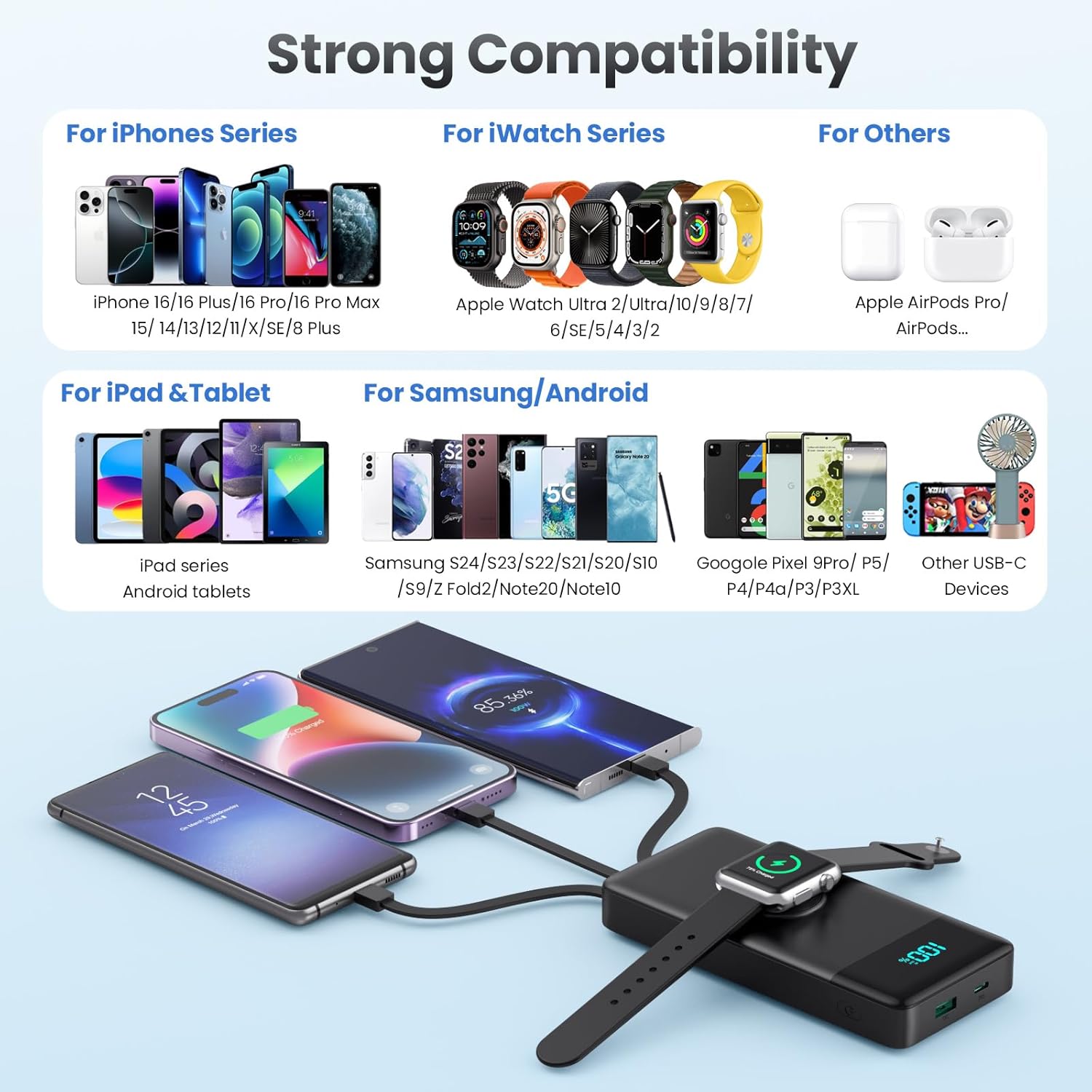
Image: Visual representation of the power bank's extensive compatibility with various device types.
6. การชาร์จพาวเวอร์แบงค์
To recharge your HETP Portable Charger, you have two convenient options:
- การใช้งานสาย Type-C ในตัว: Extend the built-in Type-C cable and plug it into a compatible USB wall charger or power adapter.
- Using Type-C Input Port: Connect a separate Type-C to Type-C or Type-C to USB-A cable to the power bank's Type-C input port and plug the other end into a compatible charger.
The power bank supports 25W fast recharging. The LCD display will show the charging percentagขณะที่มันกำลังชาร์จไฟ

Image: Two methods for recharging the power bank, demonstrating the flexibility of using either the dedicated input port or the integrated Type-C cable.
7. ข้อมูลด้านความปลอดภัย
The HETP Portable Charger is equipped with a multi-protection smart microchip to ensure safe operation. This includes protection against:
- การชาร์จไฟเกิน
- การคายประจุมากเกินไป
- เกินปริมาณtage
- กระแสไฟเกิน
- ไฟฟ้าลัดวงจร
- Overheating (Temperature Protection)
- เอาชนะ
- Recovery protection
To ensure your safety and prolong the product's lifespan, please adhere to the following:
- ห้ามให้พาวเวอร์แบงค์อยู่ในอุณหภูมิที่สูงหรือต่ำเกินไป (ร้อนหรือเย็นเกินไป) แสงแดดโดยตรง หรือสภาพแวดล้อมที่มีความชื้น
- ห้ามถอดประกอบ ดัดแปลง หรือพยายามซ่อมแซมอุปกรณ์ด้วยตนเอง
- เก็บให้ห่างจากน้ำและของเหลวอื่นๆ
- หลีกเลี่ยงการทำพาวเวอร์แบงค์ตกหรือกระแทกแรงๆ
- Use only certified charging adapters and cables.
- เก็บให้พ้นจากมือเด็ก

ภาพ: เหนือview of the comprehensive safety features built into the power bank to protect both the device and connected electronics.
8. การบำรุงรักษา
- ทำความสะอาดพาวเวอร์แบงค์ด้วยผ้านุ่มและแห้ง ห้ามใช้สารเคมีรุนแรงหรือวัสดุที่มีฤทธิ์กัดกร่อน
- เก็บพาวเวอร์แบงค์ไว้ในที่แห้งและเย็นเมื่อไม่ใช้งาน
- หากเก็บรักษาเป็นเวลานาน ควรชาร์จพาวเวอร์แบงค์ให้มีระดับประจุประมาณ 50-70% ทุกๆ สามเดือน เพื่อรักษาอายุการใช้งานของแบตเตอรี่
9 การแก้ไขปัญหา
| ปัญหา | สาเหตุที่เป็นไปได้ | สารละลาย |
|---|---|---|
| พาวเวอร์แบงค์ไม่ชาร์จอุปกรณ์ | Low battery on power bank; cable not connected properly; device not compatible; power bank in standby mode. | Recharge power bank; ensure cables are securely connected; verify device compatibility; press power button to activate. |
| พาวเวอร์แบงค์ไม่ชาร์จ | Charging cable or adapter faulty; input port damaged; power bank battery issue. | Try a different charging cable and adapter; ensure connection is secure; contact support if issue persists. |
| ชาร์จช้า | สายเคเบิลไม่รองรับการชาร์จเร็ว; อุปกรณ์ไม่รองรับการชาร์จเร็ว; กำลังชาร์จอุปกรณ์หลายเครื่องพร้อมกัน | Use a fast-charging compatible cable; ensure device supports fast charging; charge fewer devices at once for faster individual charging. |
| จอ LCD ไม่ทำงาน | Power bank is off; display malfunction. | กดปุ่มเปิด/ปิด หากยังไม่ตอบสนอง โปรดติดต่อฝ่ายสนับสนุนลูกค้า |
| Apple Watch ไม่ชาร์จ | Watch not positioned correctly; watch battery too low; power bank in standby mode. | Adjust watch position on the magnetic pad; ensure power bank has sufficient charge; press power button. |
10. ข้อมูลจำเพาะ
| คุณสมบัติ | รายละเอียด |
|---|---|
| หมายเลขรุ่น | HX100N9 |
| ความจุของแบตเตอรี่ | 10800mAh |
| ขนาดสินค้า | 6.02 x 2.8 x 0.59 นิ้ว (ประมาณ 15.29 x 7.11 x 1.5 ซม.) |
| น้ำหนักสินค้า | 12.3 ออนซ์ (ประมาณ 348.7 กรัม) |
| เทคโนโลยีการชาร์จเร็ว | QC4.0+PD 25W |
| เอาท์พุต | Built-in Type-C, Built-in iOS, Built-in Micro USB, Wireless iWatch Charger, USB-C Port, USB-A Port |
| ข้อมูลอินพุต | Built-in Type-C Cable, USB-C Port |
| แสดง | จอแสดงผล LED แบบดิจิตอล |
| สี | สีดำ |
| ผู้ผลิต | ตงกวน Yuanhaoxun เทคโนโลยีบจก |
| ประเทศต้นกำเนิด | จีน |
11. การรับประกันและการสนับสนุน
Your HETP Portable Charger comes with a รับประกัน 24 เดือน นับจากวันที่ซื้อสินค้า ครอบคลุมถึงข้อบกพร่องจากการผลิต นอกจากนี้ เรายังให้บริการอื่นๆ อีกด้วย การสนับสนุนทางเทคนิคตลอดอายุการใช้งาน for our product.
If you encounter any issues or have questions regarding your portable charger, please do not hesitate to contact our customer support team. Please have your purchase information and model number ready when contacting support.
For support, please refer to the contact information provided on the product packaging or the retailer's webไซต์ที่คุณซื้อผลิตภัณฑ์


