
CAPXSNOB ST-542S EU(CE)
Magician1 Mini 5-in-1 Coffee Machine User Manual
Brand: CAPXSNOB | Model: ST-542S EU(CE)
This manual provides detailed instructions for the safe and efficient use of your Magician1 Mini 5-in-1 Coffee Machine. Please read it thoroughly before first use and keep it for future reference.
คำแนะนำด้านความปลอดภัยที่สำคัญ
เมื่อใช้เครื่องใช้ไฟฟ้า ควรปฏิบัติตามข้อควรระวังด้านความปลอดภัยพื้นฐานเสมอเพื่อลดความเสี่ยงต่อการเกิดไฟไหม้ ไฟฟ้าช็อต และ/หรือการบาดเจ็บต่อบุคคล ซึ่งรวมถึงสิ่งต่อไปนี้:
- อ่านคำแนะนำทั้งหมด
- อย่าสัมผัสพื้นผิวที่ร้อน ใช้ที่จับหรือลูกบิด
- เพื่อป้องกันไฟไหม้ ไฟฟ้าช็อต และการบาดเจ็บต่อบุคคล ห้ามจุ่มสายไฟ ปลั๊ก หรือเครื่องชงกาแฟลงในน้ำหรือของเหลวอื่นๆ
- จำเป็นต้องมีการดูแลอย่างใกล้ชิดเมื่อมีเด็กหรือใช้งานเครื่องใช้ไฟฟ้าใดๆ ใกล้เด็ก
- ถอดปลั๊กออกเมื่อไม่ได้ใช้งานและก่อนทำความสะอาด ปล่อยให้เย็นลงก่อนใส่หรือถอดชิ้นส่วน และก่อนทำความสะอาดเครื่องใช้ไฟฟ้า
- ห้ามใช้งานเครื่องใช้ไฟฟ้าที่มีสายไฟหรือปลั๊กชำรุด หรือหลังจากที่เครื่องใช้ไฟฟ้าทำงานผิดปกติ หรือได้รับความเสียหายในลักษณะใดๆ ก็ตาม นำเครื่องใช้ไฟฟ้ากลับไปที่ศูนย์บริการที่ได้รับอนุญาตที่ใกล้ที่สุดเพื่อตรวจสอบ ซ่อมแซม หรือปรับแต่ง
- การใช้อุปกรณ์เสริมที่ไม่แนะนำโดยผู้ผลิตเครื่องใช้ไฟฟ้าอาจทำให้เกิดไฟไหม้ ไฟฟ้าช็อต หรือบาดเจ็บบุคคลได้
- ห้ามใช้กลางแจ้ง
- อย่าให้สายไฟห้อยออกจากขอบโต๊ะหรือเคาน์เตอร์ หรือสัมผัสพื้นผิวที่ร้อน
- ห้ามวางบนหรือใกล้เตาแก๊สหรือเตาไฟฟ้าที่ร้อน หรือในเตาอบที่อุ่น
- เสียบปลั๊กเข้ากับเครื่องใช้ไฟฟ้าก่อนเสมอ จากนั้นจึงเสียบสายไฟเข้ากับเต้ารับไฟฟ้าที่ผนัง หากต้องการตัดการเชื่อมต่อ ให้ปิดสวิตช์ควบคุมทั้งหมด จากนั้นถอดปลั๊กออกจากเต้ารับไฟฟ้าที่ผนัง
- ห้ามใช้เครื่องใช้ไฟฟ้าเพื่อวัตถุประสงค์อื่นนอกเหนือจากที่กำหนดไว้
- Exercise extreme caution when dispensing hot water or steam.
- เครื่องใช้ไฟฟ้าชิ้นนี้มีไว้สำหรับใช้ในครัวเรือนเท่านั้น
สินค้าเกินview
The Magician1 Mini is a versatile 5-in-1 coffee machine designed to accommodate various coffee formats, including Nespresso Original, Dolce Gusto, Lavazza A Modo Mio, ESE 44mm pods, and ground coffee. It features a 20-bar pump, 1450W power, and an LED display for easy operation.

รูปที่ 1 : ด้านหน้า view of the Magician1 Mini Coffee Machine with various coffee types it supports.
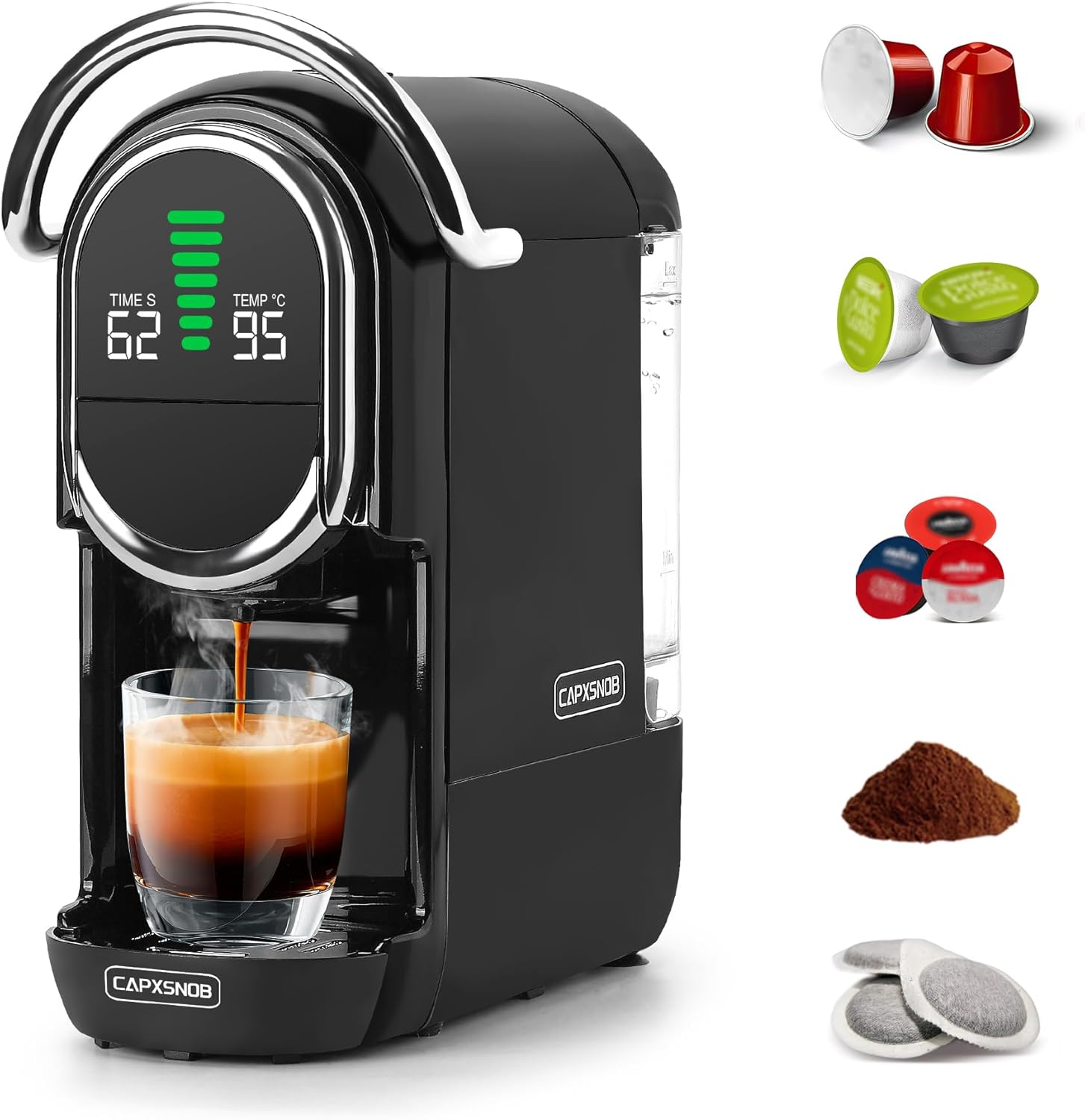
รูปที่ 2: ด้านข้าง view of the Magician1 Mini Coffee Machine, highlighting the removable water tank.
คุณสมบัติหลัก:
- ความเข้ากันได้แบบ 5-in-1: Supports Nespresso Original, Dolce Gusto, Lavazza A Modo Mio, ESE 44mm pods, and ground coffee.
- ปั๊มแรงดันสูง: 20 Bar pump for optimal extraction (15-19 Bar stable extraction).
- ให้ความร้อนรวดเร็ว: Pre-heats in just 25 seconds.
- การควบคุมอุณหภูมิ: Adjustable brewing temperature from 85°C to 97°C.
- การปรับแต่งระดับเสียง: 7 adjustable water volume levels for various cup sizes.
- การชงกาแฟร้อนและเย็น: Capable of preparing both hot and cold coffee.
- จอแสดงผล LED: Clear display showing temperature, water volume, and time.
- การออกแบบที่กะทัดรัด: Space-saving dimensions (27.4D x 14.4W x 28.5H cm) with a 600ml removable water tank.
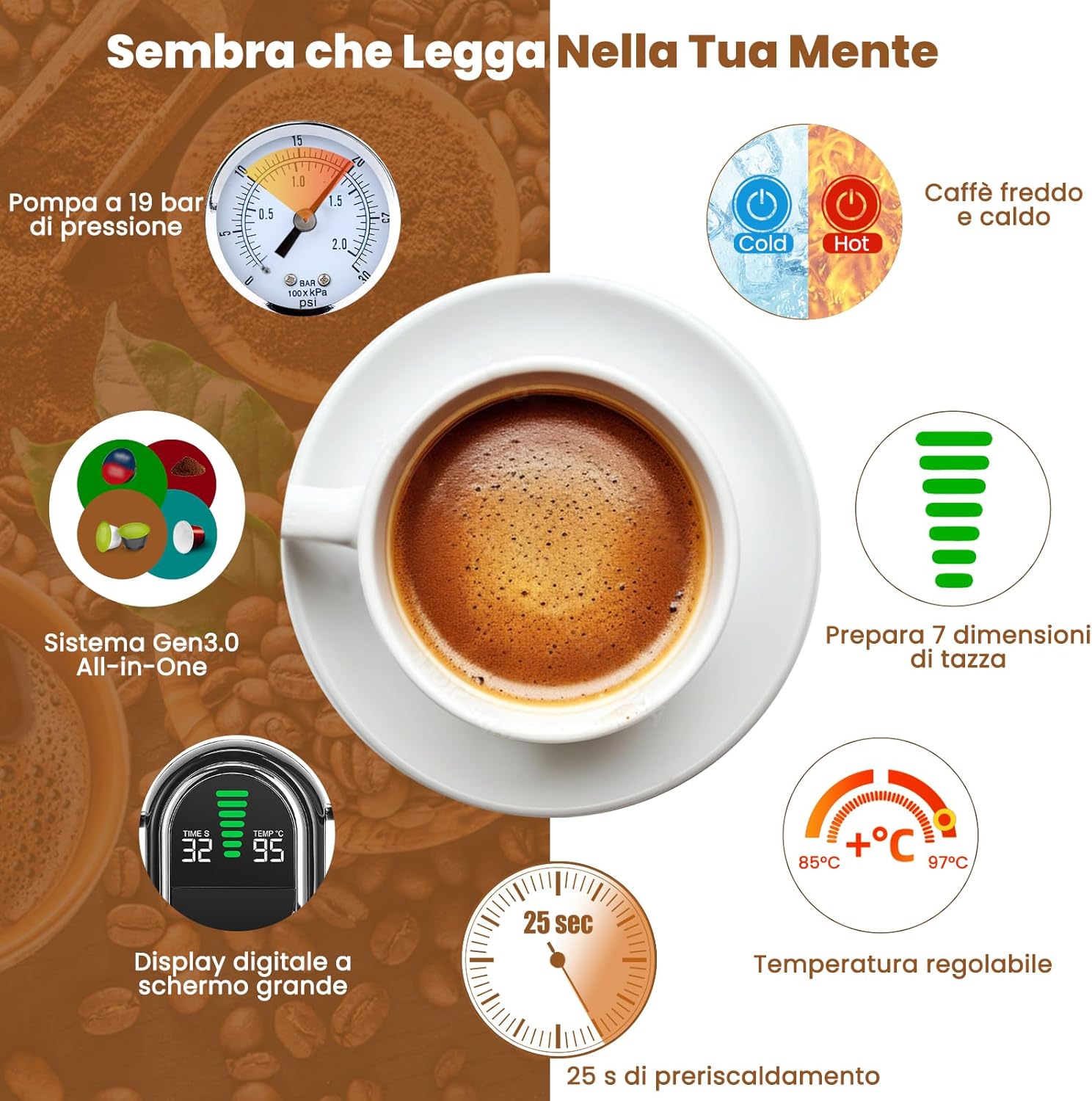
รูปที่ 3: เกินview of the Magician1 Mini's advanced features.
การตั้งค่า
1. การแกะกล่อง
Carefully remove all packaging materials and the coffee machine from the box. Ensure all components are present: main unit, water tank, drip tray, and various capsule adapters.
2. First Use and Initial Cleaning
Before first use, clean all removable parts (water tank, drip tray, capsule adapters) with warm, soapy water. Rinse thoroughly and dry. Perform a pre-rinse cycle without coffee:
- เติมถังเก็บน้ำด้วยน้ำจืด
- วางถ้วยเปล่าบนถาดรองน้ำ
- Insert an empty adapter (e.g., the ground coffee adapter without coffee) into the machine.
- Press the brew button to run a full cycle of hot water through the machine. Repeat this process 2-3 times to ensure the internal system is clean.
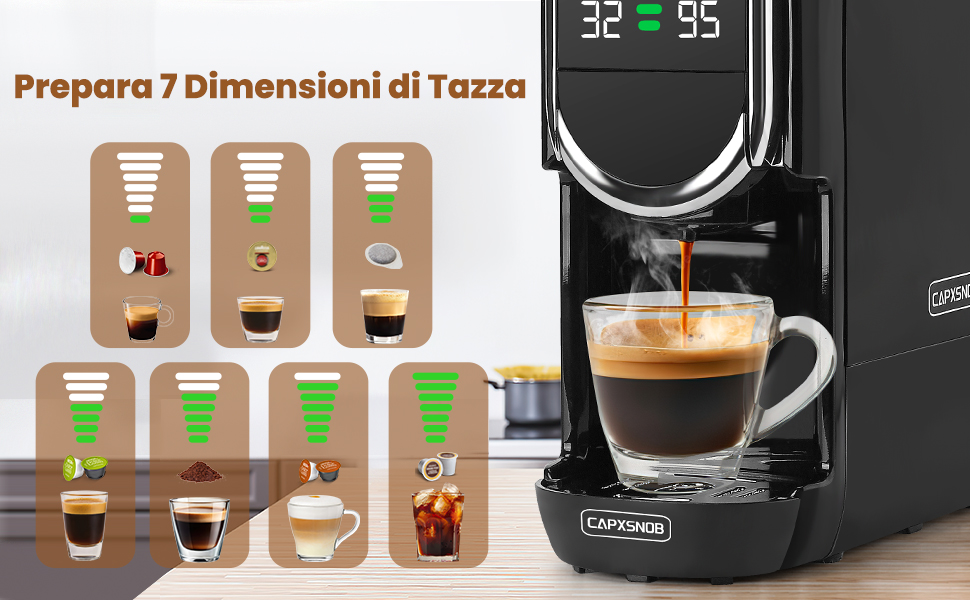
Figure 4: Useful tips, including the importance of pre-rinsing.
3. การเติมน้ำลงในถังน้ำ
- ถอดถังเก็บน้ำออกจากด้านหลังของเครื่อง
- เติมน้ำดื่มสะอาดเย็นลงในถังจนถึงเส้น MAX
- วางถังน้ำกลับเข้าที่เครื่อง ตรวจสอบให้แน่ใจว่าวางสนิทดีแล้ว
คำแนะนำการใช้งาน
1. การเปิด/ปิดเครื่อง
- เสียบเครื่องเข้ากับเต้ารับไฟฟ้าที่มีสายดิน
- Press the power button to turn on the machine. The LED display will light up.
- The machine will begin pre-heating, which takes approximately 25 seconds. The display will show the temperature.
- To turn off, press the power button again. The machine also features programmable automatic shut-off.
2. Brewing Coffee (Hot)
The Magician1 Mini supports various coffee formats. Ensure you use the correct adapter for your chosen coffee type.

รูปที่ 5: เกินview of compatible capsule types and their respective adapters.
- Select and Insert Adapter: Choose the appropriate adapter for your capsule/pod/ground coffee.
- For Nespresso Original, Dolce Gusto, Lavazza A Modo Mio: Insert the capsule into its dedicated adapter.
- For ESE 44mm Pods: Place the ESE pod into the ground coffee adapter.
- For Ground Coffee: Fill the ground coffee adapter with 12-14g of fine ground coffee and tamp เบา ๆ
- Place Adapter in Machine: Insert the filled adapter firmly into the machine's brewing chamber.
- ที่จับด้านล่าง: Close the handle securely.
- ถ้วยวาง: Position your cup on the drip tray. Note: The machine supports cups between 8.5-9.8 cm in height.
- เลือกปริมาณน้ำ: Use the volume selection buttons to choose one of the 7 available levels, ranging from Ristretto (25ml) to Americano (240ml). The LED display will show the selected volume.
- ปรับอุณหภูมิ (ไม่จำเป็น): To adjust the brewing temperature (85°C to 97°C):
- Press and hold the temperature button for 5 seconds until the temperature flashes on the screen.
- Use the volume buttons to adjust the temperature.
- การตั้งค่าจะถูกบันทึกโดยอัตโนมัติหลังจากผ่านไป 3 วินาที
- เริ่มการต้มเบียร์: Press the brew button. The machine will start dispensing coffee.
- หยุดการกลั่น: The machine will stop automatically once the selected volume is reached. You can also manually stop brewing by pressing the brew button again.

Figure 6: Simple three-step brewing process.
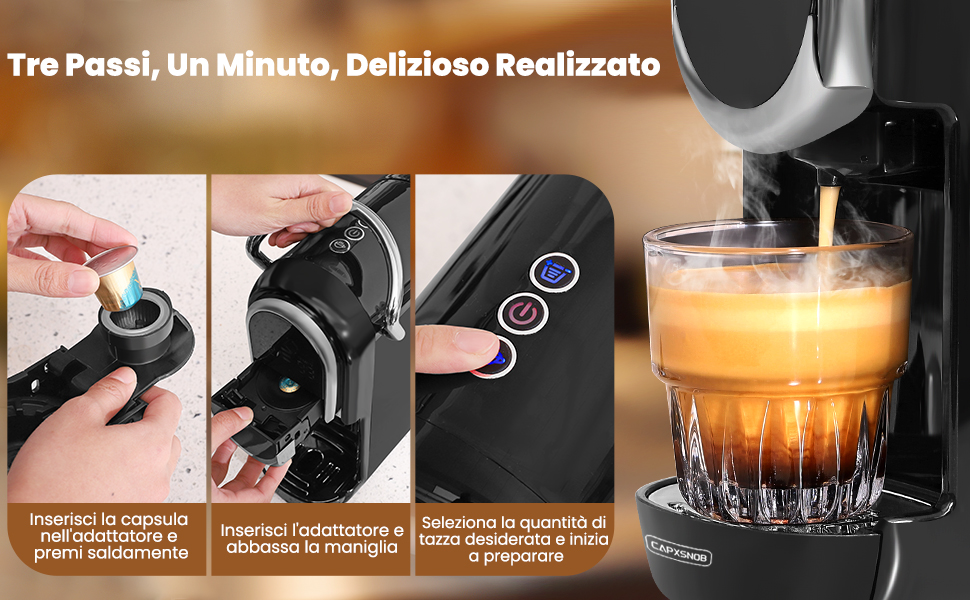
Figure 7: Seven cup size options for different coffee types.
3. Hot and Cold Brewing
The machine supports both hot and cold brewing. Cold brew refers to preparation with room temperature water. This machine does not support ice production.
- To switch between hot and cold modes, press and hold the power button for 5 seconds until the power light changes. The display will show "CO" for cold mode.
- Follow the same brewing steps as above, ensuring the water tank is filled with room temperature water for cold brewing.
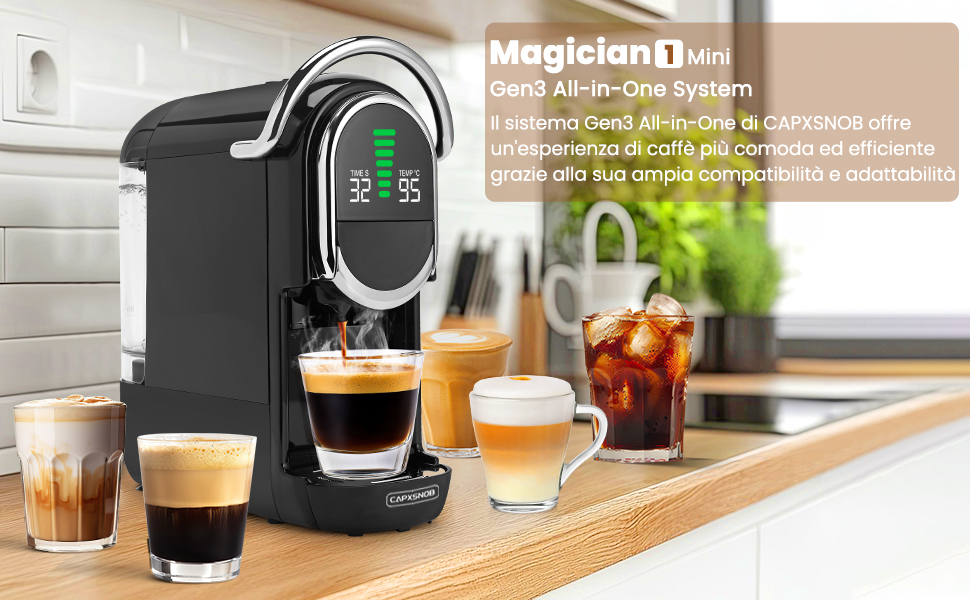
Figure 8: Hot and Cold brewing options.
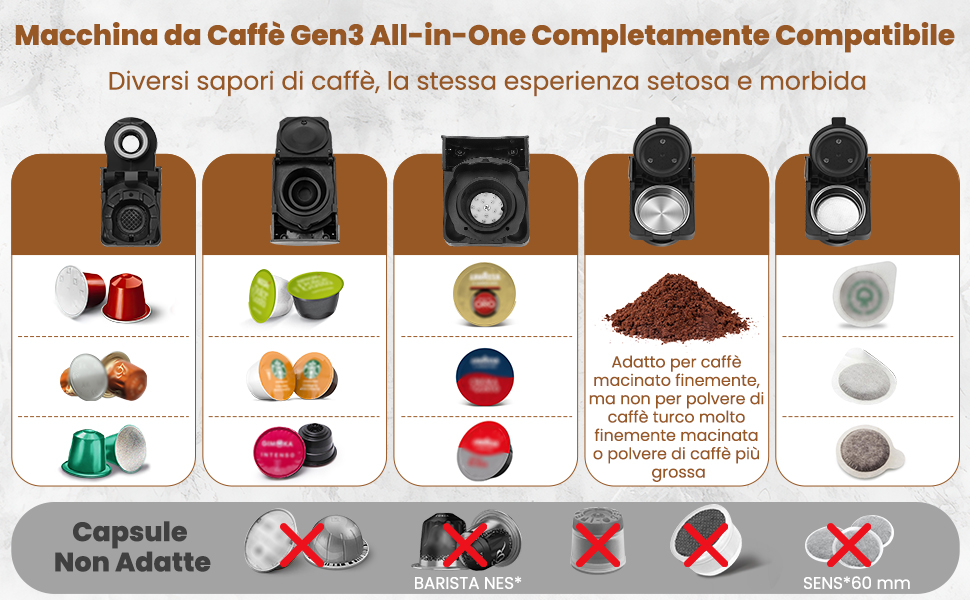
Figure 9: Customizing temperature settings.
การบำรุงรักษาและการทำความสะอาด
1. ทำความสะอาดทุกวัน
- ถาดรองน้ำหยด: เทน้ำทิ้งและล้างถาดรองน้ำหยดหลังการใช้งานทุกครั้ง หรือเมื่อไฟแสดงสถานะแสดงว่าเต็มแล้ว
- บรรจุภัณฑ์แคปซูล: Remove and empty the used capsule container after each use. Rinse with warm water.
- ถังเก็บน้ำ: ล้างถังน้ำทุกวันและเติมน้ำสะอาดใหม่
- ภายนอก: เช็ดด้านนอกของตัวเครื่องด้วยผ้านุ่มdamp ผ้า ห้ามใช้น้ำยาทำความสะอาดที่มีฤทธิ์กัดกร่อนหรือจุ่มเครื่องลงในน้ำ
2. Ground Coffee Adapter Care
Proper care of the ground coffee adapter is crucial for optimal performance and to prevent blockages.
- After each use, remove the ground coffee adapter.
- ทิ้งกากกาแฟที่ใช้แล้ว
- Rinse the plastic holes and stainless steel filters thoroughly. Blockages can prevent coffee from dispensing or cause leaks.
- For thorough cleaning, the adapter can be disassembled and reassembled as shown in Figure 10.
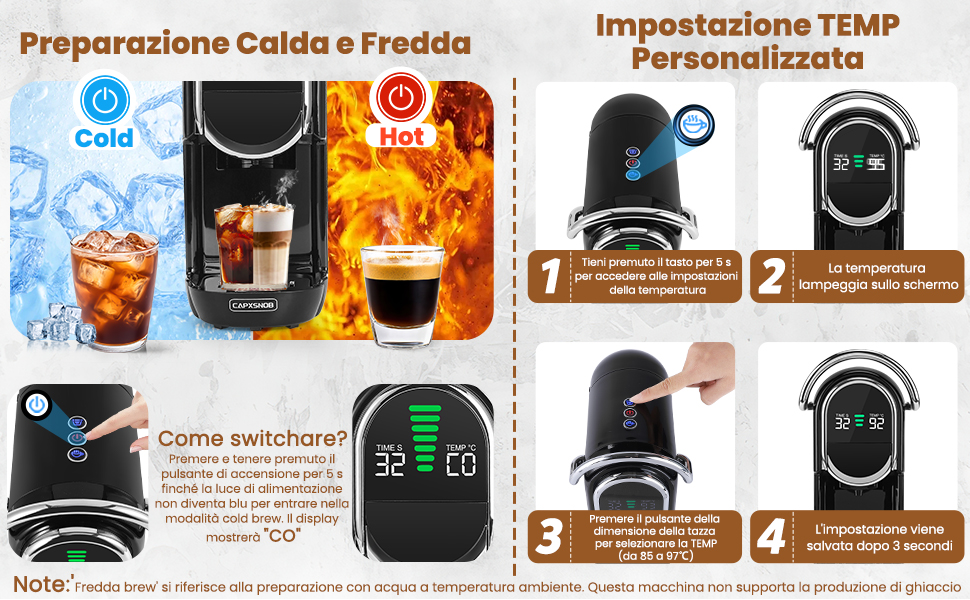
Figure 10: Maintenance and care of the ground coffee adapter.
3. การขจัดตะกรัน
Regular descaling is essential to maintain the machine's performance and extend its lifespan, especially in areas with hard water. Descale every 3-6 months depending on water hardness and usage.
- Empty the water tank and fill it with a descaling solution (follow the descaler manufacturer's instructions for dilution).
- วางภาชนะขนาดใหญ่ไว้ใต้ท่อจ่ายกาแฟ
- Run several brewing cycles without coffee until the water tank is empty.
- ล้างถังน้ำให้สะอาดแล้วเติมน้ำสะอาดลงไป
- เปิดเครื่องด้วยน้ำสะอาดหลายรอบเพื่อล้างคราบน้ำยาขจัดคราบตะกรันที่ตกค้างออกให้หมด
การแก้ไขปัญหา
If you encounter any issues with your coffee machine, please refer to the table below for common problems and their solutions.
| ปัญหา | สาเหตุที่เป็นไปได้ | สารละลาย |
|---|---|---|
| เครื่องไม่เปิดขึ้น | Not plugged in; power outlet malfunction; machine fault. | Check power cord connection; try another outlet; contact customer support. |
| ไม่มีกาแฟออกมาเลย หรือถ้ามีก็ออกมาเพียงไม่กี่หยดเท่านั้น | Water tank empty; air in the system; clogged adapter/filter; machine needs descaling. | Fill water tank; run a few cycles without coffee to prime; clean adapter/filter; descale the machine. |
| กาแฟอ่อนเกินไปหรือมีน้ำมากเกินไป | Incorrect water volume selected; coffee grounds too coarse (for ground coffee); capsule/pod not properly inserted. | Adjust water volume setting; use finer ground coffee; ensure capsule/pod is seated correctly. |
| เครื่องกำลังรั่ว | Water tank not properly seated; drip tray full; adapter not correctly inserted; internal seal issue. | Ensure water tank is secure; empty drip tray; re-insert adapter; contact customer support if problem persists. |
| กาแฟไม่ร้อนพอ | Temperature setting too low; machine needs descaling. | Adjust temperature setting (see Operating Instructions); descale the machine. |
| เครื่องจักรมีเสียงผิดปกติ | Normal pump operation; air in the system; blockage. | Some noise is normal during brewing. If excessive, run a few cycles without coffee to clear air; check for blockages. |
ข้อมูลจำเพาะทางเทคนิค
- ยี่ห้อ: CAPXSNOB
- แบบอย่าง: ST-542S EU(CE)
- สี: สีดำ
- ขนาดสินค้า : 27.5 x 14.4 x 28.5 ซม. (ลึก x กว้าง x สูง)
- น้ำหนักสินค้า: 3.3 กก.
- เล่มที่tage: 230 โวลต์ (AC)
- พลัง: 1450วัตต์
- แรงดันปั๊ม: 20 บาร์
- ความจุถังน้ำ: 600 มล.
- คุณสมบัติพิเศษ: Automatic cleaning function, Programmable, Single cup brew, Removable tank, Adjustable brew strength, LED Display.
- ปิดเครื่องอัตโนมัติ: ใช่
การรับประกันและการสนับสนุน
Your Magician1 Mini Coffee Machine comes with a comprehensive warranty and support package for your peace of mind.
- การรับประกันคืนเงินภายใน 60 วัน: If you are not completely satisfied with your purchase, you may be eligible for a refund within 60 days.
- 2-Year Limited Manufacturer's Warranty: The product is covered by a 2-year limited warranty from the manufacturer against defects in materials and workmanship.
- Free Replacement Service: By registering your product on the official CAPXSNOB website, you may receive a free replacement service for 2 years. Please visit the official CAPXSNOB website for registration details and full warranty terms and conditions.
For further assistance, troubleshooting, or warranty claims, please contact CAPXSNOB customer support through their official webไซต์หรือร้านค้าปลีกที่คุณซื้อผลิตภัณฑ์
เอกสารที่เกี่ยวข้องST-542S EU(CE)


Ask a question about this manual
Ask about setup, troubleshooting, compatibility, parts, safety, or missing instructions. Manuals+ will review the question and use this page’s manual context to help answer it.