
1. บทนำ
Thank you for choosing the FEELWORLD P215-9HSD 21.5 Inch Broadcast Production Monitor. This monitor is designed for professional video production environments, offering a 1920x1080 Full HD display, multiple input/output options including 4K HDMI and 3G-SDI, and advanced monitoring features. This manual provides essential information for the safe and efficient operation of your device. Please read it thoroughly before use and retain it for future reference.

รูปที่ 1.1 : ด้านหน้า view of the FEELWORLD P215-9HSD monitor, highlighting its 21.5-inch screen, Full HD 1920x1080 resolution, 3000:1 contrast, and 250 nits brightness.
2. ข้อมูลด้านความปลอดภัย
- แหล่งพลังงาน: Use only the provided 3A DC power adapter. Ensure the power supply voltage อยู่ในช่วงที่ระบุ
- การระบายอากาศ : อย่าปิดกั้นช่องระบายอากาศ ตรวจสอบให้แน่ใจว่ามีอากาศถ่ายเทเพียงพอรอบๆ จอภาพเพื่อป้องกันความร้อนสูงเกินไป
- น้ำและความชื้น: Do not expose the monitor to rain, moisture, or immerse it in water. If liquid enters the unit, disconnect power immediately and contact service personnel.
- การทำความสะอาด: ถอดปลั๊กไฟออกก่อนทำความสะอาด ใช้ผ้านุ่มและแห้ง ห้ามใช้น้ำยาทำความสะอาดชนิดน้ำหรือสเปรย์
- การจัดวาง: Place the monitor on a stable surface. Avoid placing it in direct sunlight, near heat sources, or in environments with excessive dust or vibration.
- การบริการ: อย่าพยายามให้บริการผลิตภัณฑ์นี้ด้วยตนเอง ส่งต่อการบริการทั้งหมดไปยังช่างบริการที่ผ่านการรับรอง
3. เนื้อหาบรรจุภัณฑ์
ตรวจสอบว่าสินค้าทั้งหมดที่ระบุไว้ด้านล่างนี้รวมอยู่ในบรรจุภัณฑ์ของคุณแล้ว หากมีสินค้าใดสูญหายหรือเสียหาย โปรดติดต่อผู้ค้าปลีกของคุณ
- FEELWORLD P215-9HSD 21.5 Inch Broadcast Production Monitor
- 3A DC Power Adapter
- V Battery Plate
- สาย Mini HDMI
- Tally Kit
- ร่มกันแดด
- U วงเล็บ
- คู่มือการใช้งาน
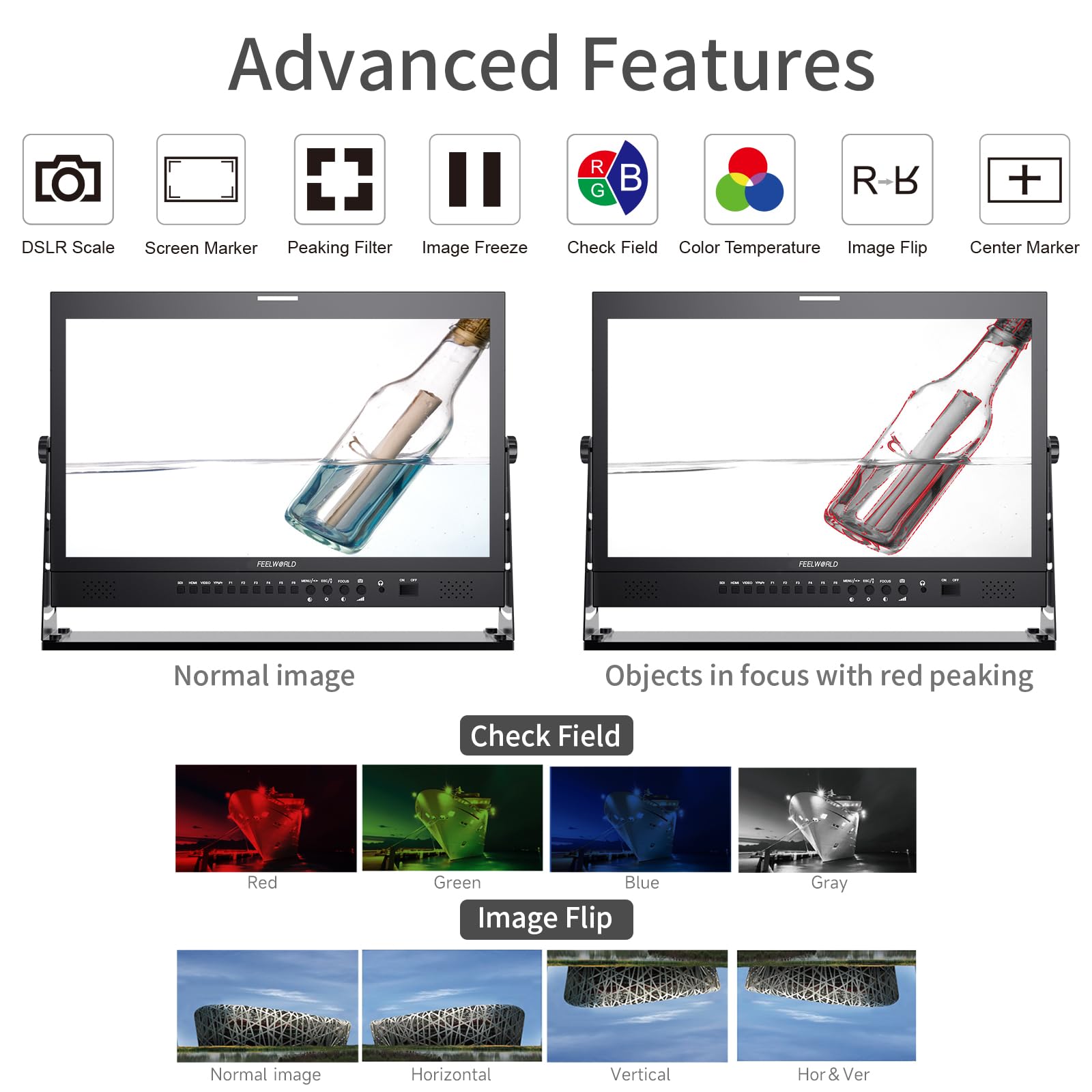
Figure 3.1: Included accessories with the FEELWORLD P215-9HSD monitor, showing the monitor, Mini HDMI cable, V battery plate, 3A power adapter, Tally Kit, Jib Crane Bracket (U bracket), and Operation Manual.
4. สินค้าหมดview
4.1 แผงควบคุมด้านหน้า
The front panel features various buttons and indicators for controlling the monitor's functions and navigating the On-Screen Display (OSD) menu.
- ปุ่มเลือกอินพุต: SDI, HDMI, VIDEO, YPbPr for selecting video sources.
- ปุ่มฟังก์ชัน (F1-F6): Customizable shortcut buttons for quick access to frequently used features.
- MENU/ESC/◄/► Buttons: Used for OSD menu navigation, entering sub-menus, and adjusting settings.
- FOCUS Button: Activates peaking focus assist.
- ปุ่มเปิด/ปิด: เปิดหรือปิดจอภาพ
- ลำโพงในตัว: สำหรับการตรวจสอบเสียง
- 3.5mm Stereo Earphone Jack: For private audio monitoring.
4.2 การเชื่อมต่อแผงด้านหลัง
The rear panel provides all necessary input and output ports for connecting video and audio sources, as well as power.
- อินพุต DVI: Digital Visual Interface input.
- อินพุต/เอาต์พุต HDMI: High-Definition Multimedia Interface for both input and loop-through output.
- ข้อมูลนำเข้า YPbPr: อินพุตวิดีโอคอมโพเนนต์
- อินพุตวิดีโอ / เอาต์พุต: Composite video input and loop-through output.
- อินพุต/เอาต์พุตเสียง: RCA connectors for analog audio.
- 3G-SDI Input/Output: Serial Digital Interface for professional video input and loop-through output.
- ขั้วต่อ XLR: For professional audio input.
- DC Barrel (5.5, 2.1): Power input for the 3A DC adapter.
- USB Upgrade Port: สำหรับการอัพเดตเฟิร์มแวร์
- แลนอิน: พอร์ต Ethernet
- TALLY Port: DP-9 connector for Tally light control.

Figure 4.1: Top section shows the front panel OSD operation buttons. Bottom section details the rear panel connections including DVI, HDMI, YPbPr, Video, Audio, 3G-SDI, XLR, DC power, USB, LAN, and Tally.
รูปที่ 4.2: ระยะใกล้ view of the rear panel, emphasizing the 3G-SDI, HDMI, Video, and Audio input/output connections, along with the USB upgrade port and DC power input.
5. การตั้งค่า
5.1 การติดตั้งจอภาพ
The monitor comes with an adjustable U bracket for desktop placement. Ensure the bracket is securely attached to the monitor and placed on a stable, flat surface. The monitor also supports VESA mounting for alternative setups (mounting hardware not included).
5.2 การต่อสายไฟ
- Connect the provided 3A DC power adapter to the DC barrel input on the rear of the monitor.
- เสียบอะแดปเตอร์แปลงไฟเข้ากับเต้ารับที่เหมาะสม
- Alternatively, attach a compatible V-mount battery to the V Battery Plate on the rear of the monitor for portable power.
5.3 การเชื่อมต่อแหล่งวิดีโอ
Connect your video source (camera, video switcher, etc.) to the appropriate input port on the monitor's rear panel.
- ช่องต่อ HDMI: Use an HDMI cable (Mini HDMI cable included) to connect to the HDMI IN port.
- 3G-SDI: Use an SDI cable to connect to the 3G-SDI IN port.
- YPbPr: Use component video cables to connect to the YPbPr IN ports.
- วีดีโอ: Use a composite video cable to connect to the VIDEO IN port.
If you need to loop out the signal to another device, connect an appropriate cable from the corresponding OUT port (HDMI OUT, 3G-SDI OUT, VIDEO OUT) to your next device.
6. คู่มือการใช้งาน
6.1 การเปิด/ปิดเครื่อง
กดปุ่ม เปิด/ปิด button on the front panel to power the monitor on or off.
6.2 การเลือกอินพุต
Press the corresponding input button (เอสดีไอ, HDMI, วีดีโอ, วายพีบีพีอาร์) on the front panel to switch between video sources.
6.3 การนำทางเมนู OSD
กดปุ่ม เมนู button to open the On-Screen Display menu. Use the ◄ และ ► buttons to navigate through menu options and adjust values. Press เมนู again to confirm a selection or เอสซีเอส เพื่อออกจากเมนู
6.4 ฟังก์ชั่นขั้นสูง
The monitor includes several advanced features to assist with professional monitoring:
- ระบบช่วยเพิ่มสมาธิสูงสุด: Highlights sharp edges in the image to aid in achieving precise focus. Activate with the จุดสนใจ button or assign to a function button.
- เครื่องหมายกลาง: Displays a crosshair in the center of the screen.
- Screen Marker: Provides various aspect ratio markers (e.g., 16:9, 4:3, 2.35:1) and safety area markers.
- ตรึงภาพ: Pauses the current video frame.
- พลิกภาพ: Flips the image horizontally, vertically, or both. Useful for specific mounting orientations.
- Camera 5D II Mode: Optimizes display for Canon 5D Mark II camera output.
- ตรวจสอบฟิลด์: Displays only Red, Green, Blue, or Mono channels for color calibration.
- พิกเซลเป็นพิกเซล: Displays the image at its native resolution without scaling.
- ซูมทั้งหมด: Magnifies the entire image.
- U/D & L/R Zoom: Allows independent vertical and horizontal zooming.
- อัตราส่วนภาพ: Adjusts the display aspect ratio.
- การปรับอุณหภูมิสี: Allows fine-tuning of the display's color temperature.
Figure 6.1: Visual demonstration of advanced features including Peaking Filter (red peaking), Check Field (Red, Green, Blue, Gray channels), and Image Flip (Normal, Horizontal, Vertical, Horizontal & Vertical).
6.5 Tally Light System
The monitor features a 3-color Tally light system (Red, Green, Yellow) on both the front and rear panels, controlled via the DP-9 Tally port. This allows for clear indication of live, preview, and standby states in a multi-camera setup.
- สีแดง: Indicates the camera is live (On Live).
- สีเขียว: Indicates the camera is on preview (On Preview).
- เหลือง: Indicates the camera is on standby (Standby).

Figure 6.2: Illustration of the Red, Green, and Yellow Tally lights and their corresponding states (On Live, Standby, On Preview), controlled via the DP-9 Barrel on the rear.
7. การบำรุงรักษา
- การทำความสะอาดหน้าจอ: เช็ดหน้าจอเบาๆ ด้วยผ้านุ่มที่ไม่เป็นขุย สำหรับรอยฝังแน่น ให้เช็ดเบาๆampชุบผ้าด้วยน้ำหรือน้ำยาทำความสะอาดหน้าจอโดยเฉพาะ อย่าฉีดน้ำยาลงบนหน้าจอโดยตรง
- การทำความสะอาด Casing: ใช้ผ้าแห้งนุ่มเช็ดจอภาพasinก. หลีกเลี่ยงน้ำยาทำความสะอาดหรือตัวทำละลายที่มีฤทธิ์กัดกร่อน
- พื้นที่จัดเก็บ: เมื่อไม่ได้ใช้งานเป็นเวลานาน ควรเก็บจอภาพไว้ในที่แห้งและเย็น หลีกเลี่ยงแสงแดดโดยตรงและอุณหภูมิที่สูงหรือต่ำเกินไป
- อัพเดตเฟิร์มแวร์: Periodically check the FEELWORLD official website for any available firmware updates to ensure optimal performance and access to new features. Use the USB Upgrade Port for this purpose.
8 การแก้ไขปัญหา
หากคุณพบปัญหาเกี่ยวกับจอภาพ โปรดดูปัญหาและวิธีแก้ไขที่พบบ่อยต่อไปนี้:
| ปัญหา | สาเหตุที่เป็นไปได้ | สารละลาย |
|---|---|---|
| ไม่มีไฟฟ้า | อะแดปเตอร์ไฟไม่ได้เชื่อมต่อหรือมีข้อบกพร่อง มีปัญหากับเต้ารับไฟฟ้า | Ensure power adapter is securely connected to monitor and outlet. Test outlet with another device. Check if V-mount battery is charged and properly installed. |
| ไม่มีสัญญาณภาพ | Incorrect input selected; cable not connected or faulty; source device not outputting signal. | Select the correct input source (HDMI, SDI, etc.). Check all video cables for secure connection. Verify the source device is powered on and outputting video. Try a different cable. |
| Image is distorted or incorrect colors | Incorrect display settings; faulty cable; source issue. | Reset monitor settings to default via OSD menu. Check cable connections. Verify source device output. Adjust color temperature settings. |
| ไม่มีเสียง | Audio cable not connected; volume too low; source device not outputting audio. | Ensure audio cables are connected (if applicable). Increase monitor volume. Check audio settings on the source device. |
| Tally light not working | Tally cable not connected or faulty; switcher not sending Tally signal. | Ensure the Tally Kit is correctly wired and connected to the DP-9 port. Verify your video switcher is configured to send Tally signals. |
9. ข้อมูลจำเพาะ
Detailed technical specifications for the FEELWORLD P215-9HSD Broadcast Production Monitor:
- ขนาดหน้าจอ: 21.5 นิ้ว
- ความละเอียดดั้งเดิม: 1920 x 1080 (ฟูลเอชดี)
- ประเภทจอภาพ: LED IPS Panel
- อัตราส่วนภาพ: 16:9 น.
- ความสว่าง: 400 ซีดี/ตรม.
- Viewอิงมุม: 160 องศา (สูง/ต่ำ)
- อัตราส่วนคอนทราสต์: 3000:1 น.
- ความลึกของสี: 8 บิต 16.7 ล้านสี
- อินพุตวิดีโอ: 1x HDMI, 1x 3G-SDI, 1x YPbPr, 1x Video, 1x DVI
- เอาต์พุตวิดีโอ: 1x HDMI, 1x 3G-SDI, 1x Video
- อินพุตเสียง: Analog Audio (RCA), XLR
- เอาต์พุตเสียง: 3.5mm Stereo Earphone Jack, Built-in Speakers
- กำลังไฟเข้า: กระแสตรง 12V (3A)
- เทคโนโลยีการเชื่อมต่อ: HDMI, 3G-SDI
- คุณสมบัติพิเศษ: Peaking Focus Assist, Center Marker, Screen Marker, Image Freeze, Image Flip, Camera 5D II Mode, Check Field, Pixel to Pixel, Zoom All, U/D & L/R Zoom, Aspect Ratio, Color Temperature Adjustment, 3-Color Tally Light
รูปที่ 9.1: เกินview of key specifications and features including 8-bit color, HDMI input/output, 3G-SDI input/output, 1920x1080 resolution, 3000:1 contrast, and 250 nits brightness.
10. การรับประกันและการสนับสนุน
The FEELWORLD P215-9HSD Broadcast Production Monitor comes with a การรับประกันจากผู้ผลิต 1 ปี ตั้งแต่วันที่ซื้อ การรับประกันนี้ครอบคลุมถึงข้อบกพร่องในวัสดุและฝีมือการผลิตภายใต้การใช้งานปกติ
For warranty claims, technical support, or service inquiries, please contact your authorized FEELWORLD dealer or visit the official FEELWORLD website for customer service contact information. Please retain your proof of purchase for warranty validation.
For more information about FEELWORLD products, visit the FEELWORLD Store on Amazon.