
1. บทนำ
Thank you for choosing the JISULIFE FA13R Auto-Oscillating Clip-on Fan. This versatile fan is designed to provide personal cooling comfort in various settings, functioning as both a clip-on and a stand-up desk fan. With its powerful battery, multiple speed settings, and oscillation features, it offers a convenient and efficient cooling solution. Please read this manual carefully before use to ensure proper operation and maintenance.
2. คำแนะนำด้านความปลอดภัย
เพื่อป้องกันความเสียหายต่อผลิตภัณฑ์ หรือการบาดเจ็บต่อตัวคุณเองและผู้อื่น โปรดปฏิบัติตามข้อควรระวังด้านความปลอดภัยดังต่อไปนี้:
- ห้ามจุ่มพัดลมลงในน้ำหรือของเหลวอื่นๆ
- Keep the fan away from open flames, heat sources, and direct sunlight.
- ห้ามสอดนิ้วหรือวัตถุใดๆ เข้าไปในตะแกรงพัดลมขณะที่พัดลมกำลังทำงาน
- Ensure the fan is placed on a stable surface when used as a stand-up fan, or securely clipped when used as a clip-on fan.
- ใช้เฉพาะสาย USB-A ถึง USB-C ที่ให้มาในการชาร์จเท่านั้น
- เครื่องใช้ไฟฟ้าตัวนี้ไม่ได้มีวัตถุประสงค์เพื่อให้บุคคล (รวมทั้งเด็ก) ที่มีความบกพร่องทางร่างกาย ทางประสาทสัมผัส หรือทางจิตใจ หรือขาดประสบการณ์และความรู้ ใช้งาน เว้นแต่จะมีการดูแลหรือคำแนะนำเกี่ยวกับการใช้เครื่องใช้ไฟฟ้าโดยบุคคลที่รับผิดชอบด้านความปลอดภัยของบุคคลดังกล่าว
- ห้ามถอดประกอบ ซ่อมแซม หรือดัดแปลงพัดลมด้วยตนเอง หากต้องการรับบริการ โปรดติดต่อฝ่ายบริการลูกค้า
- Unplug the fan from the power source when not in use for extended periods or before cleaning.
3. เนื้อหาบรรจุภัณฑ์
กรุณาตรวจสอบแพ็คเกจสำหรับรายการต่อไปนี้:
- JISULIFE FA13R Fan x1
- สาย USB-A เป็น USB-C x1
- คู่มือการใช้งาน x1
4. สินค้าหมดview
The JISULIFE FA13R fan features a robust design with multiple functionalities for enhanced user experience.

The JISULIFE FA13R fan in its stand-up configuration, showcasing its compact design and green color.
คุณสมบัติหลัก:
- ฟังก์ชั่นคู่: Can be used as a stand-up desk fan or a clip-on fan.
- การตั้งค่าความเร็ว 5: Includes a Nature Wind Mode for gentle, fluctuating airflow.
- Auto-Oscillation: 90-degree horizontal oscillation for wider coverage.
- การหมุนในแนวตั้ง: Manual 25-degree vertical adjustment.
- ฟังก์ชั่นจับเวลา: Set for 1, 2, or 4 hours.
- การทำงานที่เงียบ: Equipped with a brushless DC motor for powerful yet quiet performance.
- อายุการใช้งานแบตเตอรี่ยาวนาน: 8000mAh battery provides 5 to 28 hours of runtime.
- โครงสร้างทนทาน: Made from ABS Plastic and Alloy Metal.

A composite image detailing various aspects of the fan: LED indicators for clear display of settings, a silicone base for stable desktop or clip use, and the use of premium ABS material for durability and comfort.

An exploded diagram illustrating the internal structure of the fan, highlighting features such as the double-layer enclosed electric engine room, brushless motor, deflector fan cover, and flexible airfoil fan blades, all contributing to noise reduction.
5. การตั้งค่า
Using as a Stand-up Fan:
- Place the fan on a flat, stable surface such as a desk or table.
- Ensure the silicone base is fully in contact with the surface for maximum stability.
Using as a Clip-on Fan:
- Open the strong clasp clip at the base of the fan.
- Attach the clip securely to the edge of a table, shelf, stroller, or any suitable surface. Ensure the clip has a firm grip to prevent the fan from falling.
การปรับมุมพัดลม:
- The fan head can be manually tilted up or down by 25 degrees to direct airflow.
- For horizontal oscillation, refer to the Operating Instructions section.
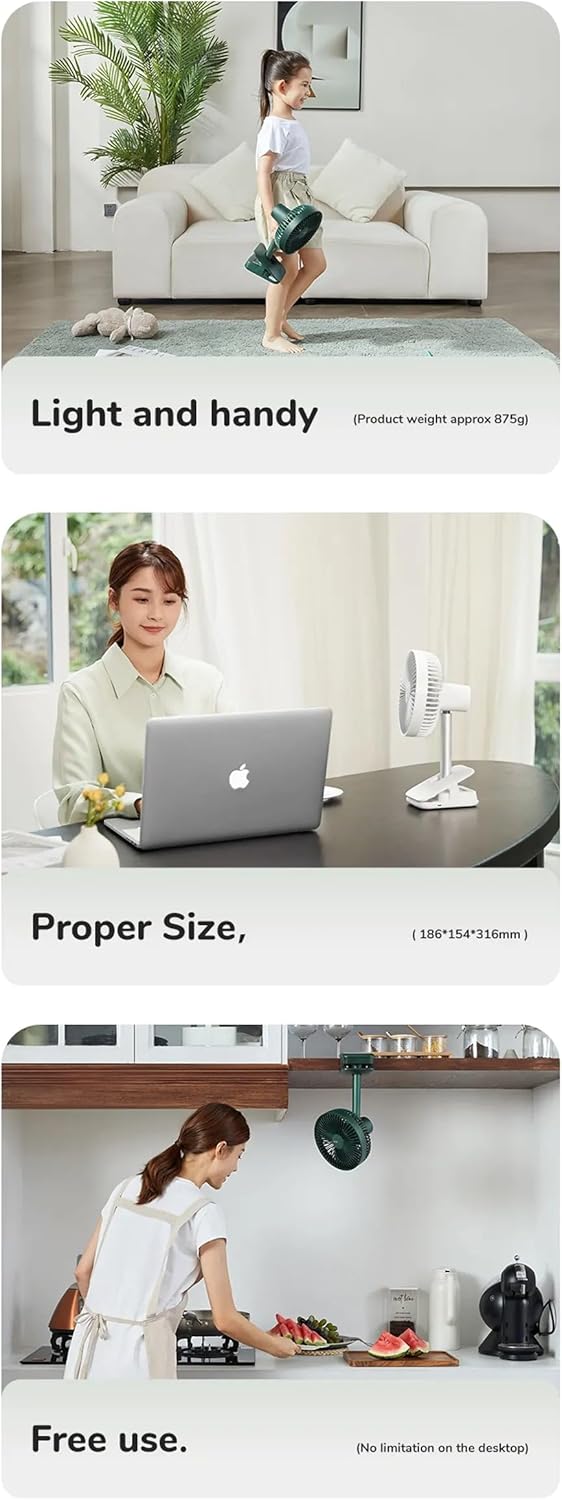
This series of images illustrates the fan's practical applications: its light and handy design (approx. 875g), its proper size for desktop use (18.6D x 31.6W x 15.4H cm), and its free use capability, including clipping under a cabinet, showing no limitation on desktop placement.
6. คู่มือการใช้งาน
The fan features a simple button control interface located on its base.

Detail of the fan's control panel, featuring buttons for power and fan speed, along with LED lights indicating active timer settings (1h, 2h, 4h) and fan speeds (1-4).
การเปิด/ปิดเครื่องและการควบคุมความเร็ว:
- กดปุ่ม ปุ่มเปิดปิด (ปุ่มขวา) once to turn the fan on at Speed 1.
- กดปุ่ม ปุ่มเปิดปิด repeatedly to cycle through Speed 1, Speed 2, Speed 3, Speed 4, Speed 5 (Nature Wind Mode), and then Off.
- The LED indicators on the control panel will show the current speed setting.
การควบคุมการสั่น:
- While the fan is on, press the Oscillation/Timer Button (ปุ่มซ้าย) once to activate 90-degree horizontal auto-oscillation.
- กดปุ่ม Oscillation/Timer Button อีกครั้งเพื่อหยุดการแกว่ง
การตั้งเวลา:
- While the fan is on, press and hold the Oscillation/Timer Button (ปุ่มซ้าย) to set the timer.
- Each press will cycle through 1 hour, 2 hours, 4 hours, and then turn the timer off.
- The corresponding LED indicator (1h, 2h, 4h) will light up to show the active timer setting. The fan will automatically turn off after the set time.
การชาร์จพัดลม:
- Connect the provided USB-A to USB-C cable to the charging port on the fan's base.
- Connect the other end of the cable to a USB power adapter (DC5V-2A/1A recommended) or a computer USB port.
- ไฟแสดงสถานะการชาร์จจะสว่างขึ้นในระหว่างการชาร์จ และดับลงเมื่อชาร์จเต็ม
- A full charge typically takes 6-10 hours. The 8000mAh battery provides 5-28 hours of operation depending on the speed setting.
7. การบำรุงรักษา
การทำความสะอาดอย่างสม่ำเสมอจะช่วยรักษาประสิทธิภาพการทำงานของพัดลมและยืดอายุการใช้งานได้
การทำความสะอาดพัดลม:
- ตรวจสอบให้แน่ใจว่าพัดลมปิดอยู่และถอดปลั๊กออกจากแหล่งพลังงานทั้งหมดก่อนทำความสะอาด
- The front fan cover is detachable for easy cleaning. Gently twist or unclip the cover as indicated in the diagram to remove it.
- Use a soft, dry cloth to wipe dust from the fan blades and the interior of the fan cover. For stubborn dirt, a slightly damp สามารถใช้ผ้าเช็ดทำความสะอาดได้ แต่ต้องระวังอย่าให้น้ำเข้าไปในตัวมอเตอร์
- สำคัญ: Do not wash the main body of the fan with water. Use a dry cloth to wipe it.
- Once clean, reattach the front fan cover securely.

The fan's front cover is shown detached, indicating its removable design for easy cleaning. A warning symbol advises against washing the main body with water.
พื้นที่จัดเก็บ:
เมื่อไม่ได้ใช้งานเป็นเวลานาน ควรเก็บพัดลมไว้ในที่แห้งและเย็น หลีกเลี่ยงแสงแดดโดยตรงและอุณหภูมิที่สูงหรือต่ำเกินไป
8 การแก้ไขปัญหา
If you encounter issues with your JISULIFE FA13R fan, please refer to the following common problems and solutions:
- พัดลมไม่เปิด:
- Ensure the battery is charged. Connect the fan to a power source using the USB-C cable.
- กดปุ่มเปิด/ปิดให้แน่นสนิท
- การไหลเวียนของอากาศที่อ่อนแอ:
- Increase the fan speed using the Power Button.
- Check if the fan grille or blades are obstructed by dust or debris. Clean the fan as described in the Maintenance section.
- Fan not oscillating:
- Press the Oscillation/Timer Button to activate oscillation.
- Ensure the fan is on a stable surface and not obstructed.
- Fan not charging:
- Ensure the USB-C cable is properly connected to both the fan and the power source.
- ลองใช้อะแดปเตอร์ไฟ USB หรือพอร์ต USB อื่น
- ตรวจสอบว่าสายชาร์จชำรุดหรือไม่
If the problem persists, please contact JISULIFE customer support for assistance.
9. ข้อมูลจำเพาะ
| คุณสมบัติ | ข้อมูลจำเพาะ |
|---|---|
| ยี่ห้อ | จีซูไลฟ์ |
| แบบอย่าง | FA13R |
| ความจุของแบตเตอรี่ | 8000mAh / 3.7V / 29.6Wh |
| รันไทม์ | 5-28 ชั่วโมง (ขึ้นอยู่กับความเร็ว) |
| เวลาในการชาร์จ | 6-10 ชั่วโมง |
| ป้อนข้อมูล | DC5V-2A/1A (Type-C) |
| กำลังไฟที่กำหนด | 5.5วัตต์ |
| ความเร็วพัดลมสูงสุด | 4.0ม./วินาที |
| การสั่น | แนวนอน 90 องศา |
| การหมุนในแนวตั้ง | 25 degrees manual |
| วัสดุ | ABS Plastic, Alloy Metal |
| ขนาด | 18.6D x 31.6W x 15.4H เซนติเมตร |
| น้ำหนัก | ประมาณ 875กรัม |
10. การรับประกันและการสนับสนุน
JISULIFE products are designed and manufactured to the highest quality standards. For information regarding warranty coverage, technical support, or service inquiries, please refer to the warranty card included with your purchase or visit the official JISULIFE webไซต์ โปรดเก็บหลักฐานการซื้อไว้เพื่อใช้ในการเรียกร้องการรับประกัน