
การแนะนำ
This manual provides detailed instructions for the setup, operation, and maintenance of your ATTACK SHARK L80 Wireless Gaming Headset. Please read this manual thoroughly before using the product to ensure proper function and longevity.
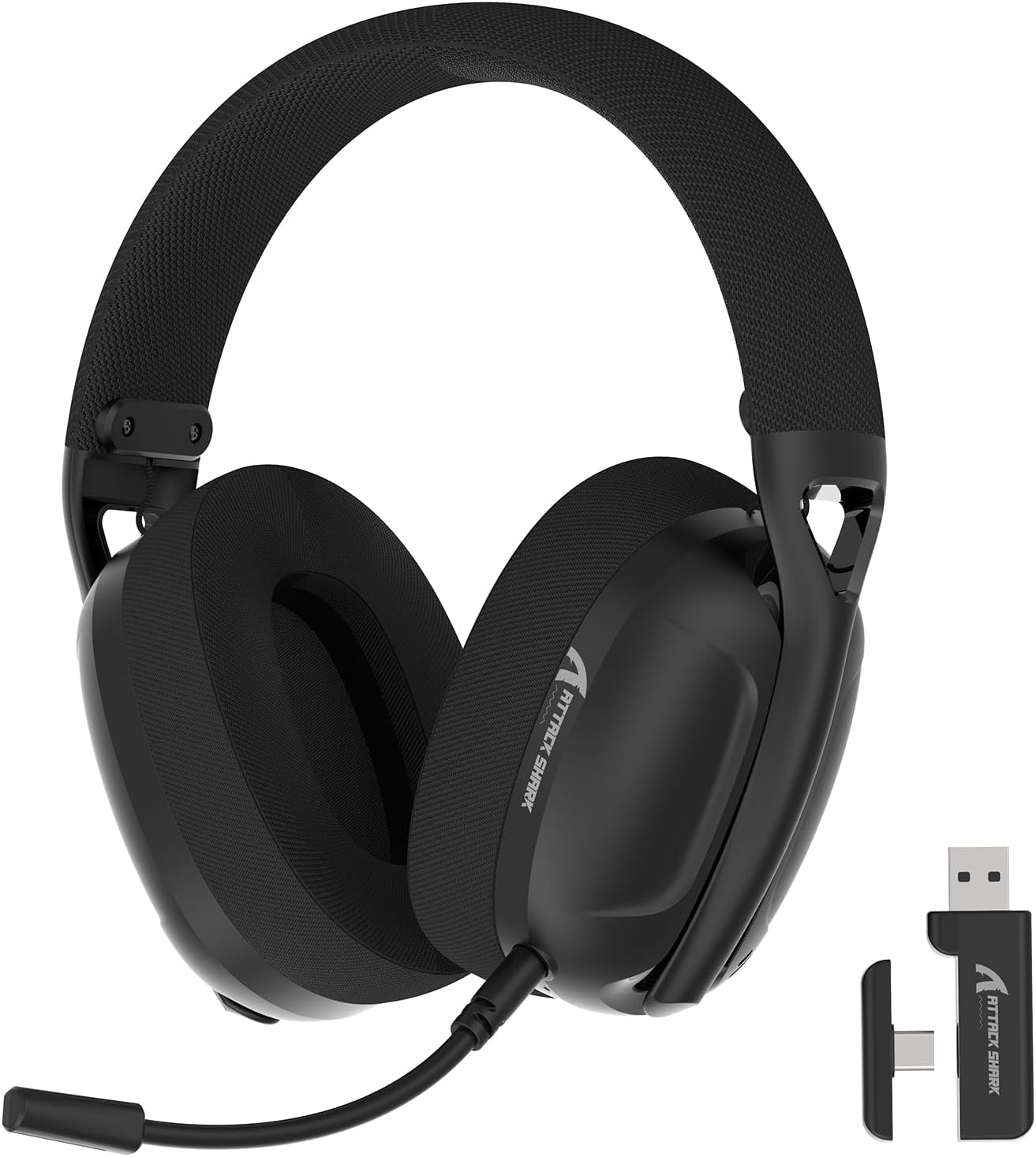
Image: The ATTACK SHARK L80 Wireless Gaming Headset, featuring over-ear cups, a flexible microphone, and a USB dongle.
เนื้อหาแพ็คเกจ
ตรวจสอบว่ามีรายการทั้งหมดอยู่ในบรรจุภัณฑ์ผลิตภัณฑ์ของคุณ:
- ATTACK SHARK L80 Wireless Gaming Headset
- ไมโครโฟนแบบถอดได้ รับเสียงรอบทิศทาง
- ดองเกิลไร้สาย USB 2.4GHz (USB-A)
- สายชาร์จ USB-C เป็น USB-A
- สายสัญญาณเสียงขนาด 3.5 มม.
- คู่มือการใช้งาน (เอกสารนี้)

Image: All components included in the ATTACK SHARK L80 headset package: headset, detachable microphone, 2.4GHz USB dongle, USB-C charging cable, and 3.5mm audio cable.
สินค้าเกินview
ปุ่มควบคุมและพอร์ตของชุดหูฟัง
Familiarize yourself with the headset's controls and connection points:

Image: Close-up of the ATTACK SHARK L80 headset's left earcup, showing the power button, mode switch button, volume up/previous track button, volume down/next track button, and microphone mute button.
- ปุ่มเปิด/ปิด: Press and hold for 3 seconds to power ON/OFF. Short press to answer/end calls or play/pause media.
- ปุ่มสลับโหมด: Short press 3 times in succession to switch between Bluetooth and 2.4G wireless modes.
- เพิ่มเสียง / เพลงก่อนหน้า: Short press for Volume+, Long press for Previous Song.
- ลดเสียง / เพลงถัดไป: Short press for Volume-, Long press for Next Song.
- ปุ่มปิดเสียงไมโครโฟน: Short press to toggle microphone ON/OFF.
- พอร์ตไมโครโฟน: สำหรับเชื่อมต่อไมโครโฟนแบบถอดได้
- แจ็คเสียงขนาด 3.5 มม.: สำหรับการเชื่อมต่อแบบมีสาย
- พอร์ตชาร์จ USB-C: สำหรับการชาร์จชุดหูฟัง
- ไฟแสดงสถานะ: แสดงสถานะการเชื่อมต่อและระดับแบตเตอรี่
ไมโครโฟนแบบถอดออกได้
The L80 headset features a detachable, omni-directional microphone with noise reduction capabilities. It can be adjusted 360 degrees for optimal positioning.

Image: The ATTACK SHARK L80 headset with its detachable, 360-degree adjustable, noise-cancelling microphone attached.
การตั้งค่า
The ATTACK SHARK L80 headset offers three connection modes: 2.4GHz wireless, Bluetooth 5.2, and 3.5mm wired. Choose the appropriate method for your device.
1. 2.4GHz Wireless Connection (for PC, PS5, PS4, Nintendo Switch Docked)
- Insert the 2.4GHz USB wireless dongle into an available USB port on your PC, PS5, PS4, or Nintendo Switch dock.
- Power on the L80 headset by pressing and holding the Power Button for 3 seconds.
- The headset will automatically attempt to connect to the dongle. The indicator light will show a stable color once connected.
- On your device, ensure the audio output is set to "ATTACK SHARK L80" or similar.

Image: Diagram illustrating 2.4GHz USB dongle connection to a PS4 and a USB-C dongle connection to a portable device, alongside Bluetooth connectivity for phones.
2. Bluetooth 5.2 Connection (for Phones, Tablets, Laptops)
- Power on the L80 headset by pressing and holding the Power Button for 3 seconds.
- If not already in Bluetooth mode, short press the Mode Switch Button three times in quick succession to enter Bluetooth pairing mode. The indicator light will flash, indicating it is discoverable.
- บนอุปกรณ์ของคุณ (โทรศัพท์ แท็บเล็ต แล็ปท็อป) ไปที่การตั้งค่าบลูทูธ แล้วค้นหาอุปกรณ์ที่ใช้งานได้
- Select "ATTACK SHARK L80" from the list to pair. The indicator light will become stable once connected.
3. 3.5mm Wired Connection (for various devices)
- Connect one end of the 3.5mm audio cable to the 3.5mm audio jack on the L80 headset.
- ต่อปลายอีกด้านของสายสัญญาณเสียง 3.5 มม. เข้ากับพอร์ตเอาต์พุตเสียงของอุปกรณ์ของคุณ
- The headset will function in wired mode. Note that volume control via the headset buttons may not be available in wired mode, depending on the connected device.

Image: The ATTACK SHARK L80 headset displayed among various compatible platforms including PlayStation consoles, Nintendo Switch, Xbox, PC, tablets, and smartphones.
คำแนะนำการใช้งาน
เปิด/ปิดเครื่อง
- เปิดเครื่อง: กดปุ่มเปิด/ปิดค้างไว้ประมาณ 3 วินาที จนกว่าไฟแสดงสถานะจะสว่างขึ้น
- หมดแรง: กดปุ่มเปิด/ปิดค้างไว้ประมาณ 3 วินาที จนกว่าไฟแสดงสถานะจะดับลง
การควบคุมระดับเสียง
- เพิ่มปริมาณ: กดปุ่มเพิ่มระดับเสียงสั้นๆ
- ลดระดับเสียง: กดปุ่มลดระดับเสียงสั้นๆ
การควบคุมการเล่นสื่อ
- เล่น/หยุดชั่วคราว: กดปุ่มเปิด/ปิดสั้นๆ
- เพลงก่อนหน้า: กดปุ่มเพิ่มระดับเสียงค้างไว้
- เพลงถัดไป: กดปุ่มลดระดับเสียงค้างไว้
การจัดการการโทร
- รับ/วางสาย: กดปุ่มเปิด/ปิดสั้นๆ
การใช้งานไมโครโฟน
- ต่อไมโครโฟนแบบถอดได้เข้ากับพอร์ตที่กำหนดไว้บนชุดหูฟัง
- ปรับตำแหน่งไมโครโฟนเพื่อให้รับเสียงได้ดีที่สุด
- ปิดเสียง/เปิดเสียงไมโครโฟน: Short press the Microphone Mute Button.
การสลับโหมด
- To switch between 2.4GHz wireless mode and Bluetooth mode, short press the Mode Switch Button three times in quick succession.
การชาร์จหูฟัง
The headset provides up to 50 hours of playtime at 50% volume and takes approximately 3 hours for a full charge.
- เสียบปลายสายชาร์จ USB-C เข้ากับพอร์ต USB-C ของหูฟัง
- เชื่อมต่อปลาย USB-A ของสายชาร์จเข้ากับแหล่งจ่ายไฟ USB (เช่น พอร์ต USB ของคอมพิวเตอร์ อะแดปเตอร์ติดผนัง)
- The indicator light will show charging status. A red light alert indicates battery level below 10%.

Image: Visual representation of the ATTACK SHARK L80 headset's battery features, including 45-50 hours gaming time, red light alert for low battery, 3 hours charging time, and electricity saving standby.
การซ่อมบำรุง
- การทำความสะอาด: ใช้ผ้านุ่มและแห้งเช็ดทำความสะอาดชุดหูฟัง ห้ามใช้สารเคมีรุนแรงหรือวัสดุที่มีฤทธิ์กัดกร่อน
- พื้นที่จัดเก็บ: เก็บหูฟังไว้ในที่แห้งและเย็น หลีกเลี่ยงแสงแดดโดยตรงและอุณหภูมิที่สูงหรือต่ำเกินไป
- การดูแลแบตเตอรี่ เพื่อยืดอายุการใช้งานแบตเตอรี่ ควรหลีกเลี่ยงการใช้หูฟังจนหมดบ่อย ควรชาร์จหูฟังเป็นประจำ แม้จะไม่ได้ใช้งานเป็นเวลานานก็ตาม
- การจัดการสายเคเบิล: ควรหลีกเลี่ยงการดัดงอหรือหักงอสายเคเบิลอย่างรุนแรงเพื่อป้องกันความเสียหาย

Image: Close-up of the headset's ultra-soft mesh earmuffs, highlighting their breathable and comfortable design for extended wear.
การแก้ไขปัญหา
| ปัญหา | สาเหตุที่เป็นไปได้ | สารละลาย |
|---|---|---|
| ไม่มีเสียงจากหูฟัง | Headset not powered on, not connected, or volume too low. |
|
| ไมโครโฟนไม่ทำงาน | Microphone muted, not properly attached, or incorrect input device selected. |
|
| ไม่สามารถเชื่อมต่อผ่านระบบไร้สาย 2.4GHz ได้ | Dongle not inserted, headset not in 2.4GHz mode, or interference. |
|
| ไม่สามารถเชื่อมต่อผ่านบลูทูธได้ | Headset not in pairing mode, Bluetooth off on device, or previously paired device interfering. |
|
| หูฟังไม่ชาร์จ | Charging cable faulty, power source issue, or charging port obstruction. |
|
ข้อมูลจำเพาะ
| คุณสมบัติ | รายละเอียด |
|---|---|
| ชื่อรุ่น | L80 headset |
| เทคโนโลยีการเชื่อมต่อ | ไร้สาย 2.4GHz, บลูทูธ 5.2, สาย 3.5 มม. |
| ขนาดไดร์เวอร์เสียง | 40 มม. |
| ช่วงความถี่ | 20 เฮิรตซ์ - 20,000 เฮิรตซ์ |
| อิมพีแดนซ์ | 30 โอห์ม |
| การควบคุมเสียงรบกวน | การแยกเสียง |
| ไมโครโฟน | Detachable, Omni-directional, Noise-reduction |
| อายุการใช้งานแบตเตอรี่ | สูงสุด 50 ชั่วโมง (ที่ระดับเสียง 50%) |
| เวลาในการชาร์จ | ประมาณ 3 ชั่วโมง |
| น้ำหนัก | 12 ออนซ์ (ประมาณ 340 กรัม) |
| วัสดุ | พลาสติก |
| อุปกรณ์ที่รองรับ | PC, PS5, PS4, Nintendo Switch, Laptops, Tablets, Phones |

ภาพ: ภาพตัดขวาง view of the ATTACK SHARK L80 headset's earcup, highlighting the powerful 40mm audio drivers responsible for high-fidelity sound.
การรับประกันและการสนับสนุน
สำหรับข้อมูลการรับประกันและการสนับสนุนทางเทคนิค โปรดดูที่เว็บไซต์อย่างเป็นทางการของ ATTACK SHARK webหรือติดต่อฝ่ายบริการลูกค้า เก็บใบเสร็จรับเงินไว้เป็นหลักฐานการซื้อสำหรับการเรียกร้องการรับประกัน
ผู้ผลิต: โจมตีฉลาม
ติดต่อ: กรุณาเข้าเยี่ยมชม ร้าน ATTACK SHARK บน Amazon for further assistance or to find contact information.