
sloHEXtted industrial wireless remote control
6 Channel 12-65V DC Industrial Wireless Crane Radio Remote Control User Manual
Brand: sloHEXtted | Model: industrial wireless remote control
1. บทนำ
This manual provides detailed instructions for the safe and effective use of the sloHEXtted 6 Channel 12-65V DC Industrial Wireless Crane Radio Remote Control system. This system is designed for controlling electric chain hoists, overhead bridge travelling cranes, and trucks, offering reliable and precise operation with enhanced safety features.
The system includes one transmitter and one receiver, operating within a 12-65V DC range. It features a robust design suitable for demanding industrial environments.
2. คุณสมบัติของผลิตภัณฑ์
- 6 Momentary Buttons: The system features 6 momentary buttons. Functions can be customized using a separate USB programming cable (not included).
- ช่วงควบคุมที่ขยายกว้างขึ้น: Offers a control range of up to 100 meters (328 feet) with 360-degree barrier-free operation and strong signal penetration.
- User-Friendly Transmitter: Equipped with 3 low-battery LED indicators for timely battery replacement.
- เพิ่มความปลอดภัย: Features EU standard EMS and a high-quality circuit board for reliable performance. Durable silicone-wrapped buttons provide comfortable operation. An Emergency Stop Button immediately halts all movement when pressed.
- IP65 Rated Durability: The remote control is IP65 dust-proof and waterproof, ensuring excellent performance in harsh environments with high oil pollution, humidity, and dust.
- Easy Pairing and Reprogramming: Software and hardware are fully compatible across the series, simplifying pairing and reprogramming processes.
- โครงสร้างเสริมแรง: The lightweight transmitter and receiver are made from collision-proof PA65 reinforced flame retardant material, featuring 8 anti-collision corners for added durability.

รูปที่ 2.1: เกินview of the sloHEXtted Industrial Wireless Crane Radio Remote Control system, showing both the transmitter and receiver units.

รูปที่ 2.2: รายละเอียด view of the transmitter highlighting its humanized design, including LED indicators, silicone buttons, and the Emergency Stop Push Button.

Figure 2.3: Close-up of the EU Standard Emergency Stop button and the reinforced nylon shell with 8 impact-resistant corners, emphasizing product safety and durability.

Figure 2.4: Technical drawing showing the dimensions of both the transmitter and receiver units for installation planning.

Figure 2.5: Illustration demonstrating the 100-meter control range of the remote control in an industrial setting, suitable for various crane types.
3. การตั้งค่า
3.1 การแกะบรรจุภัณฑ์และการตรวจสอบ
Carefully unpack all components and inspect for any signs of damage. Ensure all listed accessories are present. The package typically includes the transmitter, receiver, user manual, and mounting accessories.
Video 3.1: This video demonstrates the unboxing and initial inspection of the industrial radio controller, showcasing its high-quality components and humanized design.
3.2 การจ่ายไฟให้เครื่องส่งสัญญาณ
The transmitter requires 2 AA batteries (not included). Open the battery compartment on the back of the transmitter and insert the batteries, observing correct polarity. The low-battery LEDs will indicate battery status during operation.
3.3 Receiver Wiring and Mounting
The receiver unit comes with pre-wired Y-type fork terminals for easy connection to your equipment. Refer to the wiring diagram provided on the receiver unit and in the detailed manual for specific connections (e.g., power, UP, DOWN, EAST, WEST, SOUTH, NORTH, RO/START, etc.).
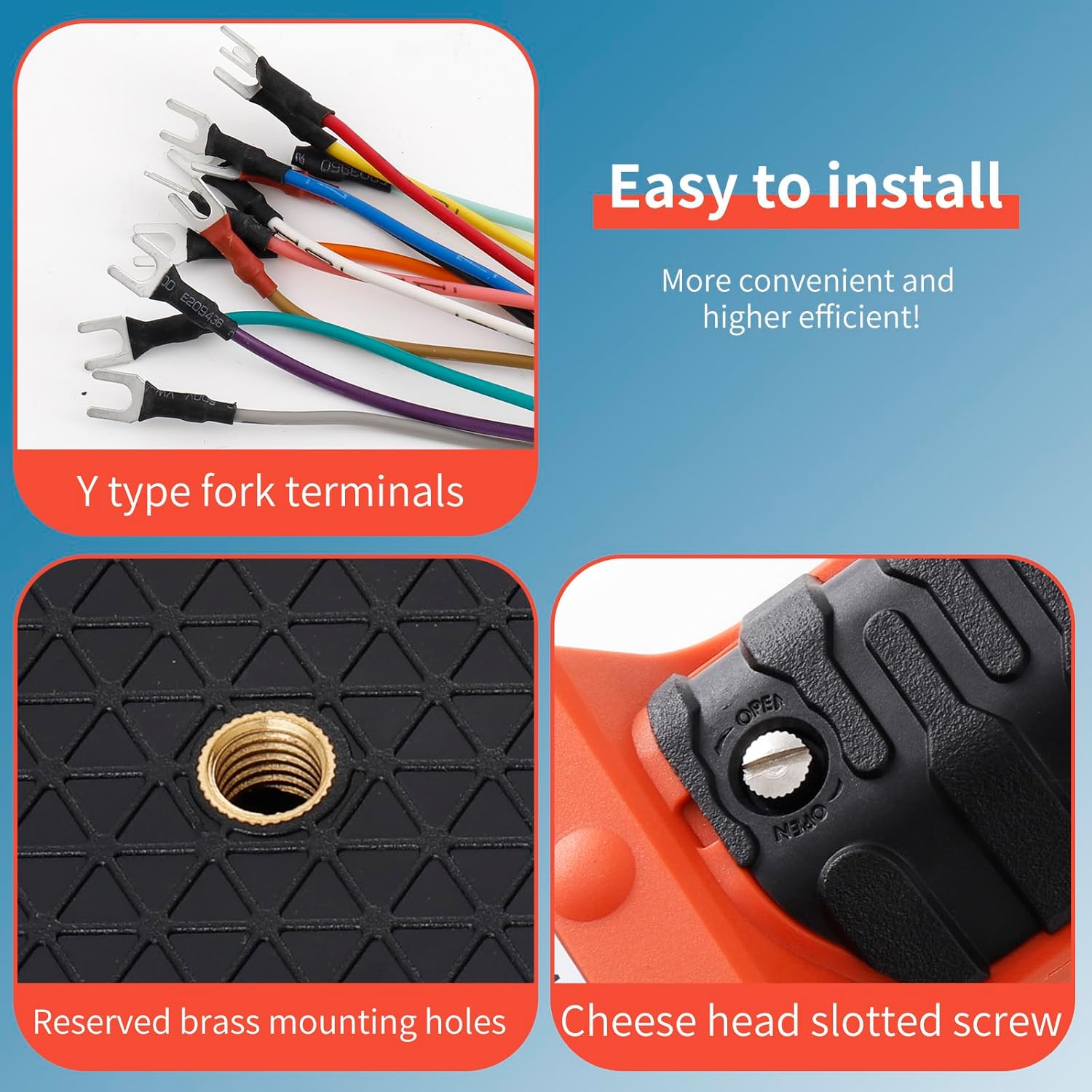
Figure 3.1: Features designed for easy installation, including Y-type fork terminals, reserved brass mounting holes, and a cheese head slotted screw for secure attachment.
The receiver features a brass mounting hole on its back for secure installation. Use the provided spring and bolt for anti-vibration mounting to ensure stable operation.

Figure 3.2: The mounting spring and bolt assembly, designed to provide secure and vibration-resistant installation for the receiver unit.
3.4 การจับคู่ (ถ้าจำเป็น)
The transmitter and receiver are typically pre-paired. If re-pairing is required, follow the instructions in the detailed manual. The system is designed for easy pairing and reprogramming.
4. คู่มือการใช้งาน
4.1 การทำงานพื้นฐาน
To begin operation, ensure the Emergency Stop button on the transmitter is disengaged (rotated to release). Press the green START button to activate the transmitter. The status LEDs on both the transmitter and receiver will indicate active connection.

รูปที่ 4.1: ระยะใกล้ view of the status LEDs on both the transmitter and receiver, indicating operational status and potential errors.
Use the directional buttons (UP, DOWN, EAST, WEST, SOUTH, NORTH) to control the corresponding functions of your equipment. All 6 buttons are momentary, meaning the function is active only while the button is pressed.
Video 4.1: This video demonstrates the durability of the reinforced nylon shell with 8 anti-collision corners, showing the remote control being used in a rugged environment.
4.2 หยุดฉุกเฉิน
In case of an emergency or unexpected movement, immediately press the red Emergency Stop button. This will cut power to the controlled equipment, stopping all operations. To resume, rotate the button to release it and then press the green START button again.
5. การบำรุงรักษา
Regular maintenance ensures the longevity and reliable operation of your remote control system.
- การทำความสะอาด: เช็ดทำความสะอาดเครื่องส่งและเครื่องรับด้วยน้ำยาทำความสะอาดamp ผ้าเช็ดทำความสะอาดฝุ่นและเศษผง หลีกเลี่ยงการใช้สารเคมีรุนแรงหรือน้ำยาทำความสะอาดที่มีฤทธิ์กัดกร่อน
- การเปลี่ยนแบตเตอรี่: Replace transmitter batteries promptly when the low-battery LED indicators illuminate.
- การตรวจสอบ: Periodically inspect the unit for any physical damage, especially the silicone buttons and the reinforced shell. Check the wiring connections on the receiver for secure fit and signs of wear.
- การปกป้องสิ่งแวดล้อม: While the unit is IP65 rated for dust and water resistance, prolonged exposure to extreme conditions should be minimized.
6 การแก้ไขปัญหา
6.1 ปัญหาทั่วไปและแนวทางแก้ไข
| ปัญหา | สาเหตุที่เป็นไปได้ | สารละลาย |
|---|---|---|
| ระบบไม่ตอบสนอง | Transmitter batteries low/dead; Emergency Stop engaged; Receiver not powered; Out of range; Interference. | Replace batteries; Disengage E-Stop; Check receiver power supply; Move closer to receiver; Check for strong interference sources. |
| การทำงานแบบไม่สม่ำเสมอ | Weak signal; Partial obstruction; Loose wiring connection. | Ensure clear line of sight; Check all wiring connections on receiver. |
| ปุ่มบางปุ่มใช้งานไม่ได้ | Damaged button; Wiring issue for that specific function. | Inspect button for physical damage; Verify wiring for the affected function. |
6.2 Reprogramming Functions
The system's functions can be reprogrammed using a dedicated USB programming cable (sold separately). This allows for customization of button behavior (e.g., momentary, toggle, interlock). Refer to the programming software manual for detailed instructions.
Video 6.1: This video provides a guide on how to reprogram the system of H series Remote Control, demonstrating the software interface for function setting.
7. ข้อมูลจำเพาะ
| ข้อมูลจำเพาะ | ค่า |
|---|---|
| ผู้ผลิต | sloHEXtted |
| หมายเลขชิ้นส่วน | industrial radio remote controller |
| น้ำหนักสินค้า | 3.03 ปอนด์ |
| ขนาดสินค้า | 11 x 8.2 x 3.9 นิ้ว |
| หมายเลขรุ่นสินค้า | industrial wireless remote control |
| ขนาด | 12-65V ซี |
| สี | เครื่องส่งสัญญาณ 1 เครื่อง + เครื่องรับสัญญาณ 1 เครื่อง |
| สไตล์ | 12-65V ซี |
| วัสดุ | Reinforced flame retardant PA65 material |
| ลวดลาย | 12-65V ซี |
| คุณสมบัติพิเศษ | Brass mounting hole reserved on receiver back |
| ส่วนประกอบที่รวมอยู่ | Transmitter, Receiver, Accessories (as per package) |
| รวมแบตเตอรี่ด้วยมั้ย? | เลขที่ |
| จำเป็นต้องใช้แบตเตอรี่หรือไม่? | ใช่ (สำหรับตัวส่งสัญญาณ) |
| วันที่พร้อมใช้งานครั้งแรก | 14 เมษายน 2023 |
8. การรับประกันและการสนับสนุน
For warranty information and technical support, please contact sloHEXtted directly through their official channels or the retailer from whom the product was purchased. Keep your purchase receipt for warranty claims.
Ask a question about this manual
Ask about setup, troubleshooting, compatibility, parts, safety, or missing instructions. Manuals+ will review the question and use this page’s manual context to help answer it.