
1. บทนำ
Thank you for choosing the FOWORE 2.5 Cuft Home Safe. This manual provides essential information for the proper setup, operation, and maintenance of your new safe. Please read these instructions carefully before use and retain them for future reference. Proper use ensures the security and longevity of your product.
2. ข้อมูลด้านความปลอดภัยที่สำคัญ
- อย่าทำ store the emergency backup keys inside the safe. Keep them in a secure, separate location.
- อย่าทำ store your personal code or master code inside the safe. Memorize your codes or keep them in a secure, confidential place.
- ตรวจสอบให้แน่ใจว่าได้ยึดตู้เซฟไว้กับผนังหรือพื้นอย่างแน่นหนาเพื่อป้องกันการถอดออกโดยไม่ได้รับอนุญาต
- Replace batteries promptly when the low battery warning is indicated to ensure continuous functionality.
- Keep children away from the safe and its contents.
3. เนื้อหาบรรจุภัณฑ์
กรุณาตรวจสอบแพ็คเกจเพื่อให้แน่ใจว่ามีสินค้าครบทั้งหมด:
- 1 x FOWORE 2.5 Cuft Home Safe
- 1 x คู่มือผู้ใช้ (เอกสารนี้)
- 1 x Fireproof and Waterproof Bag
- 2 x Emergency Backup Keys
- สกรูยึด 4 ตัว
4. สินค้าหมดview

Figure 4.1: FOWORE 2.5 Cuft Home Safe with door open, showcasing interior and included fireproof bag.
The FOWORE 2.5 Cuft Home Safe is designed to provide secure storage for your valuables. It features robust construction and advanced security mechanisms.
คุณสมบัติหลัก:
- โครงสร้างทนทาน: Made from solid cold-rolled steel with a recessed pry-resistant door and three enhanced steel locking bolts.
- Digital Security Lock: Electronic combination lock with a digital keypad for secure access.
- ระบบสัญญาณกันขโมย: Activates an audible alarm after three consecutive incorrect code entries.
- โหมดเงียบ: Option to disable keypad sounds for discreet operation.
- ชั้นวางแบบถอดได้: Allows for customizable storage space to accommodate various item sizes.
- ไฟ LED ภายใน: Provides visibility inside the safe, even in low-light conditions.
- ความสามารถในการติดตั้ง: Pre-drilled holes on the bottom and back for secure installation to a wall or floor.
- คำเตือนแบตเตอรี่ต่ำ: Visual indicator on the keypad alerts you when batteries need replacement.
- Fireproof and Waterproof Bag: An additional layer of protection for important documents and small valuables.
5. การตั้งค่า
5.1 การเปิดใช้งานครั้งแรก
For the first use, the safe must be opened using one of the emergency backup keys.
- Locate the keyhole cover on the digital keypad.
- ถอดฝาครอบออกเพื่อเผยให้เห็นรูกุญแจ
- Insert one of the emergency backup keys into the keyhole and turn it clockwise.
- While the key is turned, rotate the knob on the keypad clockwise to open the safe door.
- Once open, remove the key and store it in a safe place outside the safe.

Figure 5.1: Initial opening and two access methods.
5.2 การติดตั้งแบตเตอรี่
The safe requires 4 AA batteries (not included) to power the digital keypad.
- เปิดประตูตู้นิรภัย
- หาช่องใส่แบตเตอรี่ที่อยู่ด้านในประตูตู้เซฟ
- เปิดฝาช่องใส่แบตเตอรี่
- ใส่แบตเตอรี่ AA ใหม่ 4 ก้อน โดยตรวจสอบให้แน่ใจว่าขั้วถูกต้อง (+/-)
- ปิดฝาช่องใส่แบตเตอรี่
5.3 การตั้งรหัสส่วนตัวของคุณ
You can set a personal code (3-8 digits) for daily access.
- With the safe door open, locate the red setting button on the inside of the door, near the hinge.
- Press the red setting button. The keypad will beep, and the indicator light will flash.
- On the keypad, enter your desired 3 to 8 digit personal code.
- Press the 'A' or 'B' key to confirm your new code. The keypad will beep again, indicating successful programming.
- ทดสอบรหัสใหม่ของคุณโดยเปิดประตูไว้ก่อนปิดประตู

Figure 5.2: Password setting instructions.
5.4 Setting the Master Code (Optional)
The safe also allows for a master code, which can be useful for multiple users or as a backup.
- With the safe door open, press '00' on the keypad.
- Then, press the red setting button on the inside of the door. The keypad will beep, and the indicator light will flash.
- Enter your desired 3 to 8 digit master code.
- Press the 'A' or 'B' key to confirm your new master code. The keypad will beep again.
- Test your new master code with the door open before closing it.
5.5 การติดตั้งตู้เซฟ
For enhanced security, it is recommended to anchor the safe to a wall or floor.
- เลือกสถานที่ที่เหมาะสมสำหรับการติดตั้ง
- Open the safe door and remove the removable shelf if it obstructs access to the pre-drilled holes.
- Mark the positions for drilling through the pre-drilled holes on the back or bottom of the safe.
- Drill pilot holes in the wall or floor using an appropriate drill bit (not included).
- Align the safe with the drilled holes and secure it using the provided mounting screws.
- Ensure the safe is firmly attached and stable.

Figure 5.3: Removable shelf for customizable storage.
6. คู่มือการใช้งาน
6.1 การเปิดตู้นิรภัยด้วยรหัสของคุณ
- Enter your personal code (3-8 digits) on the digital keypad.
- Press the 'A' or 'B' key to confirm.
- Within 5 seconds, rotate the knob clockwise to open the safe door.
6.2 การเปิดตู้นิรภัยด้วยกุญแจฉุกเฉิน
This method is used if you forget your code or if the batteries are depleted.
- Remove the keyhole cover on the digital keypad.
- Insert an emergency backup key into the keyhole and turn it clockwise.
- While the key is turned, rotate the knob on the keypad clockwise to open the safe door.
6.3 Anti-Theft Alarm System
The safe is equipped with an alarm system to deter unauthorized access.
- If an incorrect code is entered three times consecutively, the alarm will activate.
- The safe will lock for approximately 5 minutes, and an audible alarm will sound.
- To silence the alarm, enter the correct code or use the emergency key.

Figure 6.1: Anti-theft alert and optional mute function.
6.4 โหมดเงียบ
To operate the safe without keypad sounds:
- Activate Silent Mode: Press "00A" on the keypad.
- Deactivate Silent Mode: Press "66A" on the keypad.
- บันทึก: Even in silent mode, the anti-theft alarm will still sound if incorrect codes are entered.
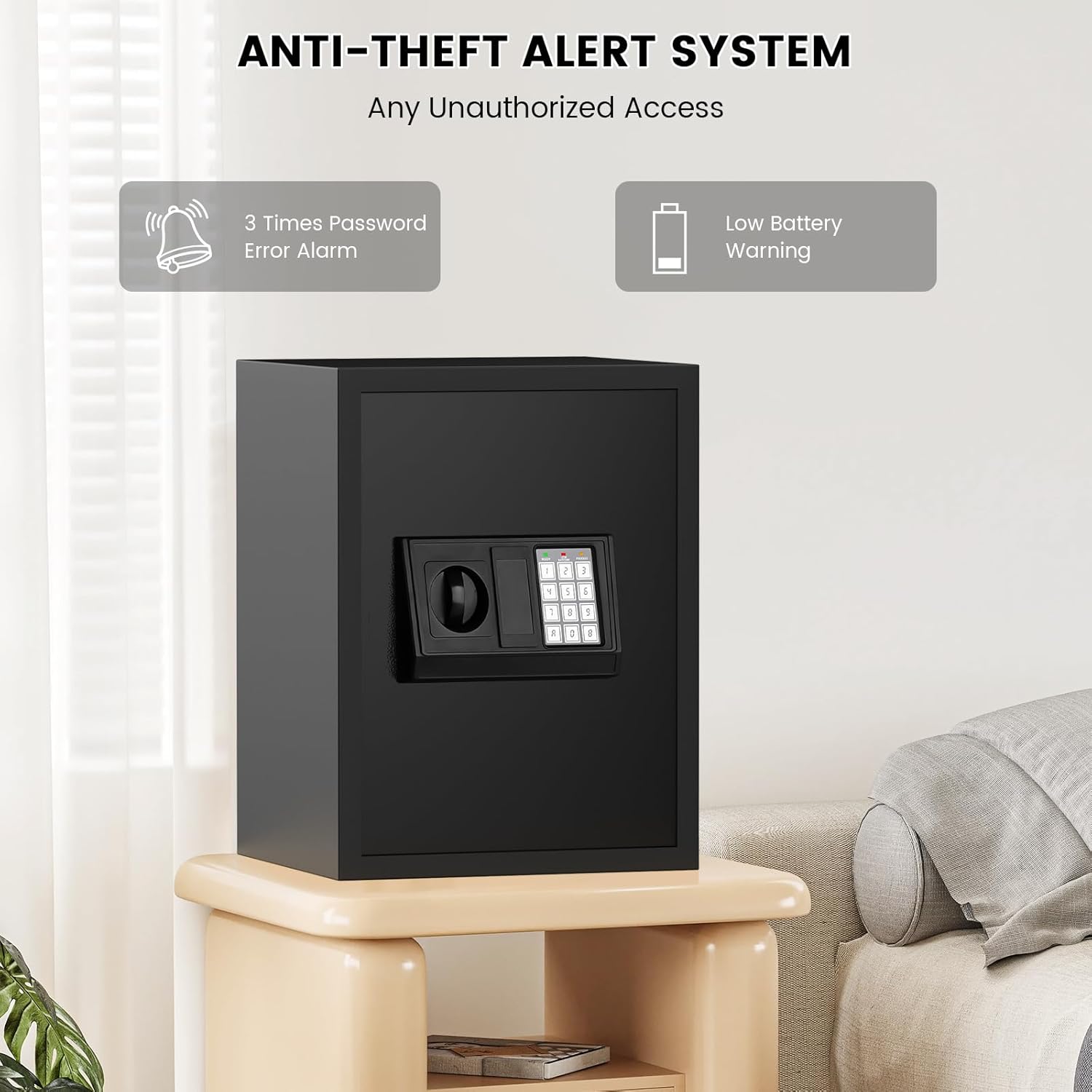
Figure 6.2: Silent mode and LED light features.
6.5 คำเตือนแบตเตอรี่ต่ำ
When the batteries are low, both the green and red indicator lights on the keypad will illuminate simultaneously. Replace the batteries immediately to ensure continued functionality.
7. การบำรุงรักษา
- การทำความสะอาด: เช็ดภายนอกตู้เซฟด้วยผ้านุ่มๆamp ผ้า หลีกเลี่ยงการใช้น้ำยาทำความสะอาดที่มีฤทธิ์กัดกร่อนหรือตัวทำละลายที่อาจทำลายพื้นผิวได้
- การเปลี่ยนแบตเตอรี่: Replace all 4 AA batteries annually or immediately when the low battery warning appears. Always use new, high-quality alkaline batteries.
- การตรวจสอบความปลอดภัย: ตรวจสอบน็อตยึดเป็นระยะ เพื่อให้แน่ใจว่ายังแน่นและปลอดภัยดีอยู่เสมอ
- การจัดเก็บกุญแจ: Regularly verify that your emergency keys are stored in a safe, accessible location outside the safe.
8 การแก้ไขปัญหา
| ปัญหา | สาเหตุที่เป็นไปได้ | สารละลาย |
|---|---|---|
| ตู้เซฟไม่สามารถเปิดด้วยรหัสได้ | Incorrect code entered; low batteries. | Re-enter correct code carefully. Replace batteries. Use emergency key. |
| แป้นพิมพ์ไม่ตอบสนอง | แบตเตอรี่เสียหรือติดตั้งไม่ถูกต้อง | ใส่แบตเตอรี่ AA ทั้ง 4 ก้อนลงไป โดยตรวจสอบให้แน่ใจว่าขั้วถูกต้อง |
| เสียงสัญญาณเตือนภัยดังขึ้นโดยไม่คาดคิด | Three incorrect code entries; tampering detected. | Enter correct code or use emergency key to disarm. Ensure safe is not being tampเอเรดด้วย |
| Forgotten personal or master code. | ลืมรหัสแล้ว | Use emergency key to open the safe. Reset your code following the instructions in Section 5.3 or 5.4. |
9. ข้อมูลจำเพาะ
| คุณสมบัติ | รายละเอียด |
|---|---|
| ยี่ห้อ | FOWORE |
| แบบอย่าง | 42ex safe |
| ความจุ | 2.5 ลูกบาศก์ฟุต |
| ขนาดผลิตภัณฑ์ (ภายนอก) | ลึก 11 นิ้ว x กว้าง 13 นิ้ว x สูง 16 นิ้ว (ประมาณ ลึก 31 ซม. x กว้าง 35 ซม. x สูง 42 ซม.) |
| น้ำหนักสินค้า | 25.5 ปอนด์ |
| ประเภทล็อค | Electronic Combination Lock, Key |
| วัสดุ | เหล็กอัลลอยด์ |
| ประเภทการติดตั้ง | Wall and Floor Mount |
| แหล่งพลังงาน | แบตเตอรี่ AA 4 ก้อน (ไม่รวม) |

Figure 9.1: External dimensions of the FOWORE Home Safe.

Figure 9.2: Robust construction details of the FOWORE Home Safe.
10. การรับประกันและการสนับสนุน
FOWORE is committed to providing high-quality products and excellent customer service.
- การรับประกันสินค้า : Your FOWORE safe comes with a 5-year product warranty.
- การสนับสนุนด้านเทคนิค: รับบริการสนับสนุนด้านเทคนิคตลอดอายุการใช้งานสำหรับผลิตภัณฑ์ของคุณ
- การส่งคืน: We offer a 30-day free return policy.
- บริการลูกค้า: Our customer service team aims to reply to inquiries within 24 hours.
For any questions, concerns, or support needs, please contact FOWORE customer service through the platform where you purchased the product or visit the official FOWORE store online.