
1. บทนำ
This manual provides comprehensive instructions for the safe and efficient operation of your HTVRONT Auto Heat Press 2. Please read this manual thoroughly before using the device to ensure proper function and to prevent damage or injury. Keep this manual for future reference.
2. ข้อมูลด้านความปลอดภัย
WARNING: Failure to follow these safety instructions may result in fire, electric shock, or other injury or damage.
- ควรใช้งานเครื่องรีดความร้อนบนพื้นผิวที่มั่นคงและทนความร้อนเสมอ
- Keep hands and fingers clear of the heating plate during operation to avoid burns.
- ห้ามจุ่มเครื่องในน้ำหรือของเหลวอื่นๆ
- ตรวจสอบให้แน่ใจว่าสายไฟไม่ได้รับความเสียหายและเสียบเข้ากับเต้ารับที่มีสายดินอย่างถูกต้อง
- ถอดปลั๊กเครื่องเมื่อไม่ใช้งานหรือก่อนทำความสะอาด
- อย่าทิ้งเครื่องไว้โดยไม่มีใครดูแลระหว่างการทำงาน
- The machine features an automatic shut-off function after 15 minutes of inactivity to prevent overheating.
- เก็บให้พ้นจากมือเด็ก
3. สินค้าหมดview
The HTVRONT Auto Heat Press 2 is designed for efficient and precise heat transfer applications. Familiarize yourself with its main components:
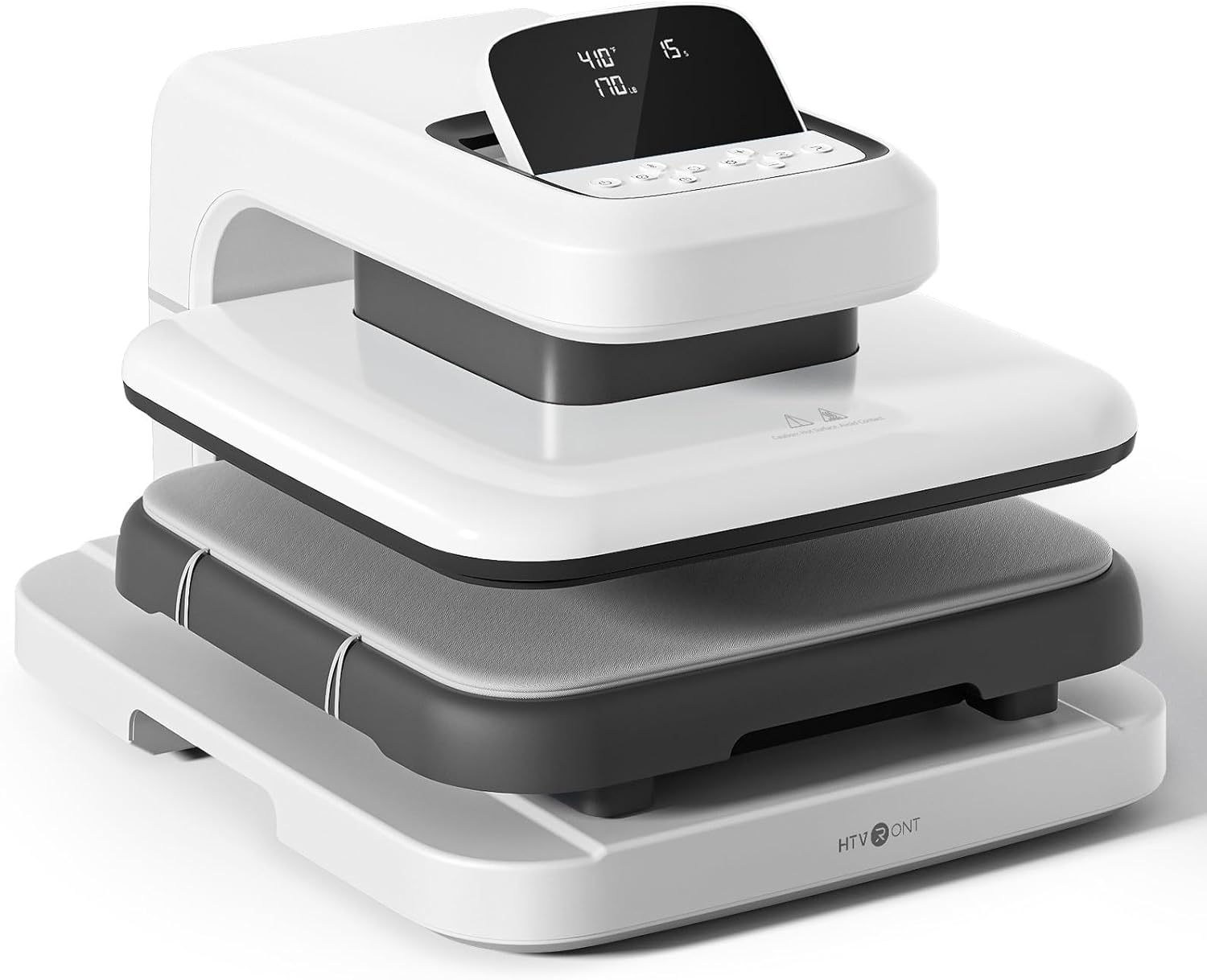

- แผ่นความร้อน: The upper heating element that applies heat and pressure.
- Ironing Board (Lower Platen): The surface where materials are placed for pressing. Features a fully pull-out drawer design.
- ฐาน: ช่วยให้เครื่องจักรมีความเสถียร
- หน้าจอ LED: Displays temperature, time, and pressure settings.
- ปุ่มควบคุม: Used to adjust settings and initiate operations.
4. การตั้งค่า
Follow these steps to set up your HTVRONT Auto Heat Press 2 for first use:
- แกะเครื่องออกจากบรรจุภัณฑ์: Carefully remove the heat press from its packaging. Retain all packaging materials for potential future transport or storage.
- การจัดวาง: Place the machine on a flat, stable, and heat-resistant surface. Ensure there is adequate clearance around the machine for ventilation and safe operation.
- การเชื่อมต่อไฟฟ้า: Connect the power cord to the machine and then plug it into a standard 110V (DC) grounded electrical outlet.
- เปิดเครื่องครั้งแรก: Press the power button to turn on the machine. The LED screen will illuminate.

5. คู่มือการใช้งาน
5.1. การเปิด/ปิดเครื่อง
- หากต้องการเปิดเครื่อง ให้กดปุ่มเปิด/ปิด
- หากต้องการปิดเครื่อง ให้กดปุ่มเปิด/ปิดค้างไว้จนกว่าหน้าจอจะดับลง
5.2. Setting Parameters (Temperature, Time, Pressure)
The HTVRONT Auto Heat Press 2 allows for precise control over temperature, time, and pressure to suit various materials and transfer types.
- ช่วงอุณหภูมิ: 210°F - 410°F (100°C - 210°C)
- ช่วงเวลา: 1 - 999 วินาที
- ช่วงความดัน: 50 - 170 LB (adjustable)

Use the control buttons on the LED screen to adjust these settings. The machine heats up quickly, reaching 410°F within 5 minutes and 30 seconds.

5.3. Automatic Pressing Cycle
Once parameters are set and the material is in place, the automatic pressing function simplifies operation:
- Place your substrate and transfer material on the ironing board.
- Press the "R" button to initiate the automatic pressing cycle. The heat plate will descend and apply pressure.
- The machine will buzz when the set time is complete and automatically release the heat plate.

5.4. Using the Fully Pull-out Drawer
The ironing board features a fully pull-out drawer, allowing for safe and easy placement of materials without contact with the hot heat plate.
- Pull the drawer completely out before placing or adjusting your items.
- Push the drawer back in before starting the pressing cycle.
5.5. Adjusting Screen Angle
The LED screen can be adjusted to 7 levels within a 0-75° range for improved visibility and ergonomic comfort during operation.

5.6. Material Compatibility and Higher Heating Height
The HTVRONT Auto Heat Press 2 is compatible with various heat transfer materials and features an increased heating height for thicker items.
- วัสดุที่เข้ากันได้: HTV (Heat Transfer Vinyl), Sublimation Paper, DTF (Direct to Film), Heat Transfer Paper, Puff Heat Transfer Vinyl, Glitter Heat Transfer Vinyl.
- Increased Heating Height: Up to 4.5 cm (1.77 inches), allowing for pressing on thicker items such as hoodies, canvas bags, and pillows, in addition to t-shirts.


6. การบำรุงรักษา
การบำรุงรักษาอย่างถูกต้องจะช่วยให้เครื่องรีดความร้อนของคุณมีอายุการใช้งานยาวนานและมีประสิทธิภาพเหมาะสมที่สุด
- Cleaning the Heat Plate: Allow the machine to cool completely. Use a soft, damp cloth to wipe the heat plate. For stubborn residue, a specialized heat press cleaner can be used, following the cleaner's instructions. Avoid abrasive materials.
- Cleaning the Ironing Board: Wipe the ironing board with a damp ผ้า. ตรวจสอบให้แน่ใจว่าแห้งก่อนใช้งานครั้งต่อไป
- การทำความสะอาดทั่วไป: เช็ดภายนอกเครื่องด้วยผ้าแห้งนุ่ม
- พื้นที่จัดเก็บ: ควรเก็บเครื่องรีดความร้อนไว้ในที่แห้งและปราศจากฝุ่นเมื่อไม่ใช้งาน
7 การแก้ไขปัญหา
If you encounter issues with your HTVRONT Auto Heat Press 2, refer to the following common troubleshooting steps:
| ปัญหา | สาเหตุที่เป็นไปได้ | สารละลาย |
|---|---|---|
| เครื่องไม่สามารถเปิดได้ | สายไฟไม่ได้เชื่อมต่ออย่างถูกต้อง ปัญหาเกี่ยวกับเต้ารับไฟฟ้า | Ensure the power cord is securely plugged into both the machine and a working grounded outlet. Test the outlet with another device. |
| เครื่องไม่ร้อน | Temperature not set; machine in standby mode. | Verify temperature settings on the LED screen. Allow sufficient time for preheating. If the machine has been idle for 15 minutes, it may have entered auto shut-off mode; power cycle the machine. |
| Uneven heat transfer results. | Incorrect pressure; uneven material placement; faulty transfer material. | Adjust pressure settings as needed (50-170 LB). Ensure material is laid flat and evenly. Test with new transfer material. |
| Automatic press not engaging/releasing. | "R" button not pressed; obstruction. | Ensure the "R" button is pressed firmly. Check for any obstructions preventing the heat plate from moving freely. |
If the problem persists after attempting these solutions, please refer to the support section for further assistance.
8. ข้อมูลจำเพาะ
| คุณสมบัติ | รายละเอียด |
|---|---|
| หมายเลขรุ่น | SG-RYJ-0521-สหรัฐอเมริกา |
| ขนาดแผ่นความร้อน | 15 x 15 นิ้ว (38.1 x 38.1 ซม.) |
| ช่วงอุณหภูมิ | 210°F - 410°F (100°C - 210°C) |
| ช่วงเวลา | 1 - 999 วินาที |
| ช่วงแรงดัน | 50 - 170 LB |
| Increased Heating Height | สูงสุด 4.5 ซม. (1.77 นิ้ว) |
| พลัง | 1500วัตต์ |
| อินพุต Voltage | 110 โวลต์ (กระแสตรง) |
| น้ำหนักสินค้า | 47.4 ปอนด์ (21.54 กก.) |
| ขนาดสินค้า | ขนาดโดยประมาณ ยาว 20.9 นิ้ว x กว้าง 17.1 นิ้ว x สูง 13 นิ้ว |
| ปิดเครื่องอัตโนมัติ | หลังจากที่ไม่ได้ใช้งานเป็นเวลา 15 นาที |
| การปรับมุมหน้าจอ | 0-75 องศา |
9. การรับประกันและการสนับสนุน
For warranty information, please refer to the documentation included with your purchase or visit the official HTVRONT website. For technical support, product inquiries, or assistance with troubleshooting beyond this manual, please contact HTVRONT customer service through their official channels. Details can typically be found on the manufacturer's webไซต์หรือแพลตฟอร์มการซื้อของคุณ
Note: The manufacturer is committed to providing support; however, specific contact methods may vary. Always check the latest information on the official HTVRONT webเว็บไซต์.