
จี63
คู่มือผู้ใช้เครื่องเสียงแสงอัจฉริยะ
Model: G63 | Brand: Generic
1. บทนำ
The Generic G63 Smart Light Sound Machine is a versatile device designed to enhance your daily routine and improve sleep quality. It integrates multiple functions including a smart LED light with seven color selections, a natural sleep aid sound machine, an alarm clock with sunrise simulation, and a convenient 10W wireless charging pad for compatible devices. This manual provides detailed instructions for setup, operation, and maintenance of your new device.

Image: The Generic G63 Smart Light Sound Machine, showcasing its design with integrated clock, wireless charging pad, and vibrant LED lighting.
2. ข้อมูลด้านความปลอดภัย
- อย่าให้เครื่องโดนน้ำหรือความชื้นมากเกินไป
- หลีกเลี่ยงการทำอุปกรณ์หล่นหรือกระแทกอย่างรุนแรง
- Use only the provided or recommended power adapter (5V/2A) to prevent damage.
- เก็บอุปกรณ์ให้ห่างจากแหล่งความร้อนและแสงแดดโดยตรง
- อย่าพยายามถอดประกอบหรือซ่อมแซมอุปกรณ์ด้วยตนเอง โปรดติดต่อเจ้าหน้าที่บริการที่มีคุณสมบัติเหมาะสม
- ตรวจสอบให้แน่ใจว่ามีการระบายอากาศที่เหมาะสมรอบๆ อุปกรณ์ โดยเฉพาะอย่างยิ่งในระหว่างการชาร์จไร้สาย
3. เนื้อหาบรรจุภัณฑ์
กรุณาตรวจสอบแพ็คเกจสำหรับรายการต่อไปนี้:
- Generic G63 Smart Light Sound Machine
- สายชาร์จ USB-C
- รีโมทคอนโทรล
- คู่มือการใช้งาน (เอกสารนี้)
4. คุณสมบัติของผลิตภัณฑ์
- Multi-functional Lamp: Combines smart lighting, sound machine, and alarm clock.
- การชาร์จแบบไร้สาย: Integrated 10W wireless charging pad for compatible smartphones and devices.
- แสงไดนามิก: Seven selectable LED light colors with dimmable options and sunrise simulation.
- เครื่องเสียง: Features natural sleep aid sounds and can function as a Bluetooth speaker (V5.2, 3W).
- นาฬิกาปลุก: Digital display with alarm function.
- Voice-Activated Adjustment: Lights can change to the rhythm of music or be adjusted via voice commands.
- 360° Surround Sound Structure: Designed for immersive audio experience.
- การออกแบบพกพา: Built-in 3.7V/300MAH battery for 2-3 hours of use.
5. การตั้งค่า
5.1 การชาร์จเริ่มต้น
Before first use, fully charge the Smart Light Sound Machine. Connect the provided USB-C charging cable to the device's charging port and the other end to a 5V/2A power adapter (not included) or a compatible USB power source. The charging indicator will show the charging status. A full charge takes approximately 2.5 hours.
5.2 การจัดวาง
Place the device on a stable, flat surface, such as a bedside table or desk. Ensure there is adequate space around the device for ventilation, especially for the wireless charging function.
6. คู่มือการใช้งาน

Image: Key Function Introduction, showing the control buttons on the device's base for volume, call management, and light effects.
6.1 เปิด/ปิดเครื่อง
Press and hold the power button (usually indicated by a power symbol) for a few seconds to turn the device on or off. The digital display will illuminate when the device is powered on.
6.2 การตั้งเวลา
To set the time, refer to the specific instructions in your remote control's manual or the device's on-screen prompts. Typically, there is a dedicated button for time setting, followed by using volume/navigation buttons to adjust hours and minutes. Confirm your selection to save the time.
6.3 การควบคุมแสง
Press the "Mode/Switch Light Effect" button (often labeled 'M' or a light bulb icon) to cycle through the seven available light colors and effects. Hold the button to dim or brighten the light. The sunrise simulation feature can be activated through the alarm settings.

Image: The Smart Light Sound Machine providing ambient light in a bedroom setting, demonstrating its use as a sleep aid.
6.4 Sound Control and Bluetooth Pairing
การจับคู่บลูทู ธ : Turn on the device. Activate Bluetooth on your smartphone or audio device and search for "G63" or "Smart Light Sound Machine" in the list of available devices. Select it to pair. A confirmation sound will indicate successful pairing.
การปรับระดับเสียง: Use the "Volume Down/Previous Song" buttons (often labeled with '-' and '+' or arrow icons) on the device or remote control to adjust the volume. Short press for volume, long press to skip tracks.
การเล่นเสียง: Once paired via Bluetooth, you can play music or select from the device's built-in natural sleep aid sounds. Use the mode button to switch between Bluetooth audio and internal sound modes.

Image: The Smart Light Sound Machine emitting colorful lights and musical notes, illustrating its audio capabilities.
6.5 ฟังก์ชันนาฬิกาปลุก
To set an alarm, locate the alarm button (often an alarm clock icon) on the device or remote. Press it to enter alarm setting mode. Use the navigation buttons to set the desired alarm time and select the alarm sound or sunrise simulation option. Confirm to save the alarm. To snooze or turn off the alarm, refer to the specific button functions on the device.
6.6 การชาร์จแบบไร้สาย
Place your Qi-compatible smartphone or device on the designated wireless charging pad located on the base of the Smart Light Sound Machine. Ensure the device is centered on the pad for optimal charging. The charging indicator on your phone will confirm that charging has begun. This device supports up to 10W wireless charging.

Image: The Smart Light Sound Machine with a smartphone on its wireless charging pad. Note: While the image indicates 5W, the product specifications state 10W wireless charging capability.
6.7 Voice-Activated Adjustment
The device supports intelligent voice-activated adjustments. When enabled, the lights can change in rhythm with music or be adjusted by voice commands. Refer to the device's specific voice command prompts or the remote control for activation and usage details.
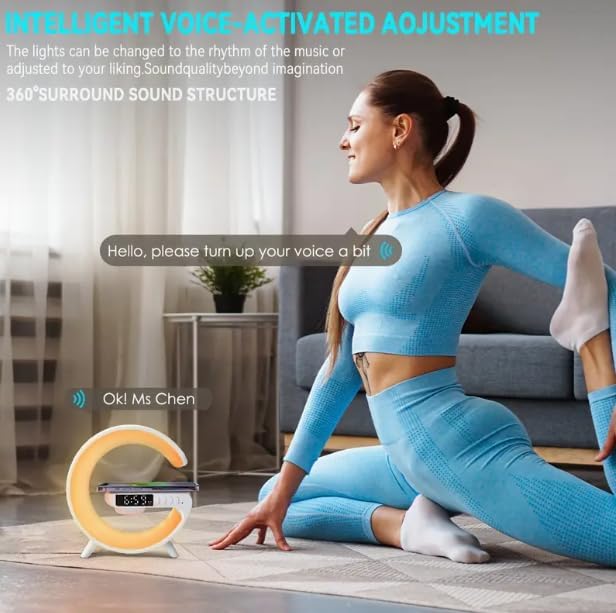
Image: Illustration of the voice-activated adjustment feature, where the device responds to spoken commands.
7. การบำรุงรักษา
- การทำความสะอาด: ใช้ผ้าแห้งเนื้อนุ่มเช็ดทำความสะอาดพื้นผิวของอุปกรณ์ ห้ามใช้สารทำความสะอาดที่มีฤทธิ์กัดกร่อนหรือตัวทำละลาย
- พื้นที่จัดเก็บ: เมื่อไม่ได้ใช้งานเป็นเวลานาน ควรเก็บอุปกรณ์ไว้ในที่แห้งและเย็น หลีกเลี่ยงแสงแดดโดยตรง
- การดูแลแบตเตอรี่ เพื่อยืดอายุการใช้งานแบตเตอรี่ ควรหลีกเลี่ยงการปล่อยให้แบตเตอรี่หมดจนเกลี้ยงบ่อยๆ ควรชาร์จแบตเตอรี่เป็นประจำ แม้ว่าจะไม่ได้ใช้งานตลอดเวลาก็ตาม
8 การแก้ไขปัญหา
| ปัญหา | สาเหตุที่เป็นไปได้ | สารละลาย |
|---|---|---|
| อุปกรณ์ไม่เปิด | แบตเตอรี่เหลือน้อย; สายไฟไม่ได้เชื่อมต่ออย่างถูกต้อง | Charge the device fully. Ensure the USB-C cable is securely connected to both the device and a working power source. |
| ไม่มีเสียงจากลำโพง | Volume too low; Not paired via Bluetooth; Incorrect mode selected. | Increase volume. Re-pair Bluetooth device. Ensure the device is in Bluetooth audio mode if playing from an external source. |
| การชาร์จแบบไร้สายไม่ทำงาน | Phone not Qi-compatible; Phone not centered; Foreign objects on pad; Device not powered on. | Ensure your phone supports Qi wireless charging. Re-position phone on the center of the pad. Remove any metal objects or thick cases. Ensure the Smart Light Sound Machine is powered on. |
| Cannot set or change time/alarm. | Incorrect button sequence; Firmware issue. | Refer to the specific instructions for time/alarm setting in the manual or remote control guide. Try resetting the device if issues persist. |
| Lights not changing or dimming. | Incorrect button usage; Device malfunction. | Ensure you are using the correct button ("Mode/Switch Light Effect") and pressing/holding it as instructed. |
9. ข้อมูลจำเพาะ
| แบบอย่าง | จี63 |
| ขนาด (กว้าง x ยาว x สูง) | ขนาด 5.7 นิ้ว (ลึก) x 5.7 นิ้ว (กว้าง) x 2.17 นิ้ว (สูง) (ประมาณ 150x54x157 มม.) |
| น้ำหนักสินค้า | 7.3 ออนซ์ |
| เวอร์ชันบลูทูธ | วี5.2 |
| กำลังขับของลำโพง | 3W |
| แบตเตอรี่ | 3.7V/300mAh |
| การใช้เวลา | 2-3 ชั่วโมง |
| เวลาในการชาร์จ | 2.5 ชั่วโมง |
| พอร์ตชาร์จ | ประเภทซี |
| อินพุตการชาร์จ | 5V/2A |
| เอาท์พุทชาร์จไร้สาย | 10วัตต์ |
| ประเภทแหล่งกำเนิดแสง | LED (7 colors) |
| วัสดุ | พลาสติก |
| ส่วนประกอบที่รวมอยู่ | รีโมทคอนโทรล |

Image: Product Size diagram, illustrating the physical dimensions of the Smart Light Sound Machine.
10. การรับประกันและการสนับสนุน
ผลิตภัณฑ์นี้มาพร้อมกับการรับประกันมาตรฐานจากผู้ผลิต โปรดดูรายละเอียดเงื่อนไขและข้อกำหนดเฉพาะในบัตรรับประกันที่อยู่ในบรรจุภัณฑ์ของคุณ สำหรับการสนับสนุนทางเทคนิค ความช่วยเหลือในการแก้ไขปัญหา หรือการเรียกร้องการรับประกัน โปรดติดต่อผู้ค้าปลีกหรือผู้ผลิตโดยตรงโดยใช้ข้อมูลการติดต่อที่ให้ไว้พร้อมกับการซื้อของคุณ
For further assistance, please visit the Generic brand's official support webเว็บไซต์หรือติดต่อฝ่ายบริการลูกค้าของพวกเขา
เอกสารที่เกี่ยวข้อง - จี63
 |
คู่มือผู้ใช้ลำโพงบลูทูธชาร์จไร้สาย G63 LED คู่มือผู้ใช้สำหรับลำโพง Bluetooth ชาร์จไร้สาย LED G63 ซึ่งมีรายละเอียดฟังก์ชัน ข้อมูลจำเพาะทางเทคนิค และคำแนะนำด้านความปลอดภัย |
 |
คู่มือการใช้งานลำโพง G63: การใช้งาน การตั้งค่า และข้อมูลจำเพาะทางเทคนิค คู่มือฉบับย่อสำหรับการใช้งานลำโพง G63 ครอบคลุมการเปิด/ปิดเครื่อง การตั้งเวลา การตั้งค่านาฬิกาปลุก การจับคู่บลูทูธ การควบคุมระดับเสียง การเล่นเพลงจากเมมโมรี่การ์ด และการชาร์จแบบไร้สาย รวมถึงข้อมูลจำเพาะทางเทคนิค |
 |
คู่มือการใช้งานลำโพงบลูทูธไร้สาย LED รุ่น G63 คู่มือนี้ให้คำแนะนำสำหรับการใช้งานลำโพงบลูทูธไร้สาย LED รุ่น G63 ครอบคลุมการตั้งค่า การจับคู่บลูทูธ ฟังก์ชั่นไฟ การเล่นเพลงจาก TF Card/USB และข้อควรระวังด้านความปลอดภัย |
 |
คู่มือผู้ใช้ลำโพงบลูทูธไร้สายพร้อมไฟ LED และที่ชาร์จ รุ่น G63 คู่มือการใช้งานลำโพงบลูทูธไร้สาย LED รุ่น G63 ครอบคลุมวิธีการใช้งาน คุณสมบัติ พารามิเตอร์ทางเทคนิค และแนวทางด้านความปลอดภัย เรียนรู้วิธีการเชื่อมต่อผ่านบลูทูธ การใช้งานการ์ด TF/USB และการควบคุมเอฟเฟกต์แสง |
 |
รายงานการประเมินการสัมผัสคลื่นวิทยุของลำโพงบลูทูธ G63 รายงานการประเมินการสัมผัสคลื่นวิทยุสำหรับลำโพงบลูทูธ G63 ซึ่งให้รายละเอียดเกี่ยวกับการปฏิบัติตามแนวทางของ FCC และผลการวัดความแรงของสนามแม่เหล็กไฟฟ้า |
 |
คู่มือการใช้งานเครื่องเสียงและแสงอัจฉริยะ G63 คู่มือการใช้งานเครื่อง G63 Smart Light Sound Machine ซึ่งให้รายละเอียดเกี่ยวกับคุณสมบัติ การใช้งาน พารามิเตอร์ทางเทคนิค และคำแนะนำด้านความปลอดภัย |
Ask a question about this manual
Ask about setup, troubleshooting, compatibility, parts, safety, or missing instructions. Manuals+ will review the question and use this page’s manual context to help answer it.