
1. บทนำ
This manual provides detailed instructions for the installation, operation, and maintenance of your JESIMAIK R16 Pro Motorcycle Helmet Bluetooth Headset. Please read this manual thoroughly before using the device to ensure proper function and safety. Keep this manual for future reference.

Image 1.1: JESIMAIK R16 Pro main units with included microphones and speakers.
2. สินค้าหมดview
2.1. คุณสมบัติหลัก
- Crystal Clear HD Stereo Audio: Equipped with 44mm HD speakers and 4 customizable sound effects (Direct, Bass, Rock, Pop).
- 10-Way 2KM Live Intercom: Supports communication for up to 10 riders with a range of 2 kilometers (1.24 miles). Cross-brand compatible.
- Multitasking Audio: Dual Qualcomm Bluetooth chips enable simultaneous music listening, GPS navigation, and intercom communication.
- การลดเสียงรบกวนขั้นสูง: Cancels up to 99% of background noise for clear communication and audio at speeds up to 120 km/h.
- กันน้ำ IP67: Provides complete protection against rain, dust, mud, and snow.
- Easy Installation & Glove-Friendly Design: Features dual microphone options (boom and soft mic) and large, easy-to-operate buttons.
- อายุการใช้งานแบตเตอรี่ยาวนาน: 1000mAh battery provides 1.5 hours charging time, 30 hours music time, 35 hours talk time, and 360 hours standby time.
2.2. เนื้อหาบรรจุภัณฑ์
The JESIMAIK R16 Pro package includes the following items:
- R16 Bluetooth Intercom Unit (x2)
- Type-C Connector Speaker (x2)
- Hard Microphone (x2)
- ไมโครโฟนแบบนิ่ม (2 ตัว)
- Headphone Velcro (x4)
- Microphone Velcro (x4)
- Metal Mounting Bracket (x2)
- Adhesive Back Clip (x2)
- สายชาร์จ Type-C (2 เส้น)
- คู่มือผู้ใช้ (x2)

ภาพที่ 2.1: รายละเอียด view of all components included in the R16 Pro package.
2.3. เค้าโครงอุปกรณ์

ภาพที่ 2.2: จบแล้วview of the R16 Pro unit with labeled controls: Volume +, Volume -, Intercom Button, Power Button, Phone Call Button, LED Indicator, Charging Port, Audio Port.
3. การติดตั้ง
The R16 Pro offers dual installation methods and is compatible with various helmet types.
3.1. การติดตั้งตัวเครื่อง
Choose between the metal mounting bracket (clip) or the adhesive back clip for installation.
- Install the bracket (clip or adhesive) on the side of your helmet.
- Insert the R16 Pro unit from above into the installed bracket.
- Plug the speakers and microphone into the host ports on the R16 Pro unit.
3.2. การจัดวางลำโพงและไมโครโฟน
Use the provided Velcro pads to secure the speakers inside the helmet's ear pockets. For the microphone, select either the boom microphone (for open-face helmets) or the soft microphone (for full-face helmets). Position the microphone close to your mouth for optimal voice clarity.

Image 3.1: Step-by-step guide for installing the R16 Pro, including bracket installation, unit insertion, speaker/microphone connection, and speaker/microphone placement.

Image 3.2: The R16 Pro is compatible with various helmet types including full, retro, uncover, and motocross helmets, and comes with both boom and soft microphones.
3.3. Removing the Unit
To safely remove the R16 Pro from its bracket:
- Use your right hand to press the plastic button located below the [+] button on the unit.
- While holding the button, use your left hand to push the R16 Pro unit in the direction of the arrow to slide it out of the bracket.

Image 3.3: Instructions for safely removing the R16 Pro unit from its mounting bracket.
4. การทำงานพื้นฐาน
4.1. เปิด/ปิดเครื่อง
- เปิดเครื่อง: กดปุ่มเปิด/ปิดค้างไว้จนกว่าไฟ LED จะสว่างขึ้น
- หมดแรง: กดปุ่มเปิด/ปิดค้างไว้จนกว่าไฟแสดงสถานะ LED จะดับลง
4.2. Bluetooth Pairing with Mobile Device
- Ensure the R16 Pro is powered off.
- Press and hold the Power Button until the LED indicator flashes red and blue, indicating pairing mode.
- On your mobile device, enable Bluetooth and search for "JESIMAIK R16 Pro".
- Select the device to pair. The LED will turn solid blue once connected.
4.3. การควบคุมระดับเสียง
ใช้ปุ่มเพิ่มเสียง (Volume +) และลดเสียง (Volume -) เพื่อปรับระดับเสียง
4.4. ฟังก์ชันการโทร
- รับสาย: Press the Phone Call Button once.
- วางสาย: Press the Phone Call Button once during a call.
- ปฏิเสธสาย: Press and hold the Phone Call Button.
- โทรซ้ำหมายเลขล่าสุด: Double-press the Phone Call Button.
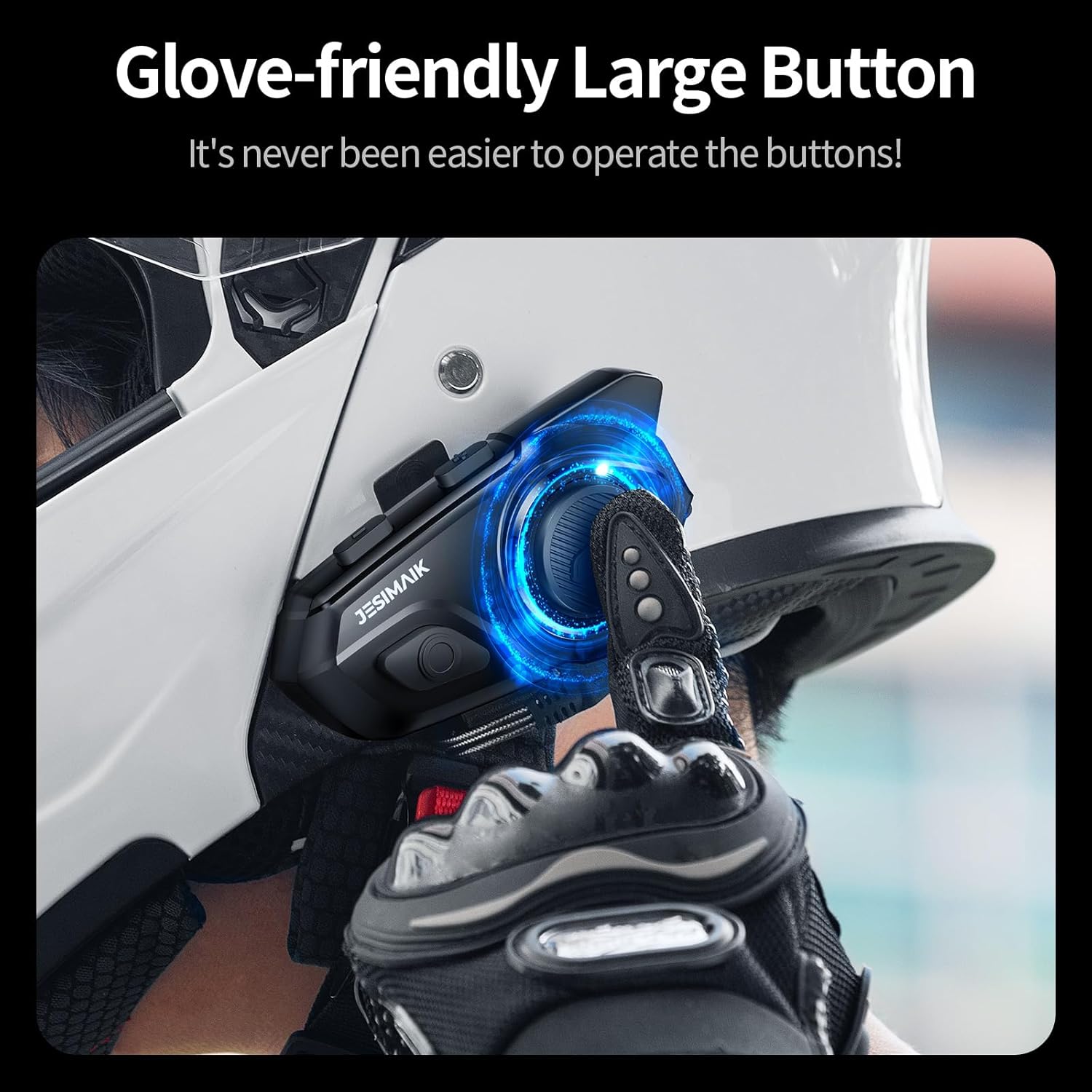
Image 4.1: The R16 Pro features large, glove-friendly buttons for easy operation while riding.
5. ฟังก์ชั่นระบบอินเตอร์คอม
5.1 การจับคู่ระบบอินเตอร์คอม (หลายเครื่อง)
The R16 Pro supports up to 10 riders for group intercom communication.
- Ensure all R16 Pro units are powered off.
- On two units, press and hold the Intercom Button until the LED flashes red and blue.
- Once paired, one unit's LED will turn solid blue, and the other will flash blue.
- Repeat the process for additional units, pairing each new unit to an already paired unit.
5.2. Initiating/Ending Intercom Calls
- เริ่มใช้งานระบบอินเตอร์คอม: Press the Intercom Button once on any paired unit.
- สิ้นสุดการสื่อสารภายใน: Press the Intercom Button once during an active intercom call.
5.3. Intercom Range and Compatibility
The R16 Pro offers an intercom range of up to 2 kilometers (1.24 miles) in optimal conditions. It is designed for seamless group rides and is cross-brand compatible with certain popular models. Note that cross-brand connection can only be established with one other brand at a time.

Image 5.1: The R16 Pro supports a 10-way intercom system with a range of up to 2 kilometers.

Image 5.2: The R16 Pro offers seamless pairing with other brands for enhanced communication.
6. ฟังก์ชั่นเสียง
6.1. Music Playback and Sound Effects
Once paired with your mobile device, you can play music. The R16 Pro features 4 customizable sound effects:
- Direct (Default)
- เบส
- หิน
- โผล่
Refer to the quick start guide for instructions on switching between sound effects.

Image 6.1: The R16 Pro offers four distinct sound effects for an optimized audio experience.
6.2. Multitasking Audio
The dual Qualcomm Bluetooth chips allow for simultaneous audio functions. You can listen to music or GPS navigation while maintaining an active intercom conversation.

Image 6.2: Multitasking audio allows for simultaneous intercom and music/GPS functions.
6.3. การแบ่งปันเพลง
The R16 Pro supports music sharing, allowing you to share the same audio with a passenger or another rider within a 10-meter range.

Image 6.3: Share music with a passenger or another rider for a synchronized audio experience.
7. การบำรุงรักษา
7.1. การชาร์จแบตเตอรี่
Connect the R16 Pro to a power source using the provided Type-C charging cable. A full charge takes approximately 1.5 hours. The LED indicator will show charging status.
- เวลาในการชาร์จ: 1.5 ชั่วโมง
- เวลาเพลง: 30 ชั่วโมง
- เวลาพูดคุย: ชั่วโมง 35
- เวลาสแตนด์บาย: 360 ชั่วโมง

Image 7.1: The R16 Pro features a 1000mAh battery providing extended usage times.
7.2. Waterproofing and Cleaning
The R16 Pro has an IP67 waterproof rating, protecting it from rain, dust, mud, and snow. To clean the unit, wipe it with a damp ผ้า. อย่าใช้สารเคมีที่รุนแรงหรือน้ำยาทำความสะอาดที่มีฤทธิ์กัดกร่อน

Image 7.2: The IP67 rating ensures the R16 Pro is protected against various environmental elements.
8 การแก้ไขปัญหา
If you encounter issues with your R16 Pro, refer to the following common problems and solutions:
| ปัญหา | สาเหตุที่เป็นไปได้ | สารละลาย |
|---|---|---|
| อุปกรณ์ไม่เปิดเครื่อง | แบตเตอรี่ต่ำ | ชาร์จอุปกรณ์อย่างน้อย 1.5 ชั่วโมง |
| ไม่สามารถจับคู่กับโทรศัพท์ได้ | อุปกรณ์ไม่ได้อยู่ในโหมดจับคู่; บลูทูธในโทรศัพท์ปิดอยู่ | Ensure R16 Pro is in pairing mode (flashing red/blue LED). Enable Bluetooth on your phone and search again. |
| Intercom connection unstable or screeching noise | Interference; improper pairing sequence | Disconnect and re-pair the intercom units. Ensure units are within range and clear of major obstructions. |
| Poor audio quality (music/calls) | Microphone not positioned correctly; volume too low/high; environmental noise | Adjust microphone position closer to mouth. Adjust volume. Ensure noise reduction is active. |
| ความเสียหายจากน้ำ | Exposure to water beyond IP67 rating; improper sealing | While IP67 rated, extreme conditions or prolonged submersion can cause damage. Ensure all ports are sealed. If damage occurs, contact support. |
9. ข้อมูลจำเพาะ
| คุณสมบัติ | ข้อมูลจำเพาะ |
|---|---|
| หมายเลขรุ่น | R16 โปร |
| น้ำหนักสินค้า | 1.59 ปอนด์ |
| ขนาดแพ็คเกจ | 7.36 x 5.67 x 3.46 นิ้ว |
| แบตเตอรี่ | ต้องใช้แบตเตอรี่ AAA 2 ก้อน (รวมอยู่ด้วย) |
| ระดับความต้านทานต่อน้ำ | กันน้ำระดับ IP67 |
| ผู้ผลิต | Shenzhen Xingyaoda Technology Co., Ltd. |
| อุปกรณ์ที่รองรับ | รถจักรยานยนต์ |
10. การรับประกันและการสนับสนุน
10.1. ข้อมูลการรับประกัน
The JESIMAIK R16 Pro comes with a 1-year warranty from the date of purchase. This warranty covers manufacturing defects and malfunctions under normal use. It does not cover damage caused by misuse, accidents, unauthorized modifications, or improper installation.
10.2. การสนับสนุนลูกค้า
For technical assistance, troubleshooting, or warranty claims, please contact JESIMAIK customer support through the retailer where the product was purchased or refer to the contact information provided in the original product packaging.