
1. บทนำ
This manual provides detailed instructions for the proper use and maintenance of your Uharbour 1/2 Drive Digital Torque Wrench (Model UHXM013). This precision instrument is designed for accurate torque application, featuring a range of 3.8-250.8 Ft.lb, digital display, and multiple alert systems. Adhering to these instructions will ensure optimal performance and longevity of the tool.
2. ข้อมูลด้านความปลอดภัย
Always observe the following safety precautions when operating the digital torque wrench:
- อ่านและทำความเข้าใจคำแนะนำทั้งหมดก่อนใช้งาน
- สวมใส่อุปกรณ์ป้องกันส่วนบุคคลที่เหมาะสม รวมถึงแว่นตานิรภัย
- อย่าใช้แรงบิดเกินกำลังสูงสุดของประแจ
- Ensure the socket or attachment is correctly seated on the drive.
- ควรทำความสะอาดประแจให้ปราศจากน้ำมันหรือจาระบี เพื่อให้จับได้อย่างมั่นคง
- เก็บประแจไว้ในกล่องป้องกันเมื่อไม่ได้ใช้งานเพื่อป้องกันความเสียหาย
- Do not use the wrench as a pry bar or hammer.
- เก็บให้พ้นจากมือเด็ก
3. เนื้อหาบรรจุภัณฑ์
ตรวจสอบว่ามีรายการทั้งหมดอยู่ในแพ็คเกจ:
- 1 x Uharbour Digital Torque Wrench
- 1 x กล่องเก็บของป้องกัน
- แบตเตอรี่ AAA 3 ก้อน
- 1 x คู่มือผู้ใช้ (เอกสารนี้)
- 1 x ใบรับรองการสอบเทียบ
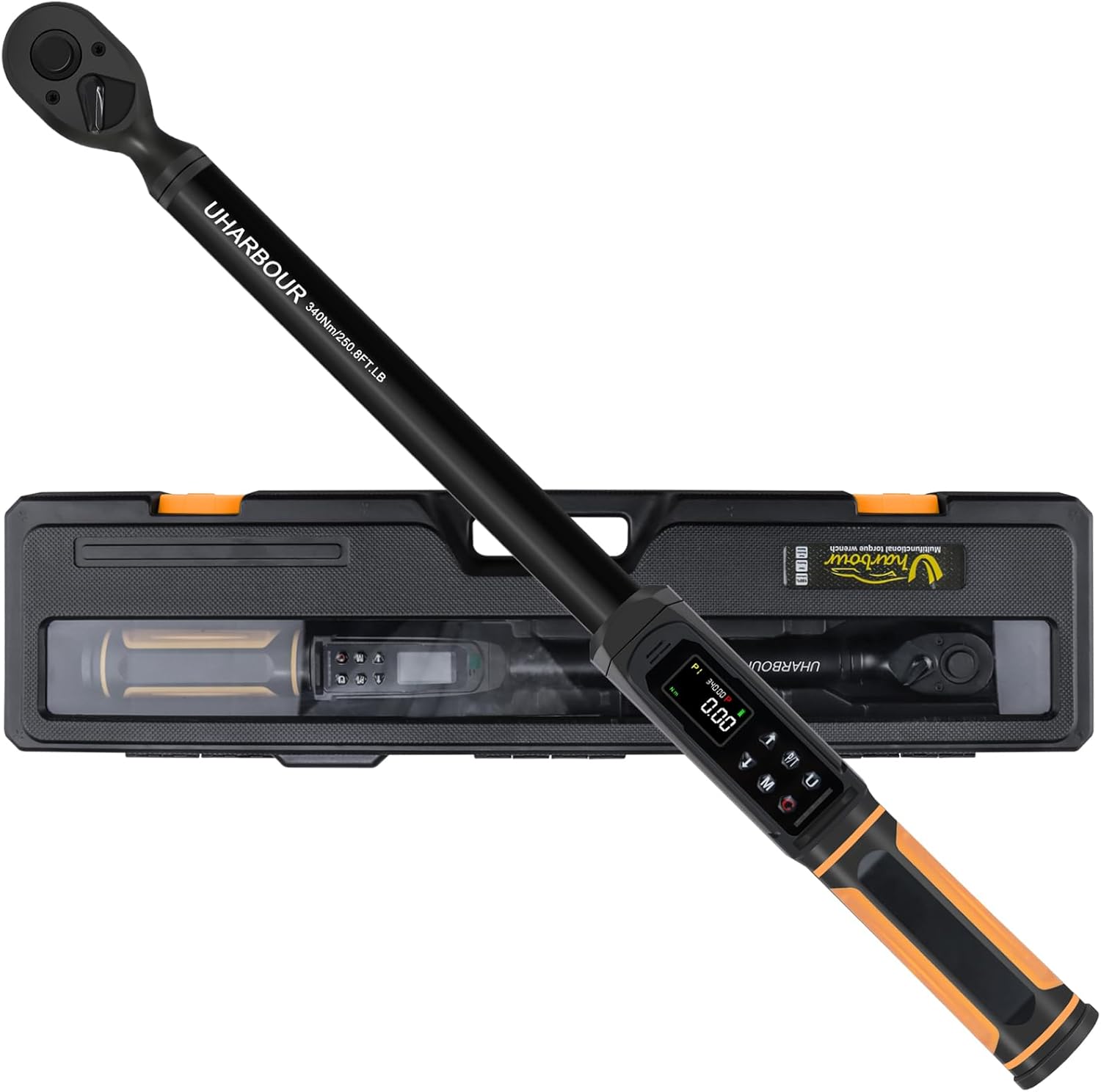
Image 3.1: The Uharbour Digital Torque Wrench shown with its included protective storage case.
4. สินค้าหมดview
The Uharbour Digital Torque Wrench features a robust design with advanced functionalities for precise torque measurement and application.
4.1 ส่วนประกอบหลัก
- 1/2" Drive Head: Compatible with standard 1/2-inch sockets.
- Digital Display (LCD Screen): High-definition screen with backlight for clear torque readings.
- ปุ่มควบคุม: สำหรับการเลือกกำลังไฟ หน่วยวัด โหมดการทำงาน และการปรับค่าต่างๆ
- ไฟ LED แสดงสถานะ: Visual alerts for approaching and reaching target torque.
- ออด: Audible alerts for approaching and reaching target torque.
- การแจ้งเตือนการสั่นสะเทือน: Tactile feedback when target torque is reached.
- Dual-Direction Ratchet: Allows for both clockwise and counterclockwise torque application.
- ปุ่มปลดล็อคด่วน: For easy and secure socket attachment and removal.

ภาพที่ 4.1: รายละเอียด view of the digital display, control buttons, LED indicators, and buzzer location on the torque wrench.

Image 4.2: The wrench in use, highlighting the dual-direction ratchet head and the quick release button for sockets.
5. การตั้งค่า
5.1 การติดตั้งแบตเตอรี่
The Uharbour Digital Torque Wrench requires three (3) AAA batteries for operation. To install or replace batteries:
- หาฝาปิดช่องใส่แบตเตอรี่ ซึ่งโดยทั่วไปจะอยู่ที่ฐานของด้ามจับ
- เปิดฝาโดยบิดหรือเลื่อนตามเครื่องหมายที่ระบุไว้
- ใส่แบตเตอรี่ AAA สามก้อน โดยตรวจสอบให้แน่ใจว่าขั้วถูกต้อง (+/-) ตามที่ระบุไว้ภายในช่องใส่แบตเตอรี่
- ปิดฝาช่องใส่แบตเตอรี่ให้แน่น
The wrench is now ready for initial power-on.
6. คู่มือการใช้งาน
6.1 เปิด/ปิดเครื่อง
- เปิดเครื่อง: Press and hold the power button (usually marked 'C' or power symbol) for a few seconds until the display illuminates.
- หมดแรง: Press and hold the power button until the display turns off. The wrench will automatically power off after a period of inactivity to conserve battery life.
6.2 การเลือกหน่วย
The wrench supports multiple measurement units. To change units:
- Press the 'U' button (Unit button) to cycle through available units: N-m, kgf-cm, lb-ft, and lb-in.
- Select the desired unit for your application.
6.3 Mode Selection (Peak & Track)
The wrench offers two primary operating modes:
- โหมดติดตาม: Displays the real-time torque value as it is applied. This is useful for monitoring torque during continuous application.
- โหมดพีค: Captures and displays the maximum torque value applied during an operation. In this mode, you can set a target torque value, and the wrench will provide alerts (vibration, buzzer, LED) when the target is approached and reached.
Press the 'P/T' button to switch between Track and Peak modes.

Image 6.1: Illustration of the three reading modes: Track mode for real-time display, Peak mode for target setting with alerts, and Torque memory for storing historical values.
6.4 Setting Target Torque (Peak Mode)
To set a target torque value in Peak mode:
- Ensure the wrench is in Peak mode (indicated on the display).
- Press the 'M' button (Memory/Set button) to enter the setting interface.
- Use the Up (▲) and Down (▼) arrow buttons to adjust the target torque value.
- Press the 'M' button again to confirm and save the setting.
6.5 การใช้แรงบิด
Once the target torque is set (or in Track mode):
- Attach the appropriate 1/2" drive socket to the wrench head.
- วางซ็อกเก็ตลงบนตัวยึด
- Apply steady, smooth force to the wrench handle.
- In Peak mode, observe the LED indicators, listen for the buzzer, and feel for vibration as you approach and reach the target torque. Stop applying force immediately upon receiving the final alert.
- In Track mode, monitor the real-time display to achieve the desired torque.

Image 6.2: The digital display providing instant and accurate torque readings, eliminating guesswork.
6.6 Torque Memory
The wrench can store torque value histories for future reference. Consult the specific instructions in the included printed manual for details on accessing and managing stored memory slots (P1-P9).
7. การบำรุงรักษา
7.1 การทำความสะอาด
- Wipe the wrench clean with a soft, dry cloth after each use.
- Do not use abrasive cleaners or solvents, as these can damage the finish or electronic components.
7.2 พื้นที่จัดเก็บ
- Store the torque wrench in its protective case in a dry, clean environment.
- ถอดแบตเตอรี่ออกหากจะไม่ใช้ประแจเป็นเวลานานเพื่อป้องกันการรั่วไหล
7.3 การสอบเทียบ
Digital torque wrenches require periodic calibration to maintain accuracy. The included Certificate of Calibration provides details on the initial calibration. It is recommended to verify calibration every 12 months or after 5000 cycles of use, whichever comes first. Contact Uharbour customer service for calibration services.

Image 7.1: The Uharbour Digital Torque Wrench is supplied with a calibration certificate, ensuring initial accuracy.
8 การแก้ไขปัญหา
If you encounter issues with your Uharbour Digital Torque Wrench, refer to the following common problems and solutions:
| ปัญหา | สาเหตุที่เป็นไปได้ | สารละลาย |
|---|---|---|
| Wrench does not power on. | แบตเตอรี่เสียหรือติดตั้งไม่ถูกต้อง | ตรวจสอบขั้วแบตเตอรี่ เปลี่ยนแบตเตอรี่ AAA ใหม่ |
| ค่าแรงบิดที่วัดได้ไม่แม่นยำ | Wrench needs calibration; improper technique. | Ensure smooth, steady pull. Refer to calibration section. Contact customer service for recalibration. |
| Alerts (buzzer, LED, vibration) not functioning. | Low battery; alert settings disabled. | Replace batteries. Check user manual for alert setting adjustments. |
| จอภาพมืดหรือกระพริบ | แบตเตอรี่อ่อน | เปลี่ยนด้วยแบตเตอรี่ AAA ใหม่ |
9. ข้อมูลจำเพาะ
| คุณสมบัติ | รายละเอียด |
|---|---|
| หมายเลขรุ่น | ยูเอชเอ็กซ์เอ็ม013 |
| ขนาดไดรฟ์ | 1/2 นิ้ว |
| ช่วงแรงบิด | 3.8-250.8 Ft.lb (5-340 N.m) |
| ความแม่นยำ | ±1% |
| หน่วยการวัด | นิวตันเมตร, กก.-ซม., ปอนด์-ฟุต, ปอนด์-นิ้ว |
| โหมดการทำงาน | จุดสูงสุด, เส้นทาง |
| การแจ้งเตือน | Vibration, Buzzer, LED Indicators |
| หัวแร็กเก็ต | Dual-Direction (Clockwise/Counterclockwise) |
| แหล่งพลังงาน | แบตเตอรี่ AAA 3 ก้อน |
| วัสดุ | Alloy Aluminum, Chrome Vanadium Steel, Plastic, Rubber |
| น้ำหนักสินค้า | 2.45 กิโลกรัม (5.39 ปอนด์) |
| ขนาด | ขนาดโดยประมาณ 23 x 6 x 3 นิ้ว (บรรจุภัณฑ์) |
10. การรับประกันและการสนับสนุน
The Uharbour Digital Torque Wrench typically comes with a two-year warranty from the date of purchase. Please refer to your Certificate of Calibration and the warranty information included in your package for specific terms and conditions.
For technical support, calibration services, or warranty claims, please contact Uharbour customer service through their official webไซต์หรือข้อมูลการติดต่อที่ระบุไว้ในเอกสารผลิตภัณฑ์ของคุณ
เป็นทางการ Webเว็บไซต์: www.uharbour.net
อีเมลฝ่ายบริการลูกค้า: support@uharbour.net