
1. บทนำ
This manual provides detailed instructions for the safe and effective operation, maintenance, and troubleshooting of your Uharbour Digital Torque Wrench 1/2 Drive, model UHXM012. Please read this manual thoroughly before using the product to ensure proper function and to prevent damage or injury.
2. ข้อมูลด้านความปลอดภัย
คำเตือน: การไม่ปฏิบัติตามคำแนะนำด้านความปลอดภัยเหล่านี้ อาจส่งผลให้เกิดการบาดเจ็บหรือความเสียหายต่อเครื่องมือหรือชิ้นงานได้
- Always wear appropriate personal protective equipment, such as safety glasses, when using this tool.
- ตรวจสอบให้แน่ใจว่าชิ้นงานได้รับการยึดอย่างแน่นหนา ก่อนที่จะใช้แรงบิด
- Do not exceed the maximum torque capacity of 147.5 ft-lbs (200 Nm).
- อย่าใช้ประแจปอนด์เป็นแท่งเบรกเกอร์
- Keep the tool clean and dry. Store it in its protective case when not in use.
- Do not attempt to disassemble or modify the torque wrench. Refer all servicing to qualified personnel.
- เก็บให้พ้นจากมือเด็ก
3. เนื้อหาบรรจุภัณฑ์
ตรวจสอบว่ารายการทั้งหมดที่ระบุไว้ด้านล่างนี้รวมอยู่ในแพ็คเกจของคุณ:
- Uharbour Digital Torque Wrench (1/2" Drive)
- ใบรับรองการสอบเทียบ
- คู่มือการใช้งาน (เอกสารนี้)
- กล่องเก็บของ
- Alkaline Batteries (pre-installed or included separately)
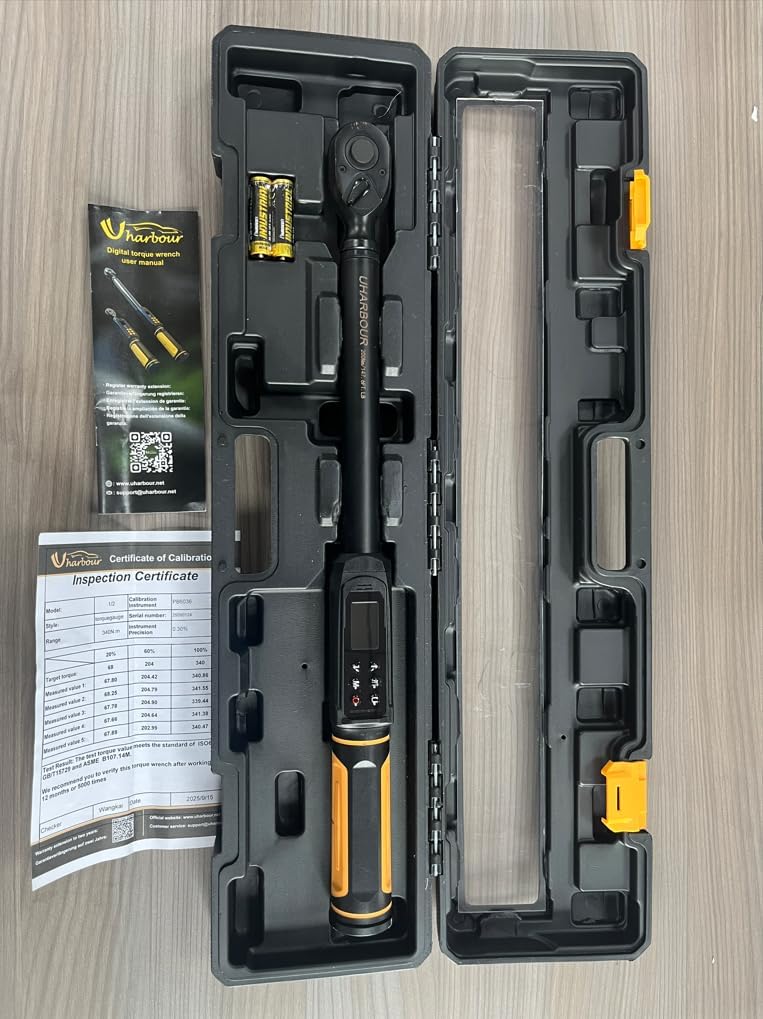
Figure 3.1: The Uharbour Digital Torque Wrench and its included accessories, neatly organized within its durable storage case.
4. สินค้าหมดview
The Uharbour Digital Torque Wrench is designed for precise torque applications across various tasks, including automotive, motorcycle, and bicycle maintenance. It features a durable construction and an intuitive digital interface.
คุณสมบัติหลัก:
- Wide Torque Range: 2.2-147.5 ft-lbs (3-200 Nm).
- ความแม่นยำสูง: ความคลาดเคลื่อน ±2% สำหรับการวัดที่เชื่อถือได้
- Peak & Track Modes: For target setting and real-time monitoring.
- การแจ้งเตือน: Vibration, buzzer, and LED indicators for target torque.
- Dual-Direction Ratchet: Supports both clockwise and counterclockwise operations.
- หน่วยการวัดหลายหน่วย: N-m, kgf-cm, lb-ft, and lb-in.
- หน้าจอ LED ความละเอียดสูง: For clear and easy-to-read measurements.

Figure 4.1: The digital display of the torque wrench, showing current torque value, selected units (N.m, lb.ft, lb.in, kg.cm), and mode indicators (P for Peak, T for Track).
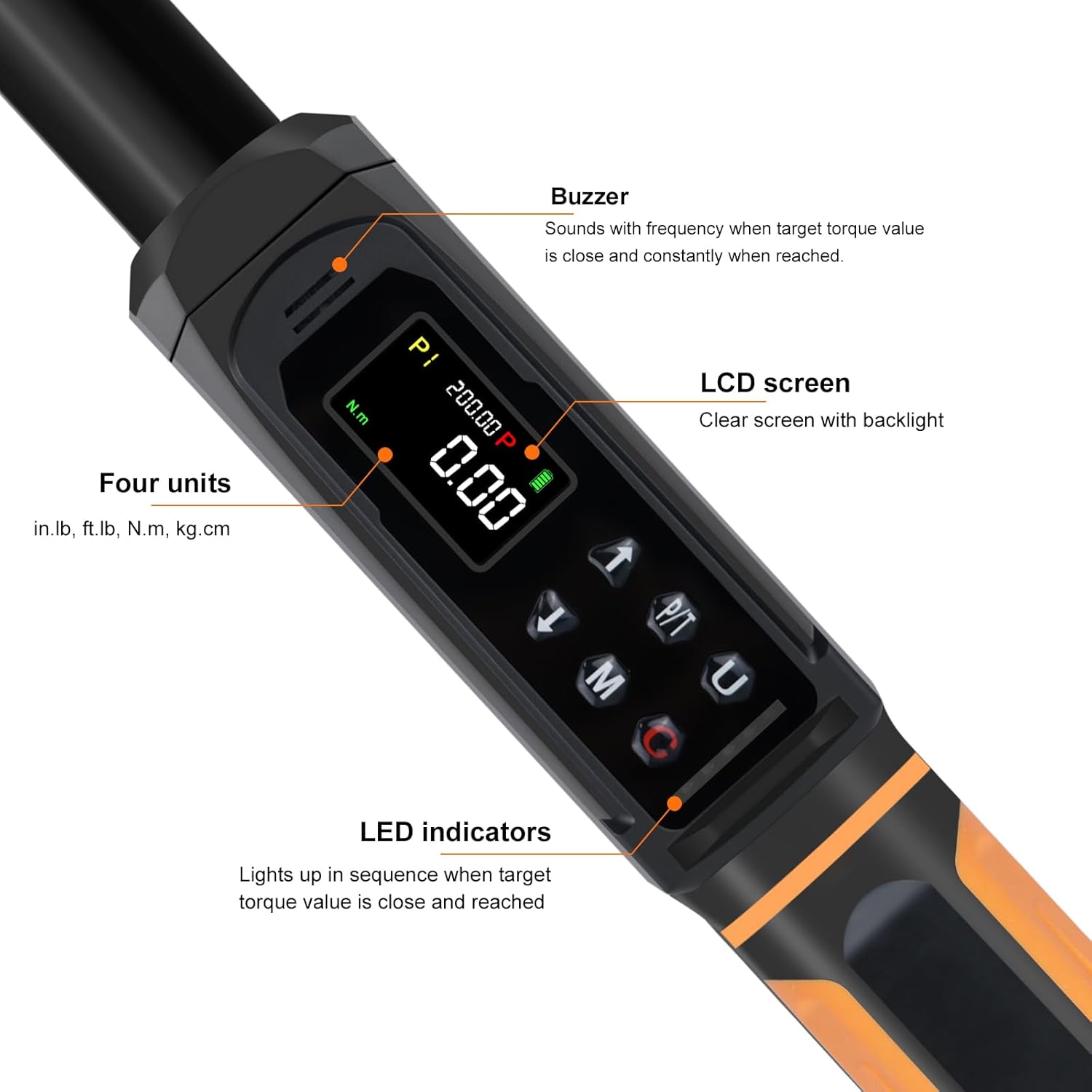
รูปที่ 4.2: รายละเอียด view of the wrench's control panel, highlighting the LCD screen, buzzer, LED indicators, and buttons for unit selection (U), mode (M), and power/clear (C).
5. การตั้งค่า
5.1 การติดตั้งแบตเตอรี่
The Uharbour Digital Torque Wrench requires alkaline batteries for operation. Ensure batteries are installed correctly before first use.
- หาฝาปิดช่องใส่แบตเตอรี่ ซึ่งโดยทั่วไปจะอยู่ที่ฐานของด้ามจับ
- Open the cover and insert the required alkaline batteries, observing the correct polarity (+/-) as indicated inside the compartment.
- ปิดฝาช่องใส่แบตเตอรี่ให้แน่น
บันทึก: If the wrench will not be used for an extended period, remove the batteries to prevent leakage and damage.
6. คู่มือการใช้งาน
6.1 เปิด/ปิดเครื่อง
- ในการเปิดเครื่อง ให้กด Power/Clear (C) ปุ่ม.
- The wrench will automatically power off after a period of inactivity to conserve battery life.
6.2 การเลือกหน่วยการวัด
The wrench supports four measurement units: N-m, kgf-cm, lb-ft, and lb-in.
- กดปุ่ม Unit (U) button to cycle through the available units until your desired unit is displayed.
6.3 โหมดการทำงาน
The Uharbour Digital Torque Wrench features two primary operating modes: Peak mode and Track mode.

Figure 6.1: Visual representation of the three reading modes: Track mode for real-time display, Peak mode for maximum torque applied, and Torque Memory for historical data.
6.3.1 Track Mode (T)
- In Track mode, the display shows the real-time torque value being applied.
- To select Track mode, press the โหมด (M) button until 'T' is displayed on the screen.
- This mode is useful for continuous monitoring of torque during tightening.
6.3.2 Peak Mode (P)
- In Peak mode, the wrench records and displays the maximum torque value applied during a tightening operation.
- To select Peak mode, press the โหมด (M) button until 'P' is displayed on the screen.
- To set a target torque value:
- While in Peak mode, press the โหมด (M) button again to enter target setting.
- ใช้ Up (↑) และ Down (↓) buttons to adjust the target torque value.
- กดปุ่ม โหมด (M) ปุ่มเพื่อยืนยันการตั้งค่า
- When the applied torque approaches the target value, the wrench will provide alerts via vibration, a buzzer, and LED indicators.
6.4 Dual-Direction Ratchet
The 1/2" drive reversible ratchet head allows for both clockwise (CW) and counterclockwise (CCW) operation. To change direction, simply flip the lever on the ratchet head.

Figure 6.2: The torque wrench being used to tighten a lug nut, illustrating the dual-direction ratchet mechanism and the quick-release button for sockets.
6.5 ปุ่มปลดเร็ว
The quick release button on the ratchet head allows for easy and secure attachment and detachment of sockets.
7. การบำรุงรักษา
- การทำความสะอาด: Wipe the wrench with a clean, dry cloth after each use. Do not use abrasive cleaners or solvents.
- พื้นที่จัดเก็บ: เก็บประแจแรงบิดในกล่องป้องกันในสถานที่แห้งและเย็น หลีกเลี่ยงแสงแดดโดยตรงและอุณหภูมิที่สูงหรือต่ำเกินไป
- การเปลี่ยนแบตเตอรี่: เปลี่ยนแบตเตอรี่เมื่อไฟแสดงสถานะแบตเตอรี่ต่ำปรากฏขึ้นบนหน้าจอแสดงผล ทิ้งแบตเตอรี่ที่ใช้แล้วอย่างถูกวิธี
- การสอบเทียบ: Digital torque wrenches require periodic calibration to maintain accuracy. Refer to the included Certificate of Calibration for details.
8 การแก้ไขปัญหา
| ปัญหา | สาเหตุที่เป็นไปได้ | สารละลาย |
|---|---|---|
| Wrench does not power on. | แบตเตอรี่เสียหรือติดตั้งไม่ถูกต้อง | Check battery polarity. Replace batteries with new alkaline batteries. |
| การอ่านที่ไม่ถูกต้อง | Wrench needs calibration; improper usage. | Ensure proper technique. Refer to calibration certificate for recommended service intervals. |
| จอภาพมืดหรือกระพริบ | พลังงานแบตเตอรี่ต่ำ | เปลี่ยนแบตเตอรี่ |
| No alert (vibration, buzzer, LED) at target torque. | Wrench not in Peak mode; alert settings off. | Ensure wrench is in Peak mode and target torque is set. Check if alert functions are enabled (if applicable). |
9. ข้อมูลจำเพาะ
| คุณสมบัติ | รายละเอียด |
|---|---|
| หมายเลขรุ่น | ยูเอชเอ็กซ์เอ็ม012 |
| ขนาดไดรฟ์ | 1/2 นิ้ว |
| ช่วงแรงบิด | 2.2-147.5 ฟุต-ปอนด์ (3-200 นิวตันเมตร) |
| ความแม่นยำ | ±2% |
| หน่วยการวัด | นิวตันเมตร, กก.-ซม., ปอนด์-ฟุต, ปอนด์-นิ้ว |
| โหมดการทำงาน | จุดสูงสุด, เส้นทาง |
| การแจ้งเตือน | Vibration, Buzzer, LED |
| ทิศทางของแร็กเก็ต | ตามเข็มนาฬิกาและทวนเข็มนาฬิกา |
| วัสดุ | Alloy Aluminum, Chrome Vanadium Steel, Plastic, Rubber |
| แหล่งพลังงาน | แบตเตอรี่อัลคาไลน์ |
| น้ำหนักสินค้า | 2.38 กก. (โดยประมาณ) |
| ขนาดแพ็คเกจ | 59.18 x 15.75 x 7.37 ซม. (โดยประมาณ) |
10. การรับประกันและการสนับสนุน
Your Uharbour Digital Torque Wrench comes with a Certificate of Calibration, ensuring its accuracy at the time of manufacture. For warranty information and support, please refer to the details provided on your Certificate of Calibration or contact Uharbour customer service.
- การขยายการรับประกัน: The product may be eligible for a warranty extension to two years. Please check the calibration certificate for registration details.
- การสนับสนุนลูกค้า: For technical assistance or service inquiries, please contact customer.service.support@uharbour.net.

Figure 10.1: The Uharbour Digital Torque Wrench alongside its Inspection Certificate, which includes calibration data and warranty information.