
1. บทนำ
This manual provides detailed instructions for the BRUBOSES Military Smart Watch. Please read this manual carefully before using the device to ensure proper operation and to maximize its features. Keep this manual for future reference.
2. สินค้าหมดview
The BRUBOSES Military Smart Watch is a rugged and versatile device designed for durability and extensive functionality. It features a robust build and a comprehensive suite of health and fitness tracking capabilities.
- Military Grade Standard & 5ATM Waterproof: Constructed from special composite materials and a metal shell, this smartwatch is designed to withstand harsh conditions, including drilling, crushing, hot steam, salt spray, and liquid contamination. It remains functional even in very low temperatures.
- Bluetooth Calls & Message Notification: Equipped with a 5.0 Bluetooth chip, allowing users to make and receive calls, receive text messages, control music playback, and remotely take photos.
- Multifunctional Smart Watch: Includes social media message notifications, AI voice assistant, blood pressure, blood oxygen, dynamic heart rate, sleep monitoring, alarm clock, calculator, breathing exercises, calorie counting, sedentary reminders, stopwatch, remote camera, music control, weather forecast, multi-dial switching, and drink water reminders.
- 530mAh Large Battery Capacity & DIY AMOLED Touch Screen: Features a 400mAh battery with up to 30 days standby time and 7-10 days normal working time. The 1.39'' AMOLED touch screen (360*360 pixels) offers 5 adjustable brightness levels and over 200 customizable UI options.
- Personal Health Assistant: Supports 24-hour heart rate monitoring, real-time blood pressure/blood oxygen detection, and sleep monitoring (deep sleep, light sleep, eye movement mode). Monitoring data is saved for 30 days.
- โหมดกีฬามากกว่า 120 แบบ: Offers over 120 sports modes, including cycling, running, basketball, rugby, skiing, and more. Connects via Bluetooth to an app for additional sports modes. Monitors workout heart rate, distance, speed, and calories in real-time.

Figure 1: The BRUBOSES Military Smart Watch, showcasing its rugged design and included metal and silicone bands.

Figure 2: The smartwatch demonstrating its Bluetooth call and smart notification capabilities, showing incoming calls and various app icons.

รูปที่ 3: รายละเอียด view of the 1.43-inch AMOLED HD display, highlighting its 360x360 pixel resolution and clear visuals.

Figure 4: The smartwatch's built-in flashlight feature in use, providing illumination in a dark outdoor environment.

Figure 5: The smartwatch screen showing its charging status and highlighting its 530mAh extra-long battery life with working and standby times.
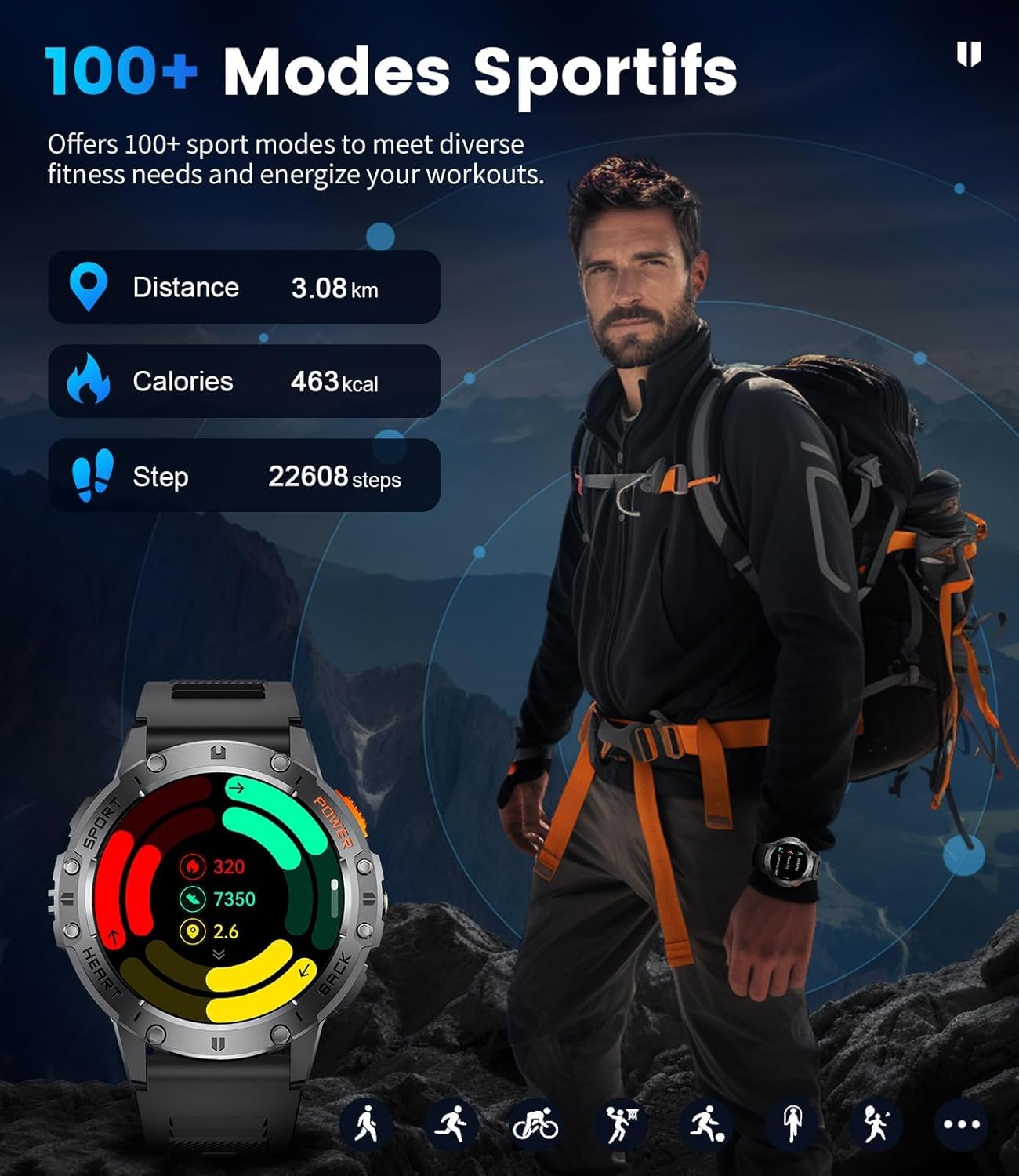
Figure 6: Visual representation of the smartwatch's 24/7 heart rate monitoring and sleep tracking features, showing data for deep sleep, light sleep, and awake time.

Figure 7: The smartwatch interface showing sports activity data, including distance, calories burned, and steps taken, with a background image of a hiker.

Figure 8: An illustration of the smartwatch's military-grade standard, highlighting its anti-impact, dustproof, harsh condition resistance, anti-fluid corrosion, and 5ATM waterproof capabilities.

รูปที่ 9: การแสดงนาฬิกาอัจฉริยะasing its extensive library of over 200 customizable watch faces, along with features like stopwatch, remote photography, music control, and weather forecast.
3. การตั้งค่า
Follow these steps to set up your BRUBOSES Military Smart Watch:
- ดาวน์โหลดแอป: Scan the QR code provided in the manual or on the product packaging to download the 'FitCloudPro' application. You can also find the app on your device's app store. ดาวน์โหลดแอป FitCloudPro
- เปิดใช้งานบลูทูธ: On your mobile phone, navigate to your settings and turn on Bluetooth.
- Open FitCloudPro: Launch the 'FitCloudPro' app on your phone and allow it to search for nearby devices.
- เชื่อมต่ออุปกรณ์: In the app, find 'K65' or the corresponding device ID and tap 'Connect' to pair your smartwatch.

Figure 10: Visual guide for connecting the smartwatch to your mobile phone via the FitCloudPro app, including scanning the QR code and enabling Bluetooth.
4. คู่มือการใช้งาน
4.1 การนำทางพื้นฐาน
The smartwatch features a responsive AMOLED touch screen and physical buttons for navigation. Swipe across the screen to access different features and menus. Use the side buttons for quick access to specific functions or to return to the previous screen.
4.2 Bluetooth Calls & Notifications
Once paired with your phone, you can make and receive calls directly from your watch. Incoming call alerts will display on the screen. Message notifications from various social media apps will also be displayed, allowing you to preview content without taking out your phone.
4.3 การตรวจติดตามสุขภาพ
The watch continuously monitors your health data:
- อัตราการเต้นของหัวใจ: มีระบบตรวจสอบอัตราการเต้นของหัวใจตลอด 24 ชั่วโมง
- ออกซิเจนในเลือด (SpO2): Real-time SpO2 detection.
- ความดันโลหิต: Real-time blood pressure monitoring.
- การติดตามการนอนหลับ: Records sleep time and detects sleep status (deep sleep, light sleep, eye movement mode). Data is saved for 30 days in the app.
4.4 Sport Modes & GPS Tracking
Select from over 120 sports modes to track your activities. For outdoor activities, the watch utilizes built-in GPS to monitor critical data such as workout heart rate, distance traveled, movement speed, and calories burned. To start a workout:
- Navigate to the 'Workout' section on your watch.
- Select your desired sport mode (e.g., Outdoor Run, Outdoor Walk).
- Wait for GPS to acquire a signal (if applicable) or tap 'Start Now'.
- The watch will begin tracking your activity. To end a workout, press and hold the designated button on the watch face until the workout ends.
4.5 ไฟฉาย
Activate the built-in LED flashlight feature for convenient illumination in dark environments. This feature is useful for outdoor adventures or navigating in low-light conditions.
4.6 การควบคุมเพลง
ควบคุมการเล่นเพลงบนสมาร์ทโฟนที่เชื่อมต่ออยู่ได้โดยตรงจากสมาร์ทวอทช์ของคุณ คุณสามารถเล่น หยุดชั่วคราว ข้ามเพลง และปรับระดับเสียงได้
4.7 ผู้ช่วยเสียง AI
Utilize the AI voice assistant for hands-free control and information retrieval. Simply activate the voice assistant and speak your commands or questions.
5. การบำรุงรักษา
To ensure the longevity and optimal performance of your smartwatch, follow these maintenance guidelines:
- การทำความสะอาด: ควรทำความสะอาดนาฬิกาและสายนาฬิกาเป็นประจำด้วยผ้าแห้งเนื้อนุ่ม สำหรับคราบสกปรกฝังแน่น ให้ใช้ผ้าที่ชุบน้ำยาทำความสะอาดเล็กน้อยamp ผ้าและสบู่ชนิดอ่อน จากนั้นล้างออกและเช็ดให้แห้งสนิท
- การชาร์จ: ใช้เฉพาะสายชาร์จที่ให้มาเท่านั้น ตรวจสอบให้แน่ใจว่าขั้วชาร์จบนนาฬิกาและสายชาร์จสะอาดและแห้งก่อนทำการชาร์จ
- ความต้านทานน้ำ: The watch is 5ATM waterproof, suitable for swimming and showering. However, avoid hot water, steam, or prolonged submersion in deep water. Do not operate buttons underwater.
- หลีกเลี่ยงเงื่อนไขที่รุนแรง: Do not expose the watch to extreme temperatures (hot or cold), direct sunlight for extended periods, or corrosive chemicals.
- พื้นที่จัดเก็บ: เมื่อไม่ได้ใช้งานเป็นเวลานาน ควรเก็บนาฬิกาไว้ในที่แห้งและเย็น
6 การแก้ไขปัญหา
หากคุณพบปัญหาเกี่ยวกับสมาร์ทวอทช์ โปรดดูวิธีแก้ไขปัญหาทั่วไปต่อไปนี้:
- นาฬิกาไม่เปิด: ตรวจสอบให้แน่ใจว่านาฬิกาชาร์จเต็มแล้ว เสียบนาฬิกาเข้ากับเครื่องชาร์จและรอสักครู่ก่อนลองเปิดเครื่อง
- ไม่สามารถจับคู่กับโทรศัพท์ได้:
- ตรวจสอบให้แน่ใจว่าได้เปิดใช้งานบลูทูธบนโทรศัพท์และนาฬิกาของคุณแล้ว
- ตรวจสอบให้แน่ใจว่านาฬิกาอยู่ในระยะบลูทูธของโทรศัพท์ของคุณ
- รีสตาร์ททั้งโทรศัพท์และนาฬิกาของคุณ
- ล้างแคชบลูทูธในโทรศัพท์ของคุณ (ถ้ามี) แล้วลองใหม่อีกครั้ง
- ข้อมูลสุขภาพที่ไม่ถูกต้อง:
- ตรวจสอบให้แน่ใจว่าสวมนาฬิกาให้พอดีกับข้อมือ ไม่แน่นหรือหลวมเกินไป
- ทำความสะอาดเซ็นเซอร์ที่ด้านหลังของนาฬิกา
- หลีกเลี่ยงการเคลื่อนไหวมากเกินไปในระหว่างการวัด
- การแจ้งเตือนไม่ปรากฏ:
- Check app permissions in your phone settings to ensure 'FitCloudPro' has access to notifications.
- Verify that notifications are enabled within the 'FitCloudPro' app for specific applications.
- ตรวจสอบให้แน่ใจว่านาฬิกาเชื่อมต่อผ่านบลูทูธ
- อายุการใช้งานแบตเตอรี่สั้น:
- ลดความสว่างหน้าจอ
- Disable continuous heart rate monitoring or other background features if not needed.
- จำกัดจำนวนการแจ้งเตือนที่ใช้งานอยู่
7. ข้อมูลจำเพาะ
| คุณสมบัติ | ข้อมูลจำเพาะ |
|---|---|
| ขนาดสินค้า | 6 x 2 x 3 นิ้ว |
| น้ำหนักสินค้า | 10.2 ออนซ์ |
| ASIN | B0DHRN1MLX |
| หมายเลขรุ่นสินค้า | f830a45f-977a-46ae-8e2e-fd026154c8cd |
| แบตเตอรี่ | ต้องใช้แบตเตอรี่ลิเธียมไอออน 1 ก้อน (รวมอยู่ด้วย) |
| วันที่พร้อมใช้งานครั้งแรก | 13 ตุลาคม 2024 |
| ผู้ผลิต | BRUBOSES |
| ขนาดการแสดงผลหน้าจอยืน | 1.43 นิ้ว |
| ความจุของหน่วยความจำ | 128MB |
| ระบบปฏิบัติการ | แอนดรอยด์แวร์ 2.9 |
| ความจุของแบตเตอรี่ | 520 Amp ชั่วโมง |
| เทคโนโลยีการเชื่อมต่อ | บลูทูธ |
| มาตรฐานการสื่อสารไร้สาย | บลูทูธ |
| ส่วนประกอบของเซลล์แบตเตอรี่ | ลิเธียมไอออน |
| จีพีเอส | ไม่มีจีพีเอส |
| รูปร่าง | กลม |
| ขนาดหน้าจอ | 1.43 นิ้ว |
8. การรับประกันและการสนับสนุน
The D65 Military Smartwatch comes with a 12-month warranty. If you encounter any issues with your watch, including accessories, quality problems, operation, or charging, please contact BRUBOSES customer service. We are committed to providing a solution within 24 hours.
ความเข้ากันได้: This smartwatch is compatible with Android 4.4 and above, and iOS 8.0 and above.