
การแนะนำ
The Anmite 15.6 inch 4K Portable Monitor is designed to enhance your visual experience, offering stunning 3840x2160 UHD resolution with excellent color reproduction. Its lightweight and ultra-thin design make it an ideal companion for work, gaming, and entertainment on the go. This manual provides detailed instructions to help you set up, operate, and maintain your portable monitor for optimal performance.
มีอะไรอยู่ในกล่อง
โปรดตรวจสอบให้แน่ใจว่าสินค้าทั้งหมดที่ระบุไว้ด้านล่างอยู่ในพัสดุของคุณ หากมีสินค้าใดขาดหายหรือเสียหาย โปรดติดต่อฝ่ายบริการลูกค้า
- Anmite Portable Monitor x 1
- Mini-HDMI to HDMI cable x 1
- สายเคเบิล Type-C ถึง Type-C x 1
- Type-C to USB-A cable x 1
- คู่มือผู้ใช้ x 1
สินค้าเกินview
The Anmite 15.6 inch 4K Portable Monitor features a sleek design with multiple connectivity options and integrated speakers.
คุณสมบัติหลัก:
- Type-C and Mini HDMI Interface: Equipped with versatile ports for high-definition video signal transmission.
- IPS FHD LED Screen: Delivers stunning 3840x2160 UHD resolution visuals with awesome color reproduction and wide viewมุมการเอียง
- การออกแบบพกพา: Ultra-thin (0.39 inches) and lightweight (1.76 pounds) for easy portability and mobile extensibility.
- ลำโพงคู่: Built-in dual speakers provide an immersive audio experience.
Physical Layout and Dimensions:

The monitor's physical dimensions are approximately 360mm x 225mm x 5-10mm. The visual area is 344.16mm x 194.59mm.

The monitor includes an integrated kickstand for flexible positioning. It also features VESA mounting holes (7.5cm x 7.5cm) for alternative mounting solutions.
พอร์ตและปุ่มควบคุม:
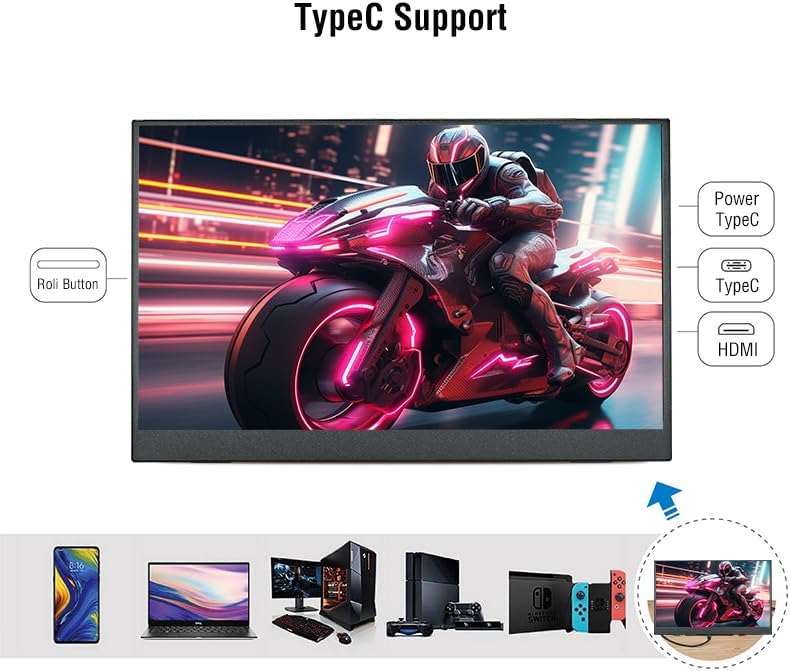
The monitor is equipped with the following interfaces:
- Mini-HDMI Input
- Type-C (Full Function) Input/Power x 1
- Type-C (Power Only) Input x 1
- 3.5mm Audio Interface Output
- Control buttons (e.g., power, menu navigation)
คำแนะนำการตั้งค่า
Follow these steps to set up your Anmite Portable Monitor:
- การวางตำแหน่งจอภาพ:
- Unfold the integrated kickstand on the back of the monitor to your desired viewมุมอิง
- Alternatively, use a VESA-compatible mount (75x75mm, M4*4mm screws) for a more permanent setup.
- การเชื่อมต่อกับแหล่งพลังงาน:
- Connect the provided Type-C to USB-A cable to the monitor's Type-C (Power Only) port and to a compatible USB power adapter or device.
- For optimal brightness and stable power supply, especially when using 4K resolution, it is recommended to use a dedicated power adapter.
- การเชื่อมต่อกับอุปกรณ์:
- Using Type-C (Full Function): If your device (laptop, smartphone, game console) has a full-featured Type-C port that supports video output, connect the provided Type-C to Type-C cable directly between your device and the monitor's Type-C (Full Function) port. This single cable can transmit both video and power.
- Using Mini-HDMI: Connect the provided Mini-HDMI to HDMI cable between your device's HDMI output and the monitor's Mini-HDMI input. If using HDMI, ensure the monitor is also connected to a power source via the Type-C (Power Only) port.
- เปิดเครื่อง: กดปุ่มเปิด/ปิดบนจอภาพเพื่อเปิดเครื่อง จอภาพจะตรวจจับสัญญาณอินพุตโดยอัตโนมัติ
คำแนะนำการใช้งาน
The Anmite Portable Monitor offers various settings and modes to customize your viewการสร้างประสบการณ์
โหมดการแสดงผล:
- โหมดซ้ำ: Displays the same content on both your primary device and the portable monitor.
- โหมดขยาย: ขยายเดสก์ท็อปของคุณให้ครอบคลุมทั้งสองหน้าจอ ทำให้คุณมีพื้นที่ทำงานมากขึ้น
- โหมดใช้งานเฉพาะหน้าจอที่สอง: แสดงเนื้อหาเฉพาะบนจอภาพพกพาเท่านั้น
To switch between display modes, use your device's display settings (e.g., Windows Key + P on Windows, Display Settings on macOS).
เมนูที่แสดงบนหน้าจอ (OSD):
Use the 'Roli Button' (roller button) on the side of the monitor to navigate the OSD menu. Press the button to enter the menu, scroll up/down to select options, and press again to confirm. Long press to go back to the previous step.
- ความสว่าง/คอนทราสต์: Adjust the display's brightness and contrast levels.
- การตั้งค่าสี: Customize color temperature, hue, and saturation for optimal visual fidelity.
- อัตราส่วนภาพ: Select between 16:9 or other available aspect ratios.
- แหล่งสัญญาณเข้า: Manually select the input source (Type-C or HDMI) if auto-detection fails.
- ปริมาณ: Adjust the volume of the built-in dual speakers.
วิดีโอสาธิต:
การซ่อมบำรุง
การบำรุงรักษาอย่างถูกต้องจะช่วยให้จอภาพของคุณมีอายุการใช้งานยาวนานและมีประสิทธิภาพเหมาะสมที่สุด
- การทำความสะอาดหน้าจอ: ใช้ผ้านุ่มไม่เป็นขุยเช็ดเล็กน้อยampล้างออกด้วยน้ำหรือน้ำยาทำความสะอาดหน้าจอ หลีกเลี่ยงสารเคมีรุนแรงหรือวัสดุที่มีฤทธิ์กัดกร่อน
- ทำความสะอาดร่างกาย: เช็ดตัวจอภาพด้วยผ้าแห้งนุ่มๆ
- พื้นที่จัดเก็บ: When not in use, store the monitor in a cool, dry place. Use the protective cover to prevent scratches and dust accumulation.
- หลีกเลี่ยงเงื่อนไขที่รุนแรง: อย่าวางจอภาพไว้ในที่ที่มีอุณหภูมิสูง ความชื้นสูง หรือแสงแดดโดยตรงเป็นเวลานาน
การแก้ไขปัญหา
If you encounter any issues with your Anmite Portable Monitor, refer to the following common solutions:
- No Signal / Monitor Not Turning On:
- Ensure the Type-C port of your device is a full-featured Type-C port if using a single Type-C cable.
- Verify that all cables are securely connected.
- Ensure the monitor is receiving sufficient power. If using HDMI, a separate power supply via Type-C is required.
- Try connecting to a different device or using different cables to rule out cable or device issues.
- Screen Flickering / Unstable Display:
- Ensure the monitor is receiving adequate power. Insufficient power can cause display instability, especially at 4K resolution.
- Try using the included power adapter for a stable power supply.
- Check the cable connections for any looseness or damage.
- Incorrect Resolution / Stretched Image:
- Adjust the display resolution settings on your connected device. For optimal viewing, set the resolution to 3840x2160.
- If the image appears stretched, check the aspect ratio settings in the monitor's OSD menu or your device's display settings.
- ไม่มีเสียง:
- ตรวจสอบการตั้งค่าระดับเสียงทั้งบนจอภาพ (ผ่านเมนู OSD) และอุปกรณ์ที่เชื่อมต่อของคุณ
- Ensure the audio output is correctly routed to the monitor in your device's sound settings.
- If using external headphones, ensure they are properly connected to the 3.5mm audio interface.
ข้อมูลจำเพาะ
| คุณสมบัติ | รายละเอียด |
|---|---|
| น้ำหนักสุทธิ | 0.7 กก. (1.54 ปอนด์) |
| ขนาด | 360 x 225 x 5-10 มม. (14.17 x 8.86 x 0.2-0.39 นิ้ว) |
| ขนาดหน้าจอ | 15.6 นิ้ว |
| ประเภทแผง | ไอพีเอส |
| อัตราส่วนภาพ | 16:9 น. |
| ปณิธาน | 3840x2160 (4K UHD) |
| สีจอแสดงผล | 16.7เมตร |
| อุณหภูมิสี | 6800K |
| มุมมองภาพ | H: 178 ° V: 178 ° |
| อัตราส่วนคอนทราสต์ | 1000:1 น. |
| ความสว่าง | 280cd/ตรม. |
| ช่วงสี | 100% |
| อัตราการรีเฟรช | 60เฮิรตซ์ |
| อินเตอร์เฟซการป้อนข้อมูล | Mini-HDMI, Type-C (Full Function), Type-C (Power Only) |
| อินเทอร์เฟซเอาท์พุต | อินเทอร์เฟซเสียง 3.5 มม |
| ลำโพง | Built-in speakers (1W*2) |
| แท่นยึด VESA | 75x75mm, M4*4mm |
การรับประกันและการสนับสนุน
Anmite offers a 12-month warranty for any quality issues. For support, inquiries, or to report any problems, please refer to the contact information provided in your User Guide or on the product packaging. Please retain your purchase receipt for warranty claims.