
BT4
Pro 4 TWS Wireless Headphones User Manual
Model: BT4 | Brand: Generic
สินค้าเกินview
The Pro 4 TWS Wireless Headphones are designed to provide a high-quality audio experience with the convenience of wireless technology. These earbuds feature Bluetooth 5.0 for stable connectivity, an IPX7 waterproof rating for durability, and a built-in microphone for clear calls. The ergonomic design ensures a comfortable and secure fit for extended use.

Image: The black protective storage case included with the Pro 4 TWS Wireless Headphones. This compact case helps protect your earbuds when not in use.

Image: The Pro 4 TWS Wireless Earbuds resting inside their open charging case. The earbuds are white with black tips, and the case is also white.
สิ่งที่รวมอยู่
- Pro 4 TWS Wireless Earbuds (Left and Right)
- เคสชาร์จไฟ
- Protective Case (Black, as shown in product images)
- คู่มือการใช้งาน (เอกสารนี้)
- Charging Cable (not explicitly mentioned but standard for earbuds)
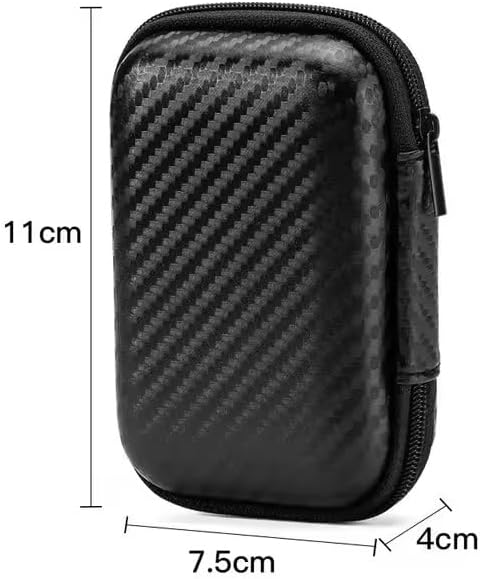
Image: A visual representation of the protective storage case with its dimensions: approximately 11cm in height, 7.5cm in width, and 4cm in depth. This illustrates the compact size of the included accessory.
คู่มือการติดตั้ง
1. การชาร์จครั้งแรก
Before first use, ensure both the earbuds and the charging case are fully charged. Place the earbuds into the charging case and connect the charging case to a power source using the provided charging cable. The indicator light on the case will show charging status.
2. การจับคู่กับอุปกรณ์
- เปิดกล่องชาร์จ หูฟังจะเข้าสู่โหมดจับคู่โดยอัตโนมัติ
- บนอุปกรณ์ของคุณ (สมาร์ทโฟน แท็บเล็ต แล็ปท็อป) ไปที่การตั้งค่าบลูทูธ
- ค้นหา available devices and select "Pro 4 TWS" (or similar name) from the list.
- เมื่อเชื่อมต่อแล้ว จะมีเสียงแจ้งเตือนยืนยันการจับคู่สำเร็จ
Note: If pairing fails, ensure the earbuds are charged and within range of your device. You may need to "forget" previous pairings on your device and try again.

Image: The Pro 4 TWS earbuds shown with a smartphone, illustrating the touch control feature for connection. A blue light effect indicates active connection or touch interaction.
คำแนะนำการใช้งาน
การควบคุมแบบสัมผัส
The Pro 4 TWS headphones feature intuitive touch controls on each earbud. Specific functions may vary slightly, but common controls include:
- แตะครั้งเดียว: เล่น/หยุดเพลง, รับสาย/วางสาย
- แตะสองครั้ง (เอียร์บัดซ้าย): เพลงก่อนหน้า.
- แตะสองครั้ง (เอียร์บัดขวา): เพลงถัดไป
- แตะสามครั้ง: เปิดใช้งานผู้ช่วยเสียง (Siri, Google Assistant)
- กดแบบยาว: ปฏิเสธสาย
การสวมหูฟัง
Gently insert each earbud into your ear canal. Rotate slightly until you achieve a comfortable and secure fit. The ergonomic design is intended to keep them stable during various activities.

Image: A woman wearing the Pro 4 TWS earbuds, highlighting their ergonomic design and comfortable fit within the ear. The image emphasizes that the earbuds are designed to stay securely in place.
การบำรุงรักษาและการดูแล
- การทำความสะอาด: ใช้ผ้านุ่ม แห้ง และไม่เป็นขุยทำความสะอาดหูฟังและกล่องชาร์จ ห้ามใช้สารเคมีรุนแรงหรือวัสดุที่มีฤทธิ์กัดกร่อน
- ความต้านทานน้ำ: The earbuds have an IPX7 waterproof rating, meaning they are resistant to sweat and rain. Do not submerge them in water or expose them to strong jets of water. Ensure they are dry before placing them back in the charging case.
- พื้นที่จัดเก็บ: When not in use, store the earbuds in their charging case, preferably within the included protective case, to prevent damage and keep them clean.
- การดูแลแบตเตอรี่ เพื่อยืดอายุการใช้งานแบตเตอรี่ ควรหลีกเลี่ยงการชาร์จหูฟังและเคสจนหมดบ่อย ควรชาร์จเป็นประจำ แม้จะไม่ได้ใช้งานบ่อยก็ตาม
การแก้ไขปัญหา
| ปัญหา | วิธีแก้ปัญหาที่เป็นไปได้ |
|---|---|
| หูฟังเอียร์บัดไม่จับคู่ |
|
| ไม่มีเสียงจากเอียร์บัดข้างเดียว |
|
| คุณภาพเสียงไม่ดี |
|
| ปัญหาการชาร์จ |
|
ข้อมูลจำเพาะ
| คุณสมบัติ | รายละเอียด |
|---|---|
| หมายเลขรุ่น | BT4 |
| เทคโนโลยีการเชื่อมต่อ | ไร้สายบลูทู ธ |
| เวอร์ชันบลูทูธ | 5.0 |
| ช่วงสาย | สูงสุด 33 ฟุต (ประมาณ 10 เมตร) |
| ความต้านทานต่อน้ำ | IPX7 (Resistant to sweat and rain) |
| ไมโครโฟน | Built-in, High-Quality |
| วิธีการควบคุม | รีโมท (ระบบควบคุมแบบสัมผัส) |
| การวางตำแหน่งหู | ในหู |
| วัสดุ | ซิลิโคน, พลาสติก |
| ส่วนประกอบที่รวมอยู่ | เคสป้องกัน |
| อุปกรณ์ที่รองรับ | Smartphones, Tablets, Laptops, Desktops, Smart Speakers, Cars (with Bluetooth capabilities) |

Image: A diagram highlighting the upgraded Bluetooth 5.0 chip, emphasizing features like HD Voice, Quick Connect, and Stable Reception, which contribute to high-fidelity sound quality and anti-interference.

ภาพ: ระเบิด view of the earbud's internal components, specifically showcasing the high-quality dynamic unit and balanced adjustment technology designed to deliver rich sound effects.
การรับประกันและการสนับสนุน
For warranty information and customer support, please refer to the documentation provided at the time of purchase or contact the seller directly. The product is manufactured by "wireless earphone".
หากต้องการความช่วยเหลือเพิ่มเติม คุณสามารถเข้าไปดูรายละเอียดผลิตภัณฑ์ได้ที่หน้าสินค้าบน Amazon: Pro 4 TWS Wireless Headphones on Amazon.
Ask a question about this manual
Ask about setup, troubleshooting, compatibility, parts, safety, or missing instructions. Manuals+ will review the question and use this page’s manual context to help answer it.