
1. บทนำ
The ALONEFIRE SV77 is a portable and rechargeable UV flashlight designed for various detection and curing applications. It utilizes a high-quality 395nm UV LED, providing a luminous power of up to 2400mW. Constructed from durable aluminum alloy, this flashlight offers reliable performance and includes essential accessories for safe and convenient use.
2. ข้อมูลด้านความปลอดภัย
คำเตือน: Ultraviolet (UV) light can be harmful to eyes and skin. Direct exposure to UV light should be avoided.
- Do not look directly into the UV light source when the flashlight is active.
- Always wear the provided UV protective glasses when operating the flashlight, especially during prolonged use. These glasses feature darker lenses for enhanced UV protection.
- เก็บอุปกรณ์ให้พ้นจากมือเด็ก
- ห้ามถอดชิ้นส่วนหรือดัดแปลงไฟฉาย
- อุปกรณ์นี้ไม่กันน้ำ โปรดหลีกเลี่ยงการสัมผัสน้ำหรือความชื้นสูง

Image: The flashlight head showing the UV LED and a caution label regarding direct eye exposure.
3. เนื้อหาบรรจุภัณฑ์
ตรวจสอบว่ามีรายการทั้งหมดอยู่ในแพ็คเกจ:
- ALONEFIRE SV77 395nm UV Flashlight (with built-in rechargeable battery)
- สายชาร์จ USB-C
- UV Protective Glasses
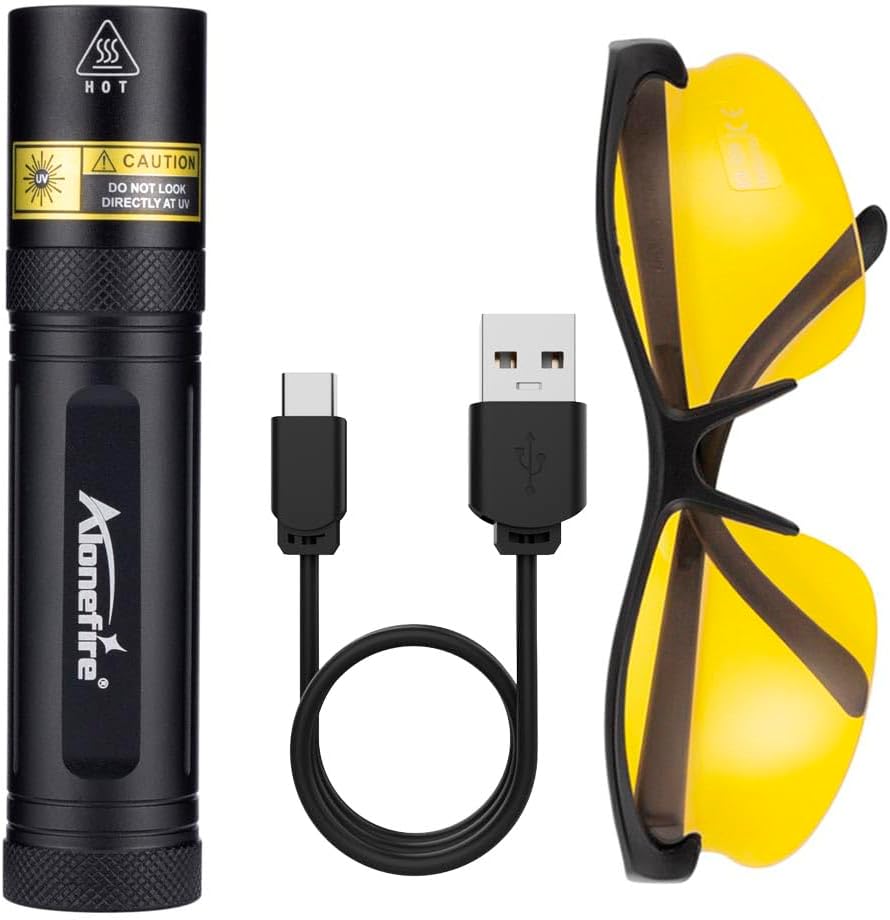
Image: The ALONEFIRE SV77 UV flashlight, USB-C charging cable, and UV protective glasses.
4. การตั้งค่าและการใช้งานครั้งแรก
4.1. การชาร์จอุปกรณ์
Before initial use, fully charge the ALONEFIRE SV77 UV Flashlight.
- Locate the USB-C charging port on the flashlight. This port is designed for easy insertion without specific orientation.
- Connect the provided USB-C charging cable to the flashlight's port.
- Connect the other end of the USB-C cable to a compatible USB power source (e.g., computer USB port, wall adapter, power bank).
- Observe the charging indicator light:
- ไฟแดง: แสดงว่าไฟฉายกำลังชาร์จอยู่
- แสงสีฟ้า: แสดงว่าไฟฉายชาร์จเต็มแล้ว
- เมื่อชาร์จเต็มแล้ว ให้ถอดสายชาร์จออก
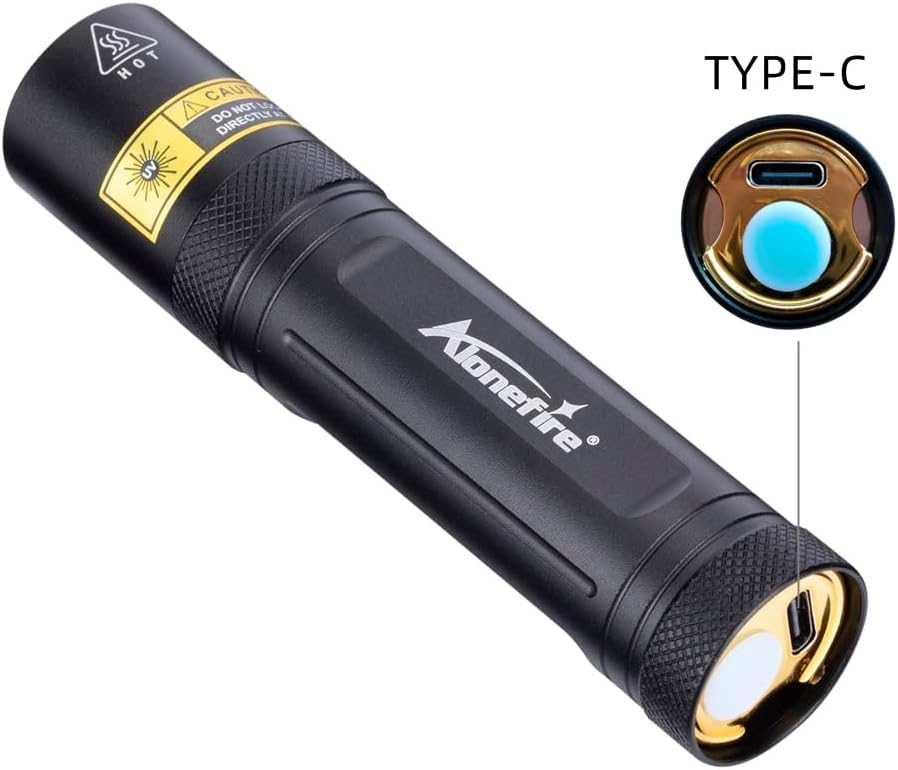
Image: Detail of the USB-C charging port on the flashlight.

Image: The flashlight charging via USB-C, illustrating the charging indicator colors.
5. คู่มือการใช้งาน
To operate the ALONEFIRE SV77 UV Flashlight:
- Ensure the flashlight is charged.
- Put on the provided UV protective glasses.
- Press the power button located at the rear of the flashlight to turn it on.
- Direct the UV light towards the area you wish to inspect or illuminate.
- Press the power button again to turn the flashlight off.
6. การสมัคร
The ALONEFIRE SV77 UV Flashlight is suitable for detecting fluorescent substances not visible under normal light. Its applications include:
- Pet Urine and Stains: Identify dried pet urine, feces, and other organic stains on carpets, rugs, and upholstery.
- Pet Ringworm Detection: Assist in identifying fungal infections like ringworm on pets, which may fluoresce under UV light.
- Currency Authentication: Verify the authenticity of banknotes by revealing security features that glow under UV light.
- การตรวจจับแมงป่อง: แมงป่องจะเรืองแสงสว่างมากเมื่อโดนแสงยูวี ทำให้มองเห็นได้ง่ายขึ้นในที่มืด
- Mineral and Gemstone Inspection: Observe fluorescence in certain minerals and gemstones for identification or authentication.
- Resin and Glue Curing: Accelerate the curing process of UV-sensitive resins and glues.
- การตรวจจับการรั่วไหล: Detect leaks in HVAC systems, automotive systems, and other machinery when used with UV-sensitive dyes.
- Hotel Room Inspection: Check for cleanliness and hidden stains in hotel rooms.

ภาพ: อดีตamples of pet urine and ringworm detection using the UV flashlight.

Image: Various applications including washroom inspection, mechanical inspection, tableware, and mineral/jewelry authentication.
7. การบำรุงรักษา
- การทำความสะอาด: Wipe the flashlight body with a soft, dry cloth. Do not use abrasive cleaners or solvents.
- พื้นที่จัดเก็บ: เก็บไฟฉายไว้ในที่แห้งและเย็น หลีกเลี่ยงแสงแดดโดยตรงและอุณหภูมิที่สูงหรือต่ำเกินไป หากเก็บรักษาเป็นเวลานาน ควรตรวจสอบให้แน่ใจว่าแบตเตอรี่มีประจุอยู่บ้าง (ประมาณ 50%) เพื่อยืดอายุการใช้งาน
- การดูแลแบตเตอรี่ Recharge the flashlight regularly, even if not in frequent use, to maintain battery health. Avoid fully discharging the battery for prolonged periods.
8 การแก้ไขปัญหา
| ปัญหา | สาเหตุที่เป็นไปได้ | สารละลาย |
|---|---|---|
| ไฟฉายไม่ติด | แบตเตอรี่หมด | ชาร์จไฟฉายโดยใช้สาย USB-C ที่ให้มา |
| ไฟฉายไม่ชาร์จ | ปัญหาเกี่ยวกับสายชาร์จหรือแหล่งจ่ายไฟ | Ensure the USB-C cable is properly connected. Try a different USB power source or cable. |
| UV light appears dim. | แบตเตอรี่เหลือน้อยหรือเลนส์สกปรก | Recharge the flashlight. Clean the lens with a soft, dry cloth. |
9. ข้อมูลจำเพาะ
| หมายเลขรุ่น | SV77 395nm |
| ยี่ห้อ | อยู่คนเดียว |
| ความยาวคลื่น UV | 395นาโนเมตร |
| ประเภทแหล่งกำเนิดแสง | นำ |
| พลังส่องสว่าง | สูงสุด 2400 มิลลิวัตต์ |
| แหล่งกำเนิดแสง วัดtage | 10 วัตต์ |
| แหล่งพลังงาน | ใช้พลังงานจากแบตเตอรี่ (แบตเตอรี่ลิเธียมไอออนในตัว) |
| พอร์ตชาร์จ | ยูเอสบี-ซี |
| วัสดุ | อลูมิเนียมอโนไดซ์ |
| น้ำหนักสินค้า | 0.12 กิโลกรัม (ประมาณ 4.2 ออนซ์) |
| ระดับความต้านทานต่อน้ำ | ไม่ทนน้ำ |
| คุณสมบัติพิเศษ | Portable, Rechargeable, Includes UV Protective Glasses |

Image: Dimensions of the ALONEFIRE SV77 UV Flashlight.
10. การรับประกันและการสนับสนุน
The ALONEFIRE SV77 UV Flashlight comes with a limited warranty. For specific warranty terms and conditions, please refer to the product packaging or contact the manufacturer directly.
For technical support, troubleshooting assistance, or inquiries regarding your product, please contact ALONEFIRE customer service through their official channels or the retailer from whom the product was purchased.