การแนะนำ
Thank you for choosing the Generic Wireless Earbuds. These earbuds are designed for comfort, high-fidelity audio, and reliable connectivity, perfect for small ears and active lifestyles. Featuring a long-lasting battery, AI noise reduction for clear calls, IPX5 water resistance, and stable Bluetooth 5.3, they are built to enhance your audio experience. This manual provides detailed instructions on how to set up, operate, maintain, and troubleshoot your new earbuds.

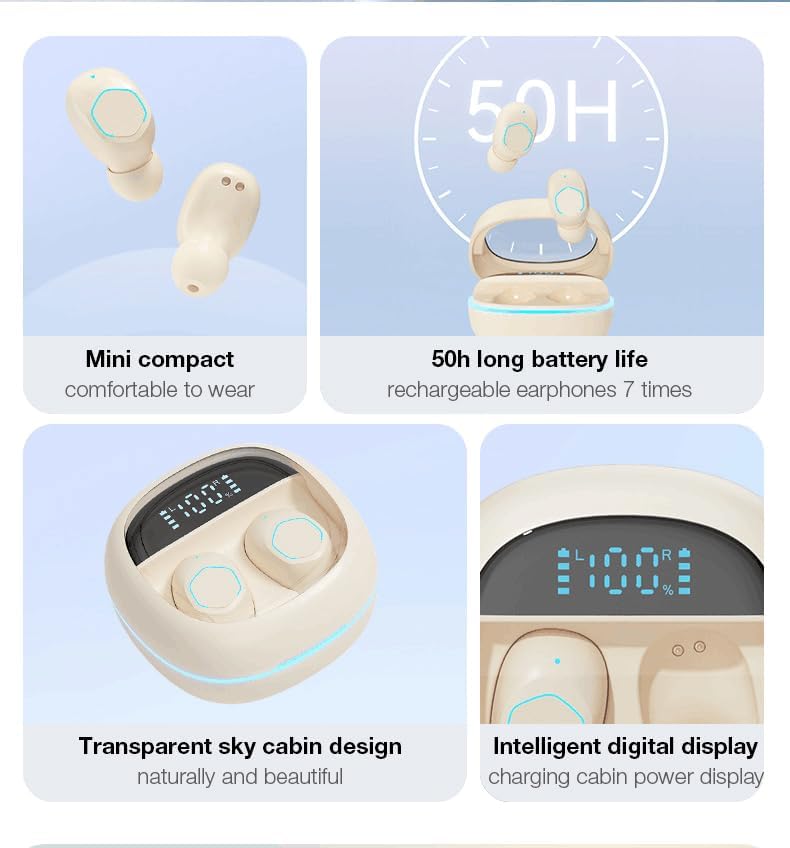
The Generic Wireless Earbuds in their open charging case, displaying the battery percentage on the LED screen.
มีอะไรอยู่ในกล่อง
กรุณาตรวจสอบเนื้อหาในแพ็คเกจเพื่อให้แน่ใจว่ามีสินค้าครบทั้งหมด:
- คู่มือการใช้งาน
- แท่นชาร์จ (กล่องชาร์จ)
- สายชาร์จ USB-C
- หูฟังไร้สาย (ซ้ายและขวา)
คู่มือการติดตั้ง
1. การชาร์จครั้งแรก
Before first use, fully charge the earbuds and the charging case. Connect the provided USB-C cable to the charging case and a power source. The LED display on the case will show the battery percentage, indicating charging progress. A full charge typically takes approximately 1.5 hours.

The charging case with earbuds inside, showing the LED power display and RGB lighting.
2. การจับคู่บลูทู ธ
- เปิดกล่องชาร์จ หูฟังจะเปิดอัตโนมัติและเข้าสู่โหมดจับคู่
- เปิดใช้งาน Bluetooth บนอุปกรณ์ของคุณ (สมาร์ทโฟน แท็บเล็ต ฯลฯ)
- ค้นหา available Bluetooth devices and select "Generic Earbuds" (or similar name) from the list.
- เมื่อเชื่อมต่อแล้ว คุณจะได้ยินเสียงยืนยัน และหูฟังจะพร้อมใช้งาน
The earbuds utilize Bluetooth 5.3 for stable and fast connections up to 50 feet (15 meters).
3. การสวมหูฟัง
These earbuds are designed to be compact and comfortable, especially for small ears. Gently insert each earbud into the corresponding ear (L for left, R for right) and rotate slightly to find a secure and comfortable fit. The skin-friendly silicone tips ensure stability during various activities.
The earbud's compact design ensures a secure and comfortable fit, even for petite ears.
คำแนะนำการใช้งาน
การควบคุมแบบสัมผัส
The earbuds feature intuitive touch controls on their outer surface. Refer to the following table for common functions:
| การกระทำ | การทำงาน |
|---|---|
| แตะเพียงครั้งเดียว (หูฟังข้างซ้ายหรือขวา) | เล่น/หยุดเพลง, รับ/วางสาย |
| แตะสองครั้ง (หูฟังข้างขวา) | เพลงต่อไป |
| แตะสองครั้ง (หูฟังข้างซ้าย) | เพลงก่อนหน้า |
| แตะสามครั้ง (หูฟังข้างขวา) | เพิ่มระดับเสียง |
| แตะสามครั้ง (หูฟังข้างซ้าย) | ลดระดับเสียง |
| กดแบบยาว (2 วินาที) | ปฏิเสธการรับสาย |
| กดแบบยาว (3 วินาที) | เปิดใช้งานผู้ช่วยเสียง |

Visual representation of the smart button controls for music and calls.
จอแสดงผล LED พลังงาน
The charging case features an LED digital display that shows the exact battery percentage of the case and individual battery levels for the left and right earbuds. This allows you to monitor power levels at a glance.
คุณสมบัติด้านเสียง
- 360° Hi-Fi Sound: Custom-tuned drivers deliver rich, immersive audio with deep bass.
- AI HD Call Clarity: Equipped with 4 microphones and AI noise reduction technology, these earbuds reduce up to 60% of ambient noise, ensuring crystal-clear voice calls.

The 'Whale Cavity' design enhances 360° stereo sound for a more immersive listening experience.
โหมดการเล่นเกมที่มีความหน่วงต่ำ
The earbuds feature a low-latency algorithm, providing minimal delay between audio and video, which is ideal for gaming and video playback. This ensures a synchronized and immersive experience.

Experience low game delay for instant audio-visual synchronization during gameplay.
การซ่อมบำรุง
การทำความสะอาด
การทำความสะอาดเป็นประจำช่วยรักษาคุณภาพเสียงและสุขอนามัย:
- ใช้ผ้าแห้งนุ่มและไม่ขุยเช็ดหูฟังและกล่องชาร์จ
- For earwax or debris in the earbud tips, use a small, soft brush or cotton swab.
- ห้ามใช้สารทำความสะอาดที่มีฤทธิ์กัดกร่อน แอลกอฮอล์ หรือตัวทำละลายเคมี
พื้นที่จัดเก็บ
เมื่อไม่ได้ใช้งาน ควรเก็บหูฟังไว้ในกล่องชาร์จเสมอ เพื่อป้องกันฝุ่น ความเสียหาย และเพื่อให้หูฟังชาร์จไฟได้
การดูแลแบตเตอรี่
เพื่อยืดอายุแบตเตอรี่:
- หลีกเลี่ยงการปล่อยแบตเตอรี่จนหมดบ่อยครั้ง
- ควรชาร์จหูฟังและเคสเป็นประจำ แม้ว่าจะไม่ได้ใช้งานเป็นเวลานานก็ตาม
- เก็บไว้ในที่แห้งและเย็น ห่างจากอุณหภูมิที่สูงหรือต่ำมาก
ความต้านทานต่อน้ำ (IPX5)
The earbuds are rated IPX5 water-resistant, meaning they can withstand splashes and sweat. They are suitable for workouts and light rain. However, they are not designed for submersion in water or use during swimming. Ensure the earbuds are dry before placing them back in the charging case.
การแก้ไขปัญหา
หากคุณพบปัญหาเกี่ยวกับหูฟัง ลองทำตามวิธีต่อไปนี้:
- ไม่มีเสียง:
- ตรวจสอบให้แน่ใจว่าหูฟังมีการชาร์จแล้ว
- ตรวจสอบการเชื่อมต่อบลูทูธบนอุปกรณ์ของคุณ
- Adjust volume on both earbuds and your device.
- เอียร์บัดไม่จับคู่:
- ตรวจสอบให้แน่ใจว่าหูฟังอยู่ในโหมดจับคู่ (เปิดเคส)
- ปิดและเปิดบลูทูธบนอุปกรณ์ของคุณ
- ลืมอุปกรณ์ในการตั้งค่าบลูทูธของคุณและจับคู่ใหม่อีกครั้ง
- ตรวจสอบให้แน่ใจว่าหูฟังชาร์จเต็มแล้ว
- เอียร์บัดข้างหนึ่งไม่ทำงาน:
- Place both earbuds back in the charging case, close it, and then open it again.
- ตรวจสอบให้แน่ใจว่าได้ชาร์จหูฟังเอียร์บัดทั้งสองข้างแล้ว
- ปัญหาการชาร์จ:
- ตรวจสอบสาย USB-C และอะแดปเตอร์ไฟ
- ตรวจสอบให้แน่ใจว่าหน้าสัมผัสการชาร์จบนหูฟังและเคสสะอาดและไม่มีสิ่งสกปรก
- คุณภาพการโทรไม่ดี:
- ตรวจสอบให้แน่ใจว่าใส่เอียร์บัดในหูของคุณอย่างถูกต้อง
- ขยับเข้าใกล้อุปกรณ์ที่เชื่อมต่อของคุณ
- ตรวจสอบสัญญาณรบกวนจากสิ่งแวดล้อม
If the issue persists, please refer to the support information provided with your purchase or contact customer service.
ข้อมูลจำเพาะ
| คุณสมบัติ | รายละเอียด |
|---|---|
| ยี่ห้อ | ทั่วไป |
| แบบอย่าง | B0DH3DQ7TY |
| สี | สีเบจ |
| การวางตำแหน่งหู | ในหู |
| ฟอร์มแฟกเตอร์ | ในหู |
| อิมพีแดนซ์ | 80 โอห์ม |
| เวอร์ชันบลูทูธ | 5.3 |
| ความต้านทานต่อน้ำ | IPX5 |
| เวลาเล่นทั้งหมด (รวมเคส) | นานถึง 30 ชั่วโมง |
| ชาร์จเร็ว | 10-minute charge = 2-hour playback |
| น้ำหนัก (ต่อเอียร์บัด) | 3.8กรัม |
การรับประกันและการสนับสนุน
These Generic Wireless Earbuds come with a standard manufacturer's warranty. Please refer to the warranty card included in your packaging for specific terms and conditions, including the warranty period and coverage details. For technical support, troubleshooting assistance beyond this manual, or warranty claims, please contact the retailer or manufacturer's customer service. Contact information can typically be found on the product packaging or the brand's official webเว็บไซต์.