
1. สินค้าหมดview
The Riokko YM119 OBD2 Scanner is a diagnostic tool designed for car owners to easily read and clear engine fault codes. It provides real-time data, freeze frame information, and supports various diagnostic functions for OBDII/EOBD compliant vehicles manufactured since 1996. Its intuitive interface and compact design make it suitable for both professional technicians and home users.

Figure 1.1: Riokko YM119 OBD2 Scanner. This image shows the main diagnostic tool with its color screen, control buttons, and the attached OBDII connector cable.
2. การตั้งค่าและการใช้งานเบื้องต้น
2.1 เนื้อหาบรรจุภัณฑ์
- Riokko YM119 OBD2 Scanner Unit
- คู่มือการใช้งาน (เอกสารนี้)
2.2 การเชื่อมต่อเครื่องสแกนเนอร์
- ค้นหาขั้วต่อข้อมูล (DLC) ของรถยนต์ โดยปกติจะอยู่ใต้แผงหน้าปัดด้านคนขับ
- Ensure the vehicle's ignition is turned ON (engine can be off or running, depending on the test).
- Plug the OBDII connector of the YM119 scanner firmly into the vehicle's DLC. The scanner will power on automatically.
2.3 การเลือกภาษา
The YM119 supports 13 national languages. To change the language:
- From the main menu, navigate to "Setting" using the arrow keys.
- กดปุ่ม OK button to enter the Setting menu.
- เลือก "ภาษา" และเลือกภาษาที่คุณต้องการจากรายการ
- กด OK เพื่อยืนยันการเลือกของคุณ
3. การใช้งานเครื่องสแกนเนอร์
3.1 ปุ่มนำทาง
- EXIT: กลับไปยังหน้าจอก่อนหน้าหรือเมนูหลัก
- ลูกศรขึ้น/ลง: นำทางผ่านตัวเลือกเมนู
- ลูกศรซ้าย/ขวา: Navigate through data screens or adjust settings.
- ตกลง: ยืนยันการเลือกหรือเข้าสู่เมนูย่อย
- ค้างคาว: Initiates the battery voltagอีทดสอบ

Figure 3.1: Main Menu and Professional Functions. This image illustrates the scanner's main menu interface and highlights its key diagnostic capabilities such as Engine Fault Diagnostics, Quick Clear Fault Code, Real-time Data Stream, and Battery Life Test.
3.2 ฟังก์ชั่นการวินิจฉัย
From the main menu, select "Diagnosis" to access the primary diagnostic functions.

Figure 3.2: OBD II Diagnostic Test Items. This image shows the comprehensive list of diagnostic tests available on the scanner, from reading and erasing codes to advanced sensor and component tests.
3.2.1 อ่านรหัส
ฟังก์ชันนี้ดึงรหัสข้อผิดพลาดในการวินิจฉัย (DTC) จากคอมพิวเตอร์ของรถยนต์ รหัสเหล่านี้บ่งชี้ถึงปัญหาเฉพาะที่ตรวจพบโดยระบบวินิจฉัยภายในรถยนต์
- Select "Read Codes" from the Diagnosis menu.
- เครื่องสแกนจะแสดงรหัส DTC ที่บันทึกไว้ กำลังรอการแก้ไข หรือแก้ไขถาวรทั้งหมด
- ใช้ ขึ้น/ลง arrows to scroll through the codes.
- For detailed information on a specific code, use the "DTC Lib" function or refer to a reliable automotive repair database.
3.2.2 ล้างรหัส
This function erases DTCs from the vehicle's computer and turns off the Malfunction Indicator Lamp (MIL) หรือที่รู้จักกันในชื่อไฟเตือนเครื่องยนต์ (Check Engine Light) Note: Clearing codes does not fix the underlying problem. The MIL will illuminate again if the fault persists.

Figure 3.3: Check and Turn Off Engine Light. This image demonstrates the scanner's ability to diagnose and clear engine fault codes, effectively turning off the Check Engine Light on the vehicle's dashboard.
- Select "Erase Codes" from the Diagnosis menu.
- ยืนยันการดำเนินการเมื่อได้รับแจ้ง
- The MIL should turn off.
3.2.3 Real-time Data (Live Data Stream)
View real-time sensor data from the vehicle's engine control unit (ECU). This data can be displayed in text or graphical format, allowing for dynamic monitoring of vehicle performance.
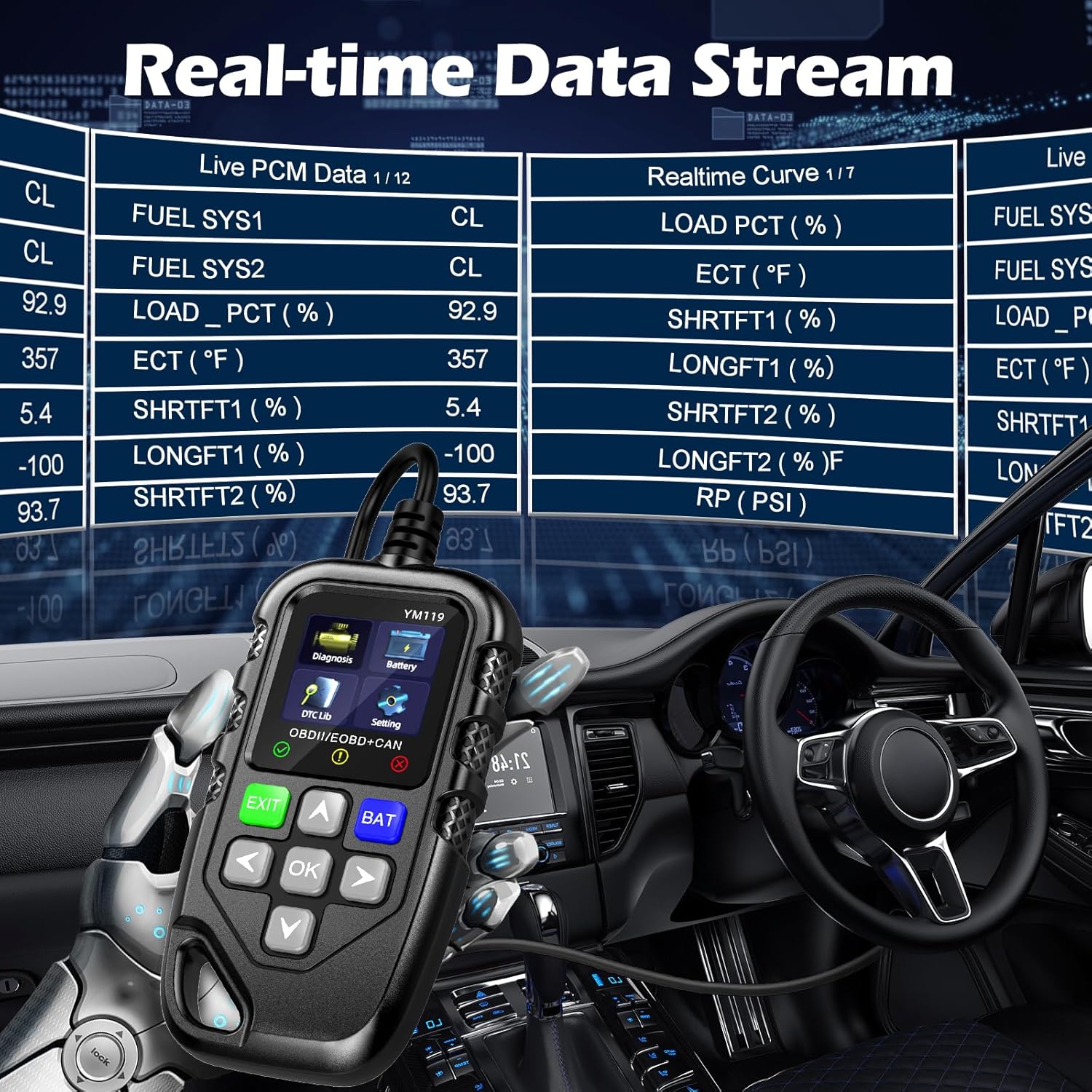
Figure 3.4: Real-time Data Stream. This image shows the scanner's capability to display live engine data, including various sensor readings and their corresponding real-time curves, aiding in dynamic vehicle diagnostics.
- Select "Live Data" or "Realtime Curve" from the Diagnosis menu.
- ใช้ ขึ้น/ลง arrows to scroll through different data parameters.
- ใช้ ซ้าย/ขวา arrows to switch between text and graph views (if available for the parameter).
3.2.4 ข้อมูลเฟรมหยุดนิ่ง
When an emission-related fault occurs, the vehicle's computer records a snapshot of operating conditions at the time of the fault. This "freeze frame" data helps in diagnosing intermittent problems.
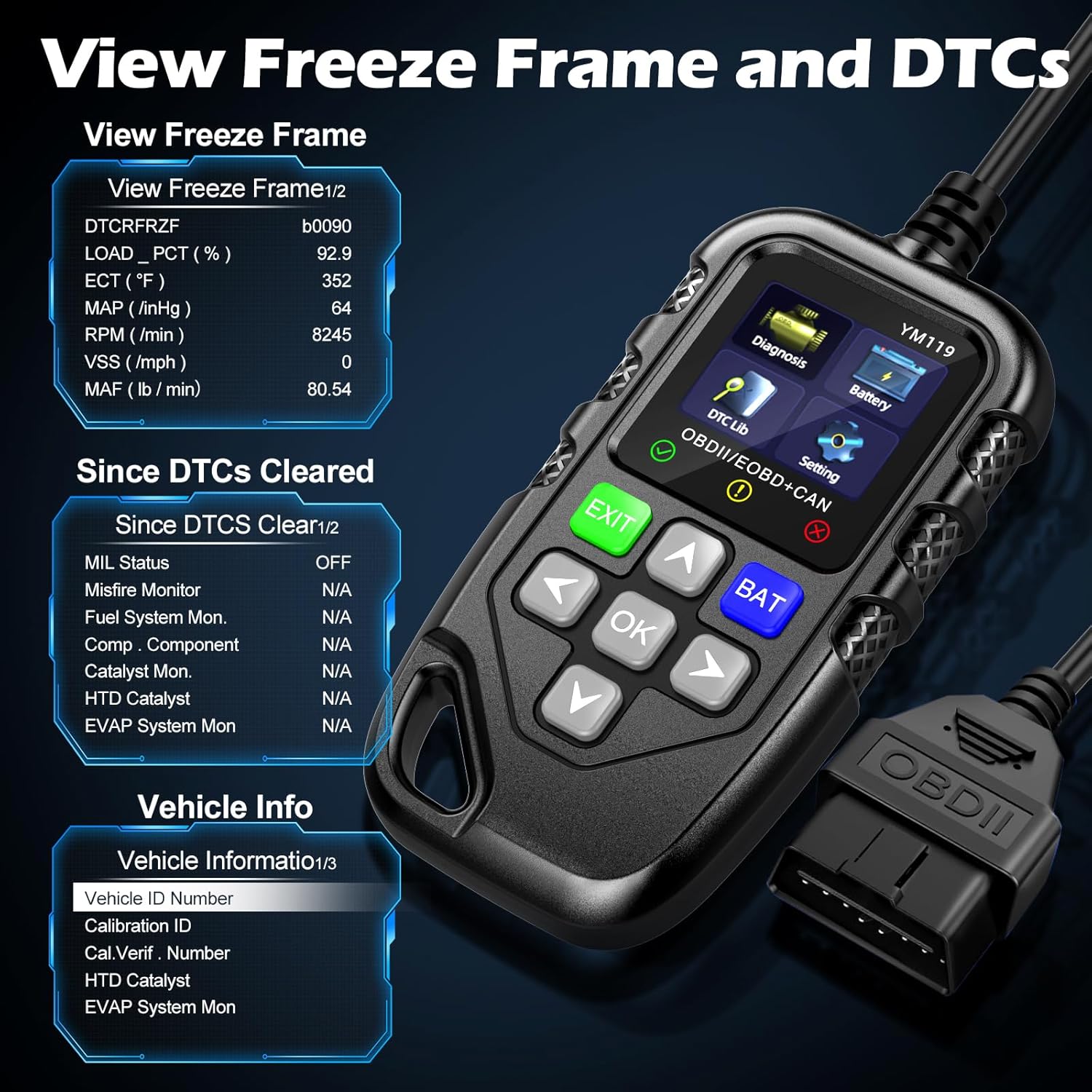
รูปที่ 3.5: View Freeze Frame and DTCs. This image displays the scanner's ability to capture and show freeze frame data, which provides a snapshot of engine conditions at the moment a fault code was set, aiding in diagnosis.
- เลือก "View Freeze Frame" from the Diagnosis menu.
- Review the recorded parameters.
3.2.5 DTC Query (DTC Lib)
The built-in DTC Library allows you to look up definitions for generic (P0, P2, P34, B0, C0, U0) and manufacturer-specific (P1, P30-P33, B1, C1, U1) codes.
- From the main menu, select "DTC Lib".
- Enter the DTC code using the arrow keys and OK ปุ่ม.
- เครื่องสแกนจะแสดงความหมายของรหัส
3.2.6 ความพร้อมของ I/M
This function checks the readiness of the emission-related monitoring systems on the vehicle. It's useful for determining if the vehicle is ready for an emissions test.
- Select "I/M Readiness" from the Diagnosis menu.
- The scanner will display the status of various monitors (e.g., Misfire Monitor, Fuel System Monitor). "OK" indicates the monitor has completed its test, "INC" indicates incomplete, and "N/A" indicates not applicable.
3.2.7 ปริมาณแบตเตอรี่tage ทดสอบ
The YM119 can perform a basic battery voltage test to assess the vehicle's battery health.

Figure 3.6: Estimate Battery Life Test. This image shows the scanner's dedicated function for monitoring and assessing the vehicle's battery voltage and overall health.
- From the main menu, select "Battery" or press the ค้างคาว ปุ่ม.
- เครื่องสแกนจะแสดงปริมาณแบตเตอรี่ปัจจุบันtage.
3.2.8 ข้อมูลรถ
This function retrieves the Vehicle Identification Number (VIN), Calibration ID (CALID), and Calibration Verification Number (CVN) of the vehicle.
- Select "Vehicle Info" from the Diagnosis menu.
- เครื่องสแกนจะแสดงข้อมูลรถยนต์ที่มีอยู่
4. การบำรุงรักษา
4.1 การทำความสะอาดเครื่อง
To maintain the scanner's performance and appearance:
- เช็ดตัวเครื่องด้วยผ้านุ่ม damp ผ้า.
- ห้ามใช้น้ำยาทำความสะอาดที่มีฤทธิ์กัดกร่อนหรือตัวทำละลาย
- ตรวจสอบให้แน่ใจว่าอุปกรณ์แห้งสนิทก่อนจัดเก็บ
4.2 พื้นที่จัดเก็บ
Store the scanner in a clean, dry environment away from extreme temperatures and direct sunlight. Keep the OBDII connector free from dust and debris.
5 การแก้ไขปัญหา
| ปัญหา | สาเหตุที่เป็นไปได้ | สารละลาย |
|---|---|---|
| เครื่องสแกนเนอร์ไม่สามารถเปิดเครื่องได้ |
|
|
| ข้อความ "ข้อผิดพลาดลิงค์" หรือ "ข้อผิดพลาดในการสื่อสาร" |
|
|
| Engine light reappears after clearing codes. | Underlying fault has not been repaired. | Clearing codes only turns off the light; it does not fix the problem. Diagnose and repair the underlying issue before clearing codes again. |
| Inaccurate or missing data readings. |
|
|
6. ข้อมูลจำเพาะ
| คุณสมบัติ | รายละเอียด |
|---|---|
| หมายเลขรุ่น | AE0004L (YM119) |
| ยี่ห้อ | Riokko |
| ขนาดหน้าจอ | 2.8 นิ้ว |
| โปรโตคอลที่รองรับ | Nine standard OBDII/EOBD protocols |
| ภาษาที่รองรับ | 13 ภาษาประจำชาติ |
| น้ำหนักสินค้า | 7.8 ออนซ์ (ประมาณ 221 กรัม) |
| ขนาดแพ็คเกจ | 8.11 x 5.35 x 1.14 นิ้ว (ประมาณ 20.6 x 13.6 x 2.9 ซม.) |
| วันที่พร้อมใช้งานครั้งแรก | 16 ตุลาคม 2024 |
7. การรับประกันและการสนับสนุน
7.1 ข้อมูลการรับประกัน
The Riokko YM119 OBD2 Scanner comes with a รับประกัน 3 ปี ตั้งแต่วันที่ซื้อ การรับประกันนี้ครอบคลุมถึงข้อบกพร่องในวัสดุและฝีมือการผลิตภายใต้การใช้งานปกติ
7.2 นโยบายการคืนสินค้า
A นโยบายการคืนสินค้าภายใน 30 วันโดยไม่ต้องแจ้งเงื่อนไขใดๆ is offered for your purchase. Please refer to your retailer's specific return instructions.
7.3 การสนับสนุนลูกค้า
For technical assistance, warranty claims, or any other inquiries, please contact Riokko customer service. บริการลูกค้าตลอด 24 ชม. พร้อมให้ความช่วยเหลือคุณ
Please visit the official Riokko webโปรดตรวจสอบข้อมูลการติดต่อล่าสุดได้จากเว็บไซต์หรือบรรจุภัณฑ์ของผลิตภัณฑ์