
1. บทนำ
ขอบคุณที่เลือกใช้ CZEview ZY-Q6 2K Outdoor Battery Surveillance Camera. This manual provides essential information for the proper installation, operation, and maintenance of your device. This robust security camera is designed for outdoor use, featuring a waterproof construction suitable for various weather conditions. It offers versatile installation options, including magnetic mounting, and provides clear surveillance with 2K resolution, 300° horizontal PTZ, motion detection, and night vision capabilities.
For optimal performance and safety, please read this manual thoroughly before using the camera and retain it for future reference.
2. ส่วนประกอบผลิตภัณฑ์
แพ็คเกจประกอบด้วยรายการต่อไปนี้:
- ซีแซดอีview ZY-Q6 2K Outdoor Battery Surveillance Camera
- สายชาร์จ
- ตัวยึด
- คู่มือการใช้งาน
Unboxing Videos
คำอธิบายวิดีโอ: This video demonstrates the unboxing process for a JSX Electronics camera, showing the contents typically found in the package, including the camera, mounting accessories, and cables.
คำอธิบายวิดีโอ: This unboxing video for the ieGeek S2 camera (a similar model) showcases the camera and its accessories, providing a visual guide to what to expect in your package.
3. การตั้งค่าและการติดตั้ง
3.1 การติดตั้งทางกายภาพ
ซีแซดอีview ZY-Q6 camera offers versatile installation options, including magnetic mounting for easy placement on metallic surfaces or screw mounting for more permanent fixtures.
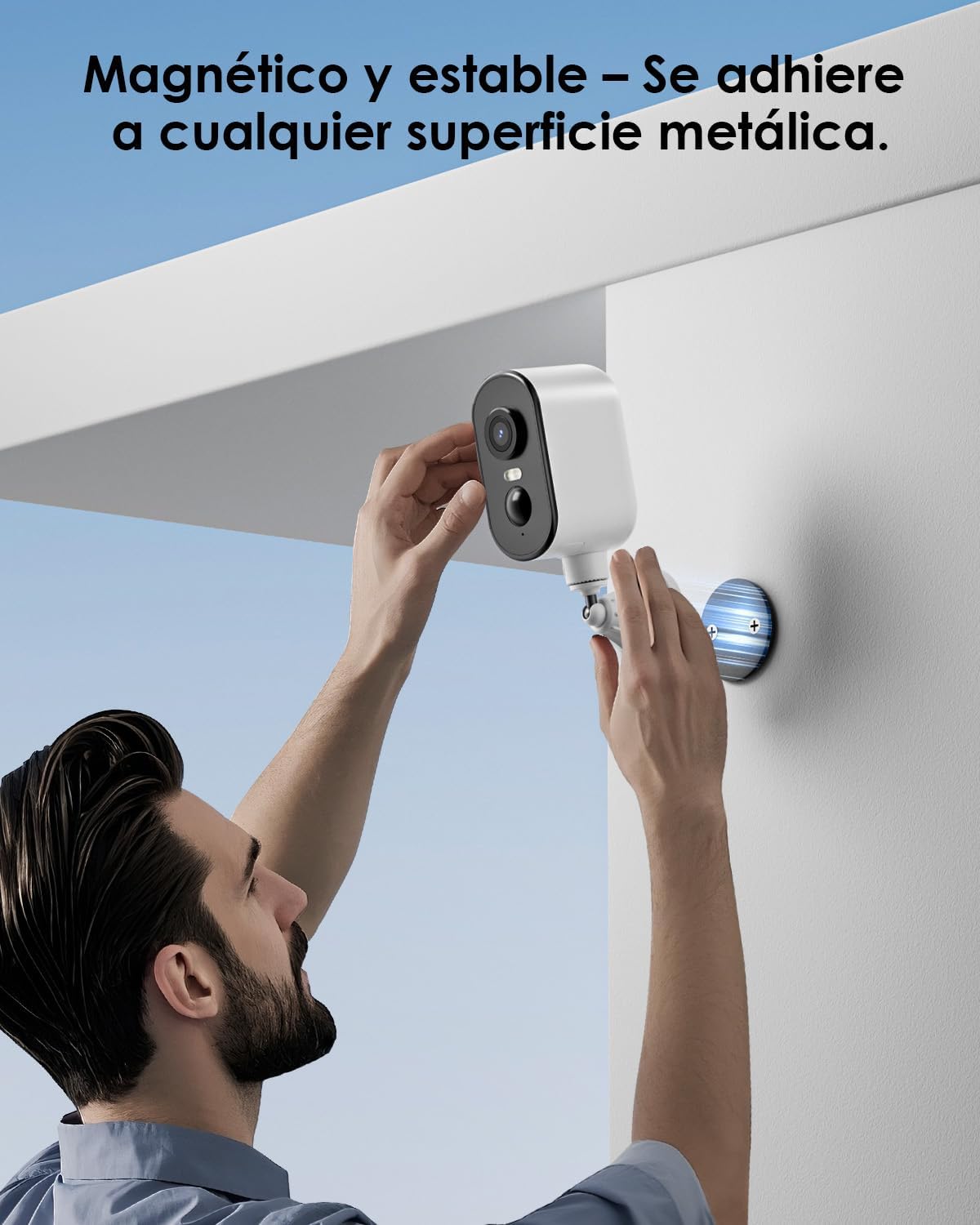
คำอธิบายภาพ: A man is shown easily attaching the CZEview ZY-Q6 camera to a metallic surface on a wall using its magnetic base, highlighting its stable and convenient mounting.
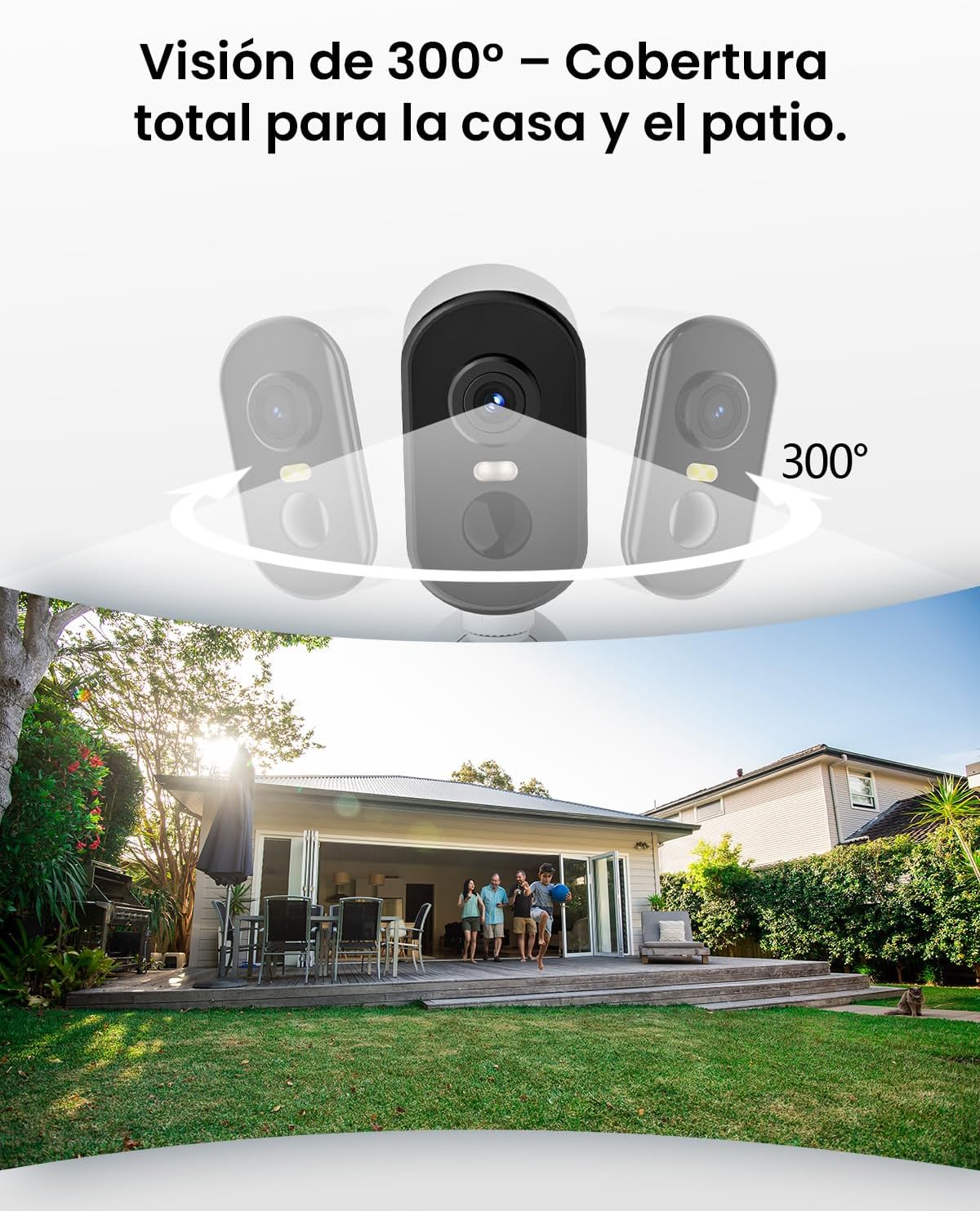
คำอธิบายภาพ: This image illustrates the camera's 300-degree horizontal PTZ (Pan-Tilt-Zoom) capability, showing how multiple cameras can provide total coverage for a house and patio area.
3.2 การเชื่อมต่อแอพ
To connect your camera to your smartphone, follow the instructions in the app. Ensure your phone is connected to a 2.4G WiFi network.
คำอธิบายวิดีโอ: This video provides a step-by-step guide on how to connect your outdoor WiFi battery surveillance camera to your smartphone application, covering initial setup and pairing.
คำอธิบายวิดีโอ: This video demonstrates the setup process for an outdoor WiFi battery camera, including app configuration and initial connection steps for remote monitoring.
คำอธิบายวิดีโอ: This video illustrates the installation process for a portable 4G camera. While this model is 2.4G WiFi, the physical mounting steps may offer general guidance.
4. คู่มือการใช้งาน
4.1 การตรวจจับการเคลื่อนไหวและการแจ้งเตือน
The camera features automatic activation upon detecting motion, recording important events. It can differentiate between people, animals, vehicles, and packages to reduce false alarms.

คำอธิบายภาพ: This image shows the camera's automatic activation feature, detecting and recording important events triggered by people, animals, vehicles, and packages.
4.2 Night Vision and Security Features
In night mode, upon detecting motion, the camera illuminates and emits an audible alarm, enhancing security during low-light conditions. The infrared illumination system provides clear and sharp surveillance even in total darkness.
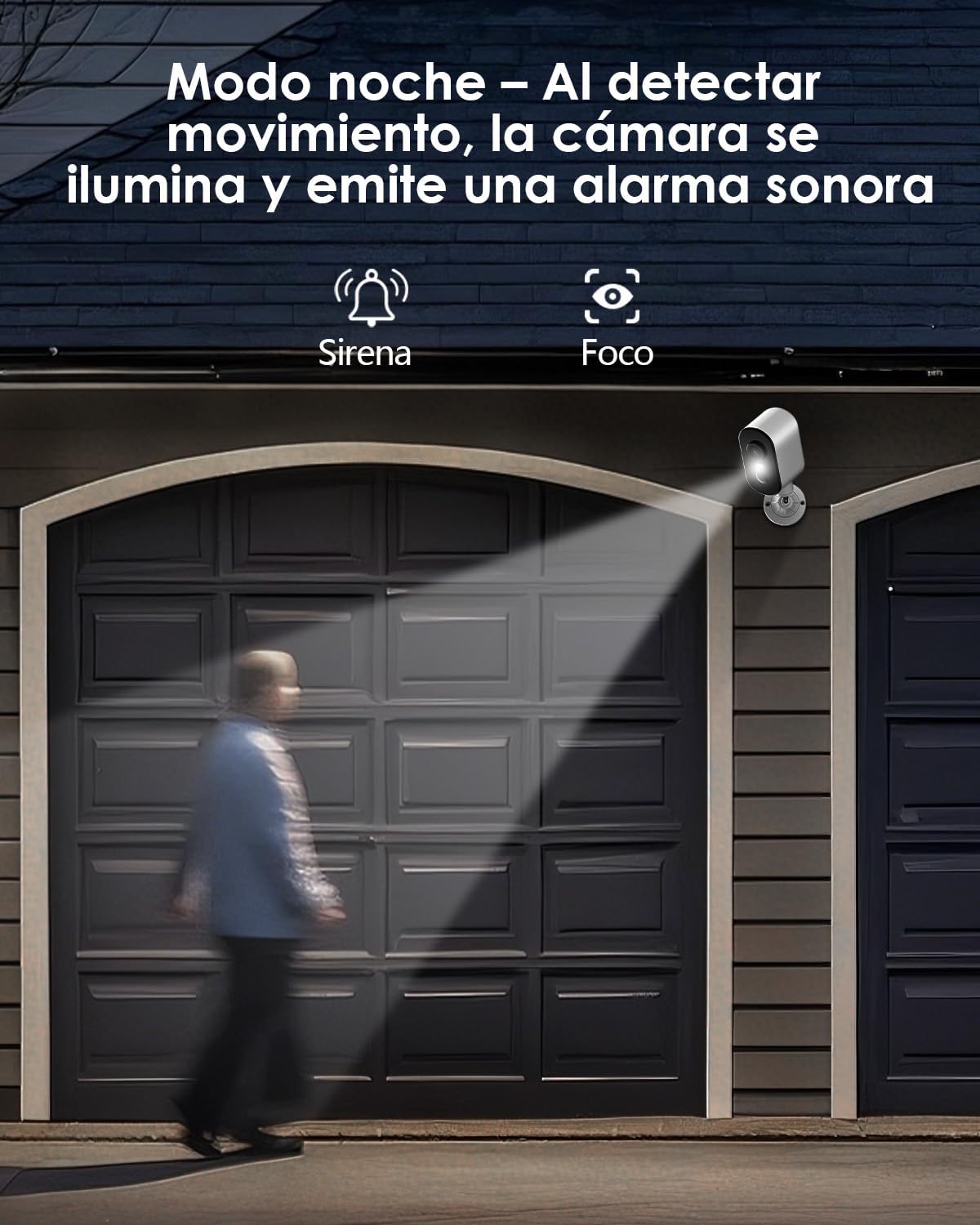
คำอธิบายภาพ: The camera is depicted in night mode, with its spotlight and siren activating upon motion detection to deter intruders and provide clear visibility.
4.3 Remote Monitoring and Multi-User Access
The camera supports remote monitoring, allowing real-time video streaming access from your smartphone. Multiple users can simultaneously access the camera feed.
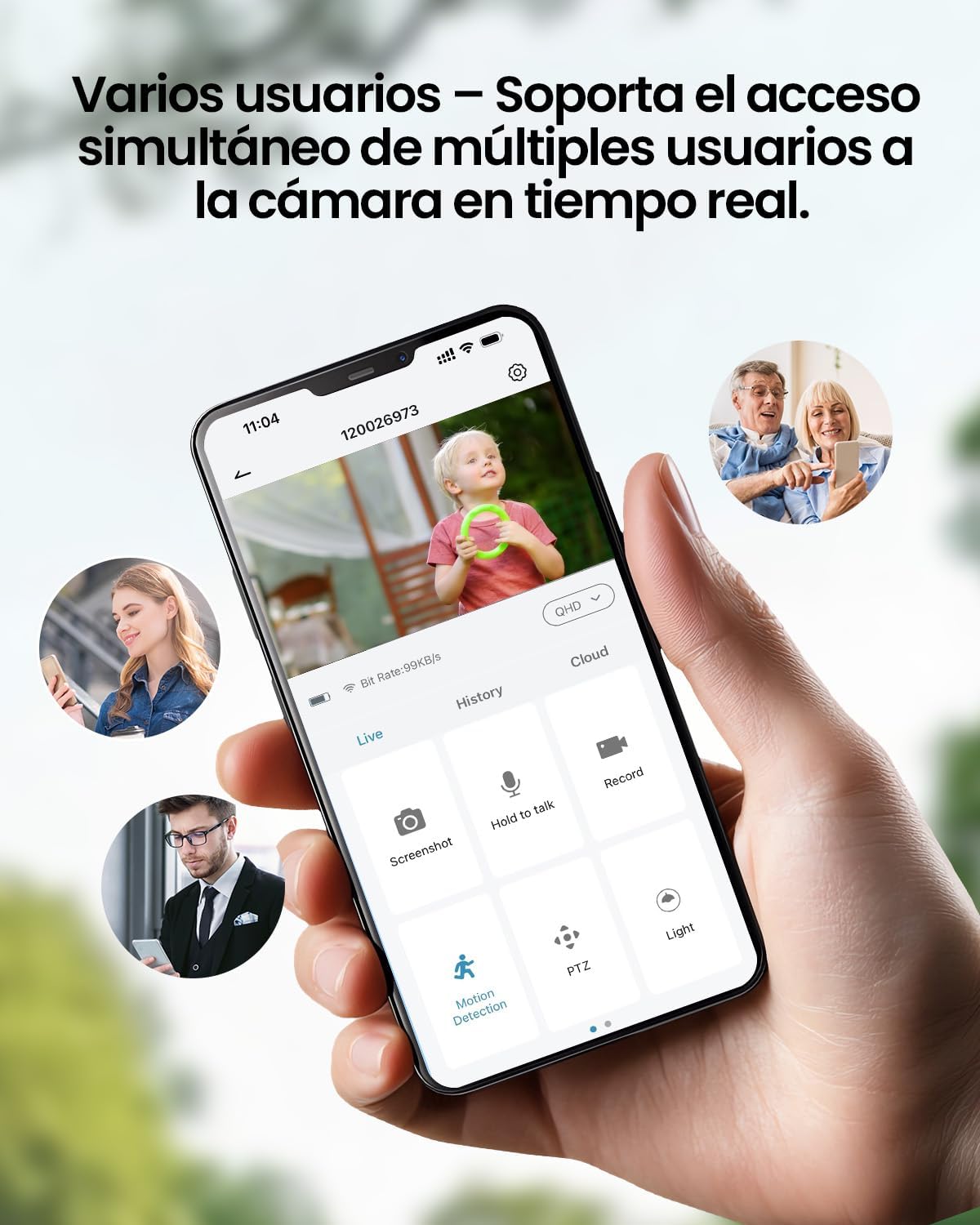
คำอธิบายภาพ: A smartphone displays the live feed from the camera, with icons indicating support for simultaneous access by multiple users, enabling shared monitoring.
5. ความทนทานต่อสภาพอากาศ
ซีแซดอีview ZY-Q6 camera is designed to withstand various outdoor conditions. Its fully dustproof and waterproof construction ensures continuous surveillance in any climate, from heavy rain to direct sun exposure.

คำอธิบายภาพ: ซีแซดอีview ZY-Q6 camera is shown mounted outdoors during rainfall, demonstrating its fully dustproof and waterproof design, ideal for continuous outdoor use.
6. ข้อมูลจำเพาะ
| คุณสมบัติ | รายละเอียด |
|---|---|
| ผู้ผลิต | ซีแซดอีview |
| ขนาดสินค้า | 6 x 6.5 x 12 ซม.; 530 กรัม |
| แบตเตอรี่ | 1 9V battery required, included |
| หมายเลขรุ่น | ZY-Q6 |
| สี | สีขาว |
| วัสดุ | พลาสติก ABS |
| แหล่งพลังงาน | แบตเตอรี่ |
| เล่มที่tage | 12 โวลต์ |
| พลังงานไฟฟ้า | 5 วัตต์ |
| วิธีการติดตั้ง | ติดผนัง |
| ประเภทหลอดไฟ | อินฟราเรดแอลอีดี |
| ประเภทการติดตั้ง | ติดตั้งบนโต๊ะ |
| คุณสมบัติพิเศษ | การตรวจจับการเคลื่อนไหว, การมองเห็นในเวลากลางคืน |
| การใช้ที่แนะนำ | Property Monitoring, Home Security, Outdoor Surveillance |
| น้ำหนักผลิตภัณฑ์ | 530 กรัม |
| ระยะสูงสุด | 20 เมตร |
| อุปกรณ์ที่รองรับ | สมาร์ทโฟน |
7. การบำรุงรักษา
- การทำความสะอาด: เช็ดเลนส์กล้องและตัวกล้องด้วยผ้านุ่มๆ เป็นประจำamp ผ้าเพื่อขจัดฝุ่นและสิ่งสกปรก หลีกเลี่ยงการใช้สารเคมีรุนแรงที่อาจทำลายพื้นผิว
- การจัดการแบตเตอรี่: Monitor the battery level through the app. Recharge the camera promptly when the battery is low to ensure continuous operation.
- อัพเดตเฟิร์มแวร์: Check for and install any available firmware updates through the companion app to ensure optimal performance and security.
- ตรวจสอบการติดตั้ง: Periodically inspect the mounting bracket and ensure the camera is securely attached, especially after severe weather conditions.
8 การแก้ไขปัญหา
- กล้องไม่เชื่อมต่อกับ WiFi:
- โปรดตรวจสอบให้แน่ใจว่าเราเตอร์ของคุณกำลังส่งสัญญาณ WiFi ความถี่ 2.4GHz กล้องไม่รองรับเครือข่าย 5GHz
- ตรวจสอบให้แน่ใจว่ารหัสผ่าน WiFi ที่ป้อนในแอปถูกต้อง
- Place the camera closer to the WiFi router during the initial setup process.
- Reset the camera by pressing the reset button for 5 seconds and attempt to reconnect.
- คุณภาพวิดีโอไม่ดี:
- Check your WiFi signal strength. A weak signal can affect video quality.
- Clean the camera lens to ensure it is free from dirt or smudges.
- ตรวจสอบให้แน่ใจว่าไม่มีสิ่งกีดขวางปิดกั้นกล้อง view.
- การตรวจจับความเคลื่อนไหวไม่ทำงาน:
- Verify that motion detection is enabled in the camera's app settings.
- ปรับการตั้งค่าความไวในการตรวจจับการเคลื่อนไหว
- ตรวจสอบให้แน่ใจว่าขอบเขตการมองเห็นของกล้อง view ครอบคลุมพื้นที่ตรวจสอบที่ต้องการ
- แบตเตอรี่หมดเร็ว:
- เหตุการณ์ตรวจจับการเคลื่อนไหวบ่อยครั้งหรือแบบเรียลไทม์ viewing can consume more battery power. Adjust sensitivity or reduce live viewเวลาไอเอ็นจี
- Ensure the camera is installed in an area with optimal WiFi signal to avoid excessive power consumption from searching for a connection.
- อุณหภูมิที่สูงเกินไปอาจส่งผลต่อประสิทธิภาพของแบตเตอรี่
9. ข้อมูลด้านความปลอดภัย
- ห้ามพยายามถอดประกอบหรือดัดแปลงกล้อง เพราะอาจทำให้การรับประกันเป็นโมฆะและเกิดความเสียหาย
- Use only the provided charging cable or a compatible certified cable for charging.
- Keep the camera away from extreme heat sources, open flames, or corrosive substances.
- Ensure the camera is securely mounted to prevent it from falling and causing injury or damage.
- ทิ้งแบตเตอรี่ตามระเบียบข้อบังคับของท้องถิ่น ห้ามทิ้งแบตเตอรี่ลงในกองไฟ
10. การรับประกันและการสนับสนุน
For warranty information, technical support, or any inquiries regarding your CZEview ZY-Q6 camera, please refer to the contact details provided in the product packaging or visit the official CZEview webเว็บไซต์.
โปรดเก็บใบเสร็จรับเงินไว้เป็นหลักฐานการซื้อสำหรับการเรียกร้องการรับประกัน