
แอคติ เอ422
คู่มือผู้ใช้กล้องวงจรปิดแบบกระสุนสำหรับใช้งานภายนอกอาคาร ACTi A422 ความละเอียด 4MP
Model: A422 | Brand: ACTi
การแนะนำ
This manual provides comprehensive instructions for the installation, operation, and maintenance of your ACTi A422 4MP Outdoor Network Bullet Camera. Please read this manual thoroughly before using the product to ensure proper setup and functionality. The ACTi A422 is designed for secure monitoring of outdoor environments, featuring high-resolution video capture, night vision capabilities, and advanced analytics.
ข้อมูลด้านความปลอดภัย
- Ensure all power connections comply with local electrical codes.
- อย่าให้กล้องสัมผัสกับอุณหภูมิหรือความชื้นที่สูงเกินกว่าเงื่อนไขการใช้งานที่ระบุไว้
- ควรหลีกเลี่ยงการให้เลนส์สัมผัสกับแหล่งกำเนิดแสงที่สว่างจ้าโดยตรงเป็นเวลานาน
- ใช้เฉพาะอุปกรณ์เสริมที่ผู้ผลิตกำหนดเท่านั้น
- โปรดตัดกระแสไฟก่อนดำเนินการบำรุงรักษาหรือติดตั้งใดๆ
- The camera enclosure is IP68 and IK10 rated for outdoor use and vandalism resistance; however, avoid intentional physical damage.
เนื้อหาแพ็คเกจ
ตรวจสอบว่ามีรายการทั้งหมดอยู่ในแพ็คเกจ:
- ACTi A422 4MP Outdoor Network Bullet Camera (1 unit)
- ฮาร์ดแวร์สำหรับติดตั้ง (สกรู, พุก)
- คู่มือเริ่มต้นอย่างรวดเร็ว
- ชุดขั้วต่อกันน้ำ
สินค้าเกินview
The ACTi A422 is a robust bullet-style network camera designed for outdoor surveillance. It features a durable metal enclosure and advanced imaging capabilities.
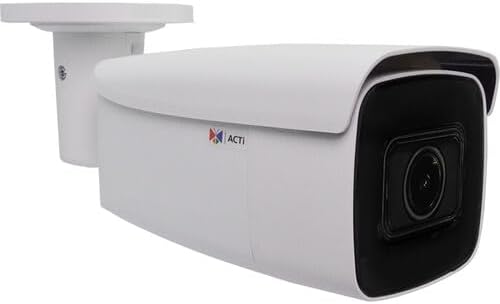
Figure 1: ACTi A422 4MP Outdoor Network Bullet Camera. This image displays the white bullet camera with its integrated mounting bracket, showcasing the main camera body and the dark lens housing.
ส่วนประกอบหลัก:
- เลนส์กล้อง: 2.7-13.5mm varifocal lens with 102.8 to 32.4° horizontal field of view.
- ไฟ LED IR: Three infrared LEDs for night vision up to 279 feet.
- ตัวยึด: Integrated for wall mounting.
- พอร์ตอีเธอร์เน็ต: RJ-45 port for network and Power over Ethernet (PoE) connection.
- อินพุต/เอาต์พุตเสียง: สำหรับการสื่อสารด้วยเสียงสองทาง
- ช่องเสียบการ์ด MicroSD: Supports Kingston or SanDisk microSD cards up to 256GB for local storage.
- ปุ่มรีเซ็ต: สำหรับการรีเซ็ตเป็นค่าเริ่มต้นจากโรงงาน
การตั้งค่า
1. การติดตั้งกล้อง
- เลือกตำแหน่ง: Select a suitable wall or surface for mounting, ensuring a clear field of view และสามารถเข้าถึงสายเคเบิลเครือข่ายได้
- เจาะรู: Use the mounting template (if provided) to mark and drill pilot holes for the mounting screws.
- รักษาความปลอดภัยกล้อง: Attach the camera's mounting bracket to the surface using the provided screws and anchors.
- ปรับมุม: คลายสกรูปรับบนตัวยึดเพื่อวางกล้องในตำแหน่งที่ต้องการ viewปรับมุมให้พอดี แล้วขันให้แน่นสนิท
2 การเชื่อมต่อเครือข่ายและแหล่งจ่ายไฟ
The ACTi A422 supports Power over Ethernet (PoE), simplifying installation by delivering both power and data through a single Ethernet cable.
- เชื่อมต่อสายเคเบิลอีเทอร์เน็ต: Connect one end of an Ethernet cable to the camera's RJ-45 port. Use the waterproof connector kit for outdoor installations to protect the connection.
- Connect to PoE Switch/Injector: Connect the other end of the Ethernet cable to a PoE-enabled network switch or a PoE injector.
- ตรวจสอบการเชื่อมต่อ: เมื่อเชื่อมต่อแล้ว กล้องจะเปิดทำงานและพยายามรับที่อยู่ IP จากเซิร์ฟเวอร์ DHCP ของเครือข่ายของคุณ
3. การกำหนดค่าเริ่มต้น
เข้าถึงกล้อง web อินเทอร์เฟซสำหรับการตั้งค่าและการกำหนดค่าเริ่มต้น
- ค้นพบกล้องถ่ายรูป: Use ACTi's IP Utility software or a network scanner to find the camera's IP address on your network.
- เข้าถึง Web อินเทอร์เฟซ: เปิด web browser (Internet Explorer 11, Chrome, Edge, or Safari are compatible) and enter the camera's IP address in the address bar.
- เข้าสู่ระบบ: Enter the default username and password (refer to the Quick Start Guide for default credentials). It is highly recommended to change the default password immediately for security.
- การตั้งค่าพื้นฐาน: Configure network settings (if not using DHCP), date/time, and user accounts.
การใช้งานกล้อง
Video and Image Settings
- ปณิธาน: The camera supports up to 2688 x 1520 resolution at 30 fps.
- การบีบอัด: Utilizes H.265 video compression for efficient storage and bandwidth usage.
- การปรับปรุงภาพ: Adjust white balance, brightness, contrast, sharpness, saturation, backlight compensation (BLC), and strong light suppression (HLC) via the web interface. The camera also features 150 dB Wide Dynamic Range (WDR) and 2D-DNR/3D-DNR for clear images in challenging lighting.
- Corridor Mode: Supports 90, 180, and 270° rotation for optimized vertical viewพื้นที่ที่กำลังดำเนินงาน
- การปกปิดความเป็นส่วนตัว: Configure up to four configurable regions to mask out sensitive areas from surveillance.
การมองเห็นตอนกลางคืน
The camera is equipped with three IR LEDs and an IR cut filter for automatic day/night switching, providing clear surveillance up to 279 feet in low-light or no-light conditions.
Deep Learning Analytics
The ACTi A422 includes built-in deep learning analytics for enhanced monitoring:
- การตรวจจับใบหน้า
- Tampการตรวจจับ
- Object-based Motion Detection
- Object Line Crossing Detection
- Object Enter Area Detection
- People Line Crossing Detection
- People Enter Area Detection
- Vehicle Line Crossing Detection
- Vehicle Enter Area Detection
These analytics can be configured to trigger alarms or recordings based on specific events within the camera's field of view.
Audio and Storage
- เสียงสองทาง: Connect external microphone and speaker to enable two-way audio communication.
- การจัดเก็บข้อมูลภายในเครื่อง: Insert a Kingston or SanDisk microSD card (up to 256GB) into the onboard slot for local video recording.
การรวมระบบ
The camera is fully compatible with ACTi software and complies with ONVIF profiles G, M, S, and T, ensuring broad compatibility with various surveillance devices and Network Video Recorders (NVRs).
การซ่อมบำรุง
- การทำความสะอาด: ทำความสะอาดเลนส์และตัวเรือนกล้องเป็นประจำด้วยผ้านุ่มๆamp ผ้า หลีกเลี่ยงน้ำยาทำความสะอาดหรือตัวทำละลายที่มีฤทธิ์กัดกร่อน
- การอัพเกรดเฟิร์มแวร์: Periodically check the ACTi website for firmware updates. Auto firmware upgrades are supported. Keeping the firmware updated ensures optimal performance and security.
- การตรวจสอบสายเคเบิล: ตรวจสอบสายเคเบิลและจุดเชื่อมต่อทั้งหมดเป็นระยะๆ เพื่อหาร่องรอยการสึกหรอหรือความเสียหาย โดยเฉพาะอย่างยิ่งสำหรับการติดตั้งภายนอกอาคาร
การแก้ไขปัญหา
| ปัญหา | สาเหตุที่เป็นไปได้ | สารละลาย |
|---|---|---|
| ไม่มีไฟ/กล้องไม่เปิด | No PoE connection; faulty Ethernet cable; PoE switch issue. | Verify Ethernet cable connection; ensure PoE switch/injector is active; try a different port or cable. |
| ไม่สามารถเข้าถึงได้ web อินเทอร์เฟซ | ที่อยู่ IP ไม่ถูกต้อง; ปัญหาการเชื่อมต่อเครือข่าย; ไฟร์วอลล์ปิดกั้น | Confirm IP address using ACTi IP Utility; check network cables; temporarily disable firewall for testing; ensure browser compatibility. |
| คุณภาพของภาพไม่ดี | Dirty lens; improper focus; lighting conditions; incorrect image settings. | Clean the lens; adjust focus via web interface; configure image enhancement settings (WDR, BLC); ensure adequate lighting. |
| Analytics not triggering | Incorrect analytics configuration; environmental factors. | Review and adjust analytics settings (detection zones, sensitivity); ensure clear view without obstructions. |
ข้อมูลจำเพาะ
- แบบอย่าง: เอ422
- เซนเซอร์ภาพ: เซ็นเซอร์ CMOS แบบ Progressive Scan ขนาด 1/2.7 นิ้ว
- ความละเอียดวิดีโอ: 2688 x 1520 (4MP) at 30 fps
- เลนส์: 2.7-13.5 มม. Varifocal
- ทุ่งแห่ง View (แนวนอน): 102.8° ถึง 32.4°
- การมองเห็นตอนกลางคืน: 3 IR LEDs, up to 279 ft (85m)
- ความสว่างขั้นต่ำ: 0.005 lux (color), 0 lux (IR on)
- การบีบอัดวิดีโอ: H.265, H.264, MJPEG
- เสียง: Two-way (input/output)
- พื้นที่จัดเก็บ: MicroSD card slot (up to 256GB, Kingston/SanDisk recommended)
- อินเทอร์เฟซเครือข่าย: RJ-45 Ethernet (10/100 Mbps)
- พลัง: การจ่ายพลังงานผ่านอีเทอร์เน็ต (PoE)
- การป้องกันการไหลเข้า: IP68-rated (Dust and Water Resistant)
- Vandal Resistance: ได้รับการจัดอันดับ IK10
- อุณหภูมิในการทำงาน: -40°C ถึง 60°C (-40°F ถึง 140°F)
- ขนาด : 6.7 x 2.8 x 2.8 นิ้ว (170 x 71 x 71 มม.)
- น้ำหนัก: 1.2 ปอนด์ (0.54 กก.)
- การปฏิบัติตามมาตรฐาน ONVIF: โปรfiles G, M, S, T
- การวิเคราะห์: Face detection, tampering detection, object-based motion detection, object/people/vehicle line crossing/enter area detection.
การรับประกันและการสนับสนุน
For warranty information and technical support, please refer to the official ACTi website or contact your authorized ACTi dealer. Keep your purchase receipt as proof of purchase for warranty claims.
Ask a question about this manual
Ask about setup, troubleshooting, compatibility, parts, safety, or missing instructions. Manuals+ will review the question and use this page’s manual context to help answer it.