
การแนะนำ
The Apple Watch Ultra 2 is a robust and feature-rich smartwatch designed for sports, adventure, and daily use. It combines advanced health monitoring, precise GPS capabilities, cellular connectivity, and a durable titanium case to support a wide range of activities and provide essential information at a glance. This manual provides detailed instructions for setting up, operating, maintaining, and troubleshooting your device.
มีอะไรอยู่ในกล่อง
เมื่อแกะกล่อง Apple Watch Ultra 2 แล้ว โปรดตรวจสอบว่ามีอุปกรณ์ครบทุกชิ้น:
- Apple Watch Ultra 2 (GPS + Cellular)
- Band (Black Titanium Milanese Loop - Large)
- USB-C Magnetic Fast Charging Cable
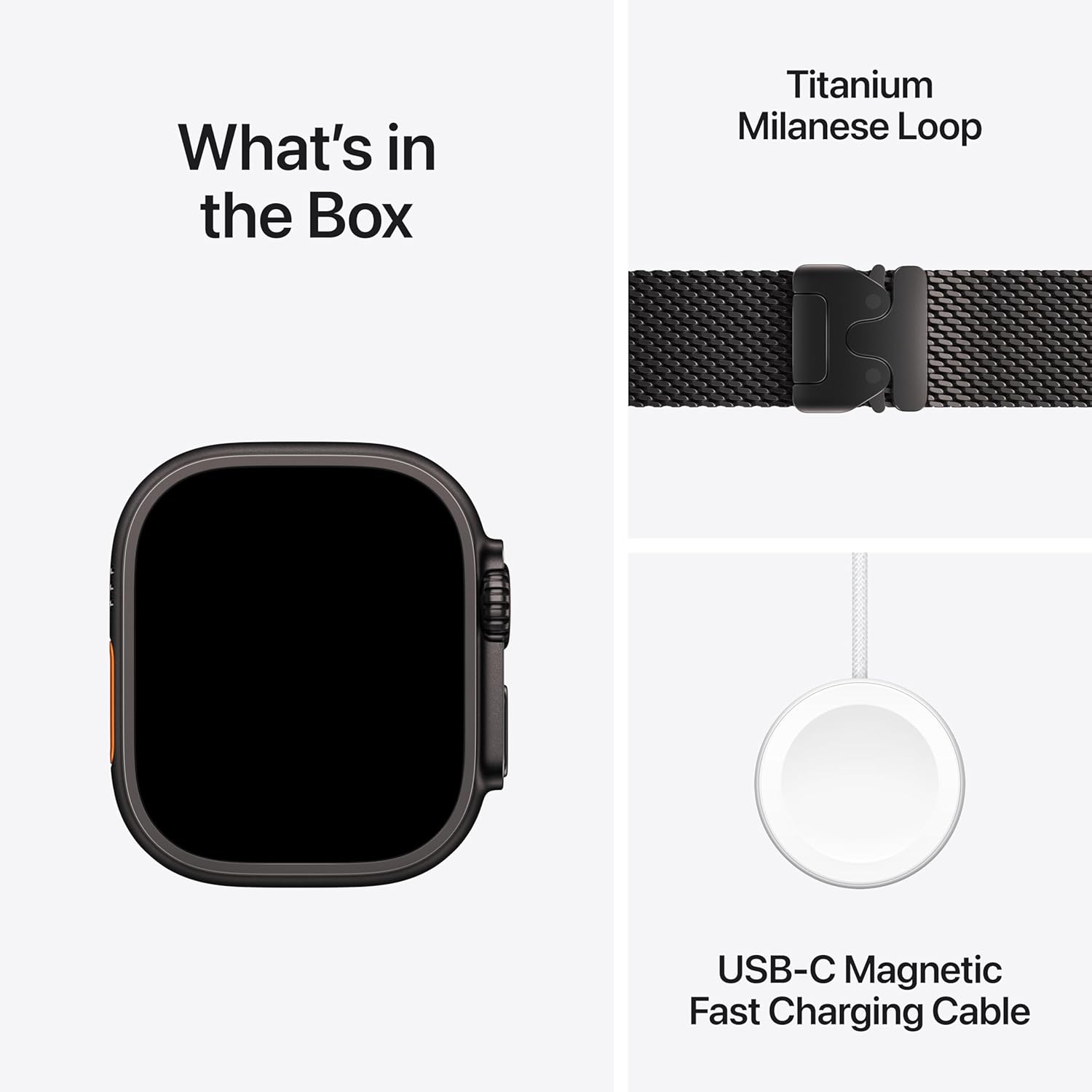
Image: The contents of the Apple Watch Ultra 2 packaging, showing the watch, the Milanese Loop band, and the USB-C magnetic fast charging cable.
สินค้าเกินview
The Apple Watch Ultra 2 features a 49mm corrosion-resistant titanium case and a sapphire front crystal for enhanced durability. It includes a large Digital Crown and a customizable Action button for intuitive control.

ภาพ: โอเวอร์view of the Apple Watch Ultra 2, detailing its 49mm titanium case, precision dual-frequency GPS, 36-hour battery life, and customizable Action button.
คุณสมบัติหลัก:
- การออกแบบที่แข็งแกร่ง: 49mm titanium case, sapphire front crystal, and 100m water resistance.
- จอภาพ Retina แบบเปิดตลอดเวลา: Superbright display for clear visibility in various conditions.
- ระบบ GPS แบบความถี่คู่ที่มีความแม่นยำสูง: Enhanced accuracy for location tracking.
- ปุ่มดำเนินการ: ปุ่มที่สามารถปรับแต่งได้เพื่อการเข้าถึงฟังก์ชันที่ต้องการได้อย่างรวดเร็ว
- การเชื่อมต่อเซลลูล่าร์: Make calls, send texts, and stream music without your iPhone.
- อายุการใช้งานแบตเตอรี่ที่ยาวนานขึ้น: Up to 36 hours in normal use, 72 hours in Low Power Mode.
การตั้งค่า
Initial Pairing with iPhone:
- โปรดตรวจสอบให้แน่ใจว่า iPhone ของคุณได้รับการอัปเดตเป็นเวอร์ชัน iOS ล่าสุดแล้ว และเปิดใช้งานบลูทูธไว้
- Power on your Apple Watch Ultra 2 by pressing and holding the side button until the Apple logo appears.
- วาง Apple Watch ของคุณไว้ใกล้กับ iPhone หน้าจอการจับคู่จะปรากฏขึ้นบน iPhone ของคุณ แตะ 'ดำเนินการต่อ'
- วางตำแหน่ง iPhone ของคุณให้ Apple Watch ปรากฏขึ้นใน viewfinder. ขั้นตอนนี้จะจับคู่อุปกรณ์เข้าด้วยกัน
- Follow the on-screen instructions on both your iPhone and Apple Watch to complete the setup, including setting up cellular service if desired.
การใช้งาน Apple Watch Ultra 2 ของคุณ
Digital Crown and Side Button:
- มงกุฎดิจิตอล: หมุนเพื่อเลื่อนดู ซูม หรือปรับค่าต่างๆ กดหนึ่งครั้งเพื่อไปยังหน้าปัดนาฬิกาหรือรายการแอป กดสองครั้งเพื่อสลับระหว่างแอปที่ใช้งานล่าสุด กดค้างไว้เพื่อเรียกใช้ Siri
- ปุ่มด้านข้าง: Press once to open the Dock (recently used apps). Press and hold to access emergency services, Medical ID, or power options.
ปุ่มดำเนินการ:
The Action button (orange button on the left side) can be customized to quickly access various functions such as starting a workout, marking a Compass Waypoint, or initiating a dive. Customize its function in the Watch app on your iPhone.
แสดงการนำทาง:
- แตะ: เลือกรายการหรือเปิดแอปพลิเคชัน
- ปัด: Navigate through notifications, glances, or app pages.
- ฟอร์ซทัช (กดค้างไว้): Access additional options within certain apps.

Image: The Apple Watch Ultra 2 display showcasing a complex watch face with various data points including tide levels, weather, and time.
การติดตามการออกกำลังกายและกิจกรรม
The Apple Watch Ultra 2 offers comprehensive tracking for various activities, providing detailed metrics and insights.
สำหรับนักวิ่ง:
- Precision dual-frequency GPS for accurate route and distance tracking.
- Automatic track detection and advanced running form metrics.
- Customizable workouts with warmups, recovery intervals, and cool-downs.
สำหรับนักปั่นจักรยาน:
- View speed, heart rate, and elevation in workout views.
- Live Activity integration with iPhone for real-time metrics.
- Connects to Bluetooth accessories like power meters for advanced data.
สำหรับนักเดินป่า:
- Offline maps for navigation without cellular service.
- Compass app with heading, elevation, longitude, and latitude.
- Compass Waypoints and Backtrack features for navigation and retracing steps.
สำหรับนักว่ายน้ำและนักดำน้ำ:
- Automatic stroke detection, lap count, splits, and custom workouts.
- Open water route mapping in workout summaries.
- Full dive computer capabilities with the Oceanic+ app, sensing depth to 40 meters and water temperature. Certified EN13319.
- Tides app for shoreline conditions.

Image: Two Apple Watch Ultra 2 devices displaying detailed metrics for a running workout (left) and a cycling workout (right), including heart rate, duration, and speed.

Image: A person running outdoors, with the Apple Watch Ultra 2 visible on their wrist, demonstrating its use during physical activity.
Advanced Health and Safety Features
The Apple Watch Ultra 2 integrates several health monitoring and safety features:
- แอป ECG: ทำการตรวจคลื่นไฟฟ้าหัวใจเพื่อตรวจสอบสัญญาณของภาวะหัวใจห้องบนสั่นพลิ้ว
- แอปวัดระดับออกซิเจนในเลือด: วัดระดับความอิ่มตัวของออกซิเจนในเลือดของคุณ (Note: For wellness purposes only, not medical use.)
- การแจ้งเตือนเกี่ยวกับจังหวะการเต้นของหัวใจผิดปกติ: Receive alerts for potential heart rhythm irregularities.
- การติดตามการนอนหลับ: ตรวจสอบการนอนหลับtages and receive notifications for potential sleep apnea.
- การตรวจจับการตก: Automatically connects to emergency services if a hard fall is detected and you are unresponsive.
- การตรวจจับการชน: เชื่อมต่อกับบริการฉุกเฉินโดยอัตโนมัติในกรณีเกิดอุบัติเหตุทางรถยนต์ร้ายแรง
- ความช่วยเหลือฉุกเฉิน SOS: Press and hold the side button to quickly call emergency services or activate a siren.
การบำรุงรักษาและการดูแล
To ensure the longevity and optimal performance of your Apple Watch Ultra 2, follow these care guidelines:
- การทำความสะอาด: Regularly clean your watch and band with a soft, lint-free cloth. For the watch, slightly dampen the cloth with fresh water if necessary. Avoid using soaps or abrasive materials.
- การอบแห้ง: After exposure to water, dry your Apple Watch thoroughly with a soft, non-abrasive cloth.
- หลีกเลี่ยงอุณหภูมิที่สูงหรือต่ำเกินไป: Do not expose your watch to extreme heat or cold.
- การชาร์จ: Use only the provided USB-C Magnetic Fast Charging Cable. Ensure the charging area is dry.
- การดูแลวงดนตรี: Follow specific cleaning instructions for your band material. The Milanese Loop can be wiped with a damp ผ้า.
การแก้ไขปัญหา
If you encounter issues with your Apple Watch Ultra 2, try these common troubleshooting steps:
- นาฬิกาไม่ตอบสนอง: Force restart by holding both the Digital Crown and the side button for at least 10 seconds until the Apple logo appears.
- ปัญหาการจับคู่: Ensure Bluetooth is on your iPhone, both devices are charged, and try restarting both.
- แบตเตอรี่หมดเร็ว: Check for background app refresh, reduce screen brightness, or enable Low Power Mode.
- แอปใช้งานไม่ได้: Ensure your watchOS is up to date. Try restarting the app or reinstalling it.
- Cellular Connectivity Problems: Verify your cellular plan is active and your watch is within network coverage.
ข้อมูลจำเพาะ
| คุณสมบัติ | รายละเอียด |
|---|---|
| หมายเลขรุ่น | MX5V3LW/A |
| ขนาดเคส | 49มม. |
| วัสดุตัวเรือน | ไทเทเนียม |
| แสดง | เรตินาแบบเปิดตลอดเวลา |
| ความต้านทานต่อน้ำ | 100m (Certified EN13319 for diving) |
| จีพีเอส | Precision Dual-Frequency GPS (Built-in) |
| การเชื่อมต่อ | Cellular, 802.11n Wi-Fi, Bluetooth |
| อายุการใช้งานแบตเตอรี่ (ใช้งานปกติ) | นานถึง 36 ชั่วโมง |
| อายุการใช้งานแบตเตอรี่ (โหมดพลังงานต่ำ) | นานถึง 72 ชั่วโมง |
| การจัดเก็บข้อมูลภายใน | 64GB |
| ระบบปฏิบัติการ | วอทช์โอเอส |
| น้ำหนักสินค้า | 12 ออนซ์ |
การรับประกันและการสนับสนุน
Apple provides various support options for your Apple Watch Ultra 2. For detailed warranty information, service options, and technical assistance, please refer to the official Apple support webไซต์หรือติดต่อฝ่ายบริการลูกค้าของ Apple
Consider AppleCare+ for extended coverage and accidental damage protection. AppleCare+ offers expert technical support and hardware coverage, including unlimited incidents of accidental damage protection, each subject to a service fee.
Video: An informational video explaining the benefits and services offered by AppleCare+ for Apple products, including repair and replacement options.
หากต้องการความช่วยเหลือเพิ่มเติม โปรดไปที่ Apple Store บน Amazon or the official Apple Support webเว็บไซต์.