
LOKMAT APPLLP 4
คู่มือผู้ใช้สมาร์ทวอทช์ LOKMAT 4G SIM
Model: APPLLP 4
การแนะนำ
This user manual provides comprehensive instructions for the LOKMAT 4G SIM Smart Watch (Model: APPLLP 4). It covers essential information regarding product setup, operation, maintenance, and troubleshooting to ensure you get the most out of your device. The LOKMAT Smart Watch is a versatile wearable device featuring Android 8.1 OS, 4G network support, a 1.508-inch AMOLED display, a unique rotating camera, and various health and fitness tracking capabilities.
มีอะไรอยู่ในกล่อง
- LOKMAT 4G SIM Smart Watch (APPLLP 4)
- สายชาร์จแม่เหล็ก
- คู่มือการใช้งาน
สินค้าเกินview
Familiarize yourself with the components of your LOKMAT Smart Watch.
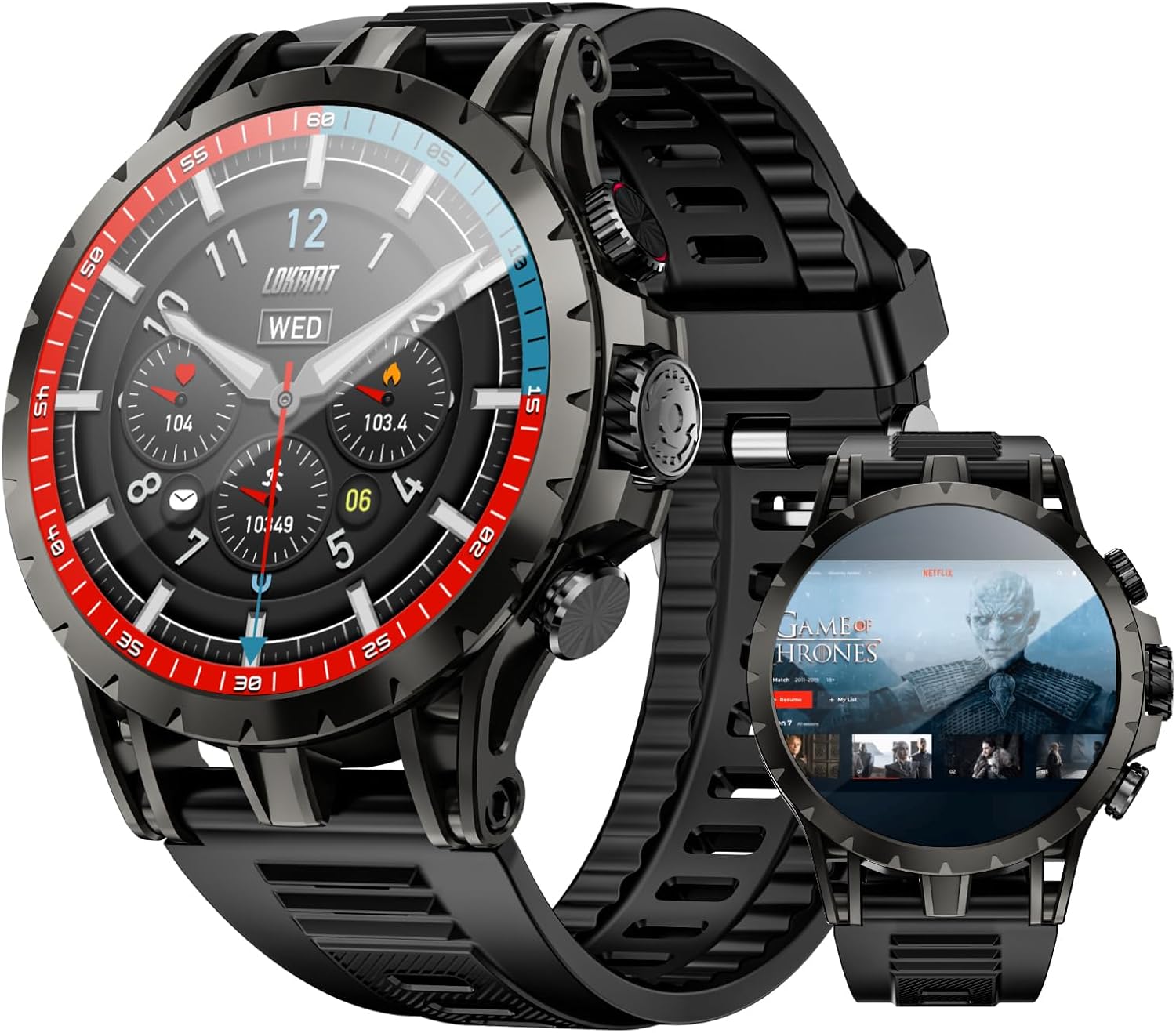
รูปที่ 1: ด้านหน้าและด้านข้าง view of the LOKMAT 4G SIM Smart Watch, showcasing its round display and robust design.

Figure 2: Close-up of the LOKMAT Smart Watch's 1.508-inch AMOLED display, highlighting its high resolution and vibrant colors.
ส่วนประกอบหลัก:
- จอแสดงผล AMOLED: High-resolution touch screen for interactive use.
- Rotating Camera: Integrated camera capable of 190° rotation for flexible photo and video capture.
- ปุ่มด้านข้าง: For power, navigation, and quick access functions.
- ช่องใส่ซิมการ์ด: Supports 4G SIM cards for standalone cellular connectivity.
- Heart Rate/SpO2 Sensor: อยู่ด้านหลังสำหรับตรวจสอบสุขภาพ
- Magnetic Charging Ports: สำหรับเชื่อมต่อสายชาร์จ
การตั้งค่า
1. การชาร์จอุปกรณ์
Before first use, fully charge your LOKMAT Smart Watch. A full charge typically takes approximately 2 hours.
- Connect the magnetic charging cable to the charging ports on the back of the watch. Ensure the pins align correctly.
- เสียบปลายสาย USB เข้ากับอะแดปเตอร์ไฟ USB มาตรฐาน (แนะนำ 5V/1A) หรือพอร์ต USB ของคอมพิวเตอร์
- หน้าจอแสดงผลของนาฬิกาจะแสดงตัวบ่งชี้การชาร์จ

Figure 3: The LOKMAT Smart Watch connected to its magnetic charging cable, displaying the charging status on screen.
2. การใส่ซิมการ์ด (ทางเลือก)
The LOKMAT Smart Watch supports 4G standalone calling. To use cellular features, insert a nano-SIM card.
- หาช่องใส่ซิมการ์ดที่ด้านข้างของนาฬิกา
- Carefully open the SIM card tray using the provided SIM ejector tool or a small pin.
- Place the nano-SIM card into the tray with the gold contacts facing down, ensuring correct orientation.
- ค่อยๆ ดันถาดกลับเข้าไปในช่องจนกระทั่งล็อคเข้าที่

Figure 4: The LOKMAT Smart Watch displaying a call interface, with an illustration of SIM cards and network frequency bands supported.
3. เปิดเครื่องครั้งแรก
Press and hold the power button (usually the top right button) for a few seconds until the LOKMAT logo appears. Follow the on-screen prompts to complete the initial setup, including language selection and time zone.
4. การเชื่อมต่อกับ Wi-Fi
To access online features and app downloads, connect your watch to a Wi-Fi network.
- From the watch face, swipe down to access the quick settings panel.
- Tap the Wi-Fi icon to enable it.
- ไปที่ การตั้งค่า > เครือข่ายและอินเตอร์เน็ต > ไวไฟ.
- เลือกเครือข่ายที่คุณต้องการจากรายการและป้อนรหัสผ่านหากได้รับแจ้ง
คำแนะนำการใช้งาน
1. การนำทางอินเทอร์เฟซ
- ปัดขึ้น: เข้าถึงลิ้นชักแอป
- เลื่อนลง: เข้าถึงการตั้งค่าด่วนและการแจ้งเตือน
- ปัดไปทางซ้าย/ขวา: Access widgets or different watch faces.
- แตะ: เลือกรายการหรือเปิดแอปพลิเคชัน
- กดแบบยาว: Customize watch face (from watch face screen).
2. Making Calls (4G)
With a SIM card inserted and network access, you can make and receive calls directly from your watch.
- เปิด โทรศัพท์ app from the app drawer.
- Dial the number using the on-screen keypad or select a contact from your address book.
- แตะไอคอนโทรเพื่อเริ่มการโทร
3. Using the Rotating Camera
The LOKMAT Smart Watch features a unique 190° pull-out rotating camera for versatile photography.
- เปิด กล้อง แอป.
- Gently pull out and rotate the camera module to your desired angle (up to 190 degrees).
- แตะปุ่มชัตเตอร์บนหน้าจอเพื่อถ่ายภาพหรือเริ่ม/หยุดบันทึกวิดีโอ

Figure 5: The LOKMAT Smart Watch showcasing its high-definition telescopic camera, capable of 190° full angle rotation for various shooting perspectives.
4. Health Data Tracking
The watch monitors various health metrics and supports multiple sports modes.
- การตรวจสอบอัตราการเต้นของหัวใจ: เปิด อัตราการเต้นของหัวใจ app to measure your current heart rate.
- การตรวจสอบ SpO2: เปิด ออกซิเจนในเลือด app to measure your blood oxygen saturation.
- โหมดกีฬา: เข้าถึง การออกกำลังกาย app to select from various sports modes (e.g., running, walking, cycling) to track your activity data.
- การฝึกหายใจ: Utilize the dedicated app for guided breathing exercises.

Figure 6: Illustration of the LOKMAT Smart Watch's 24-hour comprehensive health protection, including heart rate monitoring, blood oxygen detection, breathing training, and multiple sports modes.
5. การติดตั้งและการใช้งานแอปพลิเคชัน
As an Android 8.1 device, the watch supports installing various applications.
- เชื่อมต่อกับ Wi-Fi
- Access the pre-installed app market or browser to download and install compatible applications.

Figure 7: The LOKMAT Smart Watch screen showing a grid of popular applications available for online download and installation.
6. การเล่นสื่อ
The watch can store and play music and videos, and connect to Bluetooth headphones.
- ดนตรี: Use the pre-installed music player or download a third-party app. Connect Bluetooth headphones for private listening.
- วีดีโอ: Play videos directly on the AMOLED screen.

Figure 8: The LOKMAT Smart Watch displaying video content, illustrating its capability to function as a portable media player.

Figure 9: The LOKMAT Smart Watch displaying a music player interface, with a Bluetooth speaker and earbuds nearby, indicating support for external audio devices.
7. NFC Access Control
The watch supports NFC for access control emulation. Refer to the NFC settings within the watch to configure this feature with compatible systems.
8. ฟังก์ชัน GPS
The built-in GPS allows for real-time location tracking and navigation. This is particularly useful during outdoor activities tracked via sports modes.
การซ่อมบำรุง
1. การทำความสะอาด
- เช็ดหน้าจอและตัวเครื่องด้วยผ้าที่ไม่เป็นขุยและนุ่ม
- สำหรับรอยเปื้อนฝังแน่น ให้เช็ดออกเล็กน้อยampชุบผ้าด้วยน้ำ หลีกเลี่ยงสารเคมีรุนแรงหรือวัสดุที่มีฤทธิ์กัดกร่อน
- Ensure the charging ports are clean and dry before charging.
2. การดูแลแบตเตอรี่
- หลีกเลี่ยงอุณหภูมิที่สูงเกินไปซึ่งอาจทำให้แบตเตอรี่มีอายุการใช้งานลดลง
- ควรชาร์จนาฬิกาเป็นประจำ แต่ควรหลีกเลี่ยงการปล่อยให้แบตเตอรี่หมดเกลี้ยงเป็นเวลานาน
- ใช้เฉพาะสายชาร์จแม่เหล็กที่ให้มาเท่านั้น
3. การอัปเดตซอฟต์แวร์
ตรวจสอบการอัปเดตซอฟต์แวร์เป็นระยะเพื่อให้มั่นใจถึงประสิทธิภาพที่เหมาะสมที่สุดและการเข้าถึงฟีเจอร์ใหม่ๆ
- เชื่อมต่อนาฬิกาของคุณกับ Wi-Fi
- ไปที่ การตั้งค่า > เกี่ยวกับนาฬิกา > การอัพเดตระบบ.
- ปฏิบัติตามคำแนะนำบนหน้าจอเพื่อดาวน์โหลดและติดตั้งการอัพเดตที่มีอยู่
การแก้ไขปัญหา
| ปัญหา | วิธีแก้ปัญหาที่เป็นไปได้ |
|---|---|
| นาฬิกาไม่เปิดใช้งาน | ตรวจสอบให้แน่ใจว่านาฬิกาชาร์จเต็มแล้ว กดปุ่มเปิด/ปิดค้างไว้อย่างน้อย 10 วินาที |
| ไม่สามารถเชื่อมต่อ Wi-Fi ได้ | Check Wi-Fi password. Ensure the watch is within range of the Wi-Fi router. Restart the watch and router. |
| ตรวจไม่พบซิมการ์ด | Ensure the SIM card is correctly inserted and is a nano-SIM. Restart the watch. Check if the SIM card is active with your carrier. |
| Health tracking data seems inaccurate. | ตรวจสอบให้แน่ใจว่าสวมนาฬิกาแนบกระชับกับข้อมือ ทำความสะอาดเซ็นเซอร์ที่ด้านหลังของนาฬิกา หลีกเลี่ยงการเคลื่อนไหวมากเกินไประหว่างการวัด |
| แอปทำงานช้าหรือขัดข้อง | Close background applications. Clear app cache. Restart the watch. Consider a factory reset if issues persist (backup data first). |
ข้อมูลจำเพาะ
| คุณสมบัติ | รายละเอียด |
|---|---|
| ชื่อรุ่น | APPLLP4 |
| แสดง | 1.508-inch AMOLED, 466x466 resolution |
| ระบบปฏิบัติการ | แอนดรอยด์ 8.1 |
| แรม | 3GB |
| การจัดเก็บข้อมูลภายใน | 32GB |
| การเชื่อมต่อ | 4G LTE (SIM support), Wi-Fi (2.4GHz), Bluetooth, NFC |
| กล้อง | 190° Rotatable Camera |
| จีพีเอส | มี GPS ในตัว |
| แบตเตอรี่ | 750mAh ลิเธียมโพลิเมอร์ |
| การติดตามสุขภาพ | Heart Rate, SpO2, Multiple Sports Modes |
| ขนาด | 4.13 x 4.13 x 3.11 นิ้ว (บรรจุภัณฑ์) |
| น้ำหนัก | 7.2 ออนซ์ |
การรับประกันและการสนับสนุน
LOKMAT products are covered by a manufacturer's warranty. Please refer to the warranty card included in your product packaging for specific terms and conditions. For technical support, troubleshooting assistance, or warranty claims, please contact LOKMAT customer service through the official webเว็บไซต์หรือข้อมูลการติดต่อที่ให้มาพร้อมกับการซื้อของคุณ
ผู้ผลิต: ล๊อกแมท
วันที่เข้าใช้งานครั้งแรก: วันที่ 9 กันยายน 2024
เอกสารที่เกี่ยวข้อง - APPLLP4
 |
คู่มือผู้ใช้และคำแนะนำสำหรับสมาร์ทวอทช์ LOKMAT ATTACK PRO คู่มือครอบคลุมในการตั้งค่า การใช้งาน และการแก้ไขปัญหาสมาร์ทวอทช์ LOKMAT ATTACK PRO ครอบคลุมคุณสมบัติต่างๆ เช่น การติดตามการออกกำลังกาย การตรวจสอบอัตราการเต้นของหัวใจ การโทร และการเชื่อมต่อแอป |
 |
คู่มือผู้ใช้สมาร์ทวอทช์ LOKMAT ATTACK GT: คุณสมบัติ การตั้งค่า และการใช้งาน คู่มือผู้ใช้ฉบับสมบูรณ์สำหรับสมาร์ทวอทช์ LOKMAT ATTACK GT เรียนรู้เกี่ยวกับคุณสมบัติต่างๆ ของนาฬิกา เช่น อัตราการเต้นของหัวใจ ความดันโลหิต และการวัดระดับออกซิเจนในเลือด โหมดกีฬา เข็มทิศ และการควบคุมเพลง ประกอบด้วยคำแนะนำในการตั้งค่า คู่มือการชาร์จ เคล็ดลับการแก้ไขปัญหา และหมายเหตุการใช้งานที่สำคัญ |
 |
คู่มือผู้ใช้และคู่มือการใช้งานสมาร์ทวอทช์ ATTACK PRO คู่มือฉบับสมบูรณ์สำหรับสมาร์ทวอทช์ ATTACK PRO จาก LOKMAT ครอบคลุมการตั้งค่า การใช้งาน ฟีเจอร์ต่างๆ เช่น การวัดอัตราการเต้นของหัวใจ ความดันโลหิต การติดตามการออกกำลังกาย การควบคุมเพลง และการแก้ไขปัญหาทั่วไป ใช้งานได้กับ Android และ iOS |
 |
คู่มือผู้ใช้สมาร์ทวอทช์ LOKMAT PD7 MAX คู่มือผู้ใช้สมาร์ทวอทช์ LOKMAT PD7 MAX ฉบับสมบูรณ์ ครอบคลุมการตั้งค่า คุณสมบัติ การเชื่อมต่ออุปกรณ์ ฟังก์ชันการทำงาน และการแก้ไขปัญหา เรียนรู้วิธีการสวมใส่ ชาร์จ และใช้งานสมาร์ทวอทช์อย่างมีประสิทธิภาพ |
 |
Declaración de Transparencia de Datos: LOKMAT Smartwatch APPLLP Series según Reglamento UE 2023/2854 Información detallada sobre la gestión de datos del reloj inteligente LOKMAT con tarjeta SIM insertable, conforme a la Ley de Datos de la UE (Reglamento (UE) 2023/2854) y RGPD. Cubre tipos de datos, almacenamiento, recolección, derechos del usuario y medidas de seguridad. |
 |
Shenzhen LOKMAT Technology Co., Ltd. - หนังสือมอบอำนาจและรายชื่อรุ่นสำหรับสมาร์ทวอทช์ หนังสืออนุญาตจาก Shenzhen LOKMAT Technology Co., Ltd. สำหรับศูนย์เทคโนโลยี LGAI SA เกี่ยวกับการรับรอง FCC ของรุ่น Smart Watch รวมถึงรายการผลิตภัณฑ์รุ่นต่างๆ ที่ครอบคลุม |
Ask a question about this manual
Ask about setup, troubleshooting, compatibility, parts, safety, or missing instructions. Manuals+ will review the question and use this page’s manual context to help answer it.