
DATOUBOSS SP-7000W-New
DATOUBOSS 6200W Hybrid Solar Inverter 48V User Manual
Model: SP-7000W-New
1. บทนำ
This user manual provides comprehensive instructions for the safe and efficient operation, installation, and maintenance of your DATOUBOSS 6200W Hybrid Solar Inverter. Please read this manual thoroughly before installation and use, and keep it for future reference.
The DATOUBOSS 6200W Hybrid Solar Inverter is a versatile power solution integrating a 6200W pure sine wave inverter, a 120A MPPT solar charge controller, and a 100A AC charger. It supports battery-less operation and includes a Battery Management System (BMS) for enhanced battery longevity. This inverter is suitable for various applications including RVs, camping, and home emergency power, providing reliable power from solar, battery, or grid sources.
2. คำแนะนำด้านความปลอดภัย
คำเตือน: การไม่ปฏิบัติตามคำแนะนำด้านความปลอดภัยเหล่านี้ อาจส่งผลให้เกิดไฟฟ้าช็อต ไฟไหม้ การบาดเจ็บสาหัส หรือเสียชีวิตได้
- ตรวจสอบให้แน่ใจว่าการเชื่อมต่อทางไฟฟ้าทั้งหมดแน่นหนาและหุ้มฉนวนอย่างเหมาะสมเพื่อป้องกันไฟฟ้าลัดวงจร
- บุคลากรที่มีคุณสมบัติเหมาะสมเท่านั้นที่ควรทำการติดตั้งและบำรุงรักษา
- ห้ามใช้งานอินเวอร์เตอร์หากได้รับความเสียหายหรือดูเหมือนว่าจะทำงานผิดปกติ
- ควรเก็บอินเวอร์เตอร์ให้ห่างจากน้ำ ความชื้น และวัสดุที่ติดไฟได้ง่าย
- ตรวจสอบให้แน่ใจว่ามีการระบายอากาศที่เหมาะสมรอบๆ อินเวอร์เตอร์เพื่อป้องกันความร้อนสูงเกินไป
- The inverter features comprehensive protection mechanisms including:
- ระบบป้องกันไฟฟ้าลัดวงจร
- ระบบป้องกันกระแสไฟเกิน
- โอเวอร์โวลtagการป้องกันอี
- อันเดอร์โวลtagการป้องกันอี
- ป้องกันการโอเวอร์โหลด
- การป้องกันการถมกลับ
- การป้องกันอุณหภูมิเกิน
This image illustrates the various safety protections integrated into the inverter, such as short circuit, overcurrent, overvoltage, อันเดอร์โวลtage, overload, backfill, and over-temperature protection, ensuring safe and reliable operation.
3. สินค้าหมดview
3.1 คุณสมบัติหลัก
- 6200W Pure Sine Wave Output: Provides stable and clean power for sensitive electronics.
- 120A MPPT Solar Charge Controller: Maximizes solar power harvesting efficiency.
- Battery-less Operation: Can power loads directly from PV array or AC grid without a connected battery.
- BMS Protection System: Monitors battery status to prevent overcharge and deep discharge, extending battery lifespan.
- LCD Display and LED Indicators: Real-time system data and operational status display.
- Multiple Charging Modes: Solar priority, utility priority, solar and utility hybrid charging.
- Multiple Output Modes: PV priority, utility priority, inverter priority.
- Intelligent Heat Dissipation: Fans adjust speed based on device temperature.

This image displays the main unit of the DATOUBOSS 6200W Hybrid Solar Inverter, highlighting its compact and robust design.
3.2 คำอธิบายส่วนประกอบ

This diagram provides a detailed overview of the inverter's components, including the Liquid Crystal Display (LCD), status and error indicators, function keys, and various connection ports such as AC Input, Main Out & Second Out, WiFi/RS-232, Battery Communication/RS-485, Alternator Interface, Battery Input, Power ON/OFF Switch, and PV Input.
4. การตั้งค่าและการติดตั้ง
Proper installation is crucial for the safe and efficient operation of your hybrid solar inverter. Follow these steps carefully.
4.1 การแกะกล่องและการตรวจสอบเบื้องต้น
Carefully remove the inverter from its packaging. Inspect the unit for any signs of damage during transit. Ensure all accessories listed in the packing list are present.

This image highlights the main features of the 6200W Hybrid Solar Inverter, including its 120A MPPT solar charge controller, 6200W maximum PV array power, and 500VDC maximum PV array open circuit voltage. It also shows the included user manual and mounting hardware.
4.2 การเชื่อมต่อทางไฟฟ้า
All wiring should comply with local and national electrical codes. Use appropriate wire gauges for all connections.
- การเชื่อมต่อแบตเตอรี่: Connect the 48V battery bank to the DC Input terminals. Ensure correct polarity (positive to positive, negative to negative). The inverter supports various battery types including lead-acid (AGM, GEL, FLD) and lithium (LI, SLD, USER).
- การเชื่อมต่อแผงโซลาร์เซลล์: Connect your PV array to the PV Input terminals. The inverter supports a maximum PV array open circuit voltage of 500V DC and an MPPT voltage ช่วง 60-500V DC.
- การเชื่อมต่ออินพุต AC: Connect the AC grid or generator to the AC Input terminals.
- การเชื่อมต่อเอาต์พุต AC: Connect your loads (appliances) to the AC Output terminals.
- การต่อลงดิน: ตรวจสอบให้แน่ใจว่าได้ต่อสายดินของอินเวอร์เตอร์อย่างถูกต้องเพื่อป้องกันอันตรายจากไฟฟ้า

This diagram provides a visual guide for connecting the solar panels, generator, power grid, 48V battery packs, and various home appliances to the DATOUBOSS Hybrid Solar Inverter.

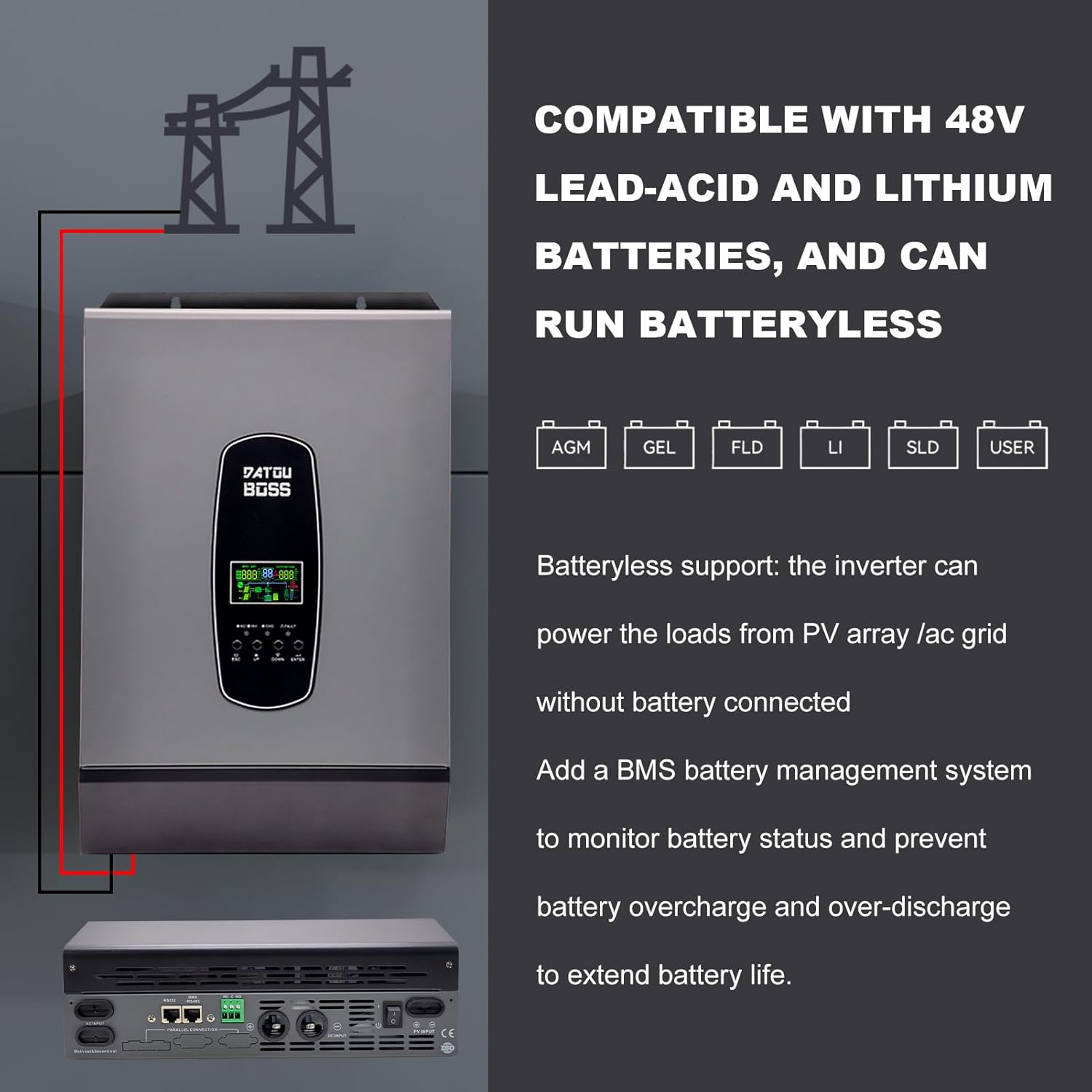
This image illustrates the inverter's compatibility with 48V lead-acid (AGM, GEL, FLD) and lithium (LI, SLD, USER) batteries. It also highlights the capability for battery-less operation, where the inverter can power loads directly from the PV array or AC grid, and the integrated BMS for battery management.
4.3 วิดีโอแนะนำการติดตั้ง
For a detailed visual guide on the installation process, please refer to the official product videos below:
วิดีโอ 4.1: จบview and unboxing of the DATOUBOSS Hybrid Solar Inverter, demonstrating initial setup steps.
Video 4.2: Detailed installation and connection guide for the DATOUBOSS 6200W Hybrid Inverter, including battery and solar panel wiring.
5. คู่มือการใช้งาน
5.1 จอแสดงผล LCD และไฟแสดงสถานะ
The inverter features an LCD display that shows real-time system data and operational status. Three LED indicators dynamically show system data, providing a quick overview of the inverter's operation.
Refer to Figure 3.2 for the layout of the LCD display and function keys.
5.2 โหมดการชาร์จและเอาต์พุต
The inverter offers flexible charging and output modes to suit various energy management needs:
- โหมดการชาร์จสี่แบบ:
- Solar Priority (CSO)
- ลำดับความสำคัญของยูทิลิตี้
- Solar and Utility Hybrid Charging (SNU - default)
- Only Solar (OSO)
- Three Output Modes:
- PV Priority (USB Utility First)
- Utility Priority (SUB Solar First - default)
- Inverter Priority (SBU Priority)

This image visually explains the different charging and output modes available, allowing users to configure the inverter based on their specific power requirements and energy sources.
6. การบำรุงรักษา
Regular maintenance ensures the longevity and optimal performance of your DATOUBOSS Hybrid Solar Inverter.
- การทำความสะอาด: ควรทำความสะอาดภายนอกของอินเวอร์เตอร์เป็นระยะด้วยผ้าแห้งเนื้อนุ่ม ตรวจสอบให้แน่ใจว่าช่องระบายอากาศปราศจากฝุ่นและสิ่งสกปรก
- การตรวจสอบการเชื่อมต่อ: Regularly inspect all electrical connections (battery, solar, AC input/output) for tightness and signs of corrosion. Loose connections can lead to overheating and poor performance.
- การตรวจสอบพัดลม: Check the cooling fans for any obstructions or unusual noises. The intelligent heat dissipation system relies on clear airflow.
- สภาพแวดล้อม : Ensure the inverter is operating within its specified temperature range and in a dry environment.
7 การแก้ไขปัญหา
If you encounter issues with your inverter, refer to the following common problems and solutions. The LCD display will show corresponding error codes to assist in diagnosis.
| ปัญหา | สาเหตุที่เป็นไปได้ | สารละลาย |
|---|---|---|
| อินเวอร์เตอร์ไม่เปิด | No DC input from battery or solar; Power switch off; Loose connections. | ตรวจสอบปริมาณแบตเตอรี่tage and connections; Ensure power switch is ON; Verify all wiring is secure. |
| โอเวอร์โหลดผิดพลาด | โหลดที่เชื่อมต่อเกินกำลังไฟฟ้าที่กำหนดของอินเวอร์เตอร์ | Reduce the connected load; Check appliance wattage. |
| เตือนอุณหภูมิเกิน | Insufficient ventilation; High ambient temperature. | Ensure adequate airflow around the inverter; Clear any obstructions from fans; Relocate to a cooler environment if necessary. |
| Battery overcharge/deep discharge | Incorrect battery settings; BMS malfunction. | Verify battery type and charging parameters in settings; Contact support if BMS issue is suspected. |
| ไม่มีเอาท์พุต AC | AC input issue; Inverter fault; Output breaker tripped. | Check AC input source; Inspect output breaker; Refer to error code on LCD for specific fault. |
For persistent issues or error codes not listed, please contact DATOUBOSS customer support.
8. ข้อมูลจำเพาะ
| คุณสมบัติ | ข้อมูลจำเพาะ |
|---|---|
| หมายเลขรุ่น | SP-7000W-New |
| กำลังไฟที่กำหนด | 6200วัตต์ |
| กระแสตรงอินพุตVoltage | กระแสตรง 48 โวลต์ |
| กระแสไฟขาออกVoltage | กระแสไฟสลับ 220V/230V |
| สูงสุด PV Array Open Circuit ฉบับที่tage | กระแสตรง 500 โวลต์ |
| PV Array MPPT ฉบับที่tagอี เรนจ์ | กระแสตรง 60~500 โวลต์ |
| Max. Charging Current (PV) | 120เอ |
| ขนาดสินค้า (กว้าง x ยาว x สูง) | 55.2 x 38.5 x 19.3 ซม. |
| น้ำหนัก | 10.12 กิโลกรัม |
| แอปพลิเคชั่นที่แนะนำ | Home, RVs, Campแหล่งจ่ายไฟฉุกเฉิน |
9. การรับประกันและการสนับสนุน
- การรับประกัน: The DATOUBOSS 6200W Hybrid Solar Inverter comes with a 24-month warranty from the date of purchase.
- นโยบายการคืนสินค้า: Enjoy a 30-day unconditional return guarantee.
- การสนับสนุนลูกค้า: For any inquiries, technical assistance, or warranty claims, please contact our 7x24 customer support. You can find more information and contact details on the official DATOUBOSS store: DATOUBOSS Store.
Ask a question about this manual
Ask about setup, troubleshooting, compatibility, parts, safety, or missing instructions. Manuals+ will review the question and use this page’s manual context to help answer it.