
SINGCALL APE500
SINGCALL Wireless Construction Site Elevator Calling System APE500 User Manual
Model: APE500 Call Button & SC-R10GX Receiver
1. สินค้าหมดview
The SINGCALL Wireless Construction Site Elevator Calling System provides efficient and reliable communication between construction site personnel and elevator operators. This system consists of a durable, waterproof call button (APE500) and a versatile receiver (SC-R10GX) designed for demanding environments.
คุณสมบัติหลัก:
- SC-R10GX Receiver: Specifically designed for construction site elevator calling. Features a storage battery for 5-6 hours of standby time without external power, with an option for power adapter use. Displays up to 3 groups of double-digit numbers simultaneously. Offers multiple prompt modes: Dingdong, Alarming sound, and voice report. Supports up to 199 pagers.
- APE500 Call Button: 360-degree waterproof design ensures sturdy construction and stable performance, offering sun-protection, dust proofing, and anti-knock durability. Provides long transmitting distance: up to 150 feet indoors and 3000 feet in open air. Numbers can be easily changed for strong reusability, and the button allows for marking numbers and floors.
อะไรอยู่ในกล่อง:
- 1 x SINGCALL APE500 Wireless Call Button
- 1 x SINGCALL SC-R10GX Wireless Receiver
- 1 x อะแดปเตอร์แปลงไฟสำหรับเครื่องรับสัญญาณ
- Mounting Hardware for Call Button
- คู่มือผู้ใช้ (เอกสารฉบับนี้)
2. การตั้งค่าระบบ
2.1 Call Button (APE500) Installation
The APE500 call button is designed for easy installation on various surfaces. Ensure the mounting location is easily accessible to users and within the transmission range of the SC-R10GX receiver.

รูปที่ 2.1 : ด้านหน้า view of the SINGCALL APE500 Call Button. It features a large 'Call' button, indicator light, and designated areas for writing 'No.' and 'Floor'.

รูปที่ 2.2: ย้อนกลับ view of the SINGCALL APE500 Call Button, showing mounting holes for secure attachment.
- เลือกสถานที่: Choose a flat, stable surface near the elevator access point.
- มาร์ค โฮลส์: Use the call button as a template to mark the positions for drilling mounting holes.
- เจาะรู: Drill appropriate holes for the provided mounting hardware.
- Secure Button: Attach the call button securely to the surface using screws.
- ฉลาก: Use a permanent marker to write the corresponding elevator number and floor number in the designated 'No.' and 'Floor' areas on the button's face.
2.2 Receiver (SC-R10GX) Setup
The SC-R10GX receiver should be placed in a central location where the elevator operator can easily see and hear incoming calls.

Figure 2.3: The SC-R10GX receiver displaying call numbers.
- การจัดวาง: Position the receiver on a flat surface or mount it on a wall within clear view and hearing range of the operator.
- การเชื่อมต่อไฟฟ้า: Connect the provided power adapter to the receiver and plug it into a standard electrical outlet. The receiver also has an internal storage battery for backup power, providing 5-6 hours of standby time.
- เสาอากาศ: Extend the antenna for optimal signal reception.
2.3 Pairing/Registration
The call buttons must be registered with the receiver to function correctly. The system prevents re-registration of an already registered number to avoid conflicts.
- เข้าสู่โหมดจับคู่: Refer to the receiver's specific instructions (usually a button combination or menu option) to enter pairing mode.
- กดปุ่มโทรออก: While the receiver is in pairing mode, press the 'Call' button on the APE500.
- การยืนยัน: The receiver will typically display a confirmation message or sound to indicate successful pairing.
- Assign Number: Follow the receiver's instructions to assign a unique number to the paired call button. This number will be displayed on the receiver when the button is pressed.
- ทำซ้ำ: Repeat this process for all additional APE500 call buttons. The SC-R10GX can work with up to 199 pagers.
3. คู่มือการใช้งาน
3.1 โทรออก
To request elevator service, simply press the 'Call' button on the APE500 unit.
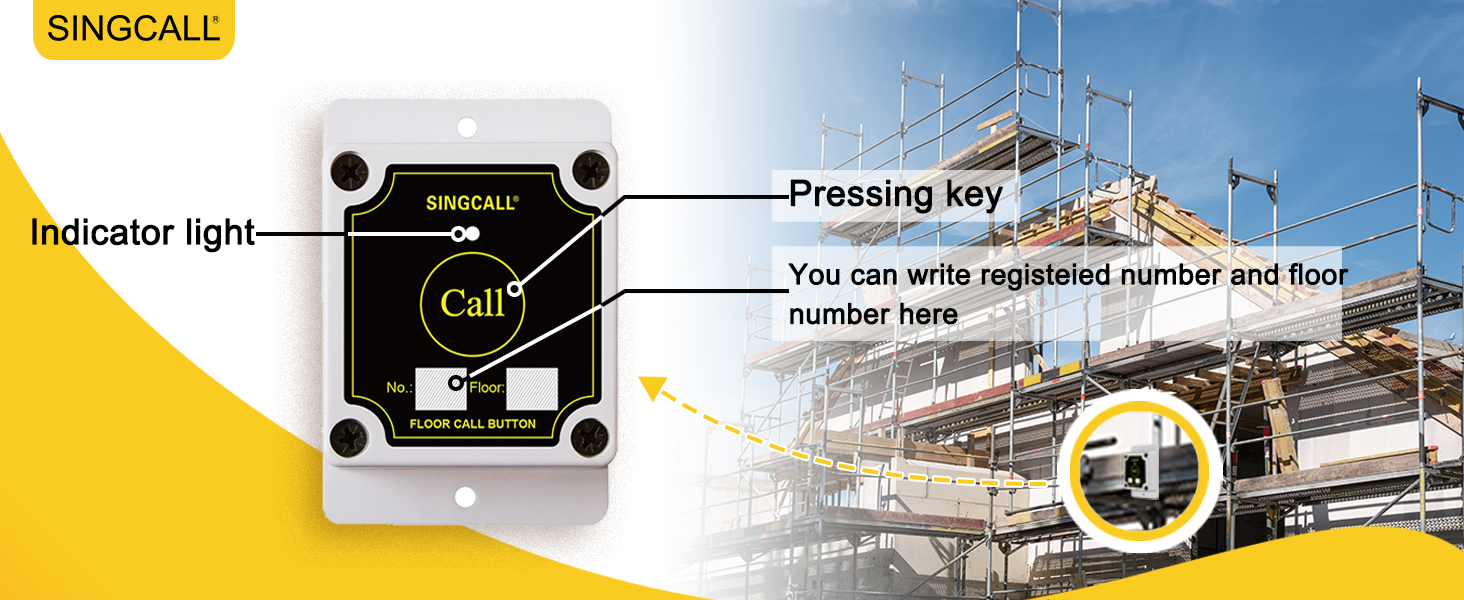
Figure 3.1: The call button with an indicator light and areas for writing the registered number and floor number.
- กดปุ่ม: Firmly press the large 'Call' button on the APE500 unit.
- ไฟแสดงสถานะ: A red indicator light on the button will illuminate briefly, confirming that the signal has been sent.
3.2 การรับสาย
When a call button is pressed, the SC-R10GX receiver will alert the operator.
Video 3.1: Demonstration of the SINGCALL system in use on a construction site. A worker presses the call button, and the receiver in the elevator cabin displays the call number and sounds an alert. (Note: Actual video URL would be provided here if available.)
- การแจ้งเตือนด้วยภาพ: The receiver's display will show the number of the calling button (e.g., '09 06' for elevator 9, floor 6). The display can show up to 3 groups of double-digit numbers simultaneously.
- การแจ้งเตือนด้วยเสียง: The receiver will emit an audible alert based on the selected prompt mode: Dingdong, Alarming sound, or a voice report (e.g., "09 06 calling").
- Acknowledge Call: The elevator operator should acknowledge the call and proceed to the designated floor.
4. การดูแลรักษา
Proper care ensures the longevity and reliable performance of your SINGCALL system.
- การทำความสะอาด: Wipe the call button and receiver with a soft, damp ผ้า. อย่าใช้สารเคมีที่รุนแรงหรือน้ำยาทำความสะอาดที่มีฤทธิ์กัดกร่อน
- Battery Care (Receiver): The SC-R10GX receiver has a built-in storage battery. For optimal battery life, avoid fully discharging the battery frequently. Charge it regularly, especially during extended periods of non-use.
- การปกป้องสิ่งแวดล้อม: While the APE500 call button is waterproof and durable, avoid exposing it to extreme temperatures or direct impact if possible.
- สัญญาณรบกวน: Ensure the receiver is not placed near large metal objects or other devices that may cause wireless interference.
5 การแก้ไขปัญหา
If you encounter issues with your SINGCALL system, refer to the table below for common problems and solutions.
| ปัญหา | สาเหตุที่เป็นไปได้ | สารละลาย |
|---|---|---|
| Receiver does not display call. | Call button not paired; Out of range; Receiver off/low battery. | Ensure button is paired (Section 2.3). Move receiver closer to button. Check receiver power and battery. |
| ไม่มีเสียงออกจากเครื่องรับสัญญาณ | Volume too low; Mute activated; Speaker malfunction. | Adjust receiver volume. Check receiver settings for mute. Contact support if speaker is faulty. |
| Call button indicator light does not illuminate. | Button malfunction; Internal battery depleted (if applicable). | Test with another button if available. Contact support for replacement. |
| Short transmission range. | Obstructions; Interference; Antenna not extended. | Ensure clear line of sight. Extend receiver antenna fully. Relocate receiver away from interference sources. |
6. ข้อมูลจำเพาะทางเทคนิค
| คุณสมบัติ | ข้อมูลจำเพาะ |
|---|---|
| Call Button Model | เอพีอี500 |
| รุ่นเครื่องรับ | SC-R10GX |
| Call Button Durability | 360-degree waterproof, sun-protection, dust proof, anti-knock |
| ระยะการส่งข้อมูล | 150 ft (in building), 3000 ft (open air) |
| จอแสดงผลเครื่องรับ | Displays 3 groups of double-digit numbers simultaneously |
| Receiver Prompt Modes | Dingdong, Alarming sound, Voice report |
| Receiver Pager Capacity | เพจเจอร์สูงสุด 199 เครื่อง |
| ตัวรับ อายุการใช้งานแบตเตอรี่ | 5-6 hours standby (storage battery) |
| Product Dimensions (Call Button) | 3.54 x 2.36 x 1.18 นิ้ว |
| ผู้ผลิต | EASTWAY INTERNATIONAL (HK) LIMITED |
7. การรับประกันและการสนับสนุน
For warranty information, technical support, or service inquiries, please contact SINGCALL customer service through your purchase platform or the official SINGCALL website. Please have your product model number (APE500) and purchase details ready.
Ask a question about this manual
Ask about setup, troubleshooting, compatibility, parts, safety, or missing instructions. Manuals+ will review the question and use this page’s manual context to help answer it.