
1. คำแนะนำด้านความปลอดภัยที่สำคัญ
Please read all instructions carefully before using the Genesis Designs GM1-B massage chair. Retain this manual for future reference.
- ความปลอดภัยทางไฟฟ้า: Ensure the power cord is securely connected to a grounded outlet. Do not operate the chair with a damaged cord or plug. Keep the power cord away from heated surfaces.
- เงื่อนไขทางการแพทย์: Consult a physician before use if you have medical conditions, are pregnant, have a pacemaker, or are undergoing medical treatment. Discontinue use if you experience discomfort.
- เด็กและสัตว์เลี้ยง: Keep children and pets away from the massage chair, especially during operation. This appliance is not intended for use by persons with reduced physical, sensory, or mental capabilities unless supervised.
- การใช้งานที่เหมาะสม: Use the chair only for its intended purpose as described in this manual. Do not stand on or place heavy objects on the chair. Avoid prolonged use in one area to prevent over-stimulation.
- สิ่งแวดล้อม: ห้ามใช้เก้าอี้ในงamp or wet environments. Keep it away from direct sunlight and heat sources.
2. สินค้าหมดview
The Genesis Designs GM1-B is a smart full-body massage chair designed for comprehensive relaxation and therapeutic massage. It features advanced 2D SL-Track rollers, zero gravity recline, voice activation, Bluetooth connectivity, and targeted heating.
คุณสมบัติหลัก:
- 2D SL-Track Rollers: Provides massage from the neck down to the glutes, following the natural curve of your spine.
- ฟังก์ชันไร้แรงโน้มถ่วง: Reclines the chair to distribute body weight evenly, reducing pressure on the spine and enhancing relaxation.
- การเปิดใช้งานด้วยเสียง: Control various functions using simple voice commands.
- ลำโพงบลูทูธ: Connect your personal device to enjoy audio during your massage.
- Heated Lumbar Function: Gentle heat therapy for the lower back to soothe muscles.
- ระบบนวดถุงลมนิรภัย: Compression massage for shoulders, arms, waist, legs, and feet.
- ลูกกลิ้งเท้า: Targeted massage for the soles of your feet.
- หลายโปรแกรม: 12 auto pre-programmed modes and 6 manual massage techniques.
- Tablet Remote Control & Quick Start Buttons: Intuitive control options for ease of use.
- พอร์ตชาร์จ USB: Convenient charging for your mobile devices.
ส่วนประกอบ:
- Massage Chair Main Unit
- Handheld Tablet Remote Control
- สายไฟ
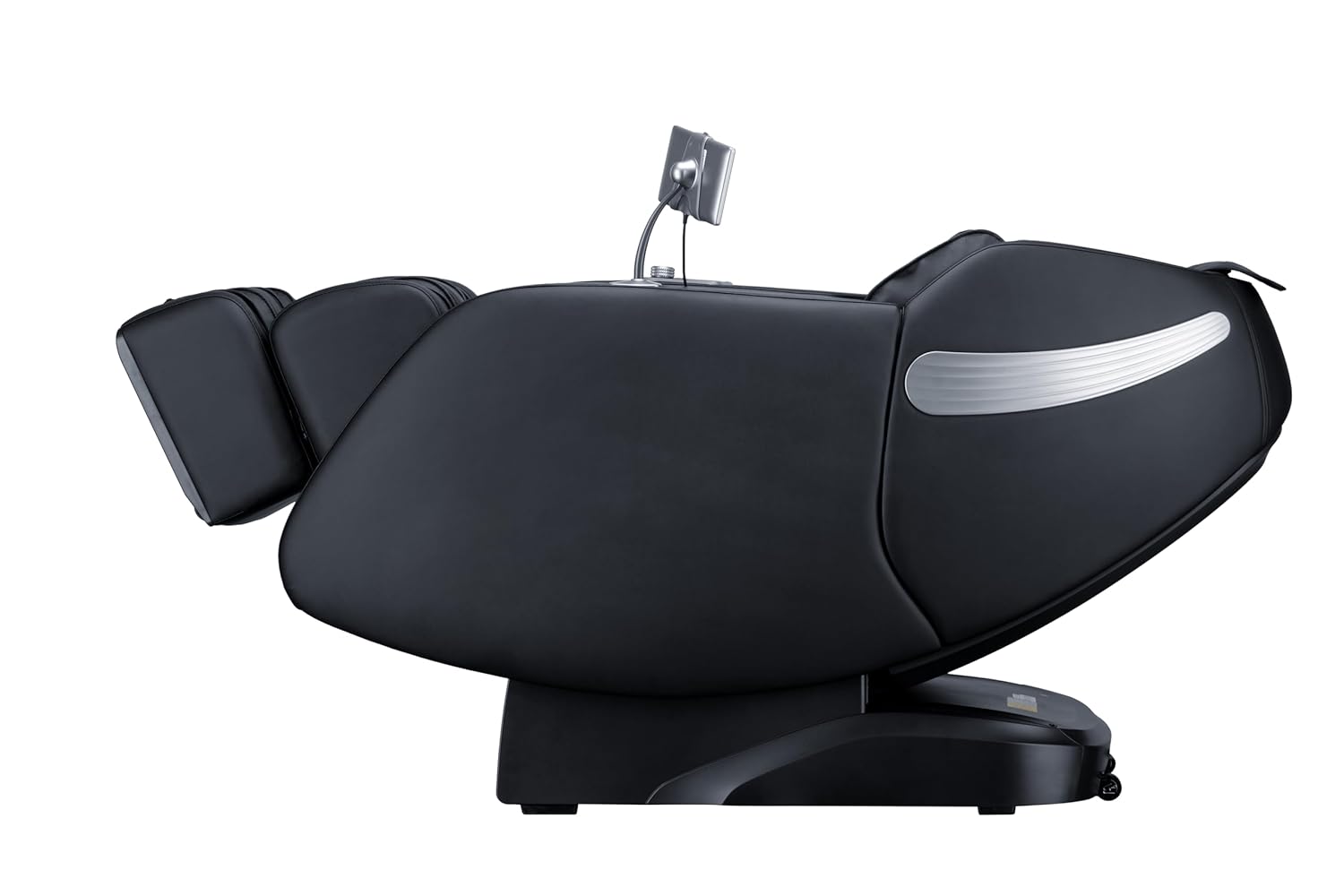
รูปที่ 2.1 : ด้านหน้า view of the Genesis Designs GM1-B Smart Full Body Massage Chair.

รูปที่ 2.2: ด้านข้าง view of the Genesis Designs GM1-B Smart Full Body Massage Chair.

Figure 2.3: Key features of the GM1-B Massage Chair.
3. การตั้งค่า
The Genesis Designs GM1-B massage chair requires minimal assembly. Follow these steps to prepare your chair for use.
3.1 การแกะและการจัดวาง
- Carefully remove all packaging materials from the chair.
- Place the massage chair on a flat, stable surface. Ensure there is sufficient space around the chair for reclining, especially for the zero gravity function.
- Avoid placing the chair in direct sunlight or near heat sources.

รูปที่ 3.1: อดีตample of chair placement in a room.
3.2 การเชื่อมต่อสายไฟ
- Locate the power input port on the back or bottom of the chair.
- Connect the power cord securely to the chair and then plug it into a standard grounded electrical outlet.
- โปรดตรวจสอบให้แน่ใจว่าสวิตช์เปิด/ปิด (ถ้ามี) อยู่ในตำแหน่ง 'ปิด' ก่อนเสียบปลั๊ก
3.3 Tablet Remote Control Setup
- Connect the handheld tablet remote control to its designated port or stand on the chair.
- Ensure the tablet is charged or connected for power if it is not battery-operated.

Figure 3.2: Handheld tablet remote control.
4. คู่มือการใช้งาน
Familiarize yourself with the control methods to fully utilize your massage chair's features.
4.1 เปิด/ปิดเครื่อง
- Press the power button on the quick start panel (right armrest) or the tablet remote to turn the chair on.
- Press again to turn off the chair. The chair will return to its upright position.
4.2 Using the Tablet Remote Control
The tablet provides detailed control over all massage functions.
- โปรแกรมอัตโนมัติ: Select from 12 pre-programmed massage modes tailored for different needs (e.g., relaxation, recovery, sleep).
- เทคนิคการใช้มือ: Choose from 6 massage techniques (e.g., Kneading, Tapping, Shiatsu) and adjust intensity, speed, and roller width.
- การนวดแบบกำหนดเป้าหมาย: Select specific body areas for massage (e.g., neck, back, lumbar, feet).
- Airbag Control: Adjust the intensity of airbag compression for shoulders, arms, waist, legs, and feet.
- ฟังก์ชั่นความร้อน: เปิดใช้งานหรือปิดใช้งานระบบทำความร้อนบริเวณเอว
- แรงโน้มถ่วงเป็นศูนย์: Adjust the recline angle to one of the zero gravity positions.
4.3 Quick Start Buttons
Located on the right armrest, these buttons offer quick access to essential functions:
- เปิด/ปิดเครื่อง
- ปรับเอนด้วยแรงโน้มถ่วงเป็นศูนย์
- Auto Program Start/Stop
- Legrest Up/Down
4.4 Voice Activation
To use voice control, ensure the feature is enabled via the tablet. Speak clearly and directly towards the chair's microphone.
- Activation Phrase: Say "Hello, Genesis" or a similar designated phrase to activate voice control.
- คำสั่ง: Follow with commands such as "Start auto massage," "Recline to zero gravity," "Increase intensity," "Turn on heat," or "Stop massage."
4.5 การเชื่อมต่อบลูทูธ
- Activate Bluetooth on your personal device (smartphone, tablet).
- On your device, search for available Bluetooth devices and select "Genesis Massage Chair" (or similar name).
- Once paired, audio from your device will play through the chair's built-in speakers.
4.6 ฟังก์ชันไร้แรงโน้มถ่วง
The zero gravity feature elevates your legs above your heart, promoting circulation and deeper relaxation.
- Press the Zero Gravity button on the tablet or quick start panel.
- The chair will recline to a preset zero gravity position. You may have options to adjust to different levels of recline.

Figure 4.1: Zero Gravity recline progression.
4.7 Foot Massage
The footrest features rollers and airbags for comprehensive foot and calf massage.
- The legrest can extend up to 6.25 inches to accommodate different user heights. Adjust manually or via the tablet.
- Foot rollers will activate during foot massage programs or can be manually controlled.

Figure 4.2: Footrest with foot rollers.
5. การบำรุงรักษา
Proper care ensures the longevity and optimal performance of your massage chair.
5.1 การทำความสะอาด
- ภายนอก: Wipe clean the leather and plastic surfaces with a soft, damp ผ้า ห้ามใช้น้ำยาทำความสะอาดที่มีฤทธิ์กัดกร่อน ตัวทำละลาย หรือสารเคมีรุนแรง
- ภายใน: Periodically vacuum any dust or debris from crevices.
- ตรวจสอบให้แน่ใจว่าเก้าอี้ถอดปลั๊กออกก่อนทำความสะอาด
5.2 พื้นที่จัดเก็บ
- เมื่อไม่ได้ใช้งานเป็นเวลานาน ควรถอดปลั๊กเก้าอี้และเก็บไว้ในที่แห้งและเย็น หลีกเลี่ยงแสงแดดโดยตรง
- Avoid placing heavy objects on the chair during storage.
6 การแก้ไขปัญหา
If you encounter issues with your massage chair, refer to the following common problems and solutions.
| ปัญหา | สาเหตุที่เป็นไปได้ | สารละลาย |
|---|---|---|
| เก้าอี้ไม่สามารถเปิดเครื่องได้ | ไม่ได้เสียบสายไฟ; สวิตช์ไฟปิดอยู่; ปลั๊กไฟเสีย | Ensure power cord is securely plugged in. Check if the main power switch is on. Test the outlet with another device. |
| ลูกกลิ้งนวดไม่เคลื่อนไหว | Program not selected; Safety sensor activated. | Select an auto program or manual massage technique. Ensure no obstructions are blocking the rollers. |
| ระบบควบคุมด้วยเสียงไม่ตอบสนอง | Voice activation disabled; Microphone obstructed; Incorrect commands. | Check tablet settings to ensure voice activation is enabled. Speak clearly and ensure no objects are covering the microphone. Refer to the manual for correct commands. |
| ไม่สามารถจับคู่บลูทูธได้ | อุปกรณ์ไม่ได้เปิดใช้งานบลูทูธ; เก้าอี้ไม่ได้อยู่ในโหมดจับคู่; มีสัญญาณรบกวน | Ensure Bluetooth is active on your device. Restart both the chair and your device. Move closer to the chair. |
| เก้าอี้ส่งเสียงแปลกๆ | เสียงการทำงานปกติ; ชิ้นส่วนหลวม; สิ่งกีดขวาง | Some mechanical sounds are normal. Check for any loose parts or foreign objects. If the noise is persistent or loud, discontinue use and contact support. |
7. ข้อมูลจำเพาะ
Detailed technical specifications for the Genesis Designs GM1-B massage chair.
| คุณสมบัติ | รายละเอียด |
|---|---|
| หมายเลขรุ่น | GM1-บี |
| ขนาดสินค้า (ตั้งตรง) | 57.67 x 29.72 x 44.33 นิ้ว (ยาว x กว้าง x สูง) |
| Product Dimensions (Zero Gravity) | 66.33 x 29.72 x 38.77 นิ้ว (ยาว x กว้าง x สูง) |
| น้ำหนักสินค้า | 165 ปอนด์ |
| ประเภทวัสดุ | Leather (Upholstery), Foam (Fill), Metal (Frame) |
| เส้นทางการนวด | 2D SL-Track |
| เทคนิคการนวด | 6 Manual Techniques, 12 Auto Programs |
| Legrest Extension | สูงถึง 6.25 นิ้ว |
| แหล่งจ่ายไฟ | เครื่องปรับอากาศมาตรฐาน (ปริมาตร)tage not specified, refer to product label) |
| การรับรอง | ได้รับการรับรองจาก ETL |
| การประกอบที่จำเป็น | No (Minimal setup required) |

Figure 7.1: Chair dimensions in upright and zero gravity positions.
8. การรับประกันและการสนับสนุน
For warranty information, product support, or service inquiries, please refer to the warranty card included with your purchase or contact Genesis Designs customer service directly. Contact details are typically available on the manufacturer's official webเว็บไซต์หรือผ่านผู้ค้าปลีกของคุณ
Please have your model number (GM1-B) and purchase date available when contacting support.