
การแนะนำ
This manual provides essential instructions for the safe and effective use of your Sony PXW-Z200 4K XDCAM Camcorder. The PXW-Z200 is designed for professional video production, offering UHD 4K60 HDR capture, advanced autofocus, and versatile recording and streaming capabilities. Please read this manual thoroughly before operating the camcorder and retain it for future reference.
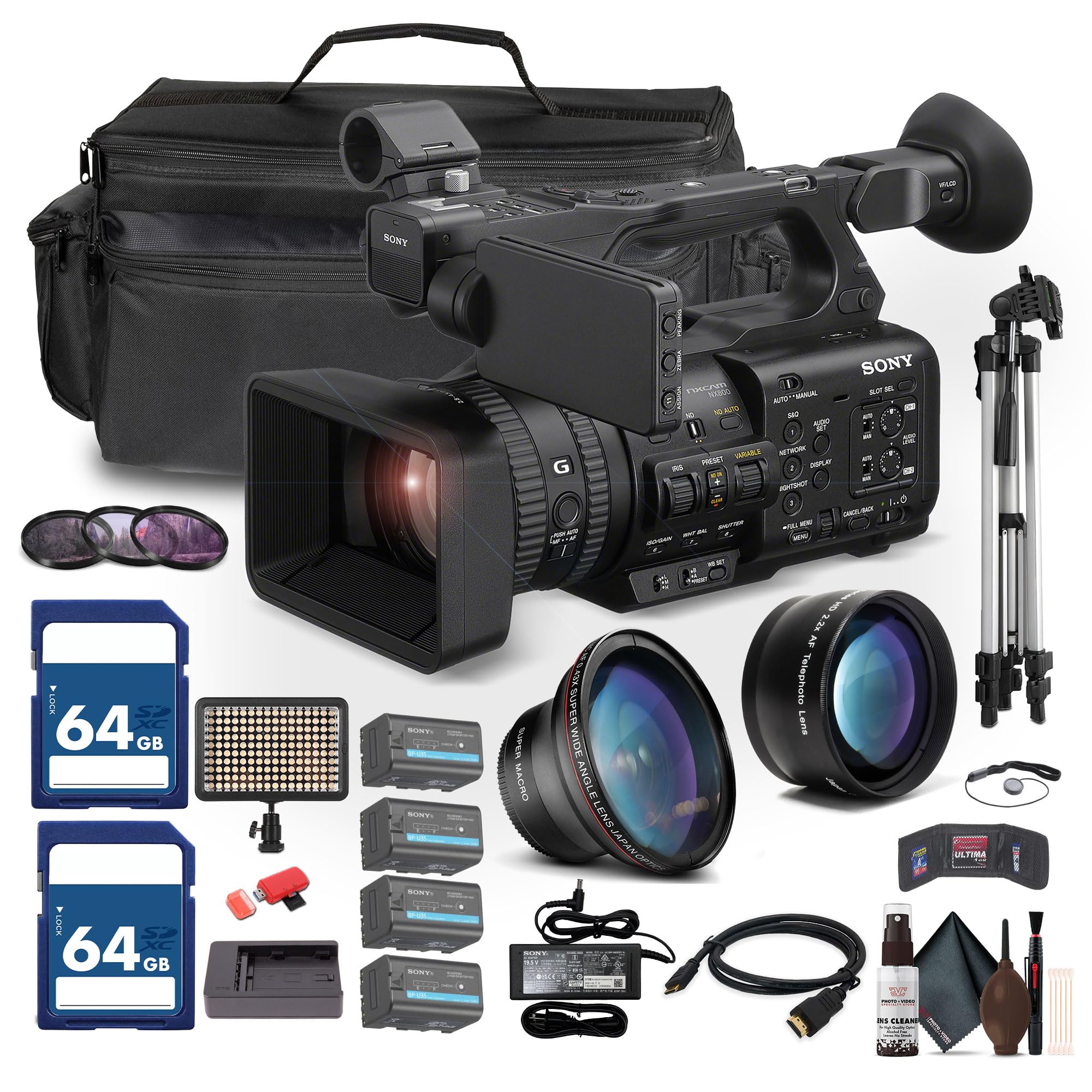
Figure 1: Sony PXW-Z200 4K XDCAM Camcorder, showing the lens, handle, and main body.
การตั้งค่า
1. การแกะกล่องและตรวจสอบเนื้อหา
Carefully unpack all items and ensure the following components are present. If any item is missing or damaged, contact your dealer.
- Sony PXW-Z200 4K 1" CMOS Sensor XDCAM Camcorder
- อะแดปเตอร์ AC
- สายไฟ
- เครื่องชาร์จแบตเตอรี่
- Battery Pack (BP-U35 or similar)
- LCD Hood
- ฮูดเลนส์
- ยางรองตา
- ขาตั้งไมโครโฟน
- Cold Shoe Kit
2 การติดตั้งฮูดเลนส์
Align the lens hood with the front of the lens and twist gently until it locks into place. The lens hood helps to reduce flare and protect the lens.
3. การติดตั้งชุดแบตเตอรี่
- ตรวจสอบให้แน่ใจว่าปิดกล้องถ่ายวิดีโอแล้ว
- ค้นหาช่องใส่แบตเตอรี่ที่ด้านหลังของกล้องวิดีโอ
- Slide the battery pack (e.g., BP-U35) into the compartment until it clicks securely into place.
- หากต้องการถอด ให้กดปุ่มปลดแบตเตอรี่แล้วเลื่อนแบตเตอรี่ออก

รูปที่ 2 : ด้านซ้าย view of the camcorder, showing the battery compartment area.
4. การใส่การ์ดหน่วยความจำ
The PXW-Z200 supports dual CFexpress Type-A/SD card slots.
- เปิดฝาปิดช่องเสียบการ์ดหน่วยความจำ
- Insert the CFexpress Type-A or SD card into the appropriate slot with the correct orientation until it clicks.
- ปิดฝาปิดช่องเสียบการ์ดหน่วยความจำ
- Format new memory cards in the camcorder before first use to ensure optimal performance. Refer to the "Operating" section for formatting instructions.
5. การเชื่อมต่ออะแดปเตอร์ AC
Connect the supplied AC adapter to the camcorder's DC IN jack and then to a wall outlet to power the camcorder or charge the battery while installed.
การใช้งานกล้องวิดีโอ
1. การเปิด/ปิดเครื่อง
ในการเปิดกล้องวิดีโอ ให้เลื่อนสวิตช์ POWER ไปที่ตำแหน่ง ON ในการปิดกล้อง ให้เลื่อนสวิตช์ไปที่ตำแหน่ง OFF
2. การบันทึกขั้นพื้นฐาน
- Ensure a formatted memory card is inserted.
- Set the desired shooting mode (e.g., Automatic, Manual) using the mode dial or menu settings.
- จัดกรอบภาพของคุณโดยใช้ viewfinder or the flip-out LCD monitor.
- กดปุ่ม บันทึก เริ่ม/หยุด กดปุ่มเพื่อเริ่มการบันทึก ไฟแสดงสถานะการบันทึกจะสว่างขึ้น
- กดปุ่ม บันทึก เริ่ม/หยุด ปุ่มอีกครั้งเพื่อหยุดการบันทึก

Figure 3: The PXW-Z200 camcorder being used to record an event, demonstrating its operational context.
3. การควบคุมโฟกัส
The PXW-Z200 offers both automatic and manual focus options.
- โฟกัสอัตโนมัติ: The camcorder features AI-powered autofocus. Ensure the AUTO/MANUAL switch for focus is set to AUTO.
- โฟกัสแบบแมนนวล: To manually adjust focus, set the AUTO/MANUAL switch to MANUAL and rotate the focus ring on the lens.

Figure 4: Detail of the camcorder's control panel, showing the AUTO/MANUAL switch for focus and other settings.
4. การดำเนินการซูม
Use the zoom rocker on the handle or the zoom ring on the lens to adjust the focal length. The camcorder features a 20x optical zoom and a 30x Clear Image Zoom in 4K.
5. Recording Formats and Settings
The PXW-Z200 supports various recording formats including XAVC S-I, HS-L, S-L, and HD/QFHD. Access the menu system to select your desired format, frame rate (up to 4K120 and 1080p240), and color profiles (S-Cinetone, ITU709, 709tone, HLG).
6. Audio Input and Monitoring
The camcorder features 4-channel audio input. Connect external microphones via the XLR inputs. Monitor audio levels on the LCD screen and through headphones connected to the headphone jack.
7. การเชื่อมต่อและการสตรีมมิ่ง
The PXW-Z200 offers multiple connectivity options:
- เอาต์พุต 12G-SDI: For high-quality video output to professional monitors or switchers.
- เอาท์พุต HDMI: For connecting to consumer displays or recorders.
- Wi-Fi/อีเธอร์เน็ต: Utilize the integrated 2.4/5 GHz Wi-Fi or Ethernet port for live streaming via RTMP/RTMPS, SRT, and FTP.
- Sony Monitor & Control App: Use the dedicated app for remote monitoring and control of the camcorder via a compatible smartphone or tablet.
การซ่อมบำรุง
การบำรุงรักษาอย่างถูกวิธีจะช่วยให้กล้องวิดีโอของคุณมีอายุการใช้งานยาวนานและทำงานได้อย่างมีประสิทธิภาพสูงสุด
- การทำความสะอาดเลนส์: Use a soft, lint-free cloth and a specialized lens cleaning solution to gently clean the lens surface. Avoid touching the lens with bare fingers.
- การทำความสะอาดร่างกาย: เช็ดตัวกล้องวิดีโอด้วยผ้าแห้งนุ่มๆ สำหรับคราบสกปรกที่ติดแน่น ให้เช็ดเบาๆ ด้วยผ้าชุบน้ำหมาดๆampen the cloth with water. Do not use strong detergents or solvents.
- การทำความสะอาดเซ็นเซอร์: Sensor cleaning should ideally be performed by authorized service personnel. Avoid attempting to clean the sensor yourself unless you are experienced.
- การดูแลแบตเตอรี่ Store batteries in a cool, dry place. Avoid fully discharging or overcharging batteries frequently to prolong their lifespan.
- พื้นที่จัดเก็บ: When not in use, store the camcorder in a dry, dust-free environment, preferably in a padded case to protect it from impacts.
การแก้ไขปัญหา
If you encounter issues with your PXW-Z200, refer to the following common troubleshooting steps:
| ปัญหา | สาเหตุที่เป็นไปได้ / วิธีแก้ไข |
|---|---|
| กล้องวิดีโอไม่สามารถเปิดได้ |
|
| ไม่สามารถบันทึกวิดีโอได้ |
|
| Image is out of focus. |
|
| ไม่มีการบันทึกเสียง |
|
สำหรับรายละเอียดการแก้ไขปัญหาเพิ่มเติมหรือปัญหาที่เกิดขึ้นอย่างต่อเนื่อง โปรดติดต่อฝ่ายสนับสนุนอย่างเป็นทางการของ Sony webไซต์หรือติดต่อฝ่ายบริการลูกค้าของ Sony
ข้อมูลจำเพาะ
Key technical specifications for the Sony PXW-Z200 Camcorder:
| คุณสมบัติ | รายละเอียด |
|---|---|
| ยี่ห้อ | โซนี่ |
| ชื่อรุ่น | PXW-Z200 |
| เทคโนโลยีโฟโต้เซนเซอร์ | ซีมอส |
| ความละเอียดในการจับภาพวิดีโอ | 4K, 720p, 480p |
| ความยาวโฟกัสสูงสุด | 154.21 มิลลิเมตร |
| รูรับแสงสูงสุด | 1.8 ฟ. |
| รูปแบบการจับภาพวิดีโอ | XAVC S-I |
| รูปแบบเสียงที่รองรับ | ดอลบี้ ดิจิทัล/เอซี-3 |
| เทคโนโลยีการเชื่อมต่อ | HDMI |
| ซูมออปติคอล | 20 เท่า |
| ประเภทเซนเซอร์ | ซีมอส |
| ระดับความต้านทานต่อน้ำ | ไม่ทนน้ำ |
| ระบบป้องกันภาพสั่นไหว | เลขที่ |
| น้ำหนักสินค้า | 4.32 ปอนด์ |
| ประเภทเลนส์ | Wide Angle, Zoom |
| ประเภทโฟกัส | โฟกัสอัตโนมัติ |
| โหมดการถ่ายภาพ | Automatic, Landscape, Low Light, Manual, Night, Portrait, Slow Motion, Sports |
| อัตราส่วนภาพ | 16:9 น. |
| File รูปแบบ | XAVC S-I, HS-L, S-L, HD/QFHD |
| ความละเอียดวิดีโอที่มีประสิทธิภาพ | 3840 พิกเซล |
| อุปกรณ์ที่รองรับ | Smartphone, Laptop, Personal Computer, Tablet, Devices with SDI input, Devices with HDMI input |
| ประเภทกล้องวีดีโอ | กล้องวิดีโอ |
| ความละเอียดการแสดงผลสูงสุด | 4K ยูเอชดี |
| ซูม | ออปติคัล, ดิจิตอล |
การรับประกันและการสนับสนุน
The Sony PXW-Z200 Camcorder is manufactured by Sony. For detailed warranty information, product registration, software updates, and technical support, please visit the official Sony support webไซต์ โปรดเก็บใบเสร็จรับเงินไว้เป็นหลักฐานการซื้อสำหรับการเรียกร้องการรับประกัน
ฝ่ายสนับสนุนอย่างเป็นทางการของโซนี่ Webเว็บไซต์: https://www.sony.com/electronics/support
For video tutorials and additional resources, please check the official Sony Professional YouTube channel or their product pages.