
วีจีอาร์ วี-360
VGR V-360 Digital Display Cordless Dual Sided OneBlade Trimmer & Shaver User Manual
รุ่น: V-360 | ยี่ห้อ: VGR
ข้อมูลด้านความปลอดภัย
Please read all instructions carefully before using the VGR V-360 Trimmer & Shaver. Keep this manual for future reference.
- Do not immerse the charging adapter in water. The trimmer itself is waterproof (IPX6 rated) and can be rinsed under water, but ensure the charging port is dry before connecting the charger.
- เก็บอุปกรณ์ให้ห่างจากเด็ก
- Do not use the appliance if the blade or comb is damaged, as this may cause injury.
- ใช้สายชาร์จที่ให้มาเท่านั้น
- Avoid extreme temperatures. Do not expose the trimmer to direct sunlight or store it in very hot or cold environments.
- For external use only. Do not use on irritated skin or open wounds.
สินค้าเกินview
ส่วนประกอบ
- VGR V-360 Trimmer & Shaver Unit
- Adjustable Limit Guide Comb (0.5-9mm)
- สายชาร์จ USB
- แปรงทำความสะอาด

This image displays the VGR V-360 trimmer, its adjustable guide comb, USB charging cable, and a small cleaning brush, which are all included in the package.

รายละเอียด view of the adjustable limit guide comb for the VGR V-360 trimmer, showing the dial for selecting cutting lengths from 0.5mm to 9mm.
การตั้งค่า
ค่าธรรมเนียมเริ่มต้น
Before first use, fully charge the VGR V-360 trimmer. Connect the USB charging cable to the trimmer's charging port and plug the other end into a compatible USB power source (e.g., computer, USB wall adapter). The LED digital display will indicate the charging status.
This image highlights the LED digital display on the VGR V-360 trimmer, indicating battery status and travel lock, along with the USB charging port.
Attaching the Guide Comb
To attach the adjustable guide comb, align it with the trimmer head and push it firmly until it clicks into place. To adjust the cutting length, rotate the dial on the comb to select your desired setting between 0.5mm and 9mm.
คำแนะนำการใช้งาน
การเปิด/ปิดเครื่อง
Press the power button located on the front of the trimmer to turn it on. Press the button again to turn it off. The LED display will show the power status.

This image illustrates key features of the VGR V-360 trimmer, including its bilateral knife net for easy shaving, IPX6 waterproof rating for full washability, LED liquid crystal display for status, and the simple switch button for operation.
การเล็มและการโกน
The VGR V-360 features a dual-sided blade for versatile grooming. For best results:
- การโกนแห้ง: Ensure your skin is clean and dry. Move the trimmer against the direction of hair growth for a close shave.
- การโกนแบบเปียก: Apply shaving cream or gel to your skin. The IPX6 waterproof design allows for comfortable wet shaving in the shower. Rinse the trimmer head frequently during use.
- Trimming with Comb: Attach the adjustable comb and select your desired length. Move the trimmer smoothly over the area to be trimmed, ensuring even contact with the skin.
- The dual-sided blade allows for precise edging and detailing. Use the edge of the blade to create sharp lines.
การบำรุงรักษาและการทำความสะอาด
ทำความสะอาดทริมเมอร์
Regular cleaning ensures optimal performance and hygiene. The VGR V-360 is IPX6 waterproof, making cleaning simple:
- Turn off the trimmer and disconnect it from the charging cable.
- Remove the guide comb (if attached).
- Rinse the trimmer head and the comb under running water. You can also use the provided cleaning brush to remove trapped hairs.
- สะบัดน้ำส่วนเกินออก และปล่อยให้เครื่องตัดหญ้าแห้งสนิทก่อนจัดเก็บหรือชาร์จไฟใหม่

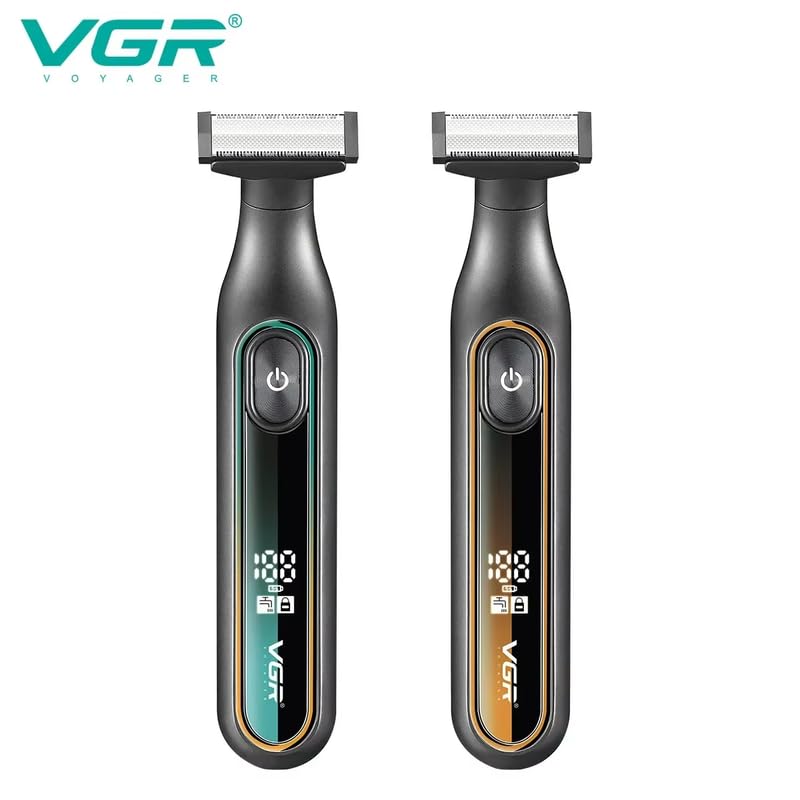
This image shows two VGR V-360 trimmers, one in green and one in orange, highlighting their IPX6 waterproof rating, which allows for easy cleaning under running water.
การดูแลใบมีด
The stainless steel blades are designed for durability. For prolonged sharpness, ensure the blades are clean and dry after each use. No oiling is typically required for this type of blade.
การแก้ไขปัญหา
| ปัญหา | สาเหตุที่เป็นไปได้ | สารละลาย |
|---|---|---|
| ทริมเมอร์ไม่เปิด | Low battery or travel lock engaged. | Charge the trimmer fully. Check the LED display for battery status. If travel lock is active, press and hold the power button for a few seconds to deactivate. |
| ประสิทธิภาพการเล็ม/โกนไม่ดี | Blades are clogged with hair, low battery, or comb not properly attached. | Clean the blades and trimmer head thoroughly. Ensure the trimmer is fully charged. Re-attach the guide comb securely. |
| เครื่องตัดหญ้ามีเสียงดังผิดปกติ | Hair or debris caught in the blade mechanism. | Turn off the trimmer and carefully clean the blade area. Ensure no foreign objects are obstructing the blades. |
ข้อมูลจำเพาะ
| แบบอย่าง | วี-360 |
| แหล่งพลังงาน | ใช้พลังงานจากแบตเตอรี่ |
| ประเภทแบตเตอรี่ | Integrated/Built-in Rechargeable Lithium-Ion, 500mAh |
| รันไทม์ | นานถึง 60 นาที |
| เวลาในการชาร์จ | ประมาณ 1.5 ชั่วโมง |
| ระดับการกันน้ำ | IPX6 |
| ความยาวตัด | 0.5mm - 9mm (with adjustable comb) |
| วัสดุใบมีด | สแตนเลส |
| ขนาด (กxยxส) | 20 x 12.5 x 4.5 ซม. |
| น้ำหนักสินค้า | 270 กรัม |
การรับประกันและการสนับสนุน
ข้อมูลการรับประกัน
The VGR V-360 Trimmer & Shaver comes with a รับประกันคุณภาพ 12 เดือน นับจากวันที่ซื้อ การรับประกันนี้ครอบคลุมถึงข้อบกพร่องจากการผลิตภายใต้การใช้งานปกติ
The warranty does not cover damage resulting from misuse, accident, unauthorized modification, or failure to follow the instructions in this manual.
การสนับสนุนลูกค้า
For any questions, concerns, or warranty claims, please contact VGR customer service. Refer to the product packaging or the official VGR webเว็บไซต์สำหรับข้อมูลการติดต่อล่าสุด
Ask a question about this manual
Ask about setup, troubleshooting, compatibility, parts, safety, or missing instructions. Manuals+ will review the question and use this page’s manual context to help answer it.