
LIECTROUX M7S PRO
คู่มือการใช้งานเครื่องดูดฝุ่นหุ่นยนต์ LIECTROUX M7S Pro
Model: M7S Pro
1. บทนำ
ขอบคุณสำหรับการซื้อasing the LIECTROUX M7S Pro Robot Vacuum Cleaner. This manual provides essential information for the safe operation, maintenance, and troubleshooting of your device. Please read this manual thoroughly before using the product and retain it for future reference.
คำแนะนำเพื่อความปลอดภัย
- ตรวจสอบให้แน่ใจว่าหุ่นยนต์ชาร์จเต็มแล้วก่อนใช้งานครั้งแรก
- ห้ามใช้งานหุ่นยนต์ในสภาพแวดล้อมที่เปียกชื้นหรือใกล้ของเหลว
- Keep loose cables, curtains, and small objects out of the robot's path to prevent entanglement.
- ดูแลเด็กและสัตว์เลี้ยงในขณะที่หุ่นยนต์กำลังทำงาน
- Do not use the robot to pick up large debris, sharp objects, or burning materials.
- โปรดใช้เฉพาะแท่นชาร์จและอะแดปเตอร์แปลงไฟที่ให้มาพร้อมกับหุ่นยนต์เท่านั้น
- Turn off the robot and unplug it from the charging dock before performing any maintenance.
2. เนื้อหาบรรจุภัณฑ์
ตรวจสอบว่ามีรายการทั้งหมดอยู่ในแพ็คเกจ:
- LIECTROUX M7S Pro Robot Vacuum Cleaner
- แท่นชาร์จ
- อะแดปเตอร์แปลงไฟ
- แปรงปัดข้าง (ชุด)
- แผ่นกรอง HEPA (ติดตั้งมาแล้วหรือเป็นอะไหล่)
- เครื่องมือทำความสะอาด
- รีโมทคอนโทรล
- คู่มือการใช้งาน
3. สินค้าหมดview
Familiarize yourself with the components of your LIECTROUX M7S Pro robot vacuum cleaner.

รูปที่ 3.1: The LIECTROUX M7S Pro robot vacuum cleaner, showcasing its sleek black design, along with its remote control and a smartphone displaying the cleaning map via the app.
องค์ประกอบหลัก:
- แผงด้านบน: Power button, Wi-Fi indicator, charging indicator.
- กันชนหน้า: Obstacle detection sensors.
- แปรงด้านข้าง: Collect dust and debris from edges and corners.
- ล้อขับเคลื่อน: Allow movement across various floor types.
- ถังขยะ: เก็บเศษขยะแห้ง
- ถังเก็บน้ำ (สำหรับถูพื้น): Holds water for wet cleaning.
- หน้าสัมผัสการชาร์จ: Connects with the charging dock.
- เซ็นเซอร์หน้าผา: Detects drops and prevents falls.
4. การตั้งค่า
4.1 การวางตำแหน่งแท่นชาร์จ
Place the charging dock against a wall in an open area, ensuring there are no obstacles within 1 meter (3 feet) to the sides and 2 meters (6 feet) in front of the dock. Connect the power adapter to the charging dock and plug it into a power outlet.
4.2 การชาร์จเริ่มต้น
Place the robot onto the charging dock, ensuring the charging contacts align. The robot will begin charging automatically. For first use, allow the robot to charge completely (approximately 4-5 hours) before operation.

รูปที่ 4.1: The robot vacuum cleaner automatically returning to its charging dock when its battery is low, ensuring it is always ready for the next cleaning cycle.
4.3 App Connection (TUYA App)
- Download the "TUYA Smart" app from your smartphone's app store (iOS or Android).
- Register or log in to your TUYA account.
- Ensure your robot is charged and powered on.
- Follow the in-app instructions to add your LIECTROUX M7S Pro robot vacuum cleaner. This typically involves pressing and holding a button on the robot to enter pairing mode and connecting to your home Wi-Fi network.
- เมื่อเชื่อมต่อแล้วคุณสามารถควบคุมหุ่นยนต์ได้ view กำหนดแผนที่การทำความสะอาดและตั้งตารางเวลาผ่านแอปพลิเคชัน
4.4 การบูรณาการผู้ช่วยเสียง
The LIECTROUX M7S Pro supports voice control via Amazon Alexa and Google Home. Refer to the respective app (Alexa app or Google Home app) for instructions on how to link your TUYA Smart account and control your robot with voice commands.
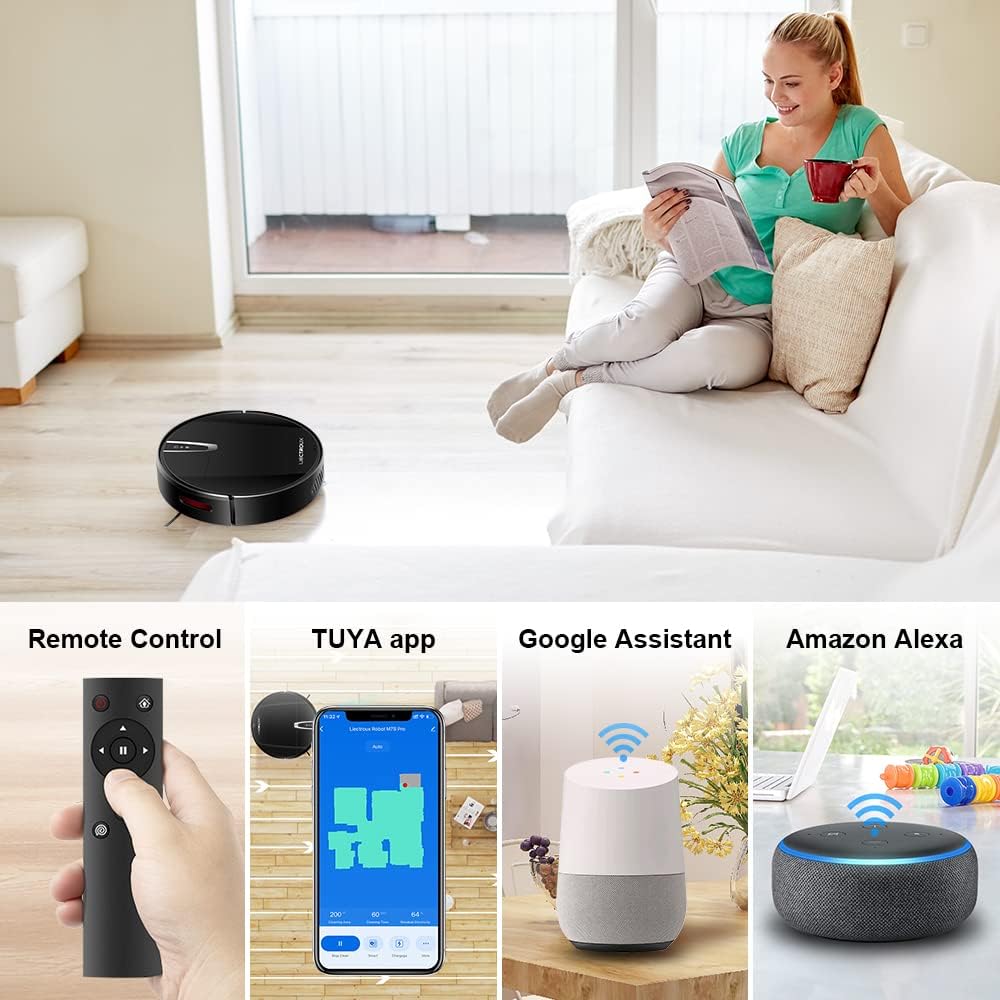
รูปที่ 4.2: Various control methods for the robot vacuum, including a physical remote control, the TUYA smartphone application displaying a cleaning map, and integration with voice assistants like Google Assistant and Amazon Alexa.
5. คู่มือการใช้งาน
โหมดทำความสะอาด 5.1 โหมด
The robot offers multiple cleaning modes to suit different needs, accessible via the app, remote control, or voice commands:
- การทำความสะอาดอัตโนมัติ: หุ่นยนต์จะนำทางและทำความสะอาดพื้นที่ทั้งหมดอย่างชาญฉลาด
- การทำความสะอาดเฉพาะจุด: เน้นทำความสะอาดบริเวณที่สกปรกเฉพาะจุดโดยทำความสะอาดแบบเป็นเกลียว
- การทำความสะอาดขอบ: ทำความสะอาดตามผนังและขอบเฟอร์นิเจอร์
- โหมดถูพื้น: For wet cleaning, attach the water tank and mopping cloth.

รูปที่ 5.1: The robot vacuum cleaner operating on a floor with scattered debris, illustrating its powerful suction and various cleaning modes: Scheduled Cleaning, Auto Cleaning, Edge Cleaning, and Spot Cleaning.
5.2 การนำทางและการทำแผนที่
The M7S Pro utilizes smart gyroscope navigation to create a 2D map of your environment, allowing for precise positioning and efficient route planning. This ensures comprehensive coverage and minimizes missed spots.

รูปที่ 5.2: The robot vacuum cleaner navigating a room, with a grid overlay illustrating its smart gyroscope navigation system for precise positioning and thorough cleaning.

รูปที่ 5.3: A visual comparison showing the efficient, systematic cleaning path generated by the LIECTROUX M7S Pro's gyroscope navigation versus a less organized common route planning method, highlighting intelligent route planning.
5.3 การชาร์จไฟอัตโนมัติ
When the battery level is low or a cleaning task is complete, the robot will automatically return to its charging dock to recharge. Ensure the charging dock is always powered on and accessible.
5.4 Anti-Drop System
The robot is equipped with cliff sensors to detect stairs and elevated surfaces, preventing it from falling. It also intelligently detects different floor types and adjusts its direction within 10 milliseconds.
6. การบำรุงรักษา
การบำรุงรักษาตามปกติจะช่วยให้หุ่นยนต์ดูดฝุ่นของคุณทำงานได้อย่างเหมาะสมที่สุดและยืดอายุการใช้งาน
6.1 การล้างถังขยะ
Empty the dustbin after each cleaning cycle or when the 'full' indicator appears. Open the top cover, remove the dustbin, and dispose of the collected debris.
6.2 การทำความสะอาดตัวกรอง
The HEPA filter should be cleaned regularly (e.g., weekly) using the provided cleaning tool or a soft brush. Replace the HEPA filter every 3-6 months, depending on usage, to maintain suction efficiency.
6.3 การทำความสะอาดแปรงด้านข้าง
Inspect and clean the side brushes regularly. Remove any tangled hair or debris. If brushes are worn or damaged, replace them with new ones.
6.4 การทำความสะอาดเซ็นเซอร์และหน้าสัมผัสการชาร์จ
Wipe the cliff sensors and charging contacts on both the robot and the charging dock with a clean, dry cloth to ensure proper function and charging.
6.5 Brush-less Suction Nozzle
The M7S Pro features an advanced brush-less suction nozzle designed to minimize hair entanglement, reducing the frequency of cleaning the main suction path.

รูปที่ 6.1: An illustration of the robot vacuum's underside, highlighting the advanced brush-less suction nozzle designed to prevent hair entanglement and ensure consistent cleaning performance.
7 การแก้ไขปัญหา
หากคุณพบปัญหาเกี่ยวกับหุ่นยนต์ดูดฝุ่น โปรดดูปัญหาทั่วไปและวิธีแก้ไขต่อไปนี้:
| ปัญหา | สาเหตุที่เป็นไปได้ | สารละลาย |
|---|---|---|
| หุ่นยนต์ไม่เปิด | แบตเตอรี่เหลือน้อย; ปิดสวิตช์ไฟ | Charge the robot; ensure the main power switch is on. |
| หุ่นยนต์ไม่ชาร์จเงิน | Charging contacts dirty; charging dock not powered. | Clean charging contacts; ensure charging dock is plugged in. |
| หุ่นยนต์ติดขัดบ่อยครั้ง | สิ่งกีดขวาง (สายเคเบิล พรม); พื้นที่แคบ | Clear the cleaning area; use virtual walls if available. |
| ประสิทธิภาพการทำความสะอาดไม่ดี | ถังขยะเต็ม ตัวกรองอุดตัน แปรงพันกัน | Empty dustbin; clean/replace filter; clean brushes. |
| ปัญหาการเชื่อมต่อแอป | รหัสผ่าน Wi-Fi ไม่ถูกต้อง; หุ่นยนต์ไม่ได้อยู่ในโหมดจับคู่; เครือข่าย Wi-Fi 5GHz | Verify Wi-Fi details; re-enter pairing mode; ensure 2.4GHz Wi-Fi is used. |
8. ข้อมูลจำเพาะ
| คุณสมบัติ | รายละเอียด |
|---|---|
| ยี่ห้อ | ลิเอคทรูซ์ |
| ชื่อรุ่น | M7S PRO |
| สี | สีดำ |
| ขนาดสินค้า | 32L x 32W x 7.8H ซม |
| น้ำหนักสินค้า | 4 กิโลกรัม |
| พลังดูดสูงสุด | 4000ปาสคาล |
| ความจุของแบตเตอรี่ | ลิเธียมไอออน 2500mAh |
| รันไทม์ | สูงสุด 120 นาที |
| ประเภทตัวกรอง | แผ่นกรอง HEPA |
| ประเภทตัวควบคุม | App Control, Touchpad Control, Voice Control |
| ความเข้ากันได้ของผู้ช่วยเสียง | Google Home, Amazon Alexa |
| ประเภทการนำทาง | Gyroscope Navigation (2D Map) |
| คุณสมบัติพิเศษ | Anti-drop system, Brush-less suction nozzle |
| คำแนะนำด้านพื้นผิว | Low-pile carpet, hard floors, ceramic tiles |
9. การรับประกันและการสนับสนุน
The LIECTROUX M7S Pro Robot Vacuum Cleaner comes with a standard manufacturer's warranty. Please refer to the warranty card included in your package for specific terms and conditions, including the warranty period and coverage details.
For technical support, troubleshooting assistance, or warranty claims, please contact the seller or LIECTROUX customer service. Contact information can typically be found on the product packaging, the seller's website, or within the TUYA Smart app.
When contacting support, please have your product model number (M7S Pro) and purchase details readily available.
Ask a question about this manual
Ask about setup, troubleshooting, compatibility, parts, safety, or missing instructions. Manuals+ will review the question and use this page’s manual context to help answer it.