
1. บทนำ
ขอบคุณสำหรับการซื้อasing the LONPOO Mini Hi-Fi Ampชีวิต AMP-615B. This 2-channel stereo ampเครื่องขยายเสียงได้รับการออกแบบมาเพื่อมอบเสียงคุณภาพสูง amplification for your passive speakers, offering versatile connectivity options including Bluetooth 5.3, Optical, Coaxial, USB, and AUX inputs. This manual provides detailed instructions for setup, operation, and maintenance to ensure optimal performance and longevity of your device.
2. คำแนะนำด้านความปลอดภัย
- แหล่งพลังงาน: ให้แน่ใจว่า amplifier is connected to a power supply within the specified voltage range (AC 100-240V ~ 50/60Hz).
- การระบายอากาศ : อย่าปิดกั้นช่องระบายอากาศ ตรวจสอบให้แน่ใจว่าอากาศไหลเวียนรอบเครื่องอย่างเพียงพอเพื่อป้องกันความร้อนสูงเกินไป
- ความชื้น: เก็บรักษาไว้ ampเก็บให้ห่างจากน้ำ ความชื้น และสภาพแวดล้อมที่มีความชื้นสูง ห้ามใช้งานขณะมือเปียก
- ความร้อน: หลีกเลี่ยงการวางเครื่องไว้ใกล้แหล่งความร้อน เช่น หม้อน้ำ เครื่องทำความร้อน เตา หรือเครื่องใช้ไฟฟ้าที่ผลิตความร้อนอื่นๆ
- การทำความสะอาด: ถอดปลั๊กไฟก่อนทำความสะอาด ใช้ผ้าแห้งและนุ่มเช็ดทำความสะอาด ห้ามใช้น้ำยาทำความสะอาดหรือสเปรย์ทำความสะอาด
- การบริการ: อย่าพยายามให้บริการผลิตภัณฑ์นี้ด้วยตนเอง ส่งต่อการบริการทั้งหมดไปยังช่างบริการที่ผ่านการรับรอง
- การจัดวาง: วางเครื่องบนพื้นผิวที่มั่นคงและเรียบเพื่อป้องกันไม่ให้เครื่องตก
3. เนื้อหาบรรจุภัณฑ์
Carefully unpack the box and ensure all items listed below are present and in good condition. If any item is missing or damaged, please contact your retailer.

The package includes the LONPOO Mini Hi-Fi Amplifier, a remote control for convenient operation, an AC power cord, an optical cable for digital audio, and a quick start guide.
- 1x LONPOO Mini Hi-Fi Ampเครื่องฟอก (AMP-615ข)
- 1x รีโมทคอนโทรล
- สายไฟ AC 1x
- สายออปติคอล 1 เส้น
- 1x User Manual (Quick Start Guide)
4. สินค้าหมดview
4.1 แผงด้านหน้า

The front panel features Treble and Bass controls, a multi-function knob for volume and input selection, AUX IN, USB input, IR receiver, and an indicator light.
- การควบคุมเสียงแหลม: Adjusts high-frequency audio levels.
- การควบคุมเบส: Adjusts low-frequency audio levels.
- Multi-Function Knob (VOLUME +/- / MODE / POWER ON/OFF):
- Rotate: Adjusts volume.
- Short Press: Cycles through input modes (Bluetooth, AUX, USB, Coaxial, Optical).
- Long Press: Powers the unit On/Off.
- AUX IN (3.5 มม.): Audio input for devices with a 3.5mm audio jack.
- ช่องต่อ USB: สำหรับการเล่นเสียง files from a USB flash drive (supports MP3, WAV formats).
- IR (Infrared) Receiver: รับสัญญาณจากรีโมทคอนโทรล
- ไฟแสดงสถานะ: Displays the current status/input mode:
- Red: Standby (Power Off)
- Blue: Bluetooth Input
- Green: AUX Input
- Yellow: Coaxial Input
- Light Blue: Optical Input
4.2 แผงด้านหลัง
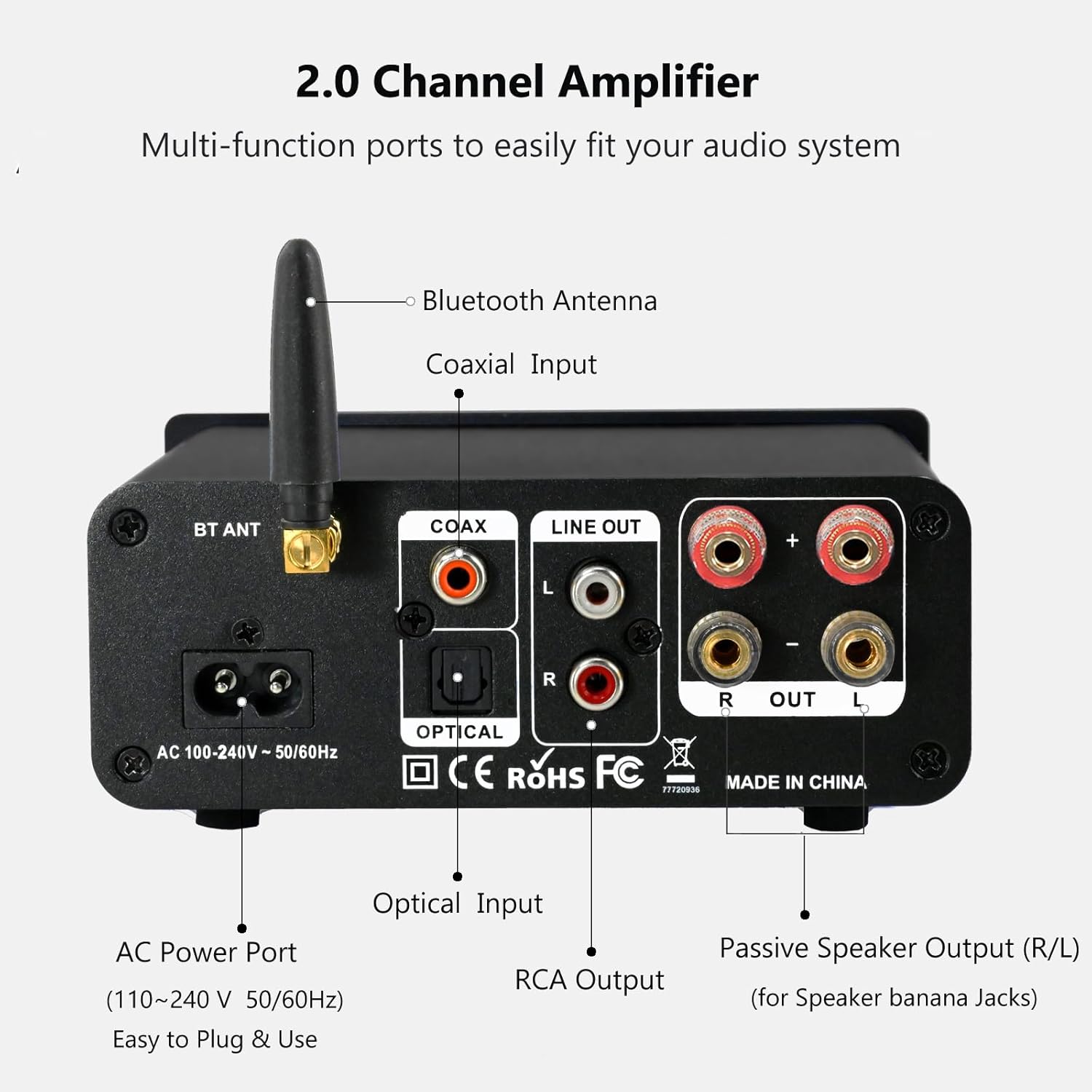
The rear panel provides connections for the Bluetooth antenna, Coaxial and Optical inputs, RCA Line Out, passive speaker outputs, and the AC power port.
- BT ANT (Bluetooth Antenna): Connect the included Bluetooth antenna for optimal wireless range and stability.
- COAX (Coaxial Input): Digital audio input for devices with a coaxial output.
- OPTICAL (Optical Input): Digital audio input for devices with an optical (Toslink) output.
- LINE OUT (RCA L/R): Analog audio output for connecting to powered speakers or a subwoofer.
- PASSIVE SPEAKER OUTPUT (R/L): Connect passive speakers using banana plugs or bare speaker wire.
- AC POWER PORT: Connect the supplied AC power cord (100-240V ~ 50/60Hz).
5. การตั้งค่า
5.1 การเชื่อมต่อลำโพง

The LONPOO Mini Hi-Fi Amplifier seamlessly integrates with your home audio setup, providing clear sound to passive bookshelf speakers.
- ลำโพงแบบพาสซีฟ: Connect your passive bookshelf speakers to the PASSIVE SPEAKER OUTPUT (R/L) terminals on the rear panel. Ensure correct polarity (+ to + and - to -) for each speaker. You can use banana plugs or strip the speaker wire ends and insert them into the terminals.
- Powered Speakers/Subwoofer: If you wish to connect powered speakers or a subwoofer, use an RCA cable to connect them to the LINE OUT (RCA L/R) พอร์ตที่แผงด้านหลัง
5.2 การเชื่อมต่อแหล่งเสียง
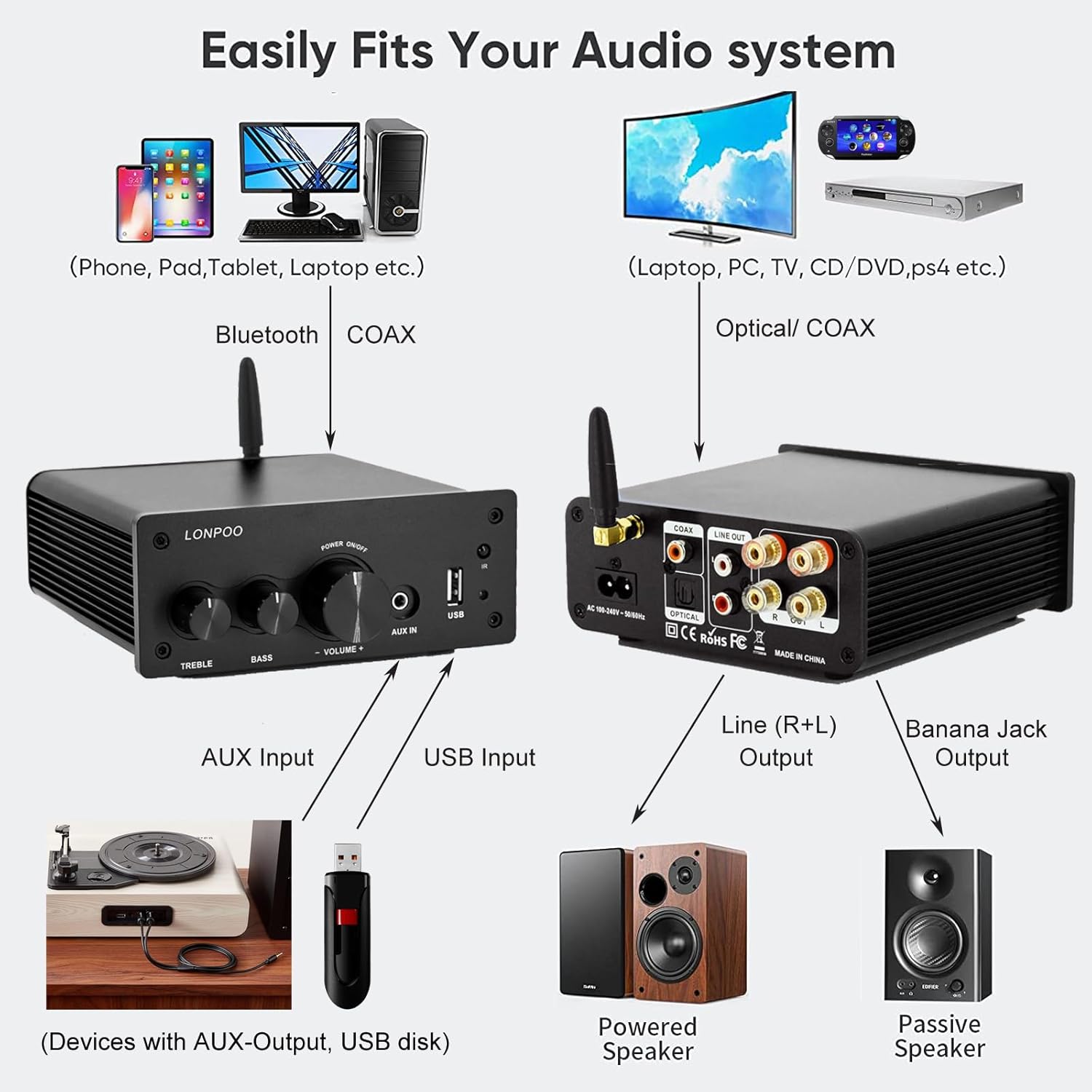
This diagram illustrates how the amplifier connects to a wide range of audio sources and output devices, including phones, PCs, TVs, CD players, powered speakers, and passive speakers.
- บลูทูธ: Ensure the Bluetooth antenna is connected to the บีที แอนท์ ท่าเรือ.
- อินพุต AUX: Connect your smartphone, tablet, or other audio device using a 3.5mm audio cable to the AUX IN พอร์ตที่แผงด้านหน้า
- ช่องต่อ USB: เสียบแฟลชไดรฟ์ USB ที่มีไฟล์เสียง MP3 หรือ WAV fileเข้าไปใน อินพุต USB พอร์ตที่แผงด้านหน้า
- อินพุตออปติคัล: Connect your TV, CD player, or game console with an optical output to the ออปติคอล port on the rear panel using the provided optical cable.
- อินพุตโคแอกเชียล: Connect your TV, DVD player, or other audio source with a coaxial output to the โคแอกซ์ พอร์ตที่แผงด้านหลัง
5.3 การเชื่อมต่อสายไฟ
เชื่อมต่อสายไฟ AC ที่ให้มาเข้ากับ พอร์ตไฟฟ้ากระแสสลับ ที่แผงด้านหลังของ amplifier, then plug the other end into a wall outlet.
6. คู่มือการใช้งาน
6.1 เปิด/ปิดเครื่อง
เพื่อเปิดเครื่อง ampลิไฟเออร์, กดยาว เดอะ ปุ่มมัลติฟังก์ชั่น on the front panel. The indicator light will illuminate. To power off, กดยาว the knob again.
6.2 การเลือกอินพุต
To select an audio input source, การพิมพ์สั้น เดอะ ปุ่มมัลติฟังก์ชั่น. Each short press will cycle through the available inputs: Bluetooth, AUX, USB, Coaxial, and Optical. The ไฟแสดงสถานะ will change color to reflect the active input mode (refer to Section 4.1 for color codes).
6.3 การปรับระดับเสียง
หมุน ปุ่มมัลติฟังก์ชั่น หมุนตามเข็มนาฬิกาเพื่อเพิ่มระดับเสียง และหมุนทวนเข็มนาฬิกาเพื่อลดระดับเสียง
6.4 โทนคอนโทรล
ใช้ เสียงแหลม และ BASS knobs on the front panel to adjust the high and low frequencies of the audio output according to your preference.
6.5 การจับคู่บลูทูธ

Connect your smartphone or other Bluetooth-enabled devices wirelessly to the amplifier for convenient audio streaming.
- Ensure the Bluetooth antenna is securely connected.
- เปิดเครื่อง amplifier and select the Bluetooth input mode (the indicator light will turn blue).
- บนอุปกรณ์ที่รองรับบลูทูธ (เช่น สมาร์ทโฟน แท็บเล็ต) ให้ค้นหาอุปกรณ์บลูทูธที่ใช้งานได้
- Select "LONPOO AMP-615" from the list to pair.
- เมื่อจับคู่แล้ว amplifier will play a confirmation sound, and you can stream audio wirelessly.
6.6 การเล่น USB

การ amplifier supports direct audio input via 3.5mm AUX and USB, allowing for plug-and-play functionality with various devices.
ใส่แฟลชไดรฟ์ USB ลงใน อินพุต USB port. The amplifier will automatically detect and begin playing supported audio files (MP3, WAV). Use the remote control for playback functions like play/pause, next/previous track.
6.7 การควบคุมระยะไกล
รีโมตคอนโทรลที่ให้มาช่วยให้ใช้งานได้สะดวกยิ่งขึ้น amplifier from a distance. Functions include:
- เปิด/ปิดเครื่อง
- เพิ่ม/ลดระดับเสียง
- ปิดเสียง
- Input Source Selection (BT, AUX, USB, COAX, OPT)
- USB Playback Controls (Play/Pause, Next/Previous Track)
7 การแก้ไขปัญหา
If you encounter any issues with your LONPOO Mini Hi-Fi Amplifier, please refer to the following troubleshooting guide:
| ปัญหา | สาเหตุที่เป็นไปได้ | สารละลาย |
|---|---|---|
| ไม่มีเสียงออก |
|
|
| Poor sound quality (distortion, low volume) |
|
|
| ปัญหาการเชื่อมต่อบลูทูธ |
|
|
| Optical/Coaxial audio dropouts or no sound |
|
|
| เสียงฮัมหรือเสียงหวีด |
|
|
8. ข้อมูลจำเพาะ
| หมายเลขรุ่น | AMP-615 |
| กำลังขับ | 100W + 100W (200W total) |
| ช่องทางการ | 2.0 สเตอริโอ |
| เวอร์ชันบลูทูธ | 5.3 |
| ข้อมูลอินพุต | Bluetooth, Optical, Coaxial, USB, 3.5mm AUX |
| เอาท์พุต | RCA Line Out (L/R), Passive Speaker Output (Banana Jack compatible) |
| แหล่งจ่ายไฟ | ไฟฟ้ากระแสสลับ 100-240V ~ 50/60Hz |
| ขนาด (กว้าง x สูง x ลึก) | 132 มม. x 55 มม. x 140 มม. (ประมาณ 5.19 x 2.16 x 5.51 นิ้ว) |
| น้ำหนัก | 1.09 กก. (ประมาณ 2.4 ปอนด์) |
| ส่วนประกอบที่รวมอยู่ | ไฮไฟ Amplifier, AC Cable, Remote Control, Optical Cable |
9. การบำรุงรักษา
- การทำความสะอาด: ถอดปลั๊กไฟก่อนทำความสะอาด ใช้ผ้าแห้งนุ่มเช็ดทำความสะอาดภายนอกเครื่อง ampห้ามใช้สารทำความสะอาดที่มีฤทธิ์กัดกร่อนหรือตัวทำละลาย
- พื้นที่จัดเก็บ: หากมีการเก็บข้อมูล amplifier for an extended period, disconnect it from the power supply and store it in a cool, dry place.
- การจัดการสายเคเบิล: ตรวจสอบให้แน่ใจว่าสายเคเบิลทั้งหมดจัดเรียงอย่างเป็นระเบียบและไม่ตึงจนเกินไป เพื่อป้องกันความเสียหาย
10. การรับประกันและการสนับสนุน
This product comes with a standard manufacturer's warranty. For specific warranty details, please refer to the documentation provided with your purchase or contact your retailer. For technical support, troubleshooting assistance, or inquiries regarding spare parts, please contact LONPOO customer service or your authorized dealer. Information regarding spare parts availability is currently unavailable.
