
การแนะนำ
Thank you for choosing the GGSTOPWATER Open Ear Headphones, Model JM13. These headphones are designed to provide a comfortable listening experience while maintaining awareness of your surroundings. Featuring Bluetooth 5.4 connectivity and an IPX5 waterproof rating, they are suitable for various activities including sports, gaming, and driving.
Please read this manual carefully to ensure proper use and to maximize the performance and lifespan of your device.
เนื้อหาแพ็คเกจ
ตรวจสอบว่ามีรายการทั้งหมดอยู่ในแพ็คเกจของคุณ:
- True Wireless Bluetooth Headphones (2 units)
- Headset Charging Compartment (1 unit)
- สายชาร์จ Type-C (1 เส้น)
- คู่มือผู้ใช้ (1 หน่วย)
- Silicone Lanyard (1 unit)

สินค้าเกินview
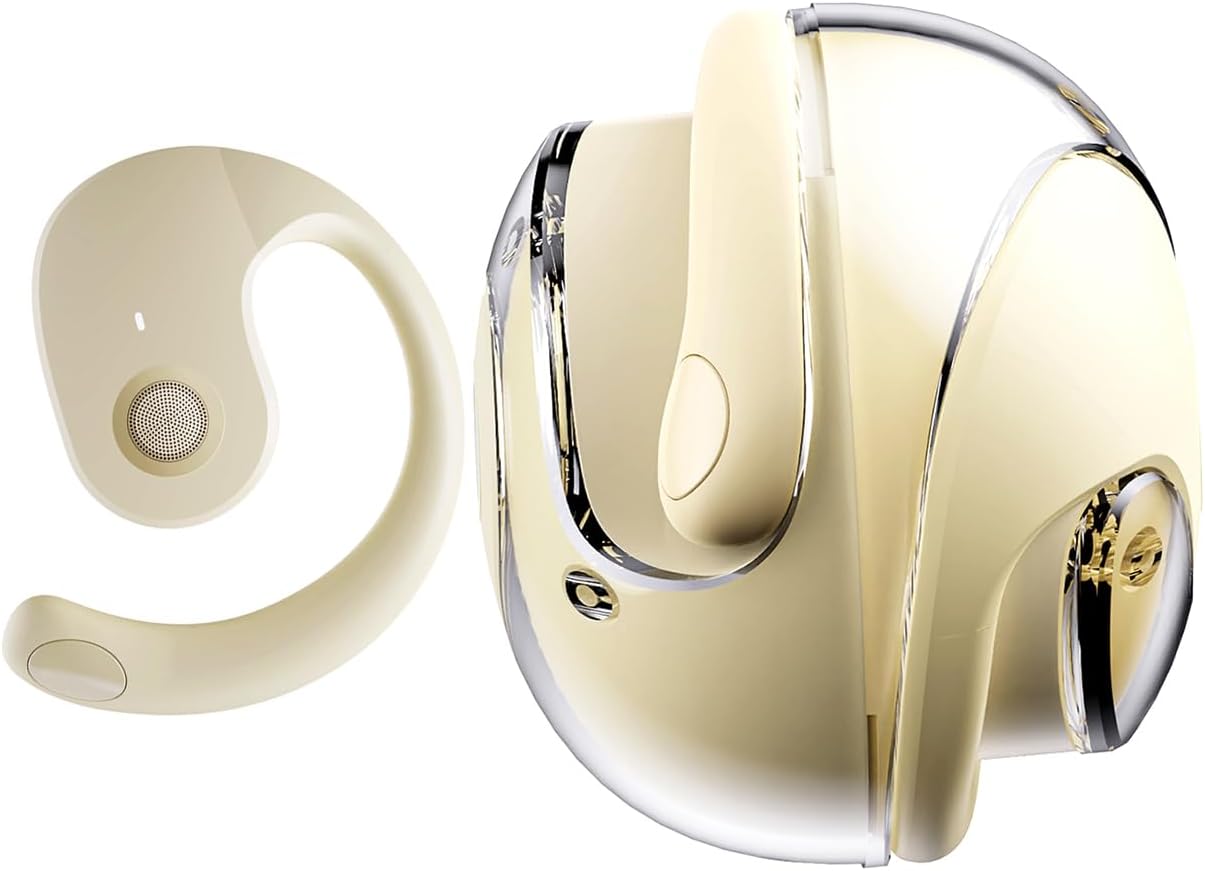
The GGSTOPWATER JM13 headphones feature an open-ear design with ear hooks for a secure and comfortable fit. The charging case is designed for portability and convenience.
การตั้งค่า
1. การชาร์จหูฟังและเคส
Before first use, fully charge the headphones and the charging case. Place the headphones into the charging case. Connect the Type-C charging cable to the charging port on the case and plug the other end into a USB power source.
- เวลาในการชาร์จ: ประมาณ 1.5 ชั่วโมงสำหรับการชาร์จเต็ม
- Headset Usage Time: สูงสุด 4 ชั่วโมงต่อการชาร์จหนึ่งครั้ง
- เวลาสแตนด์บาย: นานถึง 120 ชั่วโมง


2. การสวมหูฟัง
The open-ear design with ear hooks ensures a stable and comfortable fit without entering the ear canal.
- Pick up the headset from the charging case.
- Wear it along the back of your ear, positioning the speaker over your ear canal.
- Gently adjust the headphones to a comfortable and secure position.

3. การจับคู่บลูทู ธ
The headphones utilize Bluetooth 5.4 for a stable and fast connection. They support multi-device linking and are compatible with iOS, Android, and Windows systems.
- ตรวจสอบให้แน่ใจว่าหูฟังได้รับการชาร์จและเปิดอยู่
- เปิดการตั้งค่าบลูทูธบนอุปกรณ์ของคุณ (สมาร์ทโฟน แท็บเล็ต แล็ปท็อป)
- ค้นหา อุปกรณ์ที่มีอยู่และเลือก "JM13" จากรายการ
- Once connected, you will hear a confirmation tone, and the device will show as 'Connected'.

คำแนะนำการใช้งาน
การควบคุมแบบสัมผัส
The headphones feature intuitive touch controls for managing calls and music playback.

| การกระทำ | Function (Telephone Mode) | ฟังก์ชั่น (โหมดเพลง) |
|---|---|---|
| กด2s .ค้าง | ปฏิเสธการรับสาย | ไม่มีข้อมูล |
| คลิก | รับสายเข้า | ไม่มีข้อมูล |
| คลิกอีกครั้ง | วางสาย | ไม่มีข้อมูล |
| Double touch (L) | ไม่มีข้อมูล | เล่นเพลงก่อนหน้า |
| Double touch (R) | ไม่มีข้อมูล | เล่นเพลงถัดไป |
| สัมผัสเพียงครั้งเดียว | ไม่มีข้อมูล | เล่น/หยุดชั่วคราว |
| กด3s .ค้าง | เปิด/ปิดเครื่อง | เปิด/ปิดเครื่อง |
| Three touch (L) | ไม่มีข้อมูล | ลดระดับเสียง |
| Three touch (R) | ไม่มีข้อมูล | เพิ่มระดับเสียง |
การเชื่อมต่อแบบหลายจุด
The headphones support connecting to multiple devices simultaneously. This allows you to seamlessly switch between, for example, your smartphone and laptop without needing to re-pair each time. Ensure both devices are paired with the headphones. The headphones will prioritize audio from the active device.
การซ่อมบำรุง
การทำความสะอาด
การทำความสะอาดเป็นประจำช่วยรักษาคุณภาพเสียงและสุขอนามัย:
- Use a soft, dry, lint-free cloth to wipe the headphones and charging case.
- ห้ามใช้สารเคมีรุนแรง น้ำยาทำความสะอาด หรือสารซักฟอกชนิดเข้มข้น
- หลีกเลี่ยงไม่ให้ความชื้นเข้าไปในช่องเปิดต่างๆ
พื้นที่จัดเก็บ
เมื่อไม่ใช้งาน ให้เก็บหูฟังไว้ในกล่องชาร์จเพื่อป้องกันฝุ่นและความเสียหาย เก็บในที่แห้งและเย็น ห่างจากอุณหภูมิที่สูงหรือต่ำเกินไป
ความต้านทานต่อน้ำ (IPX5)
The headphones are rated IPX5 water-resistant, meaning they can withstand splashes of water and sweat. This makes them suitable for workouts and light rain exposure. However, they are not designed for submersion in water or for use during heavy rain or showering. Ensure the charging port is dry before charging.
การแก้ไขปัญหา
If you encounter issues with your GGSTOPWATER JM13 headphones, please refer to the following common solutions:
- ไม่มีไฟฟ้า: ตรวจสอบให้แน่ใจว่าหูฟังและเคสชาร์จชาร์จเต็มแล้ว
- ไม่สามารถจับคู่ได้:
- Ensure Bluetooth is enabled on your device and the headphones are within range.
- Turn off and then turn on the headphones.
- Delete "JM13" from your device's Bluetooth list and attempt to re-pair.
- If only one earbud connects, try placing both back in the case, closing it, and then reopening to reset.
- ไม่มีเสียงหรือระดับเสียงต่ำ:
- Check the volume level on both your connected device and the headphones using the touch controls.
- ตรวจสอบให้แน่ใจว่าหูฟังแนบสนิทกับหูของคุณอย่างถูกต้อง
- Confirm that the headphones are connected to the correct audio output on your device.
- ระบบควบคุมแบบสัมผัสที่ไม่ตอบสนอง:
- ให้แน่ใจว่านิ้วของคุณสะอาดและแห้งเมื่อใช้ระบบควบคุมแบบสัมผัส
- Restart the headphones by placing them in the charging case and taking them out again.
- ปัญหาการชาร์จ:
- ตรวจสอบว่าสายชาร์จเชื่อมต่อกับเคสและแหล่งจ่ายไฟอย่างแน่นหนาแล้ว
- ลองใช้สาย Type-C และอะแดปเตอร์แปลงไฟอันอื่นดู
- ตรวจสอบให้แน่ใจว่าขั้วชาร์จบนหูฟังและภายในเคสสะอาดและปราศจากสิ่งสกปรก
หากขั้นตอนเหล่านี้ไม่สามารถแก้ไขปัญหาของคุณได้ โปรดติดต่อฝ่ายสนับสนุนลูกค้า
ข้อมูลจำเพาะ
| คุณสมบัติ | รายละเอียด |
|---|---|
| ชื่อรุ่น | เจเอ็ม13 |
| ยี่ห้อ | จีจีเอสท็อปวอเตอร์ |
| เทคโนโลยีการเชื่อมต่อ | ไร้สาย (Bluetooth) |
| เวอร์ชันบลูทูธ | 5.4 |
| การวางตำแหน่งหู | หูเปิด |
| รูปทรงของหูฟัง | ที่เกี่ยวหู |
| ระดับความต้านทานต่อน้ำ | IPX5 (กันน้ำ กันเหงื่อ) |
| การควบคุมเสียงรบกวน | ระบบตัดเสียงรบกวนแบบแอคทีฟ |
| ประเภทไดร์เวอร์เสียง | ไดรเวอร์ไดนามิก (16 มม.) |
| ช่วงความถี่ | 20 เฮิรตซ์ - 20,000 เฮิรตซ์ |
| อิมพีแดนซ์ | 32 โอห์ม |
| วิธีการควบคุม | รีโมท (ระบบสัมผัส) |
| ประเภทแบตเตอรี่ | ลิเธียมโพลีเมอร์ |
| น้ำหนักสินค้า | 4.6 ออนซ์ |
| วัสดุ | ซิลิโคน |
| อุปกรณ์ที่รองรับ | Laptops, Tablets, Cellphones (iOS, Android, Windows) |
การรับประกันและการสนับสนุน
GGSTOPWATER products are manufactured to high-quality standards. For information regarding warranty coverage, please refer to the warranty card included in your product packaging or contact your retailer. Keep your purchase receipt as proof of purchase.
การสนับสนุนลูกค้า
If you have any questions, concerns, or require technical assistance, please contact GGSTOPWATER customer support through the retailer's platform or the official GGSTOPWATER website. Please have your product model (JM13) and purchase details ready when contacting support.