
1. บทนำ
Thank you for choosing the Anmite 24-inch IPS 100Hz Full HD Gaming Monitor, model AN-238W02. This manual provides essential information for setting up, operating, and maintaining your new monitor. Please read this manual thoroughly before use to ensure proper functionality and to maximize your viewการสร้างประสบการณ์
This monitor features a 24-inch IPS panel with a 1920 x 1080 Full HD resolution, a 100Hz refresh rate, and a 1ms response time, designed to deliver smooth and vibrant visuals for gaming and multimedia. It also includes AMD FreeSync Premium technology for tear-free gameplay and specialized FPS/RTS game modes.
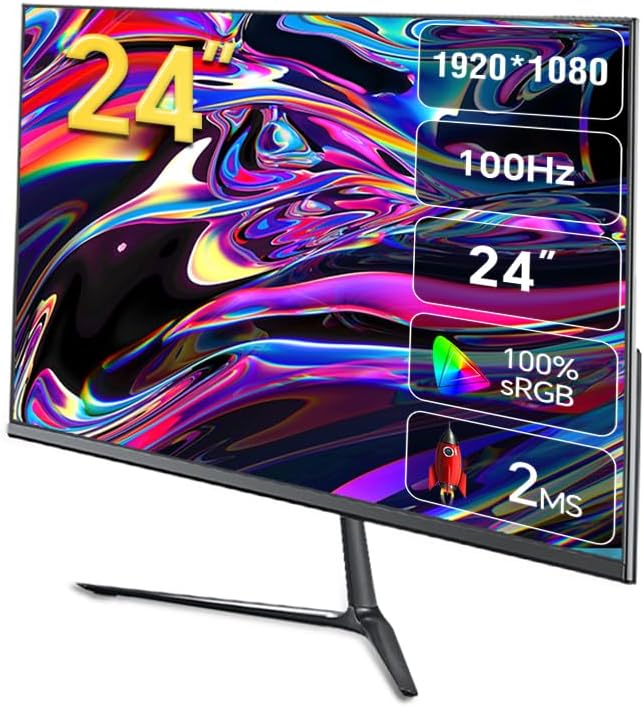
ภาพที่ 1.1: ด้านหน้า view of the Anmite AN-238W02 monitor, showcasing its 24-inch display, 1920x1080 resolution, 100Hz refresh rate, and 1ms response time.
2. ข้อมูลด้านความปลอดภัย
- ควรวางจอภาพบนพื้นผิวที่มั่นคงและเรียบเสมอ เพื่อป้องกันไม่ให้จอภาพตก
- อย่าปิดกั้นช่องระบายอากาศ ควรมีพื้นที่รอบจอภาพเพียงพอเพื่อให้อากาศถ่ายเทได้สะดวก
- ใช้เฉพาะอะแดปเตอร์ไฟฟ้าที่ให้มาพร้อมกับจอภาพเท่านั้น
- เก็บจอภาพให้ห่างจากน้ำ ความชื้น และแสงแดดโดยตรง
- Do not attempt to open the monitor casinก. ส่งต่อการบริการทั้งหมดให้กับบุคลากรที่มีคุณสมบัติเหมาะสม
- ถอดปลั๊กจอภาพออกจากเต้าเสียบไฟฟ้าในระหว่างที่มีพายุฝนฟ้าคะนองหรือเมื่อไม่ได้ใช้งานเป็นเวลานาน
3. เนื้อหาบรรจุภัณฑ์
กรุณาตรวจสอบสิ่งของภายในกล่องเมื่อแกะกล่อง หากมีสินค้าใดสูญหายหรือเสียหาย โปรดติดต่อตัวแทนจำหน่ายของคุณ
- Anmite 24" IPS 100Hz Full HD Gaming Monitor (AN-238W02)
- ขาตั้งจอมอนิเตอร์ (ฐานและคอ)
- อะแดปเตอร์แปลงไฟและสายไฟ
- สาย HDMI
- คู่มือการใช้งาน (เอกสารนี้)
4. การตั้งค่า
4.1 การประกอบขาตั้งจอภาพ
- นำจอภาพออกจากบรรจุภัณฑ์อย่างระมัดระวัง โดยระวังอย่าให้หน้าจอเสียหาย
- Attach the stand neck to the back of the monitor by aligning the mounting points and securing with screws (if provided).
- ประกอบฐานขาตั้งเข้ากับส่วนคอของขาตั้ง ตรวจสอบให้แน่ใจว่าล็อคเข้าที่แล้ว หรือขันให้แน่นด้วยสกรูที่ให้มา
- วางจอภาพที่ประกอบแล้วไว้บนพื้นผิวที่มั่นคงและเรียบ
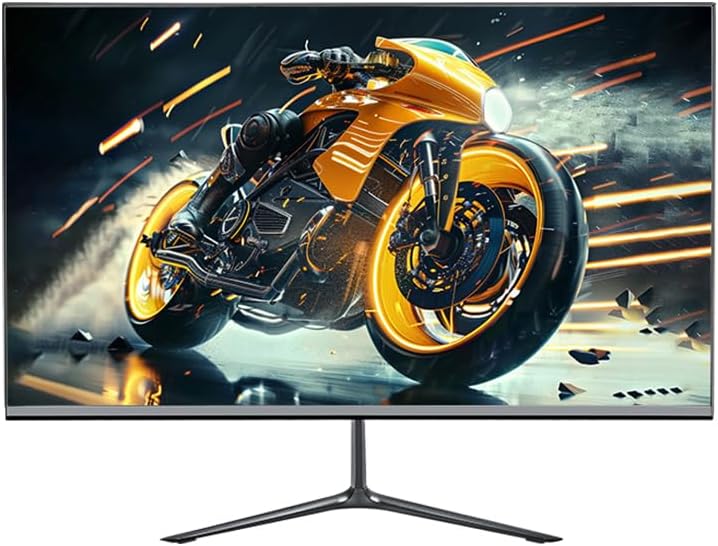
Image 4.1: The Anmite AN-238W02 monitor fully assembled with its stand, ready for connection.
4.2 การเชื่อมต่อจอภาพของคุณ
ตรวจสอบให้แน่ใจว่าปิดอุปกรณ์ทั้งหมดแล้วก่อนที่จะทำการเชื่อมต่อใดๆ
- การเชื่อมต่อไฟฟ้า: ต่ออะแดปเตอร์แปลงไฟเข้ากับช่องเสียบไฟของจอภาพ จากนั้นเสียบสายไฟเข้ากับเต้ารับที่ผนัง
- การเชื่อมต่อวิดีโอ: Connect one end of the HDMI cable (or VGA cable) to the corresponding port on your computer's graphics card and the other end to the HDMI (or VGA) input on the monitor. For optimal performance and 100Hz refresh rate, HDMI is recommended.
- เอาต์พุตเสียง: If you wish to connect external speakers or headphones, plug them into the Audio Out Jack on the monitor.
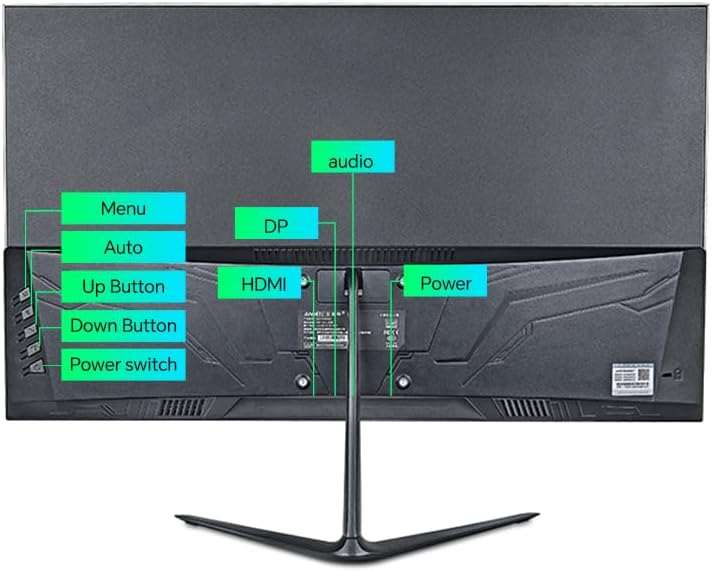
ภาพที่ 4.2: ด้านหลัง view of the monitor, highlighting the power input, HDMI, DP (DisplayPort, if available), VGA, and audio ports, along with the control buttons.
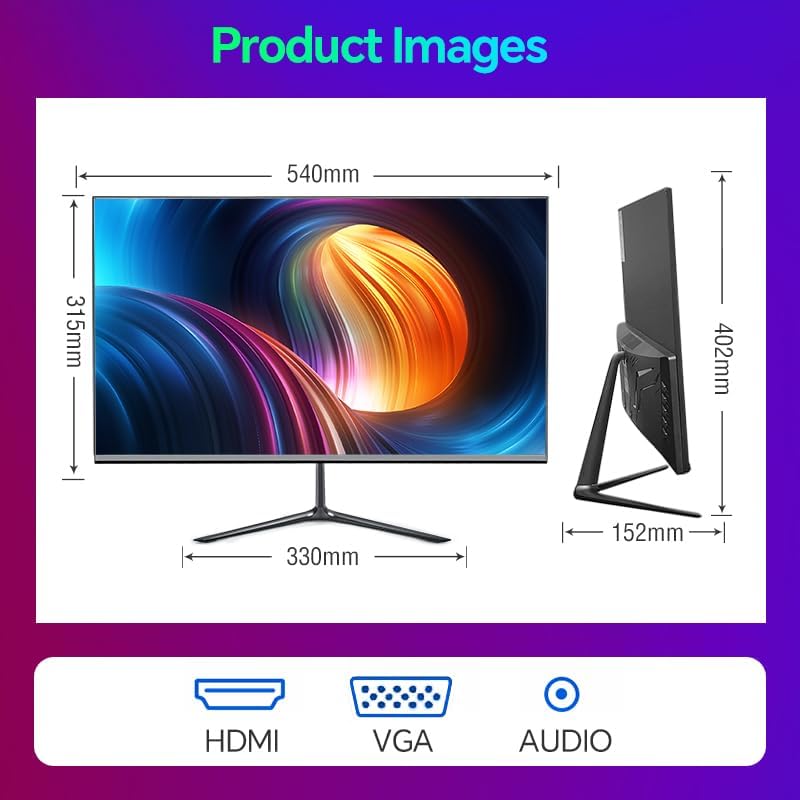
Image 4.3: Diagram illustrating the monitor's physical dimensions and the types of input ports available: HDMI, VGA, and Audio Out.
5. คู่มือการใช้งาน
5.1 เปิด/ปิดเครื่อง
กดปุ่ม สวิตซ์ไฟฟ้า button located on the back of the monitor to turn it on or off. The power indicator light will illuminate when the monitor is on.
5.2 เมนูการแสดงผลบนหน้าจอ (OSD)
The OSD menu allows you to adjust various monitor settings. Use the buttons on the back of the monitor to navigate:
- เมนู: กดเพื่อเปิดเมนู OSD หรือเข้าสู่เมนูย่อย
- ปุ่มขึ้น: Navigate up or increase a value.
- ปุ่มลง: Navigate down or decrease a value.
- Auto (or Exit): Automatically adjust image settings (VGA only) or exit the current menu.
5.3 คุณสมบัติหลักและการตั้งค่า
- อัตราการรีเฟรช 100Hz: This monitor supports a 100Hz refresh rate, providing smoother motion and reduced input lag compared to standard 60Hz monitors. Ensure your graphics card and connection cable (HDMI recommended) support this refresh rate, and set it in your operating system's display settings.
- AMD FreeSync พรีเมียม: This technology synchronizes the monitor's refresh rate with your AMD graphics card's frame rate, eliminating screen tearing and stuttering. Enable FreeSync in your graphics card's control panel and ensure it is active in the monitor's OSD settings (if applicable).
- FPS/RTS Game Modes: The monitor includes pre-calibrated display settings optimized for First-Person Shooter (FPS) and Real-Time Strategy (RTS) games. Access these modes through the OSD menu to enhance visibility and color profiles for specific game genres.
- ป้องกันการกะพริบ: This feature reduces screen flickering, which can cause eye strain during prolonged use. It operates by preventing the backlight from flickering periodically, providing a more comfortable viewการสร้างประสบการณ์
- Micro-Bezel Design: The monitor features a micro-bezel on three sides, maximizing the visible screen area and providing an immersive viewการสร้างประสบการณ์

Image 5.1: The monitor displaying a high-refresh-rate gaming experience, emphasizing smooth visuals.

ภาพที่ 5.2: รายละเอียด view of the monitor's micro-bezel design, illustrating the minimal border around the display.
6. การบำรุงรักษา
6.1 การทำความสะอาดจอภาพ
- ถอดปลั๊กจอภาพทุกครั้งก่อนทำความสะอาด
- ใช้ผ้านุ่มไม่เป็นขุยค่อยๆ งampened with water or a non-abrasive screen cleaner to wipe the screen.
- สำหรับจอภาพ casing, use a soft, dry cloth. Avoid using harsh chemicals or abrasive materials.
6.2 พื้นที่จัดเก็บ
If storing the monitor for an extended period, unplug it, cover it to protect from dust, and store it in a cool, dry place.
7 การแก้ไขปัญหา
| ปัญหา | สาเหตุที่เป็นไปได้ | สารละลาย |
|---|---|---|
| ไม่มีไฟฟ้า | สายไฟไม่ได้เชื่อมต่อ เต้ารับไฟฟ้าไม่ทำงาน | ตรวจสอบให้แน่ใจว่าสายไฟเชื่อมต่อกับจอภาพและปลั๊กไฟอย่างแน่นหนาแล้ว ทดสอบปลั๊กไฟด้วยอุปกรณ์อื่น |
| ไม่มีสัญญาณ | ไม่ได้เชื่อมต่อสายวิดีโอ; เลือกแหล่งสัญญาณเข้าไม่ถูกต้อง | Check video cable connections (HDMI/VGA); Use OSD menu to select correct input source. |
| ภาพเบลอหรือบิดเบี้ยว | ความละเอียดไม่ถูกต้อง; ปัญหาสายเคเบิล | Set display resolution to 1920 x 1080 in your computer's display settings; Try a different video cable. |
| หน้าจอกะพริบ | อัตราการรีเฟรชไม่ตรงกัน ปัญหาสายเคเบิล | Ensure refresh rate is set to 100Hz in display settings; Check for Anti-Flicker setting in OSD; Try a different video cable. |
8. ข้อมูลจำเพาะ
| คุณสมบัติ | ข้อมูลจำเพาะ |
|---|---|
| หมายเลขรุ่น | AN-238W02 |
| ขนาดหน้าจอ | 23.8 นิ้ว |
| ประเภทแผง | ไอพีเอส |
| ปณิธาน | 1920 x 1080 (ฟูลเอชดี) |
| อัตราการรีเฟรช | สูงถึง 100Hz |
| เวลาตอบสนอง | 1มิลลิวินาที |
| การเชื่อมต่อ | VGA, HDMI, Audio Out Jack |
| เอเอ็มดี ฟรีซิงค์ | Yes (Premium Compatible) |
| ป้องกันการสั่นไหว | ใช่ |
| ขนาดสินค้า (รวมขาตั้ง) | 21 x 38 x 49 นิ้ว |
| น้ำหนักสินค้า | 5.5 ปอนด์ |
| ผู้ผลิต | Shenzhen Anmite Technology Co.,Ltd. |
9. การรับประกันและการสนับสนุน
Anmite monitors are designed for reliability and performance. For information regarding warranty coverage, please refer to the warranty card included with your purchase or the retailer's policy where the product was acquired.
For technical support, troubleshooting assistance beyond this manual, or service inquiries, please contact Anmite customer support through the contact information provided with your product documentation or visit the official Anmite webเว็บไซต์.