การแนะนำ
This manual provides detailed instructions for the operation, maintenance, and troubleshooting of your new STN-28 Colorful Cat Ear Luminous Wireless Bluetooth Headset. Please read this manual thoroughly before using the product to ensure proper function and longevity.
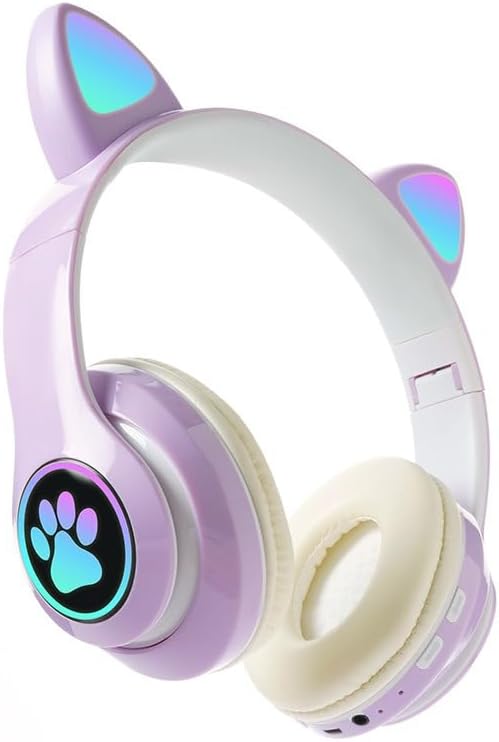
Image: The STN-28 Colorful Cat Ear Luminous Wireless Bluetooth Headset in light purple, featuring glowing cat ears and a paw print design on the ear cup.
คุณสมบัติผลิตภัณฑ์
- การออกแบบที่มีสไตล์: Features unique cat ear design with luminous accents.
- การเชื่อมต่อไร้สาย: Bluetooth 5.0+EDR for seamless pairing.
- สวมใส่สบาย: Padded ear cups and adjustable headband.
- การควบคุมเสียง: Integrated buttons for music, volume, and calls.
- พกพาได้: Lightweight and foldable head-mounted design.
- การเล่นการ์ด TF: Supports playing songs from an external TF card.
เนื้อหาแพ็คเกจ
กรุณาตรวจสอบแพ็คเกจสำหรับรายการต่อไปนี้:
- STN-28 Wireless Headset Body
- สายชาร์จ USB
- คู่มือการใช้งาน (เอกสารนี้)
การตั้งค่า
การชาร์จหูฟัง
Before first use, fully charge the headset. Connect the provided USB charging cable to the headset's USB charging port and to a compatible USB power source (e.g., computer USB port, USB wall adapter).
- ไฟแสดงสถานะจะเป็นสีแดงในระหว่างการชาร์จ
- เวลาในการชาร์จประมาณ 2 ชั่วโมง
- The red light will turn off once the headset is fully charged.
The headset is equipped with a rechargeable 3.7V/400MAH polymer A-grade lithium battery with overcharge and over-discharge protection.
การเปิด/ปิดเครื่อง
- การเปิดเครื่อง: Press and hold the power button until the indicator lights flash red and blue.
- วิธีปิดเครื่อง: กดปุ่มเปิด/ปิดค้างไว้จนกว่าไฟแสดงสถานะจะดับลง
คำแนะนำการใช้งาน
จับคู่บลูทู ธ
- ตรวจสอบให้แน่ใจว่าหูฟังชาร์จเต็มแล้วและปิดเครื่องเรียบร้อยแล้ว
- Press and hold the power button for approximately 3-5 seconds until the indicator lights flash red and blue alternately. This indicates the headset is in pairing mode.
- บนอุปกรณ์ของคุณ (สมาร์ทโฟน แท็บเล็ต คอมพิวเตอร์) เปิดใช้งาน Bluetooth และค้นหาอุปกรณ์ที่มีอยู่
- Select "STN-28" or "LX-B39C" from the list of found devices.
- Once successfully paired, the indicator light on the headset will flash blue slowly.
- The headset supports Bluetooth 5.0+EDR and modes A2DP 1.2, AVRCP 1.0, HSP, HSF 1.5.
The transmission range is up to 10 meters (33 feet) in an open environment.
การเล่นเพลงและการควบคุมการโทร
The headset features integrated controls for media and calls. Specific button functions may vary slightly, but generally include:
- เล่น/หยุดชั่วคราว: กดปุ่มมัลติฟังก์ชั่นเพียงครั้งเดียว
- เพลงถัดไป: กดปุ่ม "+" ค้างไว้
- แทร็กก่อนหน้า: กดปุ่ม "-" ค้างไว้
- ปรับระดับเสียงขึ้น: กดปุ่ม "+" สั้นๆ
- ลดเสียงลง: กดปุ่ม "-" สั้นๆ
- รับ/วางสาย: กดปุ่มมัลติฟังก์ชันเพียงครั้งเดียวขณะมีสายเรียกเข้า
- ปฏิเสธสาย: กดปุ่มมัลติฟังก์ชันค้างไว้ขณะมีสายเรียกเข้า

ภาพ: รายละเอียด view of the headset's right ear cup, highlighting the control buttons for media playback and calls, as well as the charging port and TF card slot.
เล่นการ์ด TF
The headset supports playing audio files directly from an external TF (microSD) card. Insert a TF card with your desired music into the designated slot on the headset. The headset will automatically switch to TF card playback mode.
การซ่อมบำรุง
- ควรทำความสะอาดหูฟังเป็นประจำด้วยผ้าแห้งเนื้อนุ่ม ห้ามใช้สารทำความสะอาดที่มีฤทธิ์กัดกร่อนหรือตัวทำละลาย
- หลีกเลี่ยงการให้ชุดหูฟังสัมผัสกับอุณหภูมิที่สูงหรือความชื้นสูงหรือแสงแดดโดยตรง
- เก็บหูฟังไว้ในที่แห้งและเย็นเมื่อไม่ได้ใช้งาน
- ห้ามถอดประกอบหรือซ่อมแซมหูฟังด้วยตนเอง เพราะจะทำให้การรับประกันเป็นโมฆะ
- รักษาพอร์ตชาร์จให้ปราศจากฝุ่นและเศษขยะ
การแก้ไขปัญหา
| ปัญหา | สาเหตุที่เป็นไปได้ | สารละลาย |
|---|---|---|
| หูฟังไม่สามารถเปิดเครื่องได้ | แบตเตอรี่อ่อน | ชาร์จหูฟังอย่างน้อย 2 ชั่วโมง |
| ไม่สามารถจับคู่กับอุปกรณ์ได้ | หูฟังไม่ได้อยู่ในโหมดจับคู่, Bluetooth ปิดอยู่ในอุปกรณ์, อุปกรณ์อยู่ไกลเกินไป | Ensure headset is flashing red/blue; enable Bluetooth on device; move device closer (within 10M). |
| ไม่มีเสียงในระหว่างการเล่น | ระดับเสียงเบาเกินไป; ไม่ได้เชื่อมต่อหูฟัง; เลือกเอาต์พุตเสียงไม่ถูกต้องบนอุปกรณ์ | Increase headset/device volume; re-pair headset; check device's audio settings. |
| คุณภาพเสียงไม่ดีหรือขาดการเชื่อมต่อ | Interference; device too far; low headset battery. | Move away from sources of interference; move closer to device; charge headset. |
ข้อมูลจำเพาะ
| คุณสมบัติ | รายละเอียด |
|---|---|
| แบบอย่าง | LX-B39C (STN-28) |
| วิธีการสวมใส่ | Head-mounted, Folding |
| เวอร์ชันบลูทูธ | 5.0+EDR |
| Supported Bluetooth Modes | A2DP 1.2, AVRCP 1.0, HSP, HSF 1.5 |
| ความจุของแบตเตอรี่ | 400mAh แบตเตอรี่ลิเธียมโพลิเมอร์ |
| ขนาดลำโพง/ความต้านทาน | 40มม. / 32โอห์ม |
| การรับความไว | -84เดซิเบลม |
| กำลังส่งสูงสุด | 6dBm |
| ช่วงการส่งผ่าน | ≤10 เมตร |
| พอร์ตชาร์จ | ยูเอสบี |
| เวลาในการชาร์จ | ประมาณ 2 ชั่วโมง |
| เวลาเล่นเพลง | นานถึง 6 ชั่วโมง |
| เวลาสนทนา | นานถึง 6 ชั่วโมง |
| เวลาสแตนด์บาย | 200 ชั่วโมง |
| การควบคุมเสียงรบกวน | ระบบตัดเสียงรบกวนแบบแอคทีฟ |
| วิธีการควบคุม | Touch / Media Control Buttons |
| สี | สีม่วงอ่อน |
| การวางตำแหน่งหู | ครอบหู |
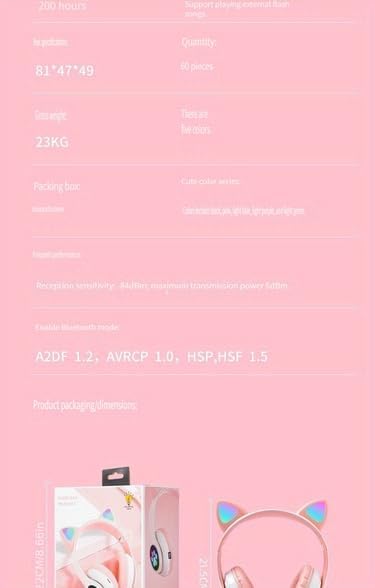
Image: A visual representation of the headset's dimensions and some technical specifications, including model number and battery capacity.
การรับประกันและการสนับสนุน
For warranty information or technical support, please refer to the retailer where you purchased this product. Keep your proof of purchase for any warranty claims.
Manufacturer: Shantou Chaoyang District Gurao Lanxin Electronics Factory


