
เอดับบลิว12
AW12 Multifunction Stainless Steel Smart Watch User Manual
Model: AW12 | Brand: Generic
1. สินค้าหมดview
The AW12 Multifunction Stainless Steel Smart Watch is a sophisticated and functional timepiece designed to seamlessly integrate into your daily life. It combines durable construction with advanced features to keep you connected and informed.
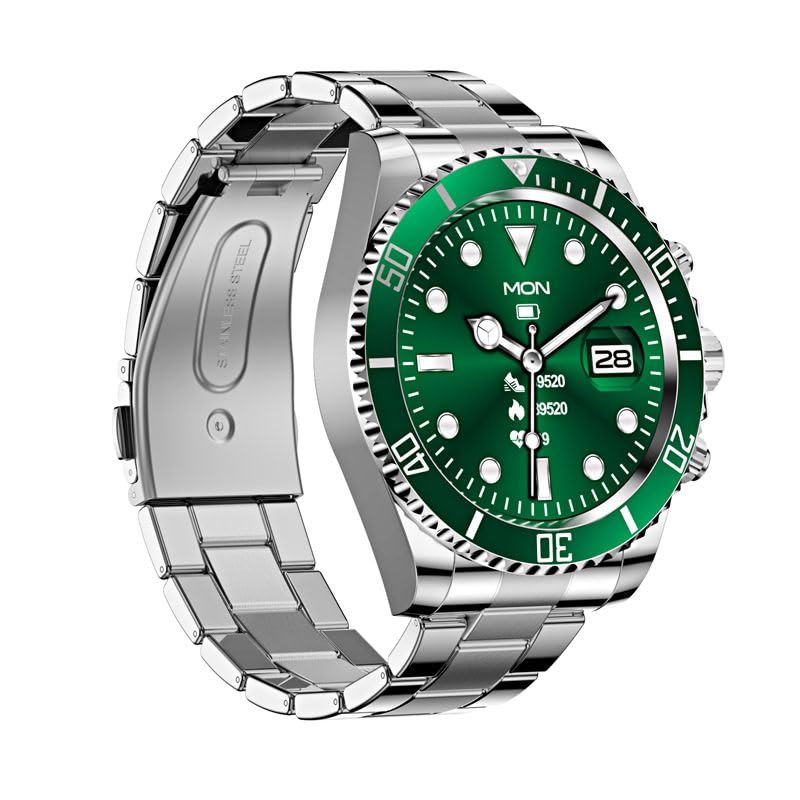
Figure 1: AW12 Multifunction Stainless Steel Smart Watch. The watch features a robust stainless steel case and bracelet, complemented by a vibrant green dial with luminous markers.
คุณสมบัติหลัก:
- Precision Timekeeping: Robust stainless steel case and bracelet design for exceptional durability.
- จอแสดงผลที่มีชีวิตชีวา: 1.28-inch Full-Touch IPS Screen with 240x240 resolution.
- เครื่องหมายเรืองแสง: Green dial boasts luminous hour markers and hands for easy reading in low-light conditions.
- การติดตามกิจกรรม: Sleep Monitor, Cycle Tracking, Activity Tracker, Alarm Clock.
- การเชื่อมต่อ: Bluetooth for phone calls and notifications.
- ความต้านทานน้ำ: IP68 rating, water-resistant up to 200 meters.
- ขอบหน้าปัดแบบหมุนได้ทิศทางเดียว: For precise timekeeping and tracking of elapsed time.
2. อะไรอยู่ในกล่อง
Upon opening your AW12 Smart Watch package, you will find the following items:
- AW12 สมาร์ทวอทช์
- สายชาร์จ
- คู่มือการใช้งาน (เอกสารนี้)
Video 1: AW12 Stainless Steel Smartwatch Overviewวิดีโอนี้ให้ข้อมูลที่ครอบคลุมview of the AW12 Stainless Steel Smartwatch, highlighting its design, features, and what's included in the box.
3. คู่มือการติดตั้ง
3.1 การชาร์จเริ่มต้น
- Connect the provided charging cable to the charging port on the back of your AW12 Smart Watch.
- Plug the USB end of the charging cable into a compatible USB power adapter (not included) or a computer's USB port.
- Allow the watch to charge fully before first use. A full charge typically takes approximately 2 hours. The battery indicator on the screen will show charging progress.
3.2 การเปิด/ปิดเครื่อง
- การเปิดเครื่อง: กดปุ่มด้านข้างค้างไว้จนกว่าหน้าจอจะสว่างขึ้น
- วิธีปิดเครื่อง: กดปุ่มด้านข้างค้างไว้ จากนั้นเลือก 'ปิดเครื่อง' บนหน้าจอ
3.3 การจับคู่กับสมาร์ทโฟนของคุณ
To unlock the full potential of your AW12 Smart Watch, pair it with your smartphone via Bluetooth.
- ตรวจสอบให้แน่ใจว่าได้เปิดใช้งาน Bluetooth บนสมาร์ทโฟนของคุณแล้ว
- On your AW12 Smart Watch, navigate to the Bluetooth settings.
- On your smartphone, search for available Bluetooth devices and select 'AW12' from the list.
- Follow the on-screen prompts on both devices to complete the pairing process. A confirmation message will appear once successfully connected.
4. คู่มือการใช้งาน
4.1 การนำทางอินเทอร์เฟซ
- หน้าจอสัมผัส: ปัดไปทางซ้าย ขวา ขึ้น หรือลง เพื่อเลื่อนดูเมนูและหน้าจอต่างๆ แตะเพื่อเลือกตัวเลือก
- ปุ่มด้านข้าง: กดเพื่อกลับสู่หน้าจอหลักหรือปลุกอุปกรณ์ กดค้างไว้เพื่อเลือกตัวเลือกพลังงาน
- ขอบหมุนได้: The unidirectional rotating bezel can be used for timing events or tracking elapsed time. Rotate it counter-clockwise to align the zero marker with the minute hand for timing.
4.2 ฟังก์ชันหลัก
- เวลาและวันที่: The watch automatically synchronizes time and date with your paired smartphone.
- โทรศัพท์: Once paired, you can make and receive calls directly from your watch. Access the call log or dial pad from the phone icon on the watch.
- การแจ้งเตือน: Receive alerts for messages, calls, and app notifications directly on your wrist.
4.3 คุณสมบัติไลฟ์สไตล์
- ตัวติดตามกิจกรรม: ตรวจสอบจำนวนก้าวที่เดิน ระยะทางที่เดิน และปริมาณแคลอรีที่เผาผลาญ View your daily progress in the activity app.
- การติดตามการนอนหลับ: Tracks your sleep patterns, including deep sleep, light sleep, and awake times. Access sleep data in the dedicated sleep app.
- การติดตามรอบเดือน: Helps track and predict menstrual cycles. Input relevant data into the cycle tracking feature.
- นาฬิกาปลุก: Set multiple alarms directly from your watch.
5. การบำรุงรักษาและการดูแล
5.1 ความต้านทานต่อน้ำ
The AW12 Smart Watch has an IP68 water resistance rating and is water-resistant up to 200 meters. This means it is suitable for swimming, showering, and shallow diving. However, it is not recommended for high-pressure water activities or prolonged submersion at extreme depths. Avoid exposing the watch to hot water or steam, as this can compromise the seals.
5.2 การทำความสะอาดนาฬิกาของคุณ
- เช็ดตัวเรือนนาฬิกาและสายนาฬิกาเป็นประจำด้วยผ้าเนื้อนุ่มและแห้งamp ผ้า.
- สำหรับคราบฝังแน่น ให้ใช้สบู่เหลวอ่อนๆ ล้างออกให้สะอาดด้วยน้ำสะอาด
- โปรดตรวจสอบให้แน่ใจว่านาฬิกาแห้งสนิทก่อนชาร์จหรือเก็บรักษาเป็นเวลานาน
5.3 การดูแลแบตเตอรี่
- เพื่อยืดอายุการใช้งานแบตเตอรี่ ควรหลีกเลี่ยงการปล่อยให้แบตเตอรี่นาฬิกาหมดเกลี้ยงบ่อยๆ
- เก็บนาฬิกาไว้ในที่แห้งและเย็นเมื่อไม่ได้ใช้งานเป็นเวลานาน
- ใช้เฉพาะสายชาร์จที่ให้มาเท่านั้น
6 การแก้ไขปัญหา
If you encounter any issues with your AW12 Smart Watch, please refer to the following common troubleshooting steps:
| ปัญหา | สาเหตุที่เป็นไปได้ | สารละลาย |
|---|---|---|
| นาฬิกาไม่เปิด | แบตเตอรี่ต่ำ | ชาร์จนาฬิกาเป็นเวลาอย่างน้อย 30 นาที |
| ไม่สามารถจับคู่กับสมาร์ทโฟนได้ | Bluetooth off, watch not in pairing mode, or interference | ตรวจสอบให้แน่ใจว่าได้เปิดบลูทูธไว้ทั้งสองอุปกรณ์แล้ว รีสตาร์ทอุปกรณ์ทั้งสอง จากนั้นลองจับคู่ใหม่อีกครั้ง |
| Display is unresponsive | ซอฟต์แวร์ผิดพลาดหรือแบตเตอรี่เหลือน้อย | Restart the watch. Ensure it is charged. |
| การติดตามกิจกรรมที่ไม่แม่นยำ | Improper fit or software calibration needed | Ensure the watch is worn snugly. Check for software updates or recalibrate if available in settings. |
หากปัญหายังคงมีอยู่หลังจากลองขั้นตอนเหล่านี้แล้ว โปรดติดต่อฝ่ายสนับสนุนลูกค้าเพื่อขอความช่วยเหลือเพิ่มเติม
7. ข้อมูลจำเพาะ
| คุณสมบัติ | รายละเอียด |
|---|---|
| แบบอย่าง | เอดับบลิว12 |
| แสดง | 1.28-inch Full-Touch IPS LCD Screen |
| ปณิธาน | 240 x 240 พิกเซล |
| น้ำหนัก | 300 กรัม |
| ความจุของหน่วยความจำ | 16MB |
| ระบบปฏิบัติการ | แอสโตรโดรมิโนโอเอส |
| การเชื่อมต่อ | บลูทูธ |
| ระดับการต้านทานน้ำ | IP68, up to 200 meters |
| ความจุของแบตเตอรี่ | 12 Amp ชั่วโมง |
| ประเภทตัวล็อค | หัวเข็มขัดทรงถัง |
| คุณสมบัติพิเศษ | Sleep Monitor, Cycle Tracking, Activity Tracker, Alarm Clock, Phone Call |
8. การรับประกันและการสนับสนุน
For information regarding warranty coverage and terms, please refer to the product packaging or the official product page on Amazon.in. For technical support, troubleshooting assistance beyond this manual, or to inquire about repairs, please contact the seller or manufacturer directly through the Amazon platform.
You can find more detailed information and contact options by visiting the product's detail page: AW12 Smart Watch on Amazon.in
Ask a question about this manual
Ask about setup, troubleshooting, compatibility, parts, safety, or missing instructions. Manuals+ will review the question and use this page’s manual context to help answer it.