
LIECTROUX X6
LIECTROUX X6 Robotic Vacuum Cleaner and Mop User Manual
แบบ: X6
การแนะนำ
This manual provides essential information for the safe operation, maintenance, and troubleshooting of your LIECTROUX X6 Robotic Vacuum Cleaner and Mop. Please read this manual thoroughly before using the product and retain it for future reference. The LIECTROUX X6 is designed to provide efficient and comprehensive cleaning for various floor types, utilizing advanced navigation and smart features.
สินค้าเกินview
คุณสมบัติหลัก
- พลังทำความสะอาดล้ำลึก: 6500Pa suction for efficient cleaning of hard floors, pet hair, and carpets.
- LSD LIDAR Navigation: Precise navigation and mapping for systematic cleaning.
- Precision Mapping: Customizable cleaning routes and schedules for personalized cleaning.
- การเชื่อมต่อ Wi-Fi: Control and schedule cleanings remotely through the app or voice assistants.
- การควบคุมด้วยเสียง: สามารถใช้งานร่วมกับผู้ช่วยเสียงเพื่อการควบคุมแบบแฮนด์ฟรี
- ระบบการกรองขั้นสูง: Captures 99.97% of dust, dirt, and allergens for cleaner air.
- การควบคุมระยะไกลและแอป: Schedule cleanings, adjust settings, and monitor progress remotely.
- Pet Hair and Allergy Friendly: Effectively picks up pet hair, dust, and allergens for a cleaner environment.
ส่วนประกอบที่รวมอยู่
- 1 x Robotic Vacuum
- แท่นชาร์จ 1 อัน
- 1 x อะแดปเตอร์ชาร์จ
- 1 x 2-in-1 Dustbin and Water Tank
- 2 x Pairs of Side Brushes
- 2 x Re-usable Wet Mopping Cloth
- 1 x Mop Pad
- แปรงทำความสะอาด 1 ชิ้น
- 2 x ตัวกรอง HEPA
- 1 x คู่มือผู้ใช้
ภาพผลิตภัณฑ์
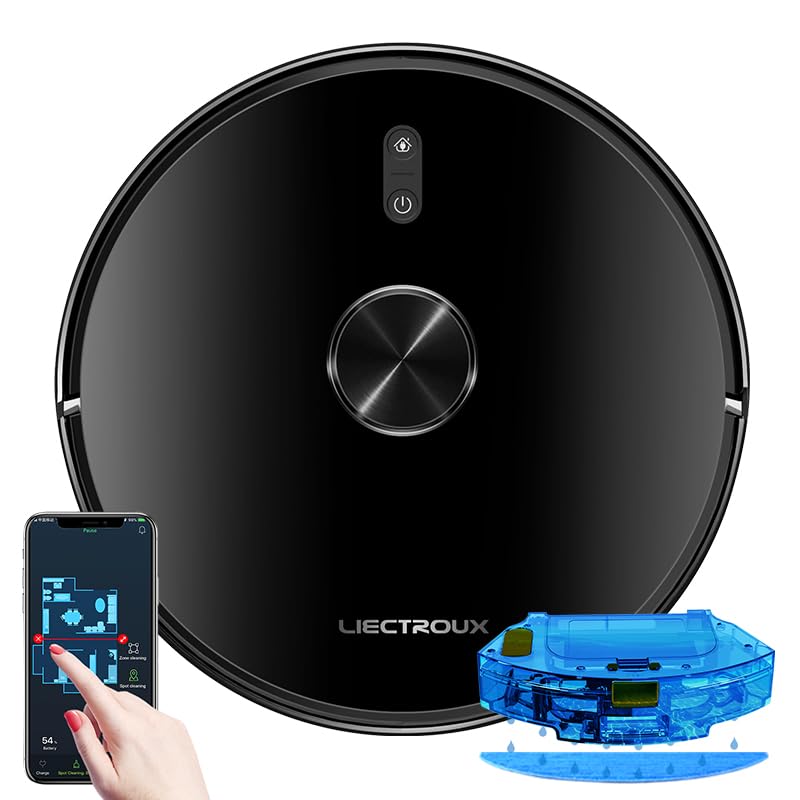
Figure 1: The LIECTROUX X6 Robotic Vacuum Cleaner and Mop, showcasing its sleek design, the accompanying mobile app interface for control, and the integrated water tank for mopping functionality.

Figure 2: Illustration of the integrated dust box and water tank system, highlighting the 400ml large dust box and 235ml large water tank, designed for effortless and worry-free cleaning. It also shows the sweeping, vacuuming, and mopping functions.

Figure 3: The LDS laser radar metering system in action, demonstrating its capabilities for LDS laser navigation, precision mapping, multi-layer map management, Y-routed floor mopping, and custom deep cleaning.

Figure 4: The mobile application interface displaying visual maps for whole house cleaning, including features like house-wide cleaning, routed cleaning, specified-area cleaning, scheduled cleaning tasks, and suction level adjustment.

Figure 5: Depiction of multiple custom cleaning modes for efficient and thorough cleaning, such as Selective Areas Cleaning, Cleaning Order, Restricted Zone Setting, Palm Virtual Blocker, and Areas Cleaning Frequency.

Figure 6: Illustration of the comprehensive breakthrough in Micro Electric Control and Air Pump Water Tank technology, showing different levels of wet mopping: Basic (Low), Normal (Medium), and Deep (High).
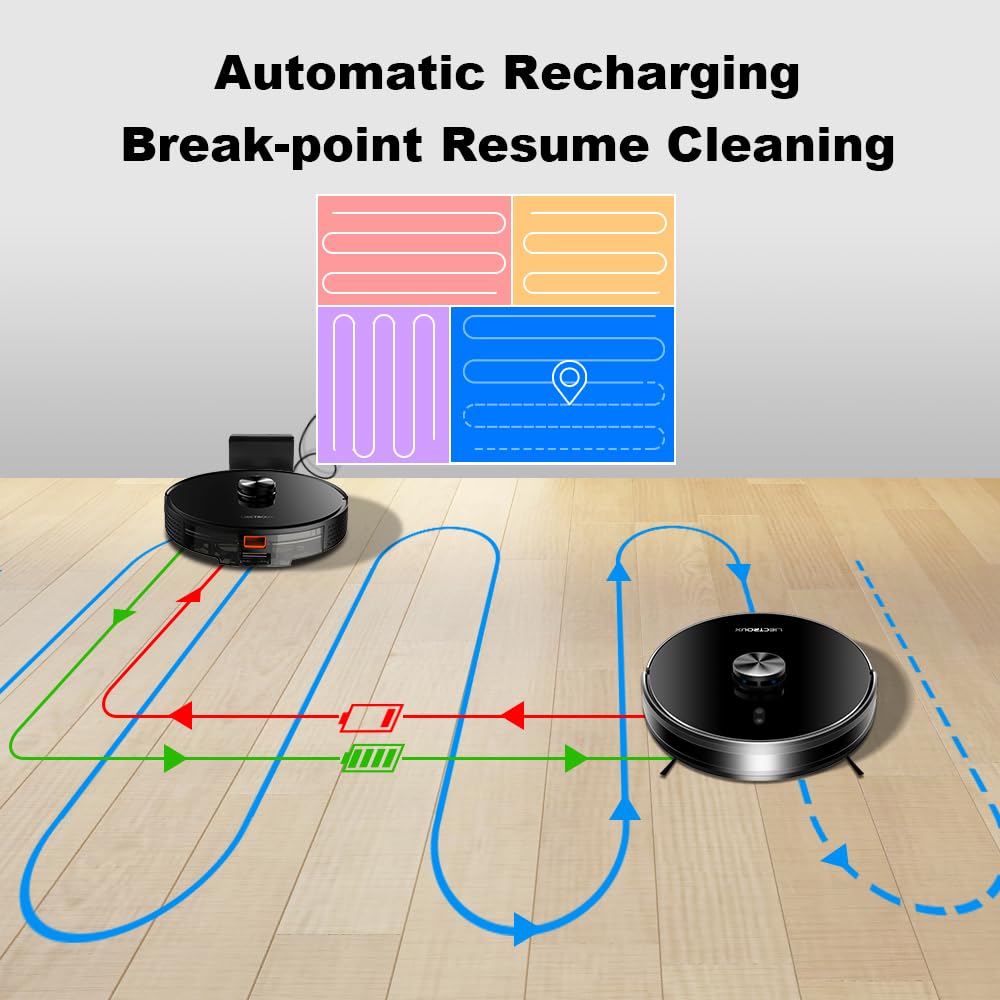
Figure 7: Diagram illustrating the automatic recharging feature and breakpoint resume cleaning, where the robot returns to its charging dock when battery is low and resumes cleaning from where it left off once sufficiently charged.

Figure 8: Visual representation of the Y-routed cleaning pattern, designed for repeated mopping and sweeping, imitating artificial kneeling-type cleaning for thorough stain removal.

Figure 9: Depiction of the multi-layer map management feature, allowing for areas segmentation, areas consolidation, recovering partition, and areas naming across multiple floors (1F to 6F shown).

รูปที่ 10: ระยะใกล้ view of key internal components, including the dustbin with double filters, the Japan-imported brushless motor, and the floating V-shaped roller brush, designed for efficient debris collection.
การตั้งค่า
1. การแกะกล่อง
Carefully remove all components from the packaging. Ensure all included items listed in the "Included Components" section are present. Remove any protective films or packing materials from the robot and charging dock.
2. การวางตำแหน่งแท่นชาร์จ
- วางแท่นชาร์จไว้ชิดผนังบนพื้นผิวแข็งและเรียบ
- ให้แน่ใจว่ามีพื้นที่ว่างอย่างน้อย 0.5 เมตร (1.6 ฟุต) ทั้งสองด้านของท่าเทียบเรือและ 1.5 เมตร (4.9 ฟุต) ด้านหน้า
- Keep the area free of obstacles, such as furniture or power cords, that could obstruct the robot's return to the dock.
- เชื่อมต่ออะแดปเตอร์ไฟฟ้าเข้ากับแท่นชาร์จและเสียบเข้ากับเต้ารับที่ผนัง
3. ค่าธรรมเนียมเริ่มต้น
Place the robot onto the charging dock, ensuring the charging contacts align. The robot will begin charging automatically. For optimal battery life, fully charge the robot before its first use. The indicator light on the robot will show charging status.
4. การติดตั้งและการเชื่อมต่อแอป
- Download the official LIECTROUX app from your mobile device's app store (iOS or Android).
- Open the app and follow the on-screen instructions to create an account and add your LIECTROUX X6 robot.
- Ensure your Wi-Fi network is 2.4GHz, as the robot may not support 5GHz networks.
- แอปจะแนะนำขั้นตอนการเชื่อมต่อหุ่นยนต์เข้ากับเครือข่าย Wi-Fi ในบ้านของคุณ
คำแนะนำการใช้งาน
1. การเริ่มวงจรการทำความสะอาด
- จากหุ่นยนต์: กดปุ่มเปิด/ปิดบนหุ่นยนต์หนึ่งครั้งเพื่อเริ่มรอบการทำความสะอาดอัตโนมัติ
- จากแอพ: Open the LIECTROUX app, select your robot, and tap "Start Cleaning" or choose a specific cleaning mode.
- การควบคุมด้วยเสียง: If connected to a voice assistant (e.g., Amazon Alexa, Google Assistant), use voice commands like "Alexa, tell [Robot Name] to start cleaning."
2. โหมดการทำความสะอาด
- ทำความสะอาดอัตโนมัติ: หุ่นยนต์นำทางและทำความสะอาดบริเวณที่เข้าถึงทั้งหมดอย่างชาญฉลาด
- การทำความสะอาดเฉพาะจุด: Directs the robot to clean a specific small area intensively. Ideal for spills or concentrated dirt.
- การทำความสะอาดโซน: Use the app to define specific zones on the map for the robot to clean.
- การทำความสะอาดตามกำหนดเวลา: Set up recurring cleaning times and days through the app.
- Restricted Zones/Virtual Walls: Use the app to draw virtual boundaries or restricted zones on the map to prevent the robot from entering certain areas.
3. ฟังก์ชั่นการถูพื้น
- Fill the water tank with clean water. Do not use cleaning solutions that are not approved by LIECTROUX.
- Attach the mopping cloth to the water tank.
- Insert the 2-in-1 dustbin and water tank into the robot.
- Select a mopping mode or a combined vacuuming and mopping mode via the app. Adjust water flow levels (Low, Medium, High) as needed.
4. Pausing and Resuming
Press the power button on the robot or use the app to pause a cleaning cycle. Press again to resume. If the robot returns to the charging dock due to low battery, it will automatically resume cleaning from where it left off once sufficiently charged.
5. Returning to Charging Dock
The robot will automatically return to its charging dock when the battery is low or when a cleaning cycle is complete. You can also manually send it back via the app or by pressing and holding the power button on the robot.
การซ่อมบำรุง
Regular maintenance ensures optimal performance and extends the lifespan of your LIECTROUX X6. Always power off the robot before performing any maintenance.
1. การล้างถังขยะ
- กดปุ่มปลดล็อกถังขยะและดึงถังขยะ 2-in-1 และถังน้ำออกมา
- เปิดฝาถังขยะและเทสิ่งของภายในลงในถังขยะ
- Frequency: After each use or when full.
2. การทำความสะอาดตัวกรอง
- นำแผ่นกรอง HEPA และแผ่นกรองฟองน้ำออกจากถังขยะ
- เคาะแผ่นกรองเบาๆ เพื่อกำจัดฝุ่น ห้ามล้างแผ่นกรอง HEPA ด้วยน้ำ
- The sponge filter can be rinsed with water and air-dried completely before reinstallation.
- Frequency: Weekly, replace HEPA filter every 3-6 months.
3. การทำความสะอาดแปรงหลัก
- พลิกหุ่นยนต์กลับด้านและถอดฝาครอบแปรงหลักออก
- Lift out the main brush. Use the provided cleaning tool to remove hair and debris tangled around the brush.
- ความถี่: รายสัปดาห์.
4. การทำความสะอาดแปรงด้านข้าง
- Inspect side brushes for damage or tangled hair.
- If necessary, remove the side brushes (they usually snap on/off) and clean them. Replace if worn.
- Frequency: Monthly, replace every 3-6 months.
5. การทำความสะอาดเซ็นเซอร์และหน้าสัมผัสการชาร์จ
- Wipe the cliff sensors (located on the bottom of the robot), wall sensors, and charging contacts on both the robot and the charging dock with a clean, dry cloth.
- ความถี่: รายเดือน.
6. Cleaning the Mopping Cloth
- Remove the mopping cloth after each mopping cycle.
- Rinse it thoroughly with water and allow it to air dry completely before storing or reattaching.
- ความถี่: หลังการถูพื้นทุกครั้ง
การแก้ไขปัญหา
If your LIECTROUX X6 encounters an issue, refer to the following common problems and solutions:
| ปัญหา | สาเหตุที่เป็นไปได้ | สารละลาย |
|---|---|---|
| หุ่นยนต์ไม่เปิดและไม่ชาร์จ | Battery is completely depleted; charging contacts are dirty; power adapter not connected. | Ensure robot is properly seated on the charging dock. Clean charging contacts on both robot and dock. Check power adapter connection. |
| หุ่นยนต์ติดขัดบ่อยครั้ง | Obstacles (cables, rugs); cliff sensors dirty; robot stuck on high thresholds. | Clear obstacles from cleaning path. Clean cliff sensors. Use virtual walls/restricted zones for problematic areas. |
| ประสิทธิภาพการดูดไม่ดี | Dustbin full; filter clogged; main brush tangled; suction inlet blocked. | Empty dustbin. Clean/replace filters. Clean main brush and side brushes. Check suction inlet for blockages. |
| หุ่นยนต์ไม่สามารถเชื่อมต่อกับ Wi-Fi ได้ | รหัสผ่าน Wi-Fi ไม่ถูกต้อง; เครือข่าย 5GHz; หุ่นยนต์อยู่ไกลจากเราเตอร์เกินไป | Ensure correct 2.4GHz Wi-Fi network is selected. Re-enter password carefully. Move robot closer to router during setup. |
| Mopping function is not working. | Water tank empty; mopping cloth not attached; water outlet clogged. | Fill water tank. Ensure mopping cloth is properly attached. Check water outlets for blockages. |
For issues not listed here, please refer to the comprehensive troubleshooting section in the full user manual or contact customer support.
ข้อมูลจำเพาะ
| คุณสมบัติ | รายละเอียด |
|---|---|
| ยี่ห้อ | ลิเอคทรูซ์ |
| ชื่อรุ่น | X6 |
| พลังดูด | 6500ปาสคาล |
| ประเภทการนำทาง | LSD Laser Navigation, Precision Mapping |
| ความจุของเครื่องดูดฝุ่น | 400มล. |
| ความจุถังน้ำ | 235มล. |
| ประเภทตัวกรอง | แผ่นกรอง HEPA |
| อายุการใช้งานแบตเตอรี่ | นานถึง 120 นาที |
| วิธีการควบคุม | การควบคุมแอพ, การควบคุมด้วยเสียง |
| ขนาดสินค้า | กว้าง 33 ยาว 33 สูง 6 เซนติเมตร |
| น้ำหนักสินค้า | 4 กก. |
| สี | สีดำ |
การรับประกันและการสนับสนุน
Your LIECTROUX X6 Robotic Vacuum Cleaner and Mop comes with a standard manufacturer's warranty. Please refer to the warranty card included in your product packaging for specific terms and conditions, including warranty period and coverage details.
For technical support, service, or warranty claims, please contact LIECTROUX customer service. Contact information can typically be found on the official LIECTROUX webไซต์หรือบนบรรจุภัณฑ์ผลิตภัณฑ์
It is recommended to register your product online to receive updates and support.
Ask a question about this manual
Ask about setup, troubleshooting, compatibility, parts, safety, or missing instructions. Manuals+ will review the question and use this page’s manual context to help answer it.