
DOOGEE FIRE6
คู่มือผู้ใช้สมาร์ทโฟน DOOGEE Fire 6 รุ่นทนทาน
Model: FIRE6
การแนะนำ
The DOOGEE Fire 6 is a robust and versatile rugged smartphone designed for demanding environments and users who require advanced features like thermal imaging. It combines military-grade durability with high-performance specifications, including a powerful processor, ample memory, and a long-lasting battery. This manual provides essential information on setting up, operating, and maintaining your device to ensure optimal performance and longevity.
สินค้าเกินview
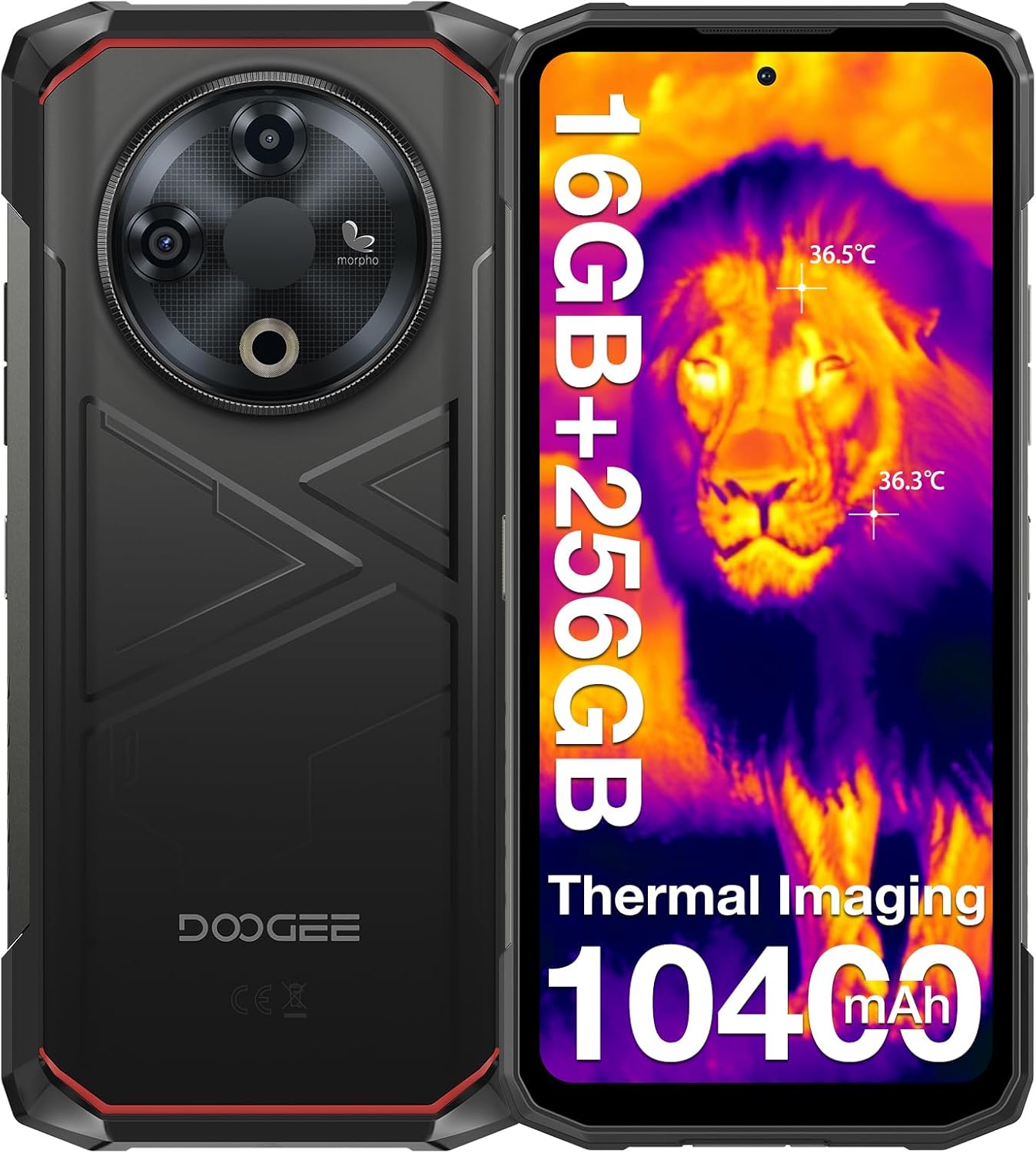
การออกแบบโดยรวม: The DOOGEE Fire 6 features a rugged design with a mechanical texture, built to withstand harsh conditions. The image shows both the front display with thermal imaging overlay and the back panel highlighting the camera module and durable casing.

Advanced Thermal Imaging: Equipped with an 8MP thermal camera, the Fire 6 detects heat sources with precision. It features a dual-light fusion algorithm for enhanced clarity, 160x120 resolution, 12µm pixel spacing, and a thermometric range from -15°C to 550°C with 2% accuracy. This allows for detailed thermal analysis in various applications.

แบตเตอรี่ขนาดใหญ่ 10400mAh: The Fire 6 boasts a large 10400mAh battery, providing extended usage times. It supports 18W fast charging and OTG reverse charging, allowing the phone to act as a portable power bank for other devices.

ประสิทธิภาพอันทรงพลัง: Powered by a Spreadtrum T606 octa-core processor, the Fire 6 offers smooth multitasking. It comes with 16GB RAM (6GB fixed + 10GB expandable) and 256GB ROM, expandable up to 2TB via TF card for extensive storage needs.

จอแสดงผลที่มีชีวิตชีวา: The device features a 6.56-inch HD+ IPS display with a 90Hz refresh rate, providing clear and fluid visuals. The screen is protected by Corning Gorilla Glass for enhanced durability.

ระบบกล้องขั้นสูง: The Fire 6 includes a 50MP AI main camera, an 8MP front camera, and an 8MP fusion lens. It supports dual-light fusion technology for improved low-light performance and features like HDR, portrait, and panorama modes.
คู่มือการติดตั้ง
- Insert SIM/TF Card: Locate the SIM card tray on the side of the phone. Use the provided SIM ejector tool to open the tray. Insert your Nano-SIM cards and/or a TF (microSD) card into the designated slots. Ensure the cards are correctly oriented before reinserting the tray.
- เปิดเครื่อง: กดปุ่มเปิด/ปิด (โดยปกติจะอยู่ด้านขวา) ค้างไว้จนกว่าโลโก้ DOOGEE จะปรากฏขึ้น
- ตั้งค่าเริ่มต้น: Follow the on-screen prompts to complete the initial setup. This includes selecting your language, connecting to Wi-Fi, setting up your Google account, and configuring security features like face unlock or fingerprint recognition.
- ชาร์จแบตเตอรี่: For optimal performance, fully charge the device before first use. Connect the provided Type-C USB cable to the phone and the charger, then plug the charger into a power outlet.

Triple Card Slot: The Fire 6 supports dual SIM cards and a TF card simultaneously, allowing for flexible connectivity and expanded storage up to 2TB.
คำแนะนำการใช้งาน
Using the Thermal Imaging Camera
The DOOGEE Fire 6's integrated thermal camera is a powerful tool for various applications, from home inspections to outdoor exploration. To use it:
- Launch ThermalEye App: Locate and open the "ThermalEye" application on your phone's home screen or app drawer.
- View Thermal Feed: The app will display a real-time thermal image. You can adjust settings like color palettes, temperature range, and measurement points within the app interface.
- จับภาพ/วิดีโอ: Use the on-screen buttons to capture thermal images or record videos. The dual-light fusion technology enhances clarity by overlaying visual details onto the thermal image.

Outdoor Thermal Imaging: This image demonstrates the thermal camera's capability in an outdoor setting, highlighting heat signatures of animals against the cooler environment. This feature is useful for wildlife observation or navigating in low-light conditions.
DOOGEE Fire 6 Rugged Smartphone Overview: This video provides a comprehensive look at the DOOGEE Fire 6, showcasing its design, thermal imaging capabilities, powerful processor, camera features, and rugged build. It highlights the phone's suitability for various demanding tasks and environments.
General Smartphone Usage
- การนำทาง: The Fire 6 runs on Android 14, offering an intuitive user interface. Swipe gestures and on-screen buttons allow for easy navigation between apps and menus.
- ความปลอดภัย: Utilize the face unlock or side-mounted fingerprint sensor for quick and secure access to your device.
- การเชื่อมต่อ: Connect to Wi-Fi networks, pair Bluetooth devices, and manage your dual SIM settings through the 'Settings' menu.
- กล้อง: Open the standard camera app to capture photos and videos using the 50MP main camera or 8MP front camera. Explore modes like HDR, portrait, and panorama for diverse photography options.

ระบบ Android 14: The Fire 6 operates on the latest Android 14 system, providing an enhanced and secure user experience with features like smart motion sensing, screen awareness, glove mode, real-time subtitles, and dual system mode.
ความทนทานและการปกป้อง
The DOOGEE Fire 6 is engineered for extreme durability, meeting stringent industry standards:
- IP68 & IP69K Certified: This certification ensures the phone is highly resistant to dust and water. It can withstand immersion in water up to 1.5 meters for 30 minutes.
- สอดคล้องกับ MIL-STD-810H: The device has passed military-grade tests for shock, vibration, extreme temperatures (-30°C to 55°C), humidity, and more, making it suitable for harsh environments.
- โครงสร้างแข็งแรงทนทาน: Built with aerospace-grade high-strength titanium alloy, Bayer TPU anti-drop/anti-abrasion materials, and PC/PMMA composite materials, the Fire 6 offers superior protection against drops and impacts.

ความทนทานที่ได้รับการรับรอง: The image illustrates the DOOGEE Fire 6's compliance with IP68, IP69K, and MIL-STD-810H standards, showcasing its waterproof, dustproof, and drop-proof capabilities. This ensures reliability in challenging conditions.
การเชื่อมต่อและการนำทาง
- รองรับซิมคู่: The Fire 6 supports two Nano-SIM cards, allowing you to manage personal and work numbers or use different carriers simultaneously.
- พื้นที่เก็บข้อมูลที่ขยายได้: In addition to its internal 256GB ROM, storage can be expanded up to 2TB using a TF (microSD) card.
- Global Navigation Systems: Equipped with GPS, GLONASS, Galileo, and Beidou, the phone provides accurate and reliable positioning for navigation in diverse environments.
- เทคโนโลยีไร้สาย: Features Wi-Fi 5 for fast internet access and Bluetooth 5.0 for seamless connection to wireless accessories.

การเชื่อมต่อที่ครอบคลุม: This image highlights the Fire 6's accurate navigation system (GPS, Glonass, Galileo, Beidou) and its triple card slot, which supports dual SIM cards and expandable storage, ensuring you stay connected and on track.
การบำรุงรักษาและการดูแล
- การทำความสะอาด: เช็ดโทรศัพท์ด้วยผ้าเนื้อนุ่มและแห้งamp ใช้ผ้าเช็ดทำความสะอาด สำหรับคราบสกปรกฝังแน่น ให้ใช้สบู่เหลวเจือจางเช็ด ตรวจสอบให้แน่ใจว่าได้ปิดช่องต่างๆ สนิทก่อนทำความสะอาดด้วยของเหลว
- การป้องกันพอร์ต: Always ensure the rubber seals covering the charging port and SIM tray are properly closed to maintain water and dust resistance.
- อุณหภูมิ: Avoid exposing the phone to extreme temperatures outside its operating range (-30°C to 55°C) for prolonged periods.
- การป้องกันหน้าจอ: While the screen is made of Corning Gorilla Glass, using the pre-applied screen protector and an additional anti-explosion film (included) can further prevent scratches and damage.
- การอัปเดตซอฟต์แวร์: ตรวจสอบและติดตั้งการอัปเดตระบบเป็นประจำเพื่อให้มั่นใจถึงประสิทธิภาพ ความปลอดภัย และการเข้าถึงฟีเจอร์ใหม่ๆ ที่เหมาะสมที่สุด
การแก้ไขปัญหา
| ปัญหา | วิธีแก้ปัญหาที่เป็นไปได้ |
|---|---|
| โทรศัพท์ไม่สามารถเปิดเครื่องได้ | Ensure the battery is charged. Connect the charger and wait a few minutes before attempting to power on again. If unresponsive, try a forced restart (refer to device-specific instructions for button combinations). |
| Thermal camera not working. | Check if the "ThermalEye" app is updated. Ensure there are no physical obstructions on the thermal camera lens. Restart the app or the phone. |
| Poor network signal (4G/5G). | Verify SIM card insertion. Check network settings (Settings > Network & internet > Mobile network). Ensure you are in an area with network coverage. Note: This model is primarily a 4G device, 5G compatibility may vary by region/carrier. |
| ประสิทธิภาพการทำงานช้า | Close unused apps. Clear cache (Settings > Storage > Cached data). Restart the phone. Consider uninstalling rarely used applications. |
| แบตเตอรี่หมดเร็วมาก | Reduce screen brightness. Disable unnecessary features like Wi-Fi, Bluetooth, GPS when not in use. Limit background app activity. Check battery usage in settings to identify power-hungry apps. |
ข้อมูลจำเพาะ
| คุณสมบัติ | รายละเอียด |
|---|---|
| ชื่อรุ่น | ไฟร์6 |
| ขนาด | 2.36 x 7.87 x 11.02 นิ้ว |
| ระบบปฏิบัติการ | แอนดรอยด์ 14 |
| แสดง | 6.56-inch HD+ IPS (1280x720 pixels), 90Hz Refresh Rate, Corning Gorilla Glass |
| โปรเซสเซอร์ | Octa-core (Spreadtrum T606) |
| แรม | 16GB (6GB คงที่ + 10GB ขยายได้) |
| หน่วยความจำภายใน (ROM) | 256GB |
| พื้นที่เก็บข้อมูลแบบขยายได้ | รองรับความจุสูงสุด 2TB ผ่านการ์ด TF |
| กล้องหลัก | 50MP AI Camera with Dual-Light Fusion |
| กล้องหน้า | 8MP |
| กล้องความร้อน | 8MP, -15°C to 550°C range, 160x120 resolution, 2% accuracy |
| ความจุของแบตเตอรี่ | 10400mAh |
| การชาร์จไฟ | ชาร์จเร็ว 18W, ชาร์จย้อนกลับ OTG |
| ระดับความทนทาน | IP68, IP69K, MIL-STD-810H |
| การเชื่อมต่อ | Wi-Fi 5, Bluetooth 5.0, Dual SIM |
| การนำทาง | GPS, GLONASS, กาลิเลโอ, เป่ยโต่ว |
| แจ็คเสียง | 3.5 มม. |
| ความปลอดภัย | Face Unlock, Side Fingerprint Sensor |
มีอะไรอยู่ในกล่อง
- 1 x DOOGEE Fire 6 Rugged Smartphone
- 1 x เครื่องชาร์จ
- สาย USB Type-C 1 เส้น
- 1 x Screen-printed Protective Film (Pre-applied)
- 1 x ฟิล์มกันระเบิด
- 1 x กล่องบรรจุภัณฑ์
- 1 x คู่มือผู้ใช้
- ใบรับประกัน 1 ใบ

เนื้อหาแพ็คเกจ: This image displays all items included in the DOOGEE Fire 6 retail package, ensuring users know what to expect upon unboxing their new rugged smartphone.
การรับประกันและการสนับสนุน
DOOGEE provides a limited warranty for the Fire 6 Rugged Smartphone. Please refer to the included Warranty Card for specific terms and conditions, including warranty period and coverage details.
สำหรับการขอรับการสนับสนุนทางเทคนิค ความช่วยเหลือในการแก้ไขปัญหา หรือการเรียกร้องการรับประกัน โปรดติดต่อฝ่ายบริการลูกค้าของ DOOGEE ผ่านช่องทางอย่างเป็นทางการของพวกเขา website or the contact information provided in your warranty documentation. Keep your purchase receipt as proof of purchase for warranty services.
Ask a question about this manual
Ask about setup, troubleshooting, compatibility, parts, safety, or missing instructions. Manuals+ will review the question and use this page’s manual context to help answer it.