
1. ข้อมูลด้านความปลอดภัยที่สำคัญ
โปรดอ่านคำแนะนำทั้งหมดอย่างละเอียดก่อนใช้งานเครื่องใช้ไฟฟ้า เก็บคู่มือนี้ไว้เพื่อใช้อ้างอิงในอนาคต การไม่ปฏิบัติตามคำแนะนำเหล่านี้อาจทำให้เกิดไฟฟ้าช็อต ไฟไหม้ หรือบาดเจ็บได้
- ห้ามพยายามใช้งานเตาอบโดยที่ประตูเปิดอยู่ เนื่องจากอาจทำให้ได้รับพลังงานไมโครเวฟที่เป็นอันตรายได้
- ห้ามวางวัตถุใดๆ ไว้ระหว่างด้านหน้าเตาอบและประตู และอย่าปล่อยให้มีดินหรือคราบน้ำยาทำความสะอาดสะสมอยู่บนพื้นผิวที่ปิดผนึก
- ห้ามใช้งานเตาอบหากได้รับความเสียหาย สิ่งสำคัญอย่างยิ่งคือต้องปิดประตูเตาอบอย่างถูกต้อง และไม่มีความเสียหายต่อ: (1) ประตู (งอ), (2) บานพับและสลัก (แตกหรือคลาย), (3) ซีลประตูและพื้นผิวการปิดผนึก
- ไม่ควรปรับแต่งหรือซ่อมแซมเตาอบโดยบุคคลใด ยกเว้นบุคลากรบริการที่มีคุณสมบัติเหมาะสมเท่านั้น
- ตรวจสอบให้แน่ใจว่าอุปกรณ์ต่อสายดินอย่างถูกต้อง
- ห้ามใช้สารเคมีหรือไอระเหยที่มีฤทธิ์กัดกร่อนในเครื่องนี้
- ควรใช้ถุงมือกันความร้อนเสมอเมื่อต้องจับสิ่งของร้อนจากเตาอบ
2. สินค้าหมดview
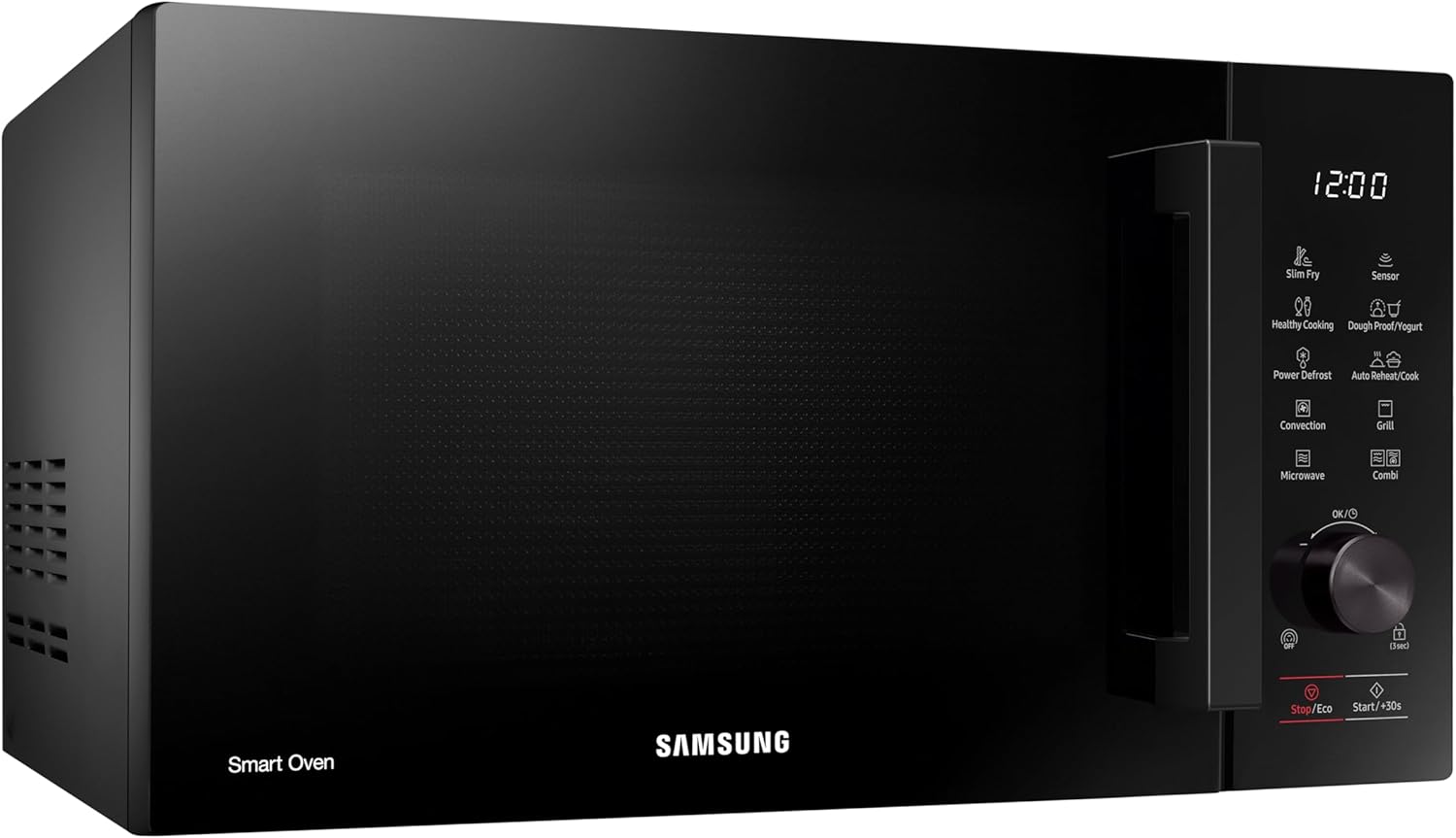
The Samsung MC28A5137KK/E1 is a 28-liter convection microwave oven designed for versatile cooking. It combines microwave, grill, and convection functions to offer a wide range of cooking possibilities.

รูปที่ 2.1 : ด้านหน้า view ของเตาไมโครเวฟ
คุณสมบัติหลัก:
- เซ็นเซอร์ปรุง: Automatically adjusts cooking time and power by detecting the moisture level of food, ensuring optimal texture and flavor.
- สลิม ฟราย: Utilizes hot air circulation to cook food, achieving a crispy exterior and juicy interior with minimal oil, offering a healthier frying alternative.
- Dough Proof/Yogurt Function: Provides the correct temperature environment for proofing homemade dough or making fresh yogurt.
- โหมดอีโค: Reduces energy consumption significantly in standby mode, minimizing power usage when the microwave is not actively in use.
- ฟังก์ชั่นละลายน้ำแข็ง: Quickly and evenly thaws frozen foods, preserving their freshness and original texture.

รูปที่ 2.2 : ภายใน view with ceramic enamel coating and glass turntable.

รูปที่ 2.3: รายละเอียด view ของแผงควบคุม
3. การตั้งค่าและการติดตั้ง
Proper installation ensures safe and efficient operation of your microwave oven.
3.1 การแกะกล่อง
- นำวัสดุบรรจุภัณฑ์ทั้งหมดออกจากภายในและภายนอกเตาอบ
- ตรวจสอบเตาอบว่ามีความเสียหายใดๆ หรือไม่ เช่น รอยบุบ หรือประตูไม่ตรงแนว อย่าใช้งานเตาอบหากพบว่าเสียหาย
- Ensure all accessories, including the glass turntable, roller ring, and wire rack, are present.
3.2 การจัดวาง
- วางเตาอบบนพื้นผิวเรียบและมั่นคงที่สามารถรองรับน้ำหนักของเตาอบและอาหารที่หนักที่สุดที่จะอบในเตาอบนั้นได้
- ควรเว้นระยะห่างอย่างน้อย 20 เซนติเมตร (8 นิ้ว) เหนือเตาอบ 10 เซนติเมตร (4 นิ้ว) ด้านหลัง และ 5 เซนติเมตร (2 นิ้ว) ด้านข้างทั้งสองด้าน เพื่อการระบายอากาศที่เหมาะสม
- อย่าปิดกั้นช่องระบายอากาศใดๆ บนเตาอบ
- เก็บเตาอบให้ห่างจากแหล่งความร้อนและสนามแม่เหล็กที่แรง
รูปที่ 3.1: ด้านข้าง view illustrating ventilation requirements.
3.3 การเชื่อมต่อไฟฟ้า
- Plug the oven into a dedicated, properly grounded electrical outlet. Do not use an extension cord.
- ให้แน่ใจว่าปริมาตรtage และความถี่ตรงตามข้อกำหนดบนฉลากค่าพิกัดของเตาอบ

รูปที่ 3.2: ด้านหลัง view showing power connection area.
4. คู่มือการใช้งาน
This section details how to use the various functions of your Samsung convection microwave oven.
4.1 การปรุงอาหารด้วยไมโครเวฟขั้นพื้นฐาน
- วางอาหารไว้ในภาชนะที่ใช้กับไมโครเวฟได้บนจานหมุนกระจก
- ปิดประตูให้แน่น
- Select the 'Microwave' function.
- ใช้แป้นหมุนเพื่อตั้งเวลาปรุงอาหารและระดับพลังงานที่ต้องการ
- กด 'เริ่ม/+30 วินาที' เพื่อเริ่มการปรุงอาหาร
4.2 การปรุงอาหารด้วยการพาความร้อน
Convection cooking uses a fan to circulate hot air, similar to a traditional oven.
- Place food on the wire rack (if applicable) or a heat-resistant dish.
- เลือกฟังก์ชัน 'การพาความร้อน'
- ตั้งอุณหภูมิและเวลาในการปรุงอาหารที่ต้องการโดยใช้ปุ่มหมุน
- Press 'Start/+30s' to begin. The oven will preheat if necessary.
4.3 ฟังก์ชั่นการย่าง
ฟังก์ชันย่างเหมาะสำหรับการทำให้อาหารมีสีน้ำตาลและกรอบ
- วางอาหารบนตะแกรง
- เลือกฟังก์ชัน 'ย่าง'
- ตั้งเวลาการปรุงอาหารที่ต้องการ
- กด 'เริ่ม/+30 วินาที' เพื่อเริ่มต้น
4.4 Combi (Combination) Cooking
Combination mode uses both microwave and convection/grill functions for faster and more thorough cooking.
- Place food in an appropriate dish.
- Select the 'Combi' function.
- Choose the desired combination mode (e.g., Microwave + Convection, Microwave + Grill).
- ตั้งอุณหภูมิและเวลา
- กด 'เริ่ม/+30 วินาที' เพื่อเริ่มต้น
4.5 Sensor Cook
For automatic cooking based on food moisture:
- วางอาหารไว้ในเตาอบ
- Select the 'Sensor Cook' function.
- Choose the appropriate food category (e.g., vegetables, potatoes).
- Press 'Start/+30s'. The oven will detect moisture and adjust cooking time automatically.
4.6 สลิมฟราย
To prepare healthier fried dishes:
- Place food on the Crusty Plate (if included) or a suitable dish. Add a small amount of oil if desired.
- Select the 'Slim Fry' function.
- Choose the food type and weight.
- Press 'Start/+30s'.
4.7 Dough Proof / Yogurt
For fermentation processes:
- Prepare your dough or yogurt mixture in a suitable container.
- Select the 'Dough Proof/Yogurt' function.
- Choose the desired program (e.g., pizza dough, bread dough, yogurt).
- Press 'Start/+30s'. The oven will maintain the optimal temperature.
4.8 ละลายน้ำแข็งด้วยไฟฟ้า
For quick and even defrosting:
- วางอาหารแช่แข็งในภาชนะที่ใช้กับไมโครเวฟได้
- Select the 'Power Defrost' function.
- ป้อนน้ำหนักของอาหาร
- Press 'Start/+30s'. The oven will calculate the defrosting time.
4.9 โหมด Eco
To activate Eco Mode, press the 'Stop/Eco' button. This reduces power consumption when the oven is not in use.
4.10 ล็อคความปลอดภัยของเด็ก
To activate the child safety lock, press and hold the 'Lock (3 sec)' button for 3 seconds. The lock indicator will appear on the display. To deactivate, press and hold the button again for 3 seconds.
5. การบำรุงรักษาและการทำความสะอาด
การทำความสะอาดและบำรุงรักษาอย่างสม่ำเสมอจะช่วยยืดอายุการใช้งานของเตาไมโครเวฟของคุณได้
5.1 การทำความสะอาดภายใน
พื้นผิวเคลือบเซรามิกได้รับการออกแบบมาให้ทำความสะอาดง่ายและทนทานต่อรอยขีดข่วน
- หลังการใช้งานทุกครั้ง ให้เช็ดภายในด้วยผ้าamp ผ้าเช็ดคราบอาหารกระเด็น
- สำหรับคราบฝังแน่น ให้ใช้ผงซักฟอกอ่อนๆ และผ้านุ่มๆ หลีกเลี่ยงการใช้น้ำยาทำความสะอาดที่มีฤทธิ์กัดกร่อนหรือแผ่นขัด
- To remove odors, place a bowl of water with lemon slices inside and microwave for a few minutes.
5.2 การทำความสะอาดภายนอก
- เช็ดพื้นผิวภายนอกด้วยผ้านุ่ม damp ผ้า.
- ทำความสะอาดแผงควบคุมอย่างเบามือด้วยผ้านุ่มๆamp ผ้า หลีกเลี่ยงความชื้นที่มากเกินไป
5.3 อุปกรณ์ทำความสะอาด
- The glass turntable and roller ring can be washed in warm, soapy water or in a dishwasher.
- Clean the wire rack and Crusty Plate (if included) with warm, soapy water.
6 การแก้ไขปัญหา
หากคุณพบปัญหาเกี่ยวกับเตาไมโครเวฟ โปรดดูปัญหาและวิธีแก้ไขที่พบบ่อยต่อไปนี้
| ปัญหา | สาเหตุที่เป็นไปได้ | สารละลาย |
|---|---|---|
| เตาอบไม่เริ่มทำงาน | สายไฟไม่ได้เสียบปลั๊ก ประตูไม่ได้ปิดอย่างถูกต้อง ฟิวส์ขาดหรือเบรกเกอร์สะดุด | ตรวจสอบให้แน่ใจว่าเสียบสายไฟอย่างแน่นหนา ปิดประตูให้แน่น ตรวจสอบฟิวส์ภายในบ้านหรือรีเซ็ตเบรกเกอร์ |
| อาหารไม่ร้อน | Incorrect cooking time/power level; Food not suitable for microwave; Door not closed properly. | Adjust time/power; Use microwave-safe dishes; Ensure door is fully closed. |
| เครื่องเล่นแผ่นเสียงไม่หมุน | จานหมุนหรือแหวนลูกกลิ้งไม่ได้วางอย่างถูกต้อง มีสิ่งกีดขวางใต้จานหมุน | จัดตำแหน่งแท่นหมุนและวงแหวนลูกกลิ้งใหม่; นำสิ่งกีดขวางออกให้หมด |
| เสียงที่ผิดปกติ | ภาชนะบรรจุอาหารสัมผัสกับผนังเตาอบ; จานหมุนไม่ได้ติดตั้งอย่างถูกต้อง | Ensure container does not touch walls; Re-seat turntable. |
| ไฟเตาอบไม่ทำงาน | หลอดไฟต้องเปลี่ยน | ติดต่อเจ้าหน้าที่บริการที่มีคุณสมบัติเหมาะสมเพื่อเปลี่ยนหลอดไฟ |
หากปัญหายังคงมีอยู่หลังจากพยายามแก้ไขปัญหาเหล่านี้แล้ว โปรดติดต่อฝ่ายสนับสนุนลูกค้าของ Samsung
7. ข้อมูลจำเพาะ
- หมายเลขรุ่น:
- MC28A5137KK/E1
- ยี่ห้อ:
- ซัมซุง
- ความจุ:
- 28 ลิตร
- วัดtage:
- 900 วัตต์
- สี:
- สีดำ
- วัสดุ:
- เซรามิก (ภายใน)
- ประเภทการติดตั้ง:
- เคาน์เตอร์ท็อป
- ขนาดสินค้า (ลึก x กว้าง x สูง):
- 47.6 ซม. x 52 ซม. x 31 ซม. (ประมาณ 18.74 นิ้ว x 20.47 นิ้ว x 12.2 นิ้ว)
- คุณสมบัติพิเศษ:
- Child Safety Lock, Defrost, Eco Mode, Turntable, Scratch Resistant, Timer
- ส่วนประกอบที่รวมอยู่:
- Crusty Plate, Wire Rack
8. การรับประกันและการสนับสนุน
สำหรับข้อมูลการรับประกันและการสนับสนุนลูกค้า โปรดดูบัตรรับประกันที่รวมอยู่ในผลิตภัณฑ์ของคุณหรือเยี่ยมชมเว็บไซต์ Samsung อย่างเป็นทางการ website for your region. You can also contact Samsung customer service directly for assistance with product registration, troubleshooting, or service requests.
ฝ่ายบริการลูกค้าของ Samsung: กรุณาเข้าเยี่ยมชม www.samsung.com/support for contact details and support resources specific to your country.