
Cellularline PBSOLAR10000O
Cellularline Power Bank Solar User Manual
Model: PBSOLAR10000O
1. สินค้าหมดview
The Cellularline Power Bank Solar is a portable charger designed for outdoor enthusiasts and everyday users. It features a high-capacity 10000 mAh battery and an integrated 1.5W ETFE solar panel, offering an alternative charging method using direct sunlight. Its robust design provides resistance against water and dust, making it suitable for various environments. The power bank is equipped with both USB-C Power Delivery 20W and USB 18W QC ports, allowing for simultaneous charging of two devices.
- Integrated 1.5W ETFE solar panel for efficient solar energy absorption.
- 10000 mAh capacity for extended device charging.
- IP54 certified: resistant to water and dust.
- Dual charging capability with USB-C Power Delivery 20W and USB 18W QC ports.

Figure 1: Cellularline Power Bank Solar - Front View
This image displays the Cellularline Power Bank Solar in its orange color, highlighting the textured solar panel on the front and the various ports on the side, including the USB-C and USB-A outputs, protected by a flap.
2. เนื้อหาบรรจุภัณฑ์
กรุณาตรวจสอบสิ่งของภายในบรรจุภัณฑ์เมื่อแกะกล่องเพื่อให้แน่ใจว่ามีสินค้าครบทั้งหมด:
- 1 x Cellularline Power Bank Solar (Portable Charger)
- สายเคเบิล USB-C ถึง USB-C 1 เส้น
- 1 x คู่มือการใช้งาน
3. ข้อมูลด้านความปลอดภัย
To ensure safe operation and prolong the life of your Power Bank Solar, please adhere to the following safety guidelines:
- อย่าวางพาวเวอร์แบงค์ไว้ในที่ที่มีอุณหภูมิสูงหรือต่ำเกินไป (สูงกว่า 45°C หรือต่ำกว่า 0°C)
- หลีกเลี่ยงการทำตก ถอดประกอบ หรือพยายามซ่อมแซมอุปกรณ์ด้วยตัวเอง
- Keep away from fire, water, and corrosive materials.
- ตรวจสอบให้แน่ใจว่ามีการระบายอากาศที่เหมาะสมขณะชาร์จหรือคายประจุ
- ห้ามใช้หากอุปกรณ์ชำรุดหรือบวม
- เก็บให้พ้นจากมือเด็ก
- กำจัดผลิตภัณฑ์ด้วยความรับผิดชอบตามข้อบังคับท้องถิ่น
4. การตั้งค่า
Before first use, it is recommended to fully charge the power bank using a wall charger and the provided USB-C cable. This ensures the internal battery is calibrated and ready for optimal performance.
- Unpack the Power Bank Solar and all accessories from the box.
- เชื่อมต่อสาย USB-C ถึง USB-C ที่ให้มาเข้ากับพอร์ต USB-C บนพาวเวอร์แบงค์
- เชื่อมต่อปลายอีกด้านของสาย USB-C เข้ากับที่ชาร์จไฟติดผนัง USB-C ที่ใช้งานร่วมกันได้ (ไม่ได้รวมอยู่ในชุด)
- Allow the power bank to charge until all indicator lights are solid, indicating a full charge.
5 การชาร์จ Power Bank
5.1. Charging via Cable (Recommended for Fast Charging)
For the fastest and most efficient charging of your power bank, use the included USB-C to USB-C cable with a compatible wall adapter.
- Connect the USB-C cable to the power bank's USB-C input port.
- Plug the other end of the cable into a USB-C wall charger.
- The LED indicators will illuminate to show the charging progress.

Figure 2: Power Bank Charging via Cable
This image shows the Cellularline Power Bank Solar connected to a charging cable, illustrating the standard method of recharging the power bank's internal battery.
5.2. Charging via Solar Panel
The integrated ETFE solar panel provides an emergency charging option and can extend the battery life when outdoors. Solar charging is slower than cable charging and is highly dependent on direct sunlight intensity.
- วางพาวเวอร์แบงค์ในที่ที่มีแสงแดดส่องโดยตรง โดยให้แผงโซลาร์เซลล์หันขึ้นด้านบน
- ตรวจสอบให้แน่ใจว่าไม่มีสิ่งกีดขวางปิดกั้นแผงโซลาร์เซลล์
- A dedicated solar charging indicator (if present) or the main battery indicators will show activity when solar charging is active.
- For optimal solar charging, avoid placing the device behind glass or in shaded areas.

Figure 3: Solar Panel Detail
ภาพนี้แสดงให้เห็นภาพจากบนลงล่างอย่างชัดเจน view of the Cellularline Power Bank Solar, emphasizing the large, efficient ETFE solar panel designed for absorbing sunlight.
6. อุปกรณ์ชาร์จ
The Power Bank Solar can charge two devices simultaneously using its USB-C Power Delivery (PD) and USB Quick Charge (QC) ports.
- เชื่อมต่อสายชาร์จอุปกรณ์ของคุณเข้ากับพอร์ตที่เหมาะสมบนพาวเวอร์แบงค์ (USB-C หรือ USB-A)
- เชื่อมต่อปลายสายอีกด้านเข้ากับอุปกรณ์ของคุณ
- พาวเวอร์แบงค์จะเริ่มชาร์จอุปกรณ์ของคุณโดยอัตโนมัติ
- Monitor your device's screen for charging indication.

Figure 4: Charging a Device Outdoors
This image depicts a user holding the Cellularline Power Bank Solar, which is actively charging a smartphone, demonstrating its portability and utility for on-the-go power needs.
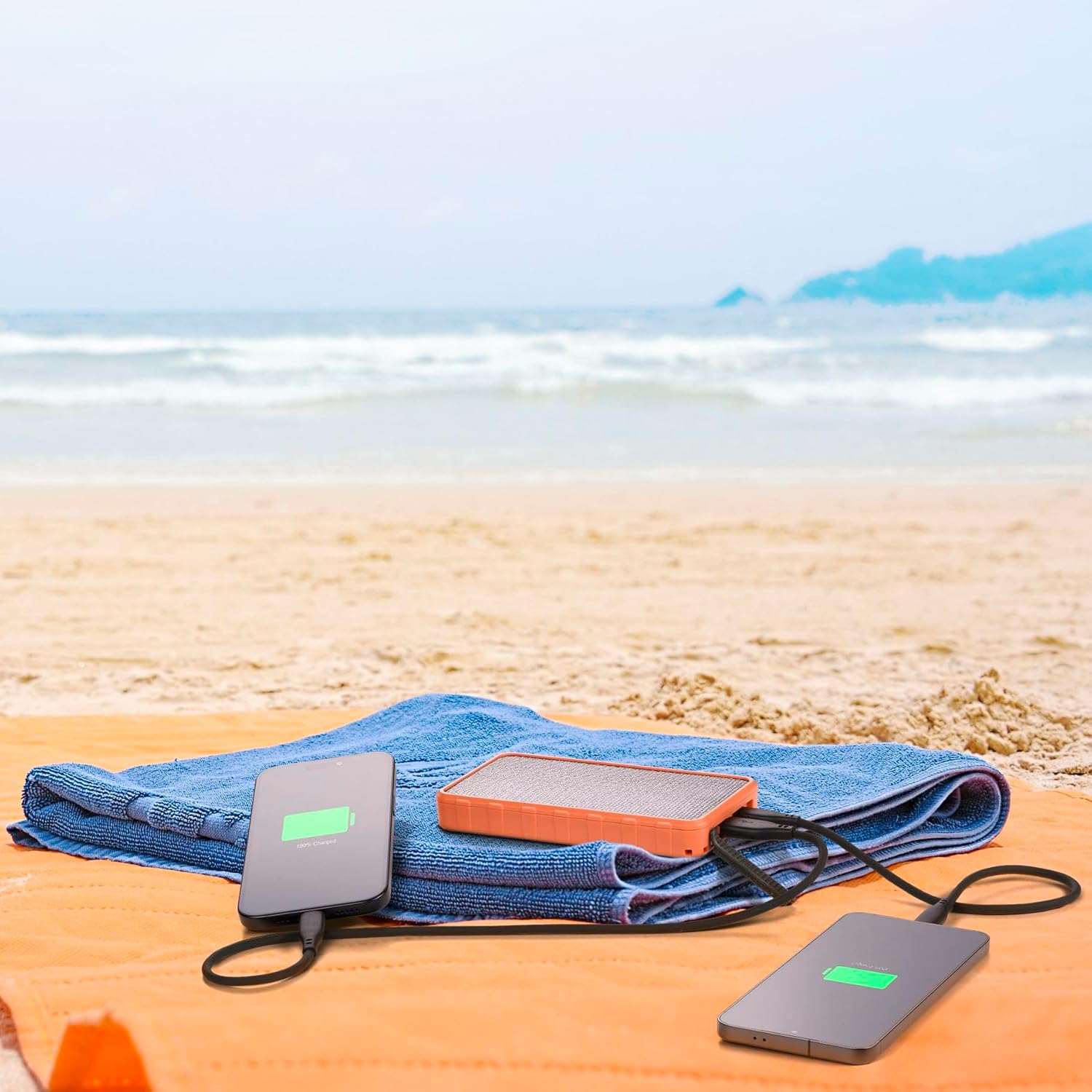
Figure 5: Dual Device Charging
This image illustrates the power bank's ability to charge two devices simultaneously, with both a smartphone and another portable device connected and showing charging indicators, set against a beach backdrop.
7. คุณสมบัติและฟังก์ชั่น
7.1. ETFE Solar Panel
The 1.5W ETFE (Ethylene Tetrafluoroethylene) solar panel offers enhanced durability and efficiency compared to traditional solar panels. ETFE material provides superior light transmittance, better resistance to high temperatures, and is more resistant to corrosion and dirt buildup, ensuring a longer lifespan and more consistent solar charging performance.
7.2. คุณสมบัติกันน้ำและฝุ่นระดับ IP54
With an IP54 rating, the Power Bank Solar is protected against dust ingress that could harm the equipment and against splashing water from any direction. This makes it suitable for outdoor use in various weather conditions, though it is not designed for submersion in water.
7.3. Power Delivery (PD) and Quick Charge (QC)
The power bank supports modern fast-charging standards:
- USB-C Power Delivery 20W: Delivers up to 20W of power through the USB-C port, ideal for rapidly charging compatible smartphones, tablets, and other USB-C devices.
- USB 18W QC: Provides up to 18W of power through the USB-A port, compatible with devices supporting Qualcomm Quick Charge technology for faster charging.
8. การบำรุงรักษา
- การทำความสะอาด: Use a soft, dry cloth to clean the power bank. Do not use harsh chemicals or abrasive cleaners.
- พื้นที่จัดเก็บ: Store the power bank in a cool, dry place away from direct sunlight and extreme temperatures when not in use for extended periods.
- การดูแลแบตเตอรี่ To maintain battery health, fully charge and discharge the power bank at least once every three months if it's not used regularly.
- การป้องกันพอร์ต: Ensure the port cover is securely closed when not in use to maintain IP54 water and dust resistance.
9 การแก้ไขปัญหา
| ปัญหา | สาเหตุที่เป็นไปได้ | สารละลาย |
|---|---|---|
| พาวเวอร์แบงค์ชาร์จไม่เข้า | ปัญหาอยู่ที่สายเคเบิลหรืออะแดปเตอร์; พาวเวอร์แบงค์ชาร์จเต็มแล้ว; พอร์ตมีปัญหา | Try a different cable or wall adapter. Ensure the power bank is not already full. Check for debris in ports. |
| อุปกรณ์ไม่ได้ชาร์จจากพาวเวอร์แบงค์ | Power bank low on charge; incorrect cable; device not compatible; faulty port. | Recharge the power bank. Use the correct charging cable for your device. Ensure device is compatible with USB-C PD or USB QC. Try a different port. |
| การชาร์จพลังงานแสงอาทิตย์ช้าหรือไม่ทำงานเลย | Insufficient direct sunlight; solar panel obstructed or dirty; cloudy weather. | Place the power bank in direct, unobstructed sunlight. Clean the solar panel. Note that solar charging is supplementary and slower than wall charging. |
| พาวเวอร์แบงค์จะร้อนขึ้นขณะใช้งาน | Normal operation during charging/discharging; excessive load. | Slight warmth is normal. If it becomes excessively hot, disconnect devices and allow it to cool down. Avoid charging in direct sunlight or enclosed spaces. |
10. ข้อมูลจำเพาะ
| คุณสมบัติ | รายละเอียด |
|---|---|
| ยี่ห้อ | เซลลูล่าร์ไลน์ |
| ชื่อรุ่น | PBSOLAR10000O |
| ความจุของแบตเตอรี่ | 10000 มิลลิแอมป์ |
| องค์ประกอบของแบตเตอรี่ | ลิเธียมไอออน |
| แผงโซล่าเซลล์ | อีทีเอฟอี 1.5W |
| เอาท์พุต USB-C | กำลังส่ง 20W |
| เอาต์พุต USB-A | ชาร์จเร็ว 18W |
| จำนวนพอร์ต | 2 (1x USB-C, 1x USB-A) |
| กันน้ำและกันฝุ่น | ได้รับการรับรอง IP54 |
| ขนาด | 14.5 cm (L) x 7.8 cm (W) x 1.9 cm (Thickness) |
| น้ำหนัก | 390 กรัม |
| อุปกรณ์ที่รองรับ | Smartphone, Tablet, other USB-powered devices |
11. การรับประกันและการสนับสนุน
Cellularline products are designed and manufactured to the highest quality standards. For information regarding warranty coverage, please refer to the warranty card included in your product packaging or visit the official Cellularline website. If you encounter any issues or require technical assistance, please contact Cellularline customer support through their official channels.
เป็นทางการ Webเว็บไซต์: www.cellline.com
Ask a question about this manual
Ask about setup, troubleshooting, compatibility, parts, safety, or missing instructions. Manuals+ will review the question and use this page’s manual context to help answer it.