
1. บทนำ
This manual provides essential instructions for the installation, operation, and maintenance of your Wokyo TF-100 Electric Scooter Throttle with 6-Pin Waterproof LCD Display. This device integrates throttle control and a display unit, designed for compatibility with various electric scooters that utilize Protocol 2, including models like Kugoo M4, Kugoo Pro, Vsett, Kaabo, and Dualtron. Please read this manual thoroughly before installation and use to ensure proper function and safety.

ภาพที่ 1.1: จบแล้วview of the Wokyo TF-100 Electric Scooter Throttle with integrated LCD display and 6-pin connector.
2. คุณสมบัติของผลิตภัณฑ์
- การออกแบบแบบบูรณาการ: Combines thumb throttle control and an LCD display into a single unit, simplifying scooter controls.
- จอแสดงผล LCD ที่ชัดเจน: Provides real-time data including speed, battery level, distance traveled, and other essential riding information.
- Ergonomic Thumb Control: Allows for easy and precise acceleration and speed adjustment with a simple thumb movement.
- การก่อสร้างกันน้ำ: Equipped with a waterproof plug and durable design to ensure reliable performance in various weather conditions.
- ความเข้ากันได้กว้าง: Designed for electric scooters using Protocol 2, such as Kugoo M4, Kugoo Pro, Vsett, Kaabo, and Dualtron.
3. การตั้งค่าและการติดตั้ง
The Wokyo TF-100 throttle is designed for straightforward installation. Follow these steps carefully:
- การตรวจสอบความเข้ากันได้: Before installation, verify that your electric scooter's controller uses Protocol 2. This throttle is specifically compatible with TF-100 system scooters. Incompatibility may prevent the device from functioning correctly.
- การติดตั้ง: Securely attach the throttle unit to your scooter's handlebars using the provided mounting hardware. Ensure it is positioned comfortably for thumb operation and that the display is clearly visible.
- การเชื่อมต่อสายไฟ: Connect the 6-pin waterproof plug from the throttle to the corresponding port on your electric scooter's wiring harness. Ensure the connection is firm and secure. Refer to the wiring diagram below for pin assignments.
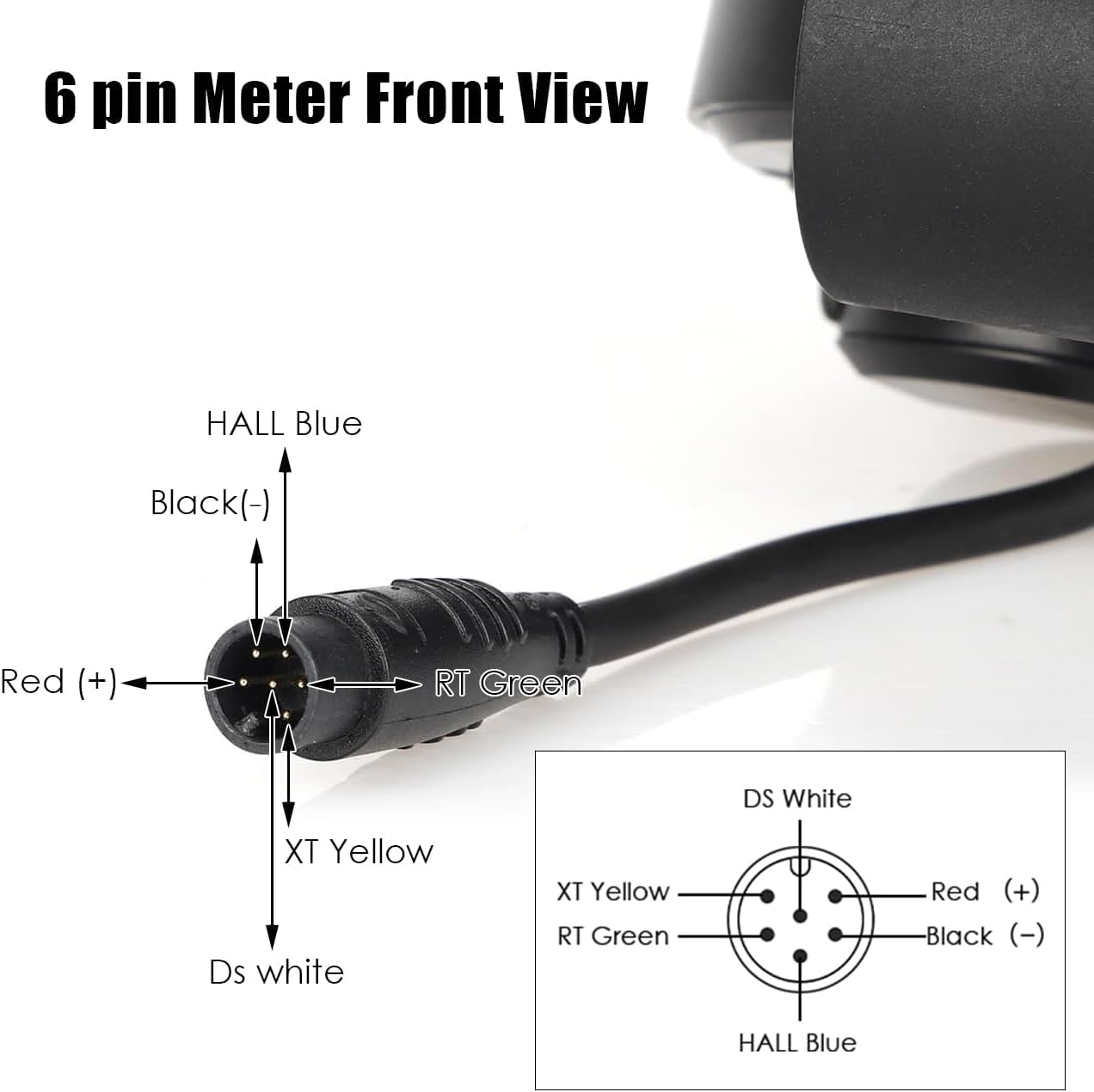
Image 3.1: Detailed 6-pin wiring diagram. Pin assignments are: Red (+) for positive power, Black (-) for negative power, HALL Blue, RT Green, XT Yellow, and DS White for signal and data lines.

Image 3.2: The TF-100 throttle unit mounted on an electric scooter's handlebars, showing its position relative to other controls.

Image 3.3: Important warning indicating that this product is only compatible with TF-100 system scooters. Users should verify their system before purchase.
4. คู่มือการใช้งาน
Once installed and connected, operating the TF-100 throttle is intuitive:
- เปิด/ปิดเครื่อง: Press and hold the power button (usually marked with a power symbol) to turn the display and throttle system on or off.
- ความเร่ง: Use the thumb lever to control acceleration. Pushing the lever forward will increase speed. Release the lever to reduce speed or coast.
- ปุ่มโหมด: The "MODE" button allows you to cycle through different display modes or settings, such as trip distance, total odometer, or other parameters depending on your scooter's controller.
- ข้อมูลจอแสดงผล LCD:
- ความเร็ว: Displays current riding speed (km/h or mph).
- ระดับแบตเตอรี่: ระบุปริมาณการชาร์จแบตเตอรี่ที่เหลืออยู่
- ระยะทาง: Shows trip distance (TRIP) and potentially total odometer (ODO).
- Gear/Mode: May indicate the current power assist level or riding mode.

ภาพที่ 4.1: ภาพระยะใกล้ view of the TF-100 LCD display, illustrating the various data points such as speed, battery charge, and trip distance.
5. การบำรุงรักษา
The Wokyo TF-100 throttle is designed for durability and minimal maintenance. Adhere to the following guidelines:
- การทำความสะอาด: เช็ดทำความสะอาดหน้าจอแสดงผลและชุดคันเร่งด้วยผ้าเนื้อนุ่มและแห้งamp cloth. Avoid using harsh chemicals or abrasive cleaners that could damage the screen or housing.
- ความต้านทานน้ำ: The unit features a waterproof plug and is designed to withstand moisture. However, avoid submerging the unit in water or exposing it to high-pressure water jets.
- ตรวจสอบการเชื่อมต่อ: Periodically inspect the 6-pin connector for any signs of wear, corrosion, or loose connections. Ensure it remains securely plugged in.
- พื้นที่จัดเก็บ: When not in use for extended periods, store the scooter and its components in a dry, cool environment away from direct sunlight.
6 การแก้ไขปัญหา
If you encounter issues with your TF-100 throttle, consider the following:
- No Power/Display Not Lighting Up:
- ตรวจสอบให้แน่ใจว่าไฟฟ้าหลักของสกู๊ตเตอร์เปิดอยู่
- Check the 6-pin connection for proper seating and any visible damage.
- ตรวจสอบว่าแบตเตอรี่ของสกู๊ตเตอร์มีประจุเพียงพอ
- คันเร่งไม่ตอบสนอง:
- Confirm the 6-pin connection is secure.
- Recheck compatibility: This throttle requires your scooter's controller to use Protocol 2. If your scooter uses a different protocol (e.g., a Jetson Haze e-bike, as noted in some user experiences), this throttle will not function.
- Inspect the throttle lever for any physical obstructions or damage.
- การอ่านค่าการแสดงผลไม่แม่นยำ:
- ตรวจสอบให้แน่ใจว่าการเชื่อมต่อทั้งหมดแน่น
- If speed or distance readings are incorrect, consult your scooter's main controller manual for calibration procedures, if available.
If problems persist after following these steps, please contact Wokyo customer support for further assistance.
7. ข้อมูลจำเพาะ
| คุณสมบัติ | รายละเอียด |
|---|---|
| หมายเลขรุ่น | Electric Scooter Throttle 6 Pin (TF-100) |
| ความเข้ากันได้ | Electric scooters using Protocol 2 (e.g., Kugoo M4, Kugoo Pro, Vsett, Kaabo, Dualtron) |
| ประเภทขั้วต่อ | 6-Pin Waterproof Plug |
| เล่มที่tagอี เรนจ์ | 36-48 โวลต์ |
| วัสดุ | อะคริโลไนไตรล์ บิวทาไดอีน สไตรีน (ABS) |
| ขนาดสินค้า | 4.92 x 4.33 x 1.38 นิ้ว |
| น้ำหนักสินค้า | 3.84 ออนซ์ |
| ผู้ผลิต | โวเคียว |
8. การรับประกันและการสนับสนุน
For warranty information or technical support, please contact Wokyo customer service. Keep your purchase receipt as proof of purchase. Contact details can typically be found on the product packaging or the official Wokyo webเว็บไซต์.